1. Introduction
Thank you for choosing the PERFEIDY 15V 4A AC/DC Adapter. This product is designed to provide reliable and efficient power to a wide range of portable power stations and other compatible devices. This manual provides essential information for the safe and effective use of your adapter, including setup, operation, maintenance, and troubleshooting.

Image 1.1: The PERFEIDY 15V 4A AC/DC Adapter, showcasing its compact design with the attached AC input cable and DC output cable.
2. Safety Information
Please read all safety instructions carefully before using the adapter. Failure to follow these instructions may result in electric shock, fire, or serious injury.
- Do not expose the adapter to rain, moisture, or extreme temperatures.
- Do not disassemble or modify the adapter. Refer all servicing to qualified personnel.
- Ensure the adapter is used with devices that match its voltage and current specifications (15V 4A).
- Keep the adapter away from heat sources and direct sunlight.
- Unplug the adapter from the power outlet when not in use or during electrical storms.
- Do not operate the adapter with a damaged cord or plug.
3. Product Overview
3.1 Key Features
- UL Listed and Certified: Ensures safety and quality standards are met (UL file E482416).
- Energy Efficiency VI: Designed for optimal power consumption.
- Input: AC 100V-140Volt.
- Output: 15V 4A.
- DC Interface Size: 5.5mm x 2.5mm (compatible with 5.5mm x 2.1mm).
- Multi-Protection System: Includes Temperature Protection, Over Load Protection, Over Voltage Protection, Over Current Protection, Over Charge Protection, and Short Circuit Protection.
- Pure Copper Cable: For faster and more stable charging with excellent electrical performance.
- Durable Construction: Features a dual-prong metal plug, premium-grade environmentally-friendly material, and precision nickel plating technology.
- LED Indicator: Provides real-time charging status monitoring.
3.2 Compatibility
This adapter is compatible with a wide range of 50W to 300W portable power stations and solar generators, including but not limited to:
- Anker Powerhouse 200
- Rockpals WCE001 RP250W K53
- EnginStar, SinKeu, FlashFish (various models like E200, EA200, EA150)
- SereneLife / COOLIS Portable Generator 150Wh 155Wh (SLSPGN10, SLSPGN20, S320-UPGRADED)
- AIPER Portable Power Station 167Wh 45000mAh
- AIMTOM 42000mAh 155Wh Power Station
- VTOMAN Jump 600X Portable Power Station 600W, 299Wh Generator
- ApowKing 296Wh Portable Solar Generator
- Neewer Ring Light 14 inch, 18 inch (Models N10088612, NW-150480D2)
- House of Marley EM-JA006-MI, EM-JA006-SB, EM-JA002-MI Portable Bluetooth Wireless Speaker System

Image 3.1: The adapter in use, connected to a portable power station, demonstrating its primary function.

Image 3.2: A visual representation of the adapter's wide compatibility with different brands and models of portable power stations.
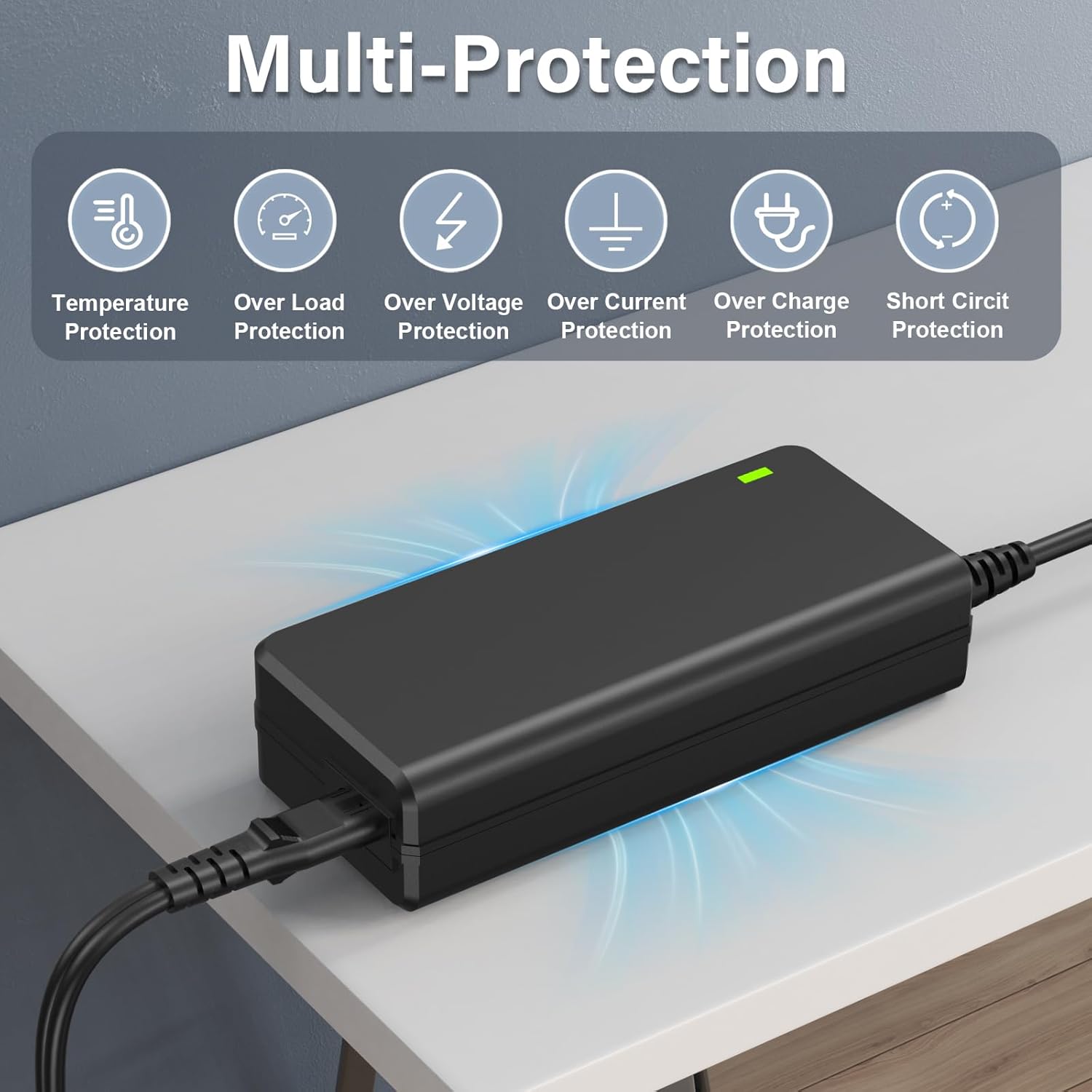
Image 3.3: An infographic detailing the six layers of protection built into the adapter: Temperature, Over Load, Over Voltage, Over Current, Over Charge, and Short Circuit protection.

Image 3.4: This image highlights the pure copper cable, emphasizing its role in providing stable and efficient power delivery.
4. Setup
Follow these steps to set up your PERFEIDY 15V 4A AC/DC Adapter:
- Inspect the Adapter: Before first use, check the adapter and cables for any visible damage. Do not use if any damage is found.
- Verify Compatibility: Ensure your device requires a 15V 4A (or lower amperage) power input and has a compatible 5.5mm x 2.5mm or 5.5mm x 2.1mm DC input port.
- Connect to Device: Insert the DC output plug of the adapter firmly into the DC input port of your portable power station or compatible device.
- Connect to Power Outlet: Plug the AC input cable of the adapter into a standard AC 100V-140Volt wall outlet.
- Observe LED Indicator: The LED indicator on the adapter should illuminate, typically green, to show that power is being supplied.
5. Operating Instructions
Once set up, the adapter operates automatically to provide power to your device.
- Charging: When connected correctly, the adapter will begin charging your device. Monitor your device's charging indicator to confirm charging status.
- Monitoring: The adapter's LED indicator provides a visual cue that it is receiving power and is operational.
- Disconnection: To disconnect, first unplug the AC input cable from the wall outlet, then disconnect the DC output plug from your device.

Image 5.1: This image showcases the durable design elements of the adapter, including the dual-prong metal plug, premium materials, precision nickel plating, and the intelligent LED indicator for real-time status.
6. Maintenance
Proper maintenance ensures the longevity and safe operation of your adapter.
- Cleaning: Use a soft, dry cloth to clean the adapter. Do not use liquid cleaners or aerosols.
- Storage: Store the adapter in a cool, dry place away from direct sunlight and moisture when not in use. Avoid tightly coiling the cables to prevent damage.
- Cable Care: Do not bend or crimp the cables excessively. Avoid placing heavy objects on the cables.
7. Troubleshooting
If you encounter issues with your adapter, refer to the following common problems and solutions:
| Problem | Possible Cause | Solution |
|---|---|---|
| Adapter LED is off, no power output. | No power from outlet; loose connection; damaged adapter/cable. | Check wall outlet with another device; ensure all connections are secure; inspect adapter/cable for damage. If damaged, discontinue use. |
| Device not charging. | Incorrect voltage/current; incompatible DC plug size; device issue. | Verify device's power requirements match adapter's output (15V 4A); confirm DC plug size (5.5mm x 2.5mm/2.1mm); test adapter with another compatible device if possible. |
| Adapter gets excessively hot. | Overload; poor ventilation; internal fault. | Ensure device's power draw is within adapter's limits; provide adequate ventilation around adapter; discontinue use if overheating persists and contact support. |
8. Specifications
| Feature | Specification |
|---|---|
| Brand | PERFEIDY |
| Input Voltage | AC 100V-140V |
| Output Voltage | DC 15V |
| Output Current | 4 Amps |
| DC Interface Size | 5.5mm x 2.5mm (compatible with 5.5mm x 2.1mm) |
| Special Feature | Temperature Protection |
| Item Weight | 10.6 ounces |
| Package Dimensions | 5.9 x 4 x 2.4 inches |
| UL File Number | E482416 |
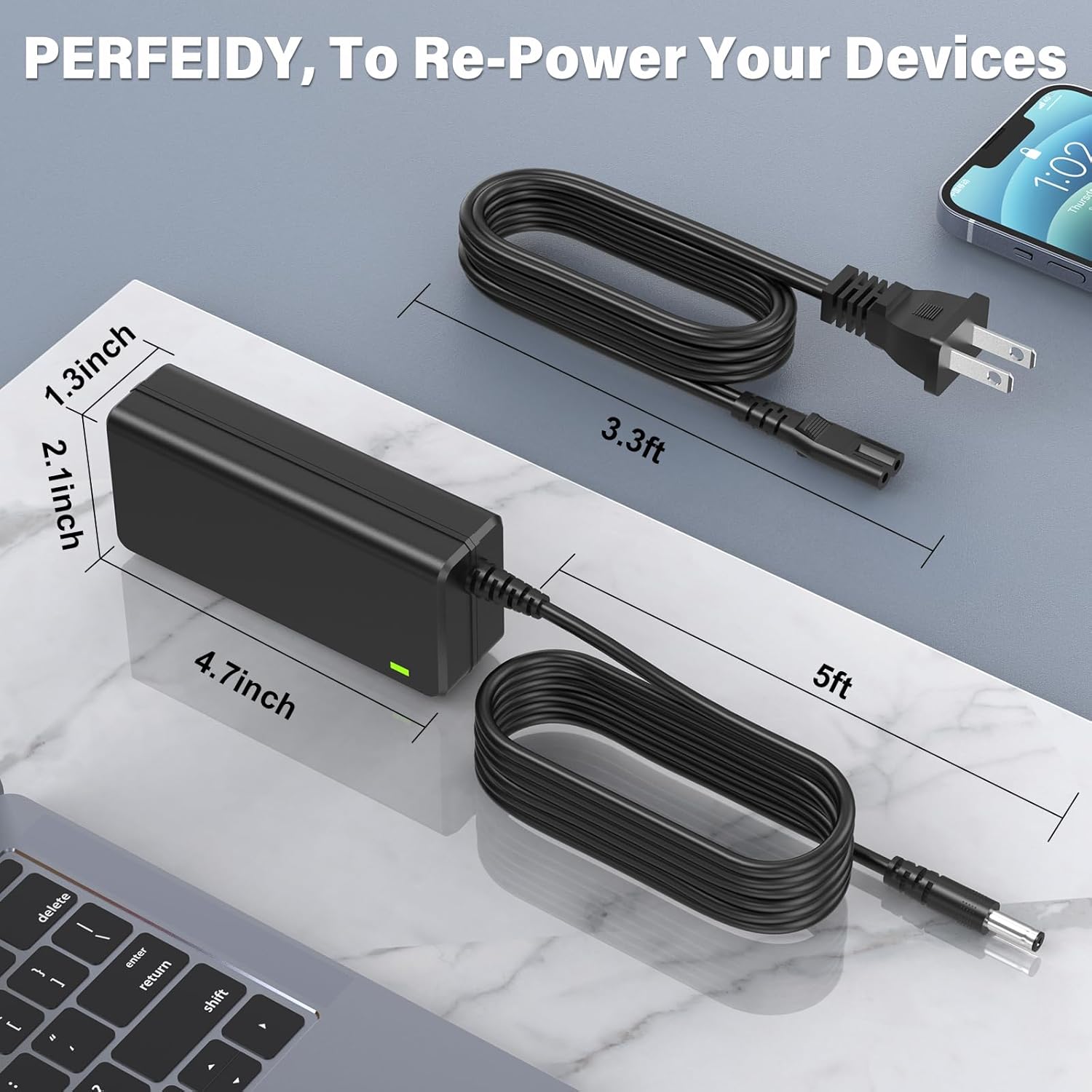
Image 8.1: A visual representation of the adapter's physical dimensions, including length, width, and cable lengths.

Image 8.2: The reverse side of the adapter, displaying its UL certification, model number, input/output specifications, and other regulatory markings.

Image 8.3: An illustration detailing the internal structure of the cable, highlighting the premium copper and aluminum foil shield, along with a depiction of the smart chip for enhanced performance and protection.
9. Warranty and Support
Your PERFEIDY 15V 4A AC/DC Adapter comes with a commitment to quality and customer satisfaction.
- Refund Policy: Enjoy a 30-day refund period from the date of purchase.
- Exchange Policy: The product is eligible for an 11-month exchange period.
For any questions, concerns, or support needs, please contact PERFEIDY customer service through the retailer's platform where you purchased the product.


