
Introduction
This manual provides comprehensive instructions for the setup, operation, and maintenance of your XINFUTE replacement remote control. This remote is designed to be compatible with Panasonic Air Conditioner models CS-PV9SKH-1 and CS-PV12SKH-1, offering full functionality for your air conditioning unit. Please read this manual carefully before using the remote control to ensure proper operation and longevity.
Product Overview
The XINFUTE replacement remote control is a direct functional equivalent for your original Panasonic air conditioner remote. It features an ergonomic design and clearly labeled buttons for ease of use.
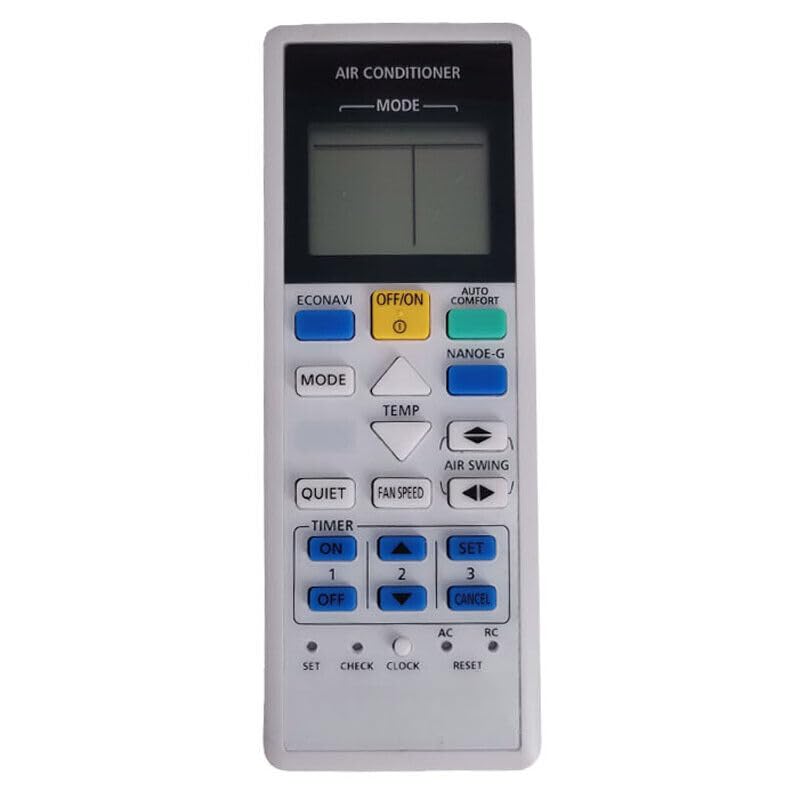
Figure 1: Front View of Remote Control. This image displays the front of the remote control, highlighting the LCD screen at the top and an array of buttons for various functions such as power, mode selection, temperature adjustment, and fan speed.

Figure 2: Back View of Remote Control. This image shows the back of the remote control, featuring the battery compartment cover. The cover can be slid open to insert or replace batteries.
Setup
1. Battery Installation
- Locate the battery compartment on the back of the remote control (refer to Figure 2).
- Slide the battery compartment cover downwards to open it.
- Insert two (2) AAA batteries, ensuring the positive (+) and negative (-) terminals match the diagrams inside the compartment. (Batteries are not included).
- Slide the battery compartment cover back into place until it clicks securely.
Note: Always replace both batteries at the same time with new ones. Do not mix old and new batteries, or different types of batteries.
Operating Instructions
Point the remote control directly at the air conditioner's receiver when operating. Ensure there are no obstructions between the remote and the unit.
- OFF/ON Button: Press this button to turn the air conditioner ON or OFF.
- MODE Button: Press repeatedly to cycle through operating modes: Auto, Cool, Dry, Fan, Heat. The selected mode will be displayed on the remote's LCD screen.
- TEMP ▲ / ▼ Buttons: Use these buttons to increase or decrease the desired temperature setting.
- FAN SPEED Button: Press to adjust the fan speed (e.g., Auto, Low, Medium, High).
- AIR SWING Button: Activates or deactivates the automatic louver swing function.
- TIMER ON / TIMER OFF Buttons: Use these buttons in conjunction with the SET and CANCEL buttons to program the air conditioner to turn ON or OFF at a specific time.
- SET / CANCEL Buttons: Used for confirming or canceling timer settings.
- CLOCK Button: Used to set the current time on the remote control.
- RESET Button: A small recessed button, typically used to restore the remote to factory default settings. May require a pointed object (like a pen tip) to press.
- Special Function Buttons (e.g., ECONAVI, AUTO COMFORT, NANOE-G, QUIET): Refer to your air conditioner's main unit manual for specific functions of these advanced features, as their availability and behavior depend on the air conditioner model.
Maintenance
- Cleaning: Wipe the remote control with a soft, dry cloth. Do not use liquid cleaners or abrasive materials, as they may damage the surface or internal components.
- Battery Replacement: Replace batteries when the remote's display becomes dim or the remote stops responding. Remove batteries if the remote will not be used for an extended period to prevent leakage.
- Storage: Store the remote control in a cool, dry place away from direct sunlight and extreme temperatures.
Troubleshooting
- Remote not responding:
- Check if the batteries are inserted correctly with the correct polarity.
- Replace old batteries with new ones.
- Ensure there are no obstructions between the remote control and the air conditioner's receiver.
- Confirm you are within the maximum operating range (approximately 5 meters).
- Limited operating range:
- Weak batteries can reduce the remote's range. Replace them.
- Bright sunlight or strong fluorescent lights can interfere with the infrared signal. Try operating in a different lighting condition.
- Air conditioner not performing desired function:
- Ensure the air conditioner unit itself is powered on and functioning correctly.
- Verify the correct mode (Cool, Heat, Fan, etc.) is selected on the remote.
- If issues persist, try resetting the remote control using the recessed RESET button.
Specifications
| Brand | XINFUTE |
| Compatible Models | Panasonic CS-PV9SKH-1, CS-PV12SKH-1 |
| Power Source | 2 x AAA batteries (not included) |
| Connectivity Technology | Infrared |
| Maximum Range | 5 Meters |
| Material | ABS Material |
| Item Weight | 0.08 Kilograms |
| Special Feature | Ergonomic |
Warranty Information
This XINFUTE remote control comes with a one-year warranty from the date of purchase. This warranty covers manufacturing defects and ensures the product functions as intended under normal use. Please retain your proof of purchase for warranty claims.
Customer Support
Should you encounter any issues or have questions regarding your XINFUTE replacement remote control, please do not hesitate to contact our customer support team. We recommend contacting us within 24 hours of receiving your product if you are not satisfied with your purchase. For assistance, please refer to the contact information provided by your retailer or on the XINFUTE official website.