
Introduction
This manual provides detailed instructions for the installation, operation, and maintenance of your FUZHUI F540 3300KV Brushless Motor Combo. This high-performance system is designed for 1/10 scale RC cars, offering excellent acceleration, throttle response, and multiple protective functions. Please read this manual thoroughly before use to ensure proper setup and safe operation.
Package Contents
Verify that all items listed below are included in your package:
- 1 x F540 3300KV Brushless Motor
- 1 x 60A Electronic Speed Controller (ESC)
- 1 x Programming Card
- 1 x Motor Heat Sink
- 1 x User Manual (this document)
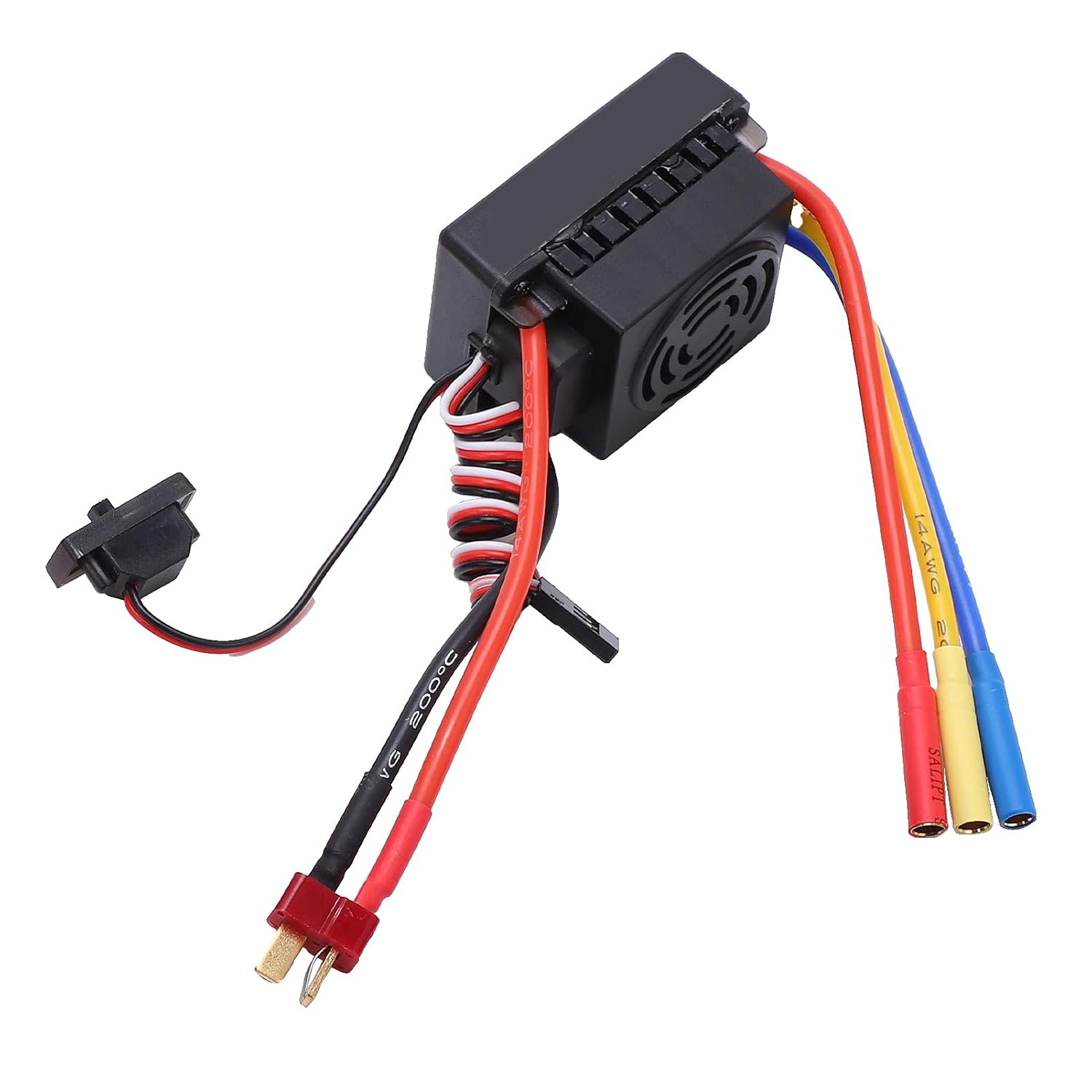
Image: All components of the FUZHUI F540 3300KV Brushless Motor Combo, including the motor, ESC, programming card, and heat sink.
Specifications
Detailed technical specifications for the motor, ESC, and programming card are provided below.
Motor Parameters (F540 3300KV)
| Material | Aluminum Alloy + Copper + Plastic |
| Weight | Approx. 311g / 11.0oz |
| Color | Red |
| Motor Size | Approx. 50x36mm / 2.0x1.4in |
| Wattage | 820W |
| Maximum Current | 47A |
| Kv (rpm/volt) | 3300KV |
| Maximum Speed | 50000 RPM |
| Shaft Length | Approx. 15mm / 0.6in |
| Shaft Diameter | Approx. 3.175mm / 0.1in |
| Plug Type | 4mm Golden Banana Plug |

Image: Detailed diagram showing the dimensions of the F540 3300KV Brushless Motor and its 4mm gold-plated banana plugs.
ESC Parameters (60A)
| Continuous Current | 60A |
| Burst Current | 320A |
| Applicable Battery | 2-3S Li-Po / 4-9S Ni-Mh Ni-Cd (not included) |
| BEC Output | 5.8V / 3A |
| Power Plug | T Plug Male |
| Motor Plug | 4mm Banana Plug Female |

Image: The 60A Electronic Speed Controller (ESC) showing its cooling fan, power input (T-plug), and motor output (banana plug sockets).
Programming Card Parameters
| Low Voltage Cut-off | 3.7V / 3.6V / 3.5V / 3.4V / 3.3V / 3.2V / 3.1V / 3.0V / 2.9V / 2.8V / 2.7V / 2.6V |
| Startup Mode | Medium / Soft / Strong |
| Maximum Braking Force | 25%, 50%, 75% (for 80A, 120A ESCs) / 50%, 25%, 75% (for 25A, 35A, 45A, 60A ESCs) |
| Maximum Reverse Force | 25%, 50%, 75% |
| Neutral Range | 6%, 9%, 12% |

Image: The programming card used to adjust various settings of the Electronic Speed Controller.
Setup and Installation
- Mount the Motor: Securely attach the F540 motor to your 1/10 RC car chassis using appropriate screws. Ensure proper gear mesh between the motor pinion and the spur gear.
- Install the Heat Sink: Place the motor heat sink around the motor to aid in heat dissipation.
- Connect the ESC to the Motor: Connect the three wires from the ESC to the three wires of the motor. The 4mm golden banana plugs ensure a secure connection. While the order typically doesn't matter for sensorless brushless motors, if the motor spins in the wrong direction, swap any two of the three wires.
- Connect the ESC to the Receiver: Plug the small signal cable from the ESC into the throttle channel (usually Channel 2) of your RC receiver.
- Connect the Battery: Connect your 2-3S Li-Po or 4-9S Ni-Mh/Ni-Cd battery (not included) to the T-plug male connector on the ESC. Ensure correct polarity.
- Power On: Turn on your RC transmitter first, then turn on the ESC.

Image: An example of the FUZHUI F540 Brushless Motor Combo with the motor, ESC, and heat sink connected, ready for installation in an RC car.
Operating Instructions
Once the system is installed and connected, follow these steps for operation:
- Transmitter On: Always turn on your RC transmitter before powering on the vehicle.
- ESC On: Connect the battery to the ESC and turn on the ESC switch. The ESC will perform a self-test and emit a series of beeps.
- Throttle Calibration (if needed): If the throttle response is incorrect, you may need to calibrate the ESC with your transmitter. Refer to the ESC's specific calibration procedure (often involves holding full throttle, then full brake, then neutral during power-up).
- Driving: Operate your RC car as usual. The ESC provides proportional throttle and brake control.
- Power Off: Always turn off the ESC first, then turn off your RC transmitter. Disconnect the battery from the ESC after use.
Key Features and Protections:
- Low Voltage Cut-off: Protects your battery from over-discharge. The motor will reduce power or stop when the battery voltage drops below the set threshold.
- Overheat Protection: Prevents damage to the ESC and motor by reducing power or shutting down if temperatures become too high.
- Throttle Signal Loss Protection: If the ESC loses the throttle signal from the receiver, it will automatically cut power to the motor to prevent runaway.
Programming Card Usage
The programming card allows you to adjust various parameters of the ESC to fine-tune its performance. Follow these steps to use the programming card:
- Disconnect from Receiver: Disconnect the ESC's signal cable from your RC receiver.
- Connect Programming Card: Plug the ESC's signal cable into the designated port on the programming card.
- Power On ESC: Connect the battery to the ESC and turn on the ESC switch. The programming card will power on and display the current settings.
- Adjust Parameters: Use the "ITEM" button to cycle through the programmable parameters. Use the "VALUE" button to change the setting for the selected parameter.
- Save Settings: Press the "OK" button to save the new settings to the ESC.
- Reset to Defaults: Press the "RESET" button to restore all parameters to their factory default settings.
- Disconnect: Turn off the ESC, disconnect the battery, and then disconnect the programming card. Reconnect the ESC to your receiver.
Programmable Parameters:
- Low Voltage Cut-off: Adjust the voltage threshold at which the ESC will reduce or cut power to protect the battery.
- Startup Mode: Select between Soft, Medium, or Strong acceleration. Soft start is gentler on the drivetrain, while Strong provides maximum punch.
- Maximum Braking Force: Sets the maximum braking power when the throttle is moved to the reverse position.
- Maximum Reverse Force: Controls the maximum power applied in reverse.
- Neutral Range: Defines the dead band around the neutral throttle position. A larger range provides more tolerance for imprecise throttle input.

Image: The programming card connected to the Electronic Speed Controller, illustrating how settings are adjusted.
Maintenance
- Cleaning: Regularly clean the motor and ESC to remove dirt, dust, and debris. Use a soft brush or compressed air. Avoid using liquids directly on electronic components.
- Inspections: Periodically inspect all wires and connectors for signs of wear, damage, or loose connections. Ensure motor mounting screws are tight.
- Motor Bearings: While the motor is designed for durability, extreme conditions may require bearing inspection or replacement over time.
- Heat Sink: Ensure the motor heat sink is free of obstructions to allow for efficient cooling.
- Storage: Store the motor combo in a dry, cool place away from direct sunlight and extreme temperatures.
Troubleshooting
| Problem | Possible Cause | Solution |
|---|---|---|
| Motor not running / No response |
|
|
| Motor runs in wrong direction | Motor wire connection order incorrect | Swap any two of the three motor wires connected to the ESC. |
| Motor stutters or runs rough |
|
|
| ESC overheats |
|
|
Safety Information
- Always disconnect the battery from the ESC when not in use to prevent accidental operation and battery discharge.
- Ensure proper ventilation for the ESC and motor during operation to prevent overheating.
- Do not operate the RC car in wet conditions unless the components are explicitly rated as waterproof. While the motor is waterproof, the ESC and other electronics may not be fully submersible.
- Keep hands, hair, and loose clothing away from rotating parts (motor, gears, wheels) during operation.
- Use only compatible batteries (2-3S Li-Po or 4-9S Ni-Mh/Ni-Cd) with the ESC. Using incompatible batteries can cause damage or fire.
- Adult supervision is recommended for users under 14 years of age.
Warranty and Support
For warranty information or technical support, please contact your retailer or the manufacturer directly. Keep your purchase receipt as proof of purchase.
Manufacturer: FUZHUI
Model: FUZHUIzv3oeg2bkt