1. Safety Information
1.1 General Safety Guidelines
- Always ensure the furniture is properly assembled and stable before use.
- Do not overload the TV stand. Refer to the specifications for weight limits.
- Keep small parts away from children during assembly to prevent choking hazards.
- Use on a level surface to prevent tipping.
- Exercise caution with the metal legs to prevent injury.
1.2 Anti-Tip Device Installation
This product includes an anti-tipping device for enhanced safety. It is crucial to install this device to prevent accidental tipping, especially in households with children or pets. Follow the detailed instructions provided in the assembly guide to securely attach the anti-tip device to both the TV stand and a wall stud.
2. Product Overview
2.1 Product Description
The Merax 78.8'' Retro TV Stand is an entertainment center media console cabinet designed to accommodate TVs up to 85 inches. It features a blend of engineered wood and metal construction, providing both durability and a modern aesthetic. The unit includes two cabinets and four drawers for ample storage.

Figure 2.1: Front view of the Merax 78.8 inch Retro TV Stand in white, showcasing its design with two side cabinets and four central drawers.
2.2 Key Features
- Spacious Storage: Four drawers and two spacious cabinets provide ample storage for various items.
- Unique Design: Features sleek design with unique glass patterns on cabinet doors and a distinctive artistic flair on the top drawer.
- Glass Cabinet Doors: Provide a transparent view to elegantly display cherished items.
- Cable Management: Equipped with two cable management holes at the back for organized wiring.
- Sturdy Construction: Six metal legs ensure stable load-bearing capacity.
- Enhanced Safety: Includes an anti-tipping device.
2.3 Product Dimensions
The overall dimensions of the TV stand are 78.8 inches (Length) x 15.8 inches (Width) x 22.4 inches (Height).
Figure 2.2: Detailed dimensional diagram of the TV stand, showing length, width, and height measurements for various sections including cabinets, drawers, and leg height.
3. Setup and Assembly
3.1 Before You Begin
- Unpack all components and verify against the parts list in the included assembly instructions.
- Ensure you have the necessary tools (e.g., screwdriver, hammer) as specified in the manual.
- Clear a spacious area for assembly.
3.2 Assembly Steps
The TV stand is designed for straightforward assembly. Follow the detailed, illustrated instructions provided in the packaging. All components are labeled to facilitate the process. It is recommended to assemble the unit with at least two people for ease and safety.
- Begin by attaching the metal legs to the base of the unit.
- Assemble the main frame of the TV stand according to the diagrams.
- Install the drawer slides and assemble the drawers.
- Attach the cabinet doors and adjust hinges for proper alignment.
- Install the anti-tip device as per the specific instructions to secure the unit to a wall.
4. Operating Instructions
4.1 Using Drawers and Cabinets
The TV stand features four drawers and two side cabinets. The drawers and cabinets are equipped with easy-to-open pull rings for smooth and effortless access. Use these compartments to store media accessories, books, or other household items.

Figure 4.1: Interior view of the TV stand showing the open cabinets and drawers, highlighting the storage capacity.
4.2 Cable Management
The back panel of the TV stand includes two strategically placed cable management holes. These holes allow you to route and organize power cords and audio/video cables, keeping them tidy and out of sight for a clean entertainment area.
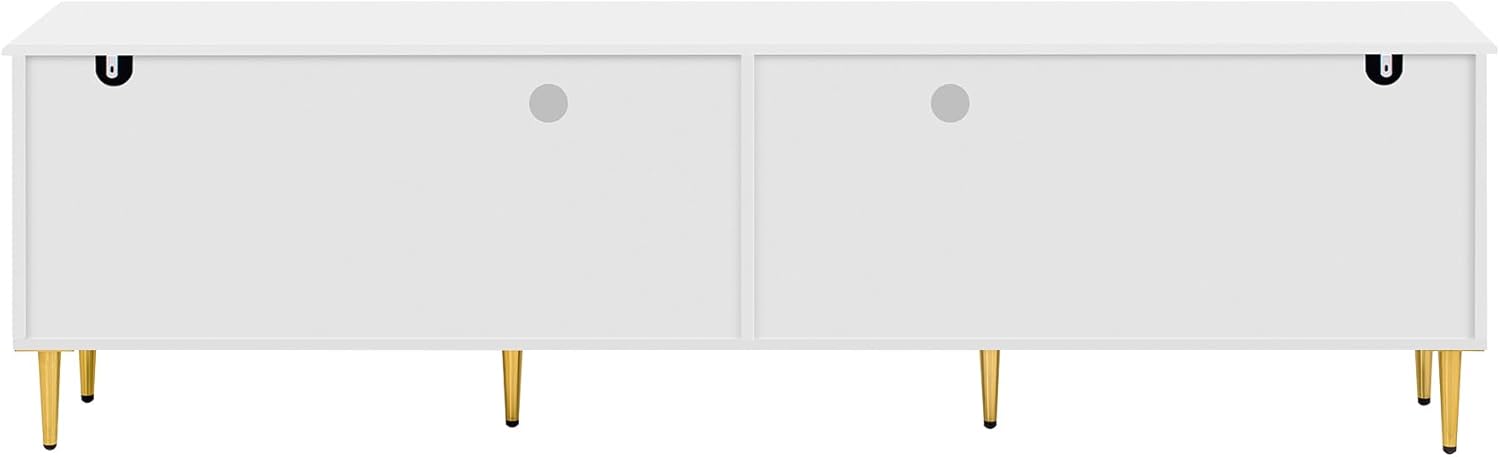
Figure 4.2: Back view of the TV stand, illustrating the two cable management holes designed for organizing electronic device wiring.
5. Maintenance and Care
5.1 Cleaning
- Wipe surfaces with a soft, damp cloth.
- Avoid using harsh chemicals, abrasive cleaners, or polishes that may damage the finish.
- For glass surfaces, use a standard glass cleaner and a lint-free cloth.
5.2 General Care
- Periodically check all screws and fasteners to ensure they are tight. Retighten if necessary.
- Avoid placing hot items directly on the surface; use coasters or protective pads.
- Protect from direct sunlight and extreme temperature changes to prevent warping or fading.
6. Troubleshooting
6.1 Common Issues and Solutions
- Issue: Stand feels wobbly.
Solution: Ensure all screws are tightened. Verify the stand is on a level surface. Adjust leg levelers if present. - Issue: Drawers do not slide smoothly.
Solution: Check that drawer slides are correctly installed and free of obstructions. Ensure the drawer is not overloaded. - Issue: Cabinet doors are misaligned.
Solution: Adjust the hinges on the cabinet doors according to the assembly instructions. - Issue: Missing parts during assembly.
Solution: Double-check the packaging. If parts are genuinely missing, contact customer support.
7. Specifications
| Attribute | Value |
|---|---|
| Brand | Merax |
| Model Number | XY00861 |
| Product Dimensions (L x W x H) | 78.8 x 15.8 x 22.4 inches |
| Item Weight | 56.2 pounds |
| Material | Engineered Wood, Metal |
| Color | White |
| Assembly Instructions | Detailed assembly instructions provided |
| UPC | 198573247288 |
8. Warranty and Support
8.1 Customer Service
For any problems, questions, or assistance with your Merax TV Stand, please contact our professional customer service team. You can visit our official website or reach out via email:
- Website: Merax.com
- Email: csr@merax.com
Our team is available to provide support and resolve any issues you may encounter.


