
Proster FY158A
Proster Smart Digital Multimeter 6000 Counts - User Manual
Model: FY158A
1. Product Overview
The Proster Smart Digital Multimeter (Model FY158A) is a versatile and reliable tool designed for accurate electrical measurements. Featuring a 6000-count display with a vibrant color VA screen, it offers both auto and manual ranging capabilities for various diagnostic tasks. This multimeter is built to CAT III 600V safety standards, ensuring protection for professional and DIY applications in automotive, HVAC, and general electrical work.

Figure 1.1: Proster Smart Digital Multimeter (Model FY158A) with included accessories.
Key features include Non-Contact Voltage (NCV) detection, Live Wire identification, continuity testing, diode testing, capacitance measurement, and resistance measurement. Its compact design, built-in flashlight, and 2-meter drop resistance make it suitable for field technicians and home users alike.

Figure 1.2: The multimeter is suitable for a wide range of applications, including home appliance repair, automotive circuit inspection, and laboratory maintenance, ensuring safety with CAT III 600V rating and built-in fuse overload protection.
2. Setup and Initial Use
2.1 Battery Installation
The Proster Smart Digital Multimeter requires three (3) AAA batteries for operation, which are included in the package. To install or replace batteries:
- Locate the battery compartment on the rear of the device.
- Use a screwdriver to remove the single screw securing the battery cover.
- Insert the three AAA batteries, ensuring correct polarity (+/-) as indicated inside the compartment.
- Replace the battery cover and secure it with the screw.

Figure 2.1: The multimeter package includes the device, test leads, three AAA batteries, and a carrying case.
2.2 Connecting Test Leads
Before performing any measurements, ensure the test leads are correctly connected to the multimeter.
- Insert the red test lead into the "VΩHz" (Voltage, Resistance, Frequency) input jack.
- Insert the black test lead into the "COM" (Common) input jack.
- Ensure the connections are firm and secure.
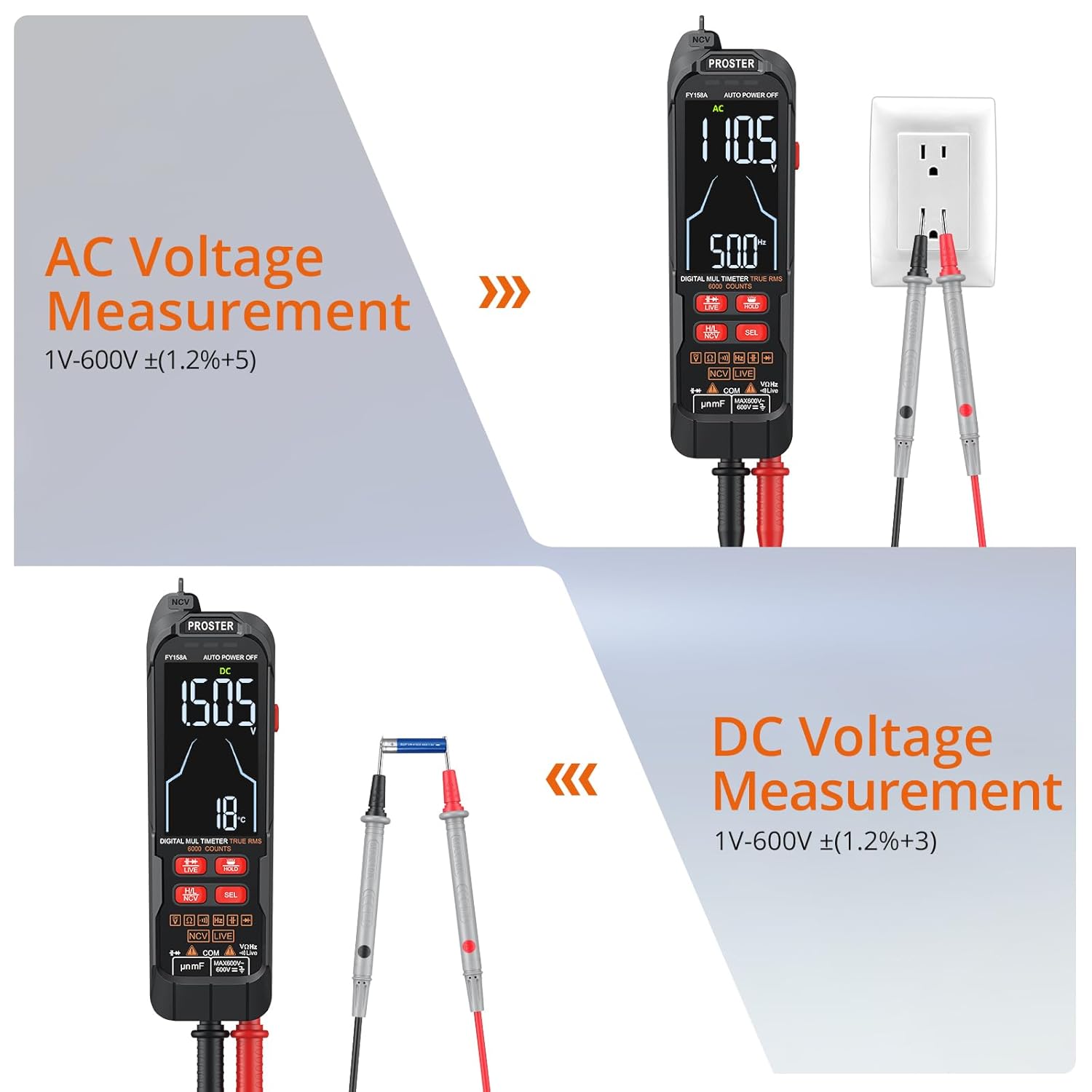
Figure 2.2: Proper connection of test leads to the multimeter's input jacks.
3. Operating Instructions
The Proster Smart Digital Multimeter offers both automatic and manual ranging modes, along with a clear color VA display for easy reading.
3.1 Display and Controls
The multimeter features a vivid 2-line color VA display that shows readings and a simulated bar graph simultaneously. A built-in backlight ensures clear visibility in various lighting conditions.

Figure 3.1: The dual display provides comprehensive measurement information at a glance.
The device also includes a built-in flashlight for illuminating dark work areas.

Figure 3.2: The digital LCD screen offers superior daylight readability, high contrast, and wide viewing angles, while the flashlight improves visibility in dark spaces.
3.2 Measurement Functions
The multimeter automatically identifies DC/AC voltage, resistance, and continuity. For other functions, use the "SEL" button to switch modes.
3.2.1 DC/AC Voltage Measurement
To measure AC or DC voltage, connect the test leads to the circuit or component. The multimeter will automatically detect the type of voltage and display the reading.

Figure 3.3: Examples of AC voltage measurement (top) and DC voltage measurement (bottom).
3.2.2 Resistance and Continuity Test
For resistance measurements, connect the test leads across the component. For continuity, the multimeter will emit an audible beep if a continuous path is detected.

Figure 3.4: The multimeter performing an on-off buzzer test (top) and resistance measurement (bottom).
3.2.3 Capacitance and Diode Test
Use the appropriate mode to test capacitance of capacitors or the forward voltage drop of diodes.
3.2.4 Non-Contact Voltage (NCV) Detection
The NCV function allows for detection of AC voltage without direct contact. Hold the NCV sensor near the conductor. The device will indicate voltage presence with visual and audible alarms. It supports two sensitivity levels: High (48V-1000V) and Low (90V-1000V).
Figure 3.5: NCV detection in action, demonstrating dual sensitivity adjustment and visual/audible alarms.
3.2.5 Live and Neutral Wire Identification / Breakpoint Judgment
This function helps identify live and neutral wires and can detect breakpoints in single wires. When measuring a live line, the display will show "LIVE" and the bar graph will be full with an audible alert. For neutral lines, there will be no response.

Figure 3.6: The multimeter identifying a live wire in an electrical outlet.
3.3 Official Product Video Demonstration
Watch the official product video below for a comprehensive demonstration of the Proster Smart Digital Multimeter's various functions, including DC voltage test, resistance test, continuity test, capacitance test, diode test, live and neutral wire identification, breakpoint judgment, and non-contact voltage detection.
Video 3.1: Demonstration of Proster Smart Multimeter functions, including voltage, resistance, continuity, capacitance, diode, live wire, breakpoint, and NCV tests.
4. Maintenance and Care
4.1 Cleaning
To ensure the longevity and accuracy of your multimeter, keep it clean. Wipe the exterior with a soft, damp cloth. Do not use abrasive cleaners or solvents.
4.2 Storage
When not in use for extended periods, remove the batteries to prevent leakage. Store the multimeter in its provided carrying case in a cool, dry place, away from direct sunlight and extreme temperatures.
5. Troubleshooting
This section addresses common issues you might encounter with your Proster Smart Digital Multimeter.
- No Display or Faint Display:
Check battery installation and ensure batteries are not depleted. Replace with fresh AAA batteries if necessary. Ensure the device is powered on.
- Inaccurate Readings:
Verify that test leads are securely connected. Ensure the correct measurement mode is selected (though auto-ranging handles many common measurements). Clean the test probes and connection points if dirty. Ensure the component being tested is within the multimeter's specified range.
- Non-Contact Voltage (NCV) Not Responding Consistently:
Ensure the NCV sensor is held close enough to the live conductor. Environmental factors or shielding within walls can affect NCV sensitivity. Try adjusting the sensitivity setting (High/Low) if available on your model.
- Device Not Turning On/Off Responsively:
This could indicate a minor button issue. Ensure the power button is pressed firmly. If the issue persists after battery replacement, contact customer support.
For issues not covered here, please refer to the "Warranty and Support" section for assistance.
6. Product Specifications
| Specification | Value |
|---|---|
| Product Dimensions | 6.38 x 1.85 x 1.02 inches |
| Item Model Number | FY158A |
| Batteries | 3 AAA batteries required (included) |
| Date First Available | February 17, 2025 |
| Manufacturer | Proster Trading Limted |
| ASIN | B0DXF2S6GC |
| Brand | Proster |
| Power Source | Battery Powered |
| Color | Orange |
| Item Weight | 107 Grams |
| Safety Rating | CAT III 600V |
| Display Counts | 6000 Counts |
7. Warranty and Support
Proster products are designed for reliability and performance. This product comes with a standard manufacturer's warranty. For specific warranty terms, technical support, or service inquiries, please refer to the contact information provided with your product packaging or visit the official Proster website.
You can also visit the Proster Store on Amazon for more information and support resources.
Ask a question about this manual
Ask about setup, troubleshooting, compatibility, parts, safety, or missing instructions. Manuals+ will review the question and use this page’s manual context to help answer it.