1. Introduction
The Baofeng UV-82 is an 8-watt high-power dual-band UHF/VHF two-way radio designed for reliable communication. This walkie-talkie features three selectable power levels (8W/5W/1W) to optimize battery life and range. It includes 50 CTCSS and 104 DCS codes for enhanced privacy and compatibility. The radio is compatible with various Radtel models and utilizes a 2-pin Kenwood type connector for accessories.
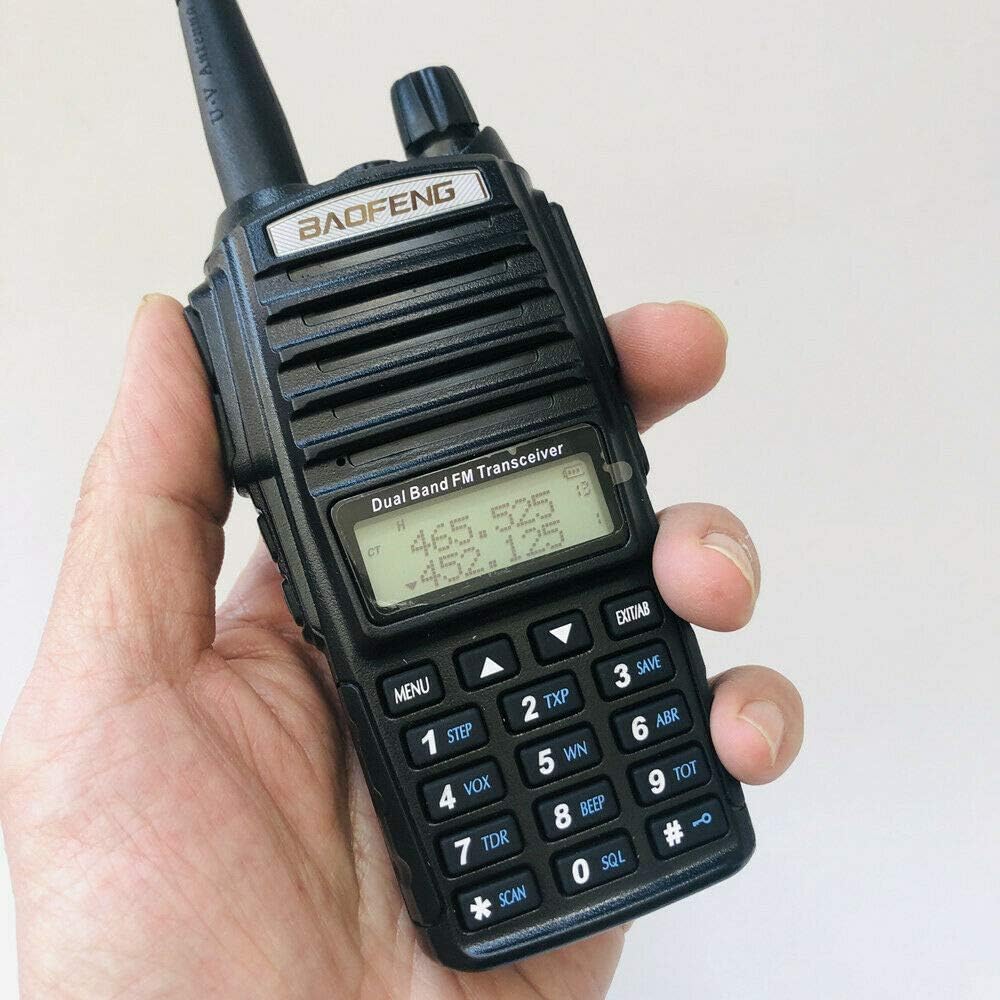
Figure 1: Front view of the Baofeng UV-82 radio with antenna attached, showing the display and keypad.
2. What's Included
Your Baofeng UV-82 package typically includes the following items:
- Baofeng UV-82 8W Dual Band Two-Way Radio
- Standard Antenna
- Rechargeable Li-ion Battery
- Desktop Charger with AC Adapter
- Belt Clip
- Hand Strap
- Earpiece with Push-to-Talk (PTT) button
- Radtel USB Programming Cable
- User's Manual

Figure 2: All components included in the Baofeng UV-82 package.
2.1 Unboxing and Overview
This video provides an overview of the Baofeng UV-82 package contents and initial impressions.
Video 1: Unboxing and initial look at the Baofeng UV-82 radio and its accessories.
3. Initial Setup
3.1 Attaching the Battery
- Align the battery with the back of the radio, ensuring the metal contacts on the battery match the contacts on the radio.
- Slide the battery upwards until it clicks securely into place.

Figure 3: Back of the radio with the battery removed, highlighting the battery contacts.
3.2 Attaching the Antenna
- Screw the antenna clockwise into the connector on the top of the radio until it is finger-tight. Do not overtighten.
3.3 Charging the Battery
- Connect the AC adapter to the desktop charger.
- Plug the AC adapter into a wall outlet.
- Place the radio (with battery attached) into the charging cradle. The LED indicator on the charger will typically show red while charging and green when fully charged.
4. Operating Basics
4.1 Power On/Off and Volume
- To power on the radio, rotate the volume knob (top-right) clockwise.
- To power off, rotate the volume knob counter-clockwise until it clicks.
- Adjust the volume by rotating the same knob.
4.2 Channel Selection and Dual PTT
The UV-82 features dual PTT buttons, allowing you to transmit on two different channels independently. The top PTT button corresponds to the upper display frequency (Channel A), and the bottom PTT button corresponds to the lower display frequency (Channel B).
- Use the UP/DOWN arrow keys on the keypad to select desired frequencies or channels.
- Press the A/B button to switch the active display line for menu operations.
- To transmit, press and hold the corresponding PTT button (top for Channel A, bottom for Channel B). Release to receive.
4.3 Keypad Functions
The keypad allows direct frequency input and access to various menu functions:
- MENU: Enters the menu system.
- EXIT: Exits the menu or cancels an operation.
- VFO/MR: Switches between Frequency Mode (VFO) and Channel Mode (MR).
- BAND: Switches between VHF and UHF bands.
- SCAN: Initiates channel scanning.
5. Programming the Radio
The Baofeng UV-82 can be programmed manually via the keypad or more efficiently using a computer with programming software (e.g., CHIRP) and a Radtel USB Programming Cable.
5.1 Using the Radtel USB Programming Cable
The Radtel USB Programming Cable allows you to connect your UV-82 radio to a computer for easy programming of channels, frequencies, and other settings using compatible software.
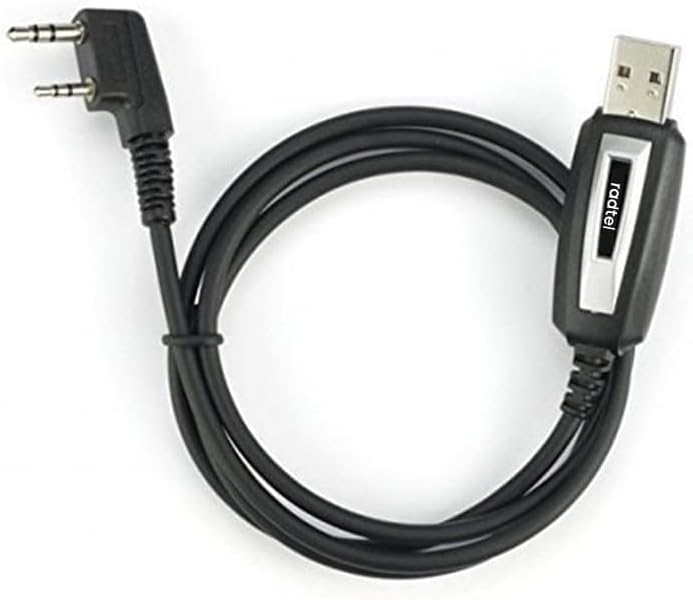
Figure 4: Radtel USB Programming Cable.
- Ensure the radio is powered off.
- Open the rubber cover on the side of the radio to expose the 2-pin Kenwood connector ports.
- Insert the 2-pin connector of the Radtel USB Programming Cable firmly into the radio's side ports.
- Connect the USB-A end of the cable to an available USB port on your computer.
- Install the necessary drivers for the programming cable (if not automatically detected).
- Open your preferred programming software (e.g., CHIRP) and follow its instructions to read/write data to the radio.
5.2 Radtel USB Programming Cable Demonstration
This video demonstrates how to connect the Radtel USB Programming Cable to your radio.
Video 2: Demonstration of connecting the Radtel USB Programming Cable to a radio.
6. Key Features
- Triple Power Output: Select between 8W, 5W, or 1W to conserve battery or maximize range.
- Dual Band Operation: Supports both UHF (400-470 MHz) and VHF (136-174 MHz) frequencies.
- Dual PTT Buttons: Allows independent transmission on two different frequencies/channels.
- FM Radio: Built-in FM radio receiver for entertainment.
- Flashlight: Integrated LED flashlight for convenience in low-light conditions.
- CTCSS/DCS Codes: 50 CTCSS and 104 DCS codes for private communication.
- Battery Life: The included 2800mAh battery provides extended standby and operation time.
7. Specifications
| Feature | Description |
|---|---|
| Model Number | UV-82 |
| Brand | BAOFENG |
| Color | Black |
| Number of Channels | 220 |
| Frequency Range | 136-174 MHz (VHF), 400-470 MHz (UHF) |
| Power Output | 8W / 5W / 1W (Triple Power) |
| Water Resistance Level | Not Water Resistant |
| Connector Type | 2-pin Kenwood type |
8. Maintenance
- Cleaning: Use a soft, damp cloth to clean the radio's exterior. Avoid harsh chemicals or abrasive cleaners.
- Battery Care: Fully charge the battery before first use. Avoid overcharging or completely draining the battery for extended periods to prolong its lifespan. Store the battery in a cool, dry place.
- Antenna Care: Ensure the antenna is securely attached. Avoid bending or stressing the antenna, as this can affect performance.
- Storage: When not in use for long periods, remove the battery and store the radio in a dry, dust-free environment.
9. Troubleshooting
- No Power: Check if the battery is properly installed and charged. Ensure the volume knob is rotated clockwise to turn on the radio.
- Poor Reception/Transmission: Verify the antenna is securely attached. Check the selected frequency/channel and ensure it is active. Ensure you are within range of the other radio or repeater. Obstructions like buildings or terrain can affect signal quality.
- Cannot Program Radio: Ensure the Radtel USB Programming Cable drivers are correctly installed on your computer. Verify the cable is securely connected to both the radio and the computer. Use compatible programming software.
- Static/Noise: Adjust the squelch level (SQL setting in the menu) to filter out background noise.
10. Warranty and Support
For warranty information, technical support, or service inquiries, please refer to the documentation provided with your product or contact the manufacturer directly. Keep your purchase receipt as proof of purchase for warranty claims.


