
Midea MAW14S1VWT-A
Midea 14,000 BTU Smart Inverter Window Air Conditioner User Manual
Model: MAW14S1VWT-A | Brand: Midea
1. Product Overview
The Midea 14,000 BTU Smart Inverter Window Air Conditioner is designed to provide efficient and quiet cooling for rooms up to 700 sq. ft. This unit features advanced inverter technology for energy savings, smart control via the Midea Air app, and compatibility with voice assistants like Alexa and Google Home. It includes a remote control and an easy installation kit for convenience.

Figure 1.1: The Midea 14,000 BTU Smart Inverter Window Air Conditioner, showcasing the unit, remote control, and smartphone application interface.
Key Features:
- Powerful Cooling: 14,000 BTU capacity effectively cools areas up to 700 sq. ft.
- Smart Inverter Technology: Optimizes energy use, reducing power consumption by over 38% compared to traditional units, leading to significant energy savings.
- Ultra-Quiet Operation: Operates at noise levels as low as 41 dB, ensuring a peaceful environment.
- Smart Control: Control the unit from anywhere using the Midea Air app (iOS/Android) or via voice commands with Alexa and Google Assistant.
- Flexible Airflow: Features auto-swing louvers for even air distribution and to avoid direct drafts.
- Easy Installation: Designed for quick and secure installation in double-hung windows.
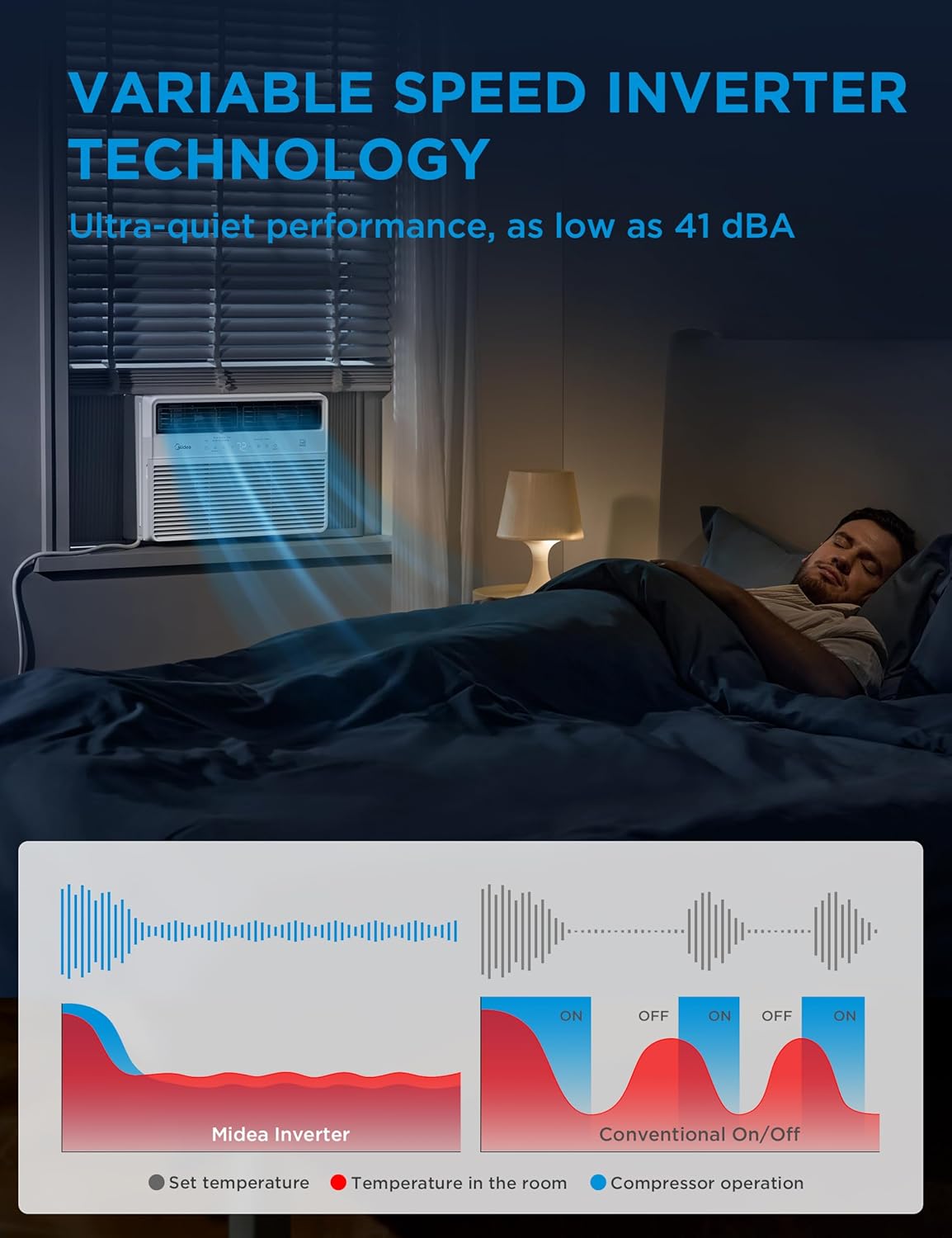
Figure 1.2: Illustration of the variable speed inverter technology, highlighting its ultra-quiet performance and efficient operation.

Figure 1.3: A graph demonstrating the minimal temperature variance achieved by the Midea Inverter AC, ensuring consistent comfort.

Figure 1.4: Energy consumption comparison showing over 40% savings with Midea Inverter Technology compared to traditional units.

Figure 1.5: The Midea Air app allows for convenient control of the air conditioner from anywhere, including integration with smart home devices.
2. Setup and Installation
Proper installation is crucial for the optimal performance and safety of your Midea Smart Inverter Window Air Conditioner. This unit is designed for installation in double-hung windows. Always refer to the detailed instructions and diagrams in the full user manual for your specific model.

Figure 2.1: The Midea AC unit is designed for quick and easy installation in double-hung windows, with key dimensions shown for fitment.
Installation Steps Overview:
- Unboxing: Carefully remove all components from the packaging. The box contains the main AC unit, support brackets, foam sealing materials, and hardware.
- Window Preparation: Ensure your window is a double-hung type. Remove any existing screens that may obstruct installation.
- Assemble Support Bracket: Assemble the included support bracket according to the instructions. This bracket provides a stable platform for the AC unit. Adjust it to fit your window width and ensure it is level.
- Place AC Unit: Carefully lift the AC unit and place it onto the assembled support bracket in the window opening. Ensure it is securely seated.
- Secure Unit: Use the provided screws and hardware to firmly secure the AC unit to the window frame and the support bracket for safety and stability.
- Seal Gaps: Use the high-density foam provided to seal any gaps between the AC unit and the window frame. This prevents air leakage and improves efficiency.

Figure 2.2: Visual guide for the six main steps of installing the Midea window air conditioner, from removing the unit from its cabinet to securing it in the window.
Installation Video Guide:
Video 2.1: A detailed installation and review guide for the Midea Inverter Window AC unit. (Note: This video is provided by an influencer and is included for its helpful installation demonstration.)
3. Operating Instructions
Your Midea Smart Inverter Window Air Conditioner offers multiple operating modes and convenient control options to suit your comfort needs.
Control Panel and Remote:
The unit features an intuitive LED display and control buttons on the front panel, as well as a full-function remote control.
- On/Off: Powers the unit on or off.
- Connect: Initiates Wi-Fi pairing for smart control.
- Timer: Set a 24-hour timer for automatic on/off scheduling.
- ECO Mode: Activates energy-saving operation.
- Mode: Cycles through 4 modes: Auto, Cool, Dry, and Fan.
- Fan Speed: Adjusts fan speed (Auto/Low/Medium/High).
- Sleep Mode: Optimizes settings for comfortable sleep.
- Swing: Controls the auto-swing louvers for air distribution.

Figure 3.1: The easy-to-use control panel and remote provide access to all functions, including 4 modes, 3 fan speeds, 24-hour timer, and ECO mode.
Smart Control via App and Voice Assistants:
The Midea Air app (available for iOS and Android) allows you to control your air conditioner from anywhere. You can also integrate the unit with Alexa and Google Assistant for hands-free voice control.
- Midea Air App: Download the app to adjust settings, monitor status, and set schedules remotely.
- Alexa & Google Assistant: Pair your AC unit with compatible voice assistant devices to use voice commands for convenient operation (e.g., "Alexa, set the AC to 72°F").

Figure 3.2: Control your Midea AC unit from anywhere using the intuitive smartphone app.

Figure 3.3: Seamless integration with voice assistant devices like Alexa and Google Home for hands-free control.
4. Maintenance
Regular maintenance ensures the longevity and efficient operation of your Midea air conditioner. The unit features a reusable, washable filter for easy cleaning.
Cleaning the Reusable Filter:
- Power Off: Always turn off and unplug the air conditioner before performing any maintenance.
- Remove Grille: Gently pop off the front grille of the unit.
- Remove Filter: Locate and carefully remove the reusable filter from its housing.
- Clean Filter: Wash the filter with warm, soapy water. Rinse thoroughly and allow it to air dry completely before reinstallation.
- Reinstall Filter and Grille: Once dry, place the filter back into its housing and reattach the front grille.
5. Troubleshooting
If you encounter any issues with your Midea air conditioner, refer to the following common troubleshooting tips. For more complex problems, consult the full user manual or contact customer support.
- Unit Not Turning On: Ensure the power cord is securely plugged into a functioning 115V outlet. Check your home's circuit breaker.
- Insufficient Cooling: Verify that the correct mode (Cool) and desired temperature are set. Ensure windows and doors are closed. Clean the air filter if it's dirty. Check for any obstructions to airflow.
- Unusual Noise: Minor noises during operation are normal. If the noise is excessive or unusual, ensure the unit is installed securely and not vibrating against the window frame.
- Water Leakage: Check if the unit is properly tilted slightly outwards to allow for proper drainage of condensation. Ensure the drain pan is not blocked.
6. Specifications
| Specification | Detail |
|---|---|
| Brand | Midea |
| Model Number | MAW14S1VWT-A |
| Cooling Capacity | 14,000 BTU |
| Coverage Area | Up to 700 Sq. Ft. |
| Voltage | 115 Volts |
| Wattage | 1508 watts |
| Sound Level | 41 dB |
| Product Dimensions | 18.98 x 21.69 x 14.65 inches |
| Item Weight | 63.5 pounds |
| Special Features | Dehumidifier, Eco Mode, Fast Cooling, Remote Controlled, Wireless control |
| Installation Method | Window |
| Energy Efficiency | Energy Star Certified, 17 SEER |
7. Warranty
The Midea 14,000 BTU Smart Inverter Window Air Conditioner comes with a One Limited Year Warranty from the original purchase date. Please retain your proof of purchase for warranty claims.
8. Support
For additional support, detailed instructions, or to download the complete user manual, please visit the official Midea website or refer to the PDF document provided at the time of purchase.
You can also access the official user manual PDF here.
Related documentsMAW14S1VWT-A


Ask a question about this manual
Ask about setup, troubleshooting, compatibility, parts, safety, or missing instructions. Manuals+ will review the question and use this page’s manual context to help answer it.