
Lamicall K36
Lamicall Frozen Pad Handheld Fan K36 User Manual
Model: K36 | Brand: Lamicall
Introduction
Thank you for choosing the Lamicall Frozen Pad Handheld Fan K36. This portable fan is designed to provide instant cooling with its innovative refrigerating plate and versatile functionality. Please read this manual carefully before use to ensure proper operation and maintenance.
Product Overview
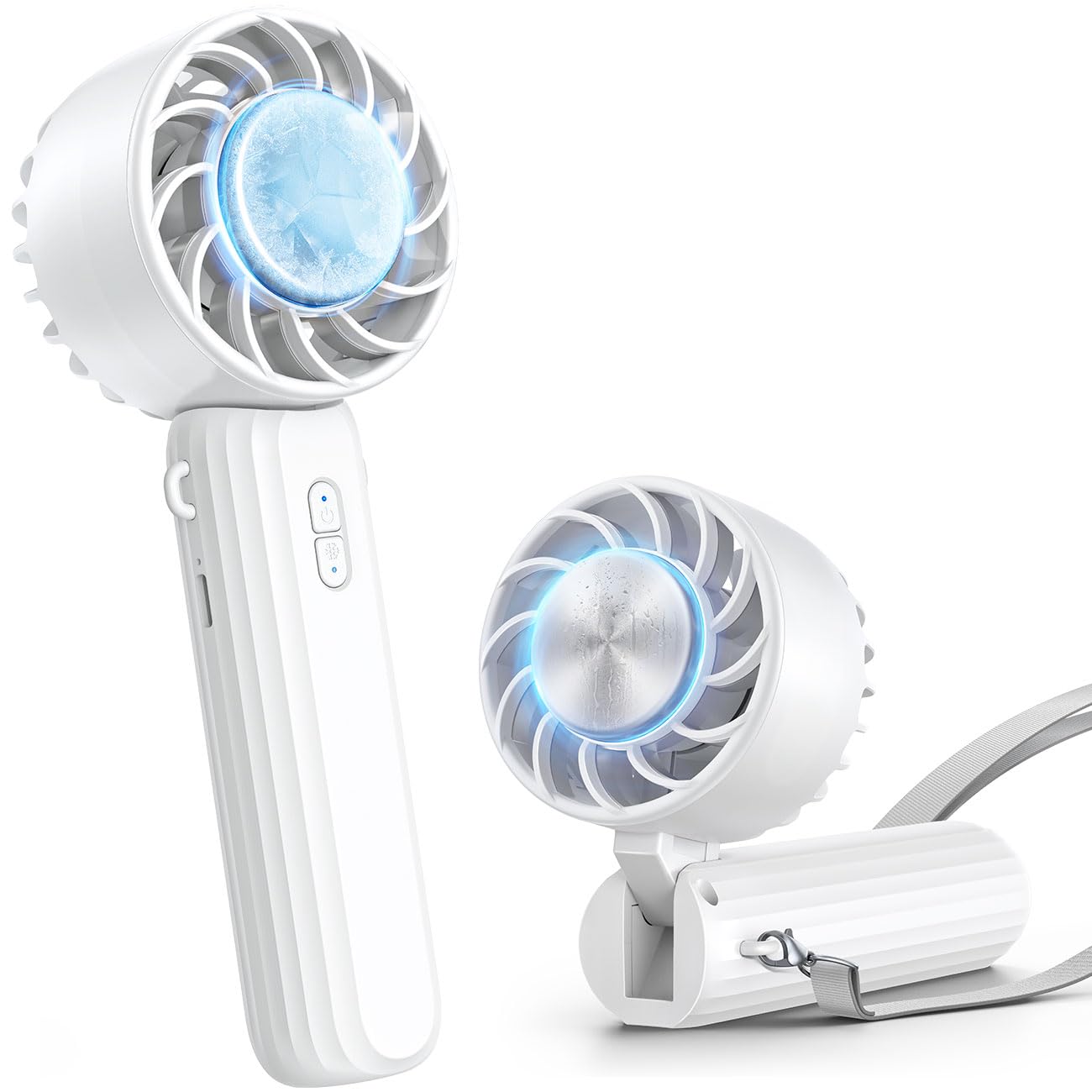
Image: The Lamicall Frozen Pad Handheld Fan K36 in white, showcasing its compact design.
Key Features:
- Instant Cooling Plate: Built-in semiconductor refrigerating pad cools to 10°C in 5 seconds for direct skin cooling.
- 3-in-1 Versatility: Functions as a handheld fan, neck fan (with included lanyard), and desk fan.
- Adjustable Wind Speeds: Three levels of wind adjustment (Slight, Cool, Strong) for personalized comfort.
- High Capacity Battery: 2000mAh battery provides up to 8.5 hours of operation on slight wind.
- Type-C Charging: Convenient and widely compatible USB Type-C charging port.
- Compact & Lightweight: Weighs only 170 grams, making it easy to carry for travel, commuting, or outdoor activities.
- Quiet Operation: Designed for low noise levels, suitable for various environments.

Image: The Lamicall K36 fan positioned on a desk, illustrating its quiet operation.
Package Contents
- Lamicall Frozen Pad Handheld Fan K36
- USB Type-C Charging Cable
- Lanyard
- User Manual
Setup
Initial Charging:
- Before first use, fully charge the fan.
- Connect the provided USB Type-C cable to the fan's charging port.
- Connect the other end of the cable to a USB power source (e.g., computer, wall adapter, power bank).
- The charging indicator light will illuminate. It will change or turn off once fully charged.

Image: The Lamicall K36 fan showing its internal 2000mAh battery and Type-C charging port connected to a cable.
Attaching the Lanyard:
Locate the small loop on the fan's handle. Thread the lanyard through this loop and secure it according to the lanyard's instructions. This allows for hands-free use as a neck fan.
Operating Instructions
Power On/Off and Wind Speed Adjustment:
- To turn on the fan, press the power button once. It will start at the lowest wind speed (Slight).
- Press the power button again to cycle through wind speeds: Slight → Cool → Strong.
- To turn off the fan, press the power button after the Strong speed setting, or press and hold the power button for 2 seconds at any speed.

Image: Diagram illustrating the three adjustable wind speeds of the Lamicall K36 fan.
Activating the Cooling Plate:
- Ensure the fan is powered on.
- Press the dedicated cooling button (usually indicated by a snowflake icon) to activate the semiconductor refrigerating pad.
- The cooling plate will rapidly cool down. Place the cooling plate directly on your skin (face, neck, wrist) for instant relief.
- To deactivate the cooling function, press the cooling button again.
Note: The cooling function operates only when the fan is running. Deactivating the cooling function when not needed can extend battery life.

Image: The Lamicall K36 fan's cooling plate, demonstrating its ability to reach 10°C for instant cooling on face, wrist, or neck.
Versatile Use:
- Handheld: Hold the fan by its handle for direct airflow.
- Neck Fan: Use the lanyard to hang the fan around your neck. The fan head can be adjusted 90° to direct airflow towards your face.
- Desk Fan: Fold the handle to create a stable base, allowing the fan to stand on a flat surface.

Image: The Lamicall K36 fan demonstrating its multi-functional use as a handheld, neck-worn, and desktop fan.
Maintenance
Cleaning:
- Ensure the fan is turned off and disconnected from any power source before cleaning.
- Wipe the exterior of the fan with a soft, dry cloth.
- For dust accumulation on the fan blades or grille, use a soft brush or compressed air. Do not use water or harsh cleaning agents.
Storage:
Store the fan in a cool, dry place away from direct sunlight and extreme temperatures. If storing for an extended period, charge the battery to approximately 50% to prolong its lifespan.
Troubleshooting
| Problem | Possible Cause | Solution |
|---|---|---|
| Fan does not turn on. | Battery is depleted. | Charge the fan using the provided USB Type-C cable. |
| Cooling plate is not cold. | Cooling function not activated or fan not running. | Ensure the fan is on and press the cooling button. Check battery level. |
| Short battery life. | Continuous use of high speed or cooling function. | Reduce wind speed or deactivate cooling when not needed. Ensure full charge before use. |
| Fan makes unusual noise. | Obstruction in fan blades. | Turn off the fan and carefully check for any foreign objects. Clean if necessary. |
Specifications
| Feature | Detail |
|---|---|
| Model Name | K36 |
| Brand | Lamicall |
| Colour | White |
| Power Source | Battery Powered (2000mAh) |
| Number of Speeds | 3 |
| Special Features | Portable, Hand Free, Pocket Friendly, Foldable, Adjustable, Cooling Plate |
| Material | Plastic |
| Product Dimensions | 120D x 40W x 80H millimeters |
| Control Method | Push Button |
| Included Components | Lamicall Portable Foldable Handheld Fan, USB Type-C Cable, Lanyard |
Safety Information
- Do not insert fingers or any objects into the fan grille when operating.
- Keep out of reach of children.
- Do not expose the fan to water or excessive humidity.
- Avoid dropping or subjecting the fan to strong impacts.
- Use only the provided charging cable or a certified USB Type-C cable for charging.
- Do not attempt to disassemble or repair the fan yourself. Contact customer support for assistance.
- Do not use the fan in environments with flammable gases or liquids.
Warranty and Support
Lamicall products come with a standard manufacturer's warranty. For detailed warranty information, product support, or any inquiries, please visit the official Lamicall website or contact their customer service directly.
Official Lamicall Website: www.lamicall.com
Ask a question about this manual
Ask about setup, troubleshooting, compatibility, parts, safety, or missing instructions. Manuals+ will review the question and use this page’s manual context to help answer it.