
1. Introduction
This manual provides comprehensive instructions for the setup, operation, and maintenance of your ZdalaMit Voice Replacement Remote Control. This remote is designed to be compatible with various RCA Ultra HD 4K LED Smart Android TV models, including RTAQ5033, RTA4002, RTAU6504, RTA3201, RTAU5004, RTA4302, and 280401011330.
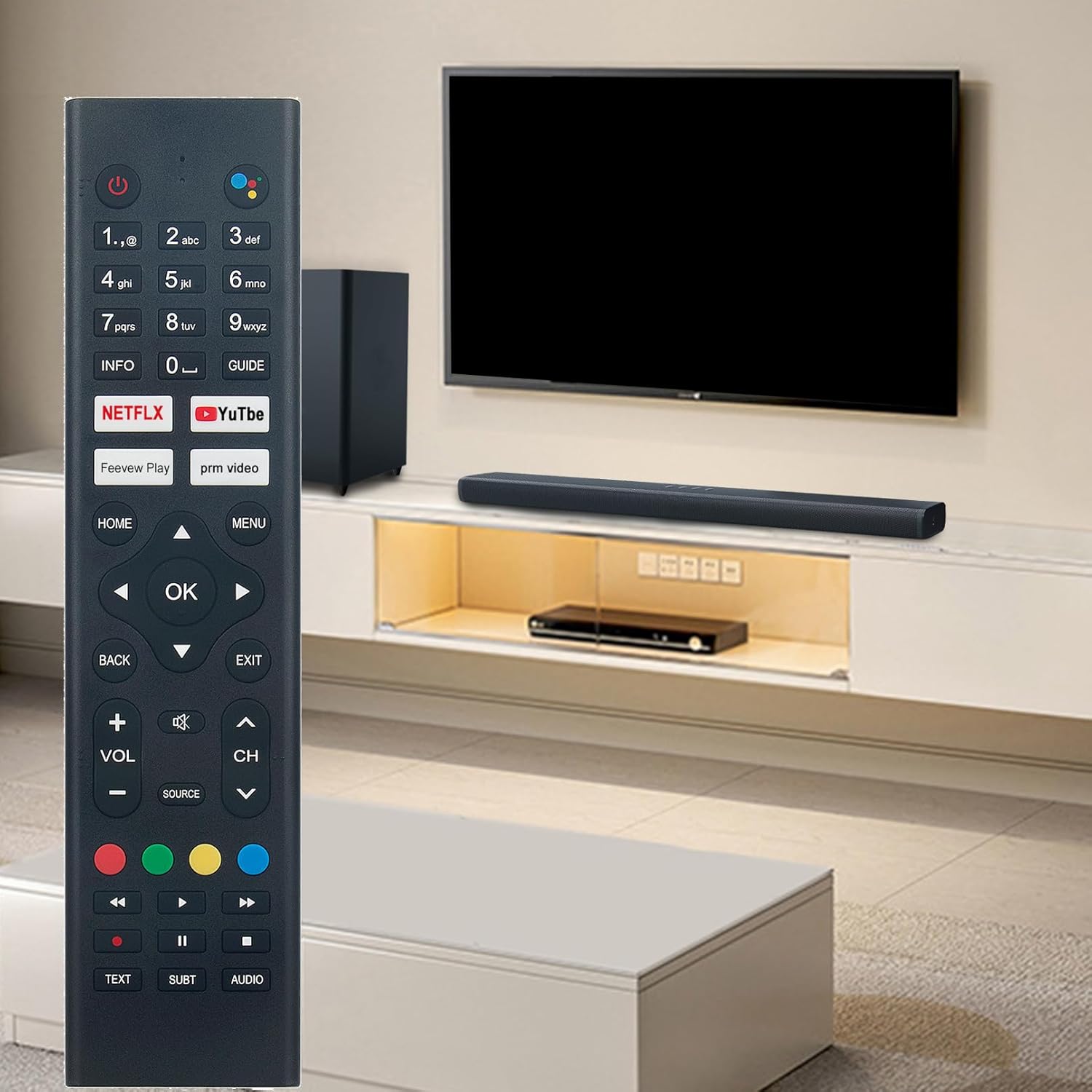
Figure 1: ZdalaMit Voice Replacement Remote Control in a typical home entertainment environment.
2. Setup
2.1 Battery Installation
The remote control requires two (2) AAA size alkaline batteries (not included) for operation.
- Locate the battery compartment cover on the back of the remote control.
- Slide the cover downwards to open the compartment.
- Insert two AAA batteries, ensuring the positive (+) and negative (-) terminals align correctly with the markings inside the compartment.
- Slide the battery compartment cover back into place until it clicks securely.

Figure 2: Front view of the remote control, showing button layout. The battery compartment is on the reverse side.
2.2 Pairing the Remote Control
Before using the remote control, it must be paired with your RCA Smart Android TV. Follow these steps:
- Ensure your RCA Smart Android TV is powered on.
- Point the remote control towards your TV.
- Simultaneously press and hold the "Home" button and the "Left Arrow" button for approximately 3 seconds.
- Release the buttons when an on-screen message indicates that the pairing process has begun or is complete.
- Test the remote control's functions to confirm successful pairing.
Note: If pairing fails, ensure the batteries are correctly installed and try the pairing process again. Maintain a clear line of sight between the remote and the TV during pairing.
3. Operating Instructions
This section details the functions of the various buttons on your ZdalaMit Voice Replacement Remote Control.
Figure 3: Layout of the remote control buttons for operational reference.
3.1 Basic Functions
- Power Button (⏻): Turns the TV on or off.
- Number Buttons (0-9): Directly input channel numbers or other numerical data.
- Volume Up/Down (VOL +/-): Adjusts the audio volume.
- Channel Up/Down (CH ^/v): Changes the TV channel.
- Mute Button (🔇): Mutes or unmutes the TV audio.
- Source Button (SOURCE): Cycles through available input sources (HDMI, AV, etc.).
3.2 Navigation and Menu Control
- Directional Pad (Up, Down, Left, Right Arrows): Navigates through menus and selections.
- OK Button: Confirms a selection or enters a menu item.
- Home Button (HOME): Returns to the TV's main home screen.
- Back Button (BACK): Returns to the previous screen or menu.
- Exit Button (EXIT): Exits the current menu or application.
- Menu Button (MENU): Opens the TV's main settings or options menu.
- INFO Button (INFO): Displays information about the current program or content.
- GUIDE Button (GUIDE): Accesses the electronic program guide (EPG).
3.3 Voice Control
The remote features a voice control function for convenient operation.
- Voice Assistant Button (●●●●): Press this button to activate the voice assistant. Speak clearly into the remote control's microphone to issue commands or search for content.

Figure 4: The voice assistant button, indicated by the multi-colored dots, is located at the top right of the remote.
3.4 Quick Access and Media Control Buttons
- Netflix Button (NETFLIX): Directly launches the Netflix application.
- YouTube Button (YouTube): Directly launches the YouTube application.
- Feevew Play Button (Feevew Play): Directly launches the Feevew Play application.
- prm video Button (prm video): Directly launches the prm video application.
- Colored Buttons (Red, Green, Yellow, Blue): These buttons may have specific functions depending on the TV application or menu. Refer to your TV's on-screen prompts.
- Media Control Buttons (Rewind, Play/Pause, Fast Forward, Stop): Control playback of media content.
- TEXT Button (TEXT): Accesses teletext services if available.
- SUBT Button (SUBT): Toggles subtitles on or off.
- AUDIO Button (AUDIO): Selects audio tracks or modes.
4. Maintenance
- Cleaning: Use a soft, dry cloth to clean the remote control. Do not use liquid cleaners or abrasive materials.
- Battery Replacement: Replace batteries when the remote's performance degrades or it stops responding. Always replace both batteries at the same time with new AAA alkaline batteries.
- Storage: If the remote control will not be used for an extended period, remove the batteries to prevent leakage and damage.
- Avoid Extreme Conditions: Do not expose the remote to direct sunlight, high temperatures, humidity, or water.
5. Troubleshooting
- Remote not responding:
- Check if the batteries are inserted correctly with the correct polarity.
- Replace old batteries with new AAA alkaline batteries.
- Ensure there are no obstructions between the remote control and the TV's infrared receiver.
- Re-pair the remote control with the TV (refer to Section 2.2).
- Voice control not working:
- Ensure the remote is successfully paired with the TV.
- Speak clearly and directly into the microphone.
- Check your TV's settings to ensure the voice assistant feature is enabled.
- Buttons are sticky or unresponsive:
- Clean the remote control with a soft, dry cloth. Avoid liquids.
- If the issue persists after cleaning and battery replacement, the remote may require replacement.
6. Specifications
| Feature | Detail |
|---|---|
| Brand | ZdalaMit |
| Model | Voice Replacement Remote Control |
| Compatible TV Models | RCA Ultra HD 4K LED Smart Android TV models: RTAQ5033, RTA4002, RTAU6504, RTA3201, RTAU5004, RTA4302, 280401011330 |
| Power Source | 2 x AAA Alkaline Batteries (not included) |
| Special Feature | Voice Search |
| Color | Black |
| Product Dimensions | 8.14 x 2 x 0.6 inches (20.68 x 5.08 x 1.52 cm) |
| Item Weight | 2 ounces (56.7 grams) |
| Manufacturer | Qianhui Factory |

Figure 5: Remote control with approximate dimensions for reference.
7. Warranty and Support
For warranty information or technical support, please refer to the documentation provided with your purchase or contact the seller directly. Keep your purchase receipt as proof of purchase.
For further assistance, you may also visit the ZdalaMit brand page on Amazon or contact Amazon customer service regarding your order.