
1. Introduction
Thank you for choosing the Adamson M1 Medical Scale. This professional-grade digital scale is designed for accurate weight and height measurements, suitable for various settings including homes, hospitals, and physician offices. This manual provides detailed instructions for assembly, operation, maintenance, and troubleshooting to ensure optimal performance and longevity of your device.
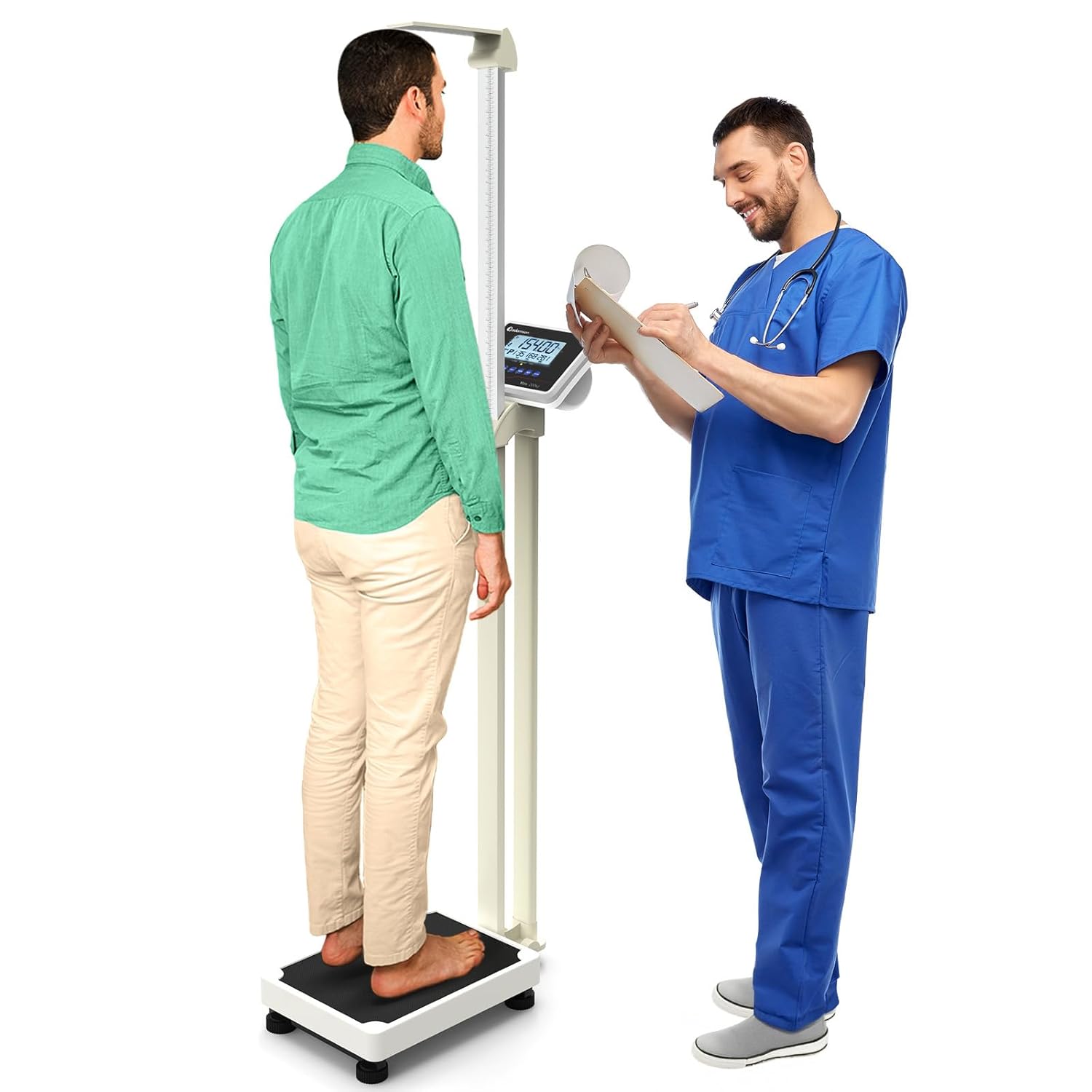
Image 1.1: The Adamson M1 Medical Scale being used by a patient and a medical professional for weight and height measurement.
2. Product Features
The Adamson M1 Medical Scale is engineered with precision and user convenience in mind. Key features include:
- Heavy-Duty Steel Construction: Built with a robust steel frame for enhanced durability and stability, ensuring reliable performance.
- High Capacity: Supports weights up to 440 lbs (200 kg), accommodating a wide range of users.
- Integrated Height Rod: Features a mechanical height rod for accurate height measurements, extending up to 7'2".
- BMI Function: Includes a built-in Body Mass Index (BMI) function to assist in health monitoring.
- User-Friendly Design: Equipped with a low platform height for stability and ease of use, along with clear, step-by-step instructions in the manual.
- Data-Saving Function: Allows tracking of measurements over time.
- Rechargeable Battery: Provides long-term use and portability.
- Energy-Saving Mode: Automatically turns off the LCD backlight after 20 seconds of inactivity to conserve power.
- Professional Grade Accuracy: Designed for precise and consistent measurements.
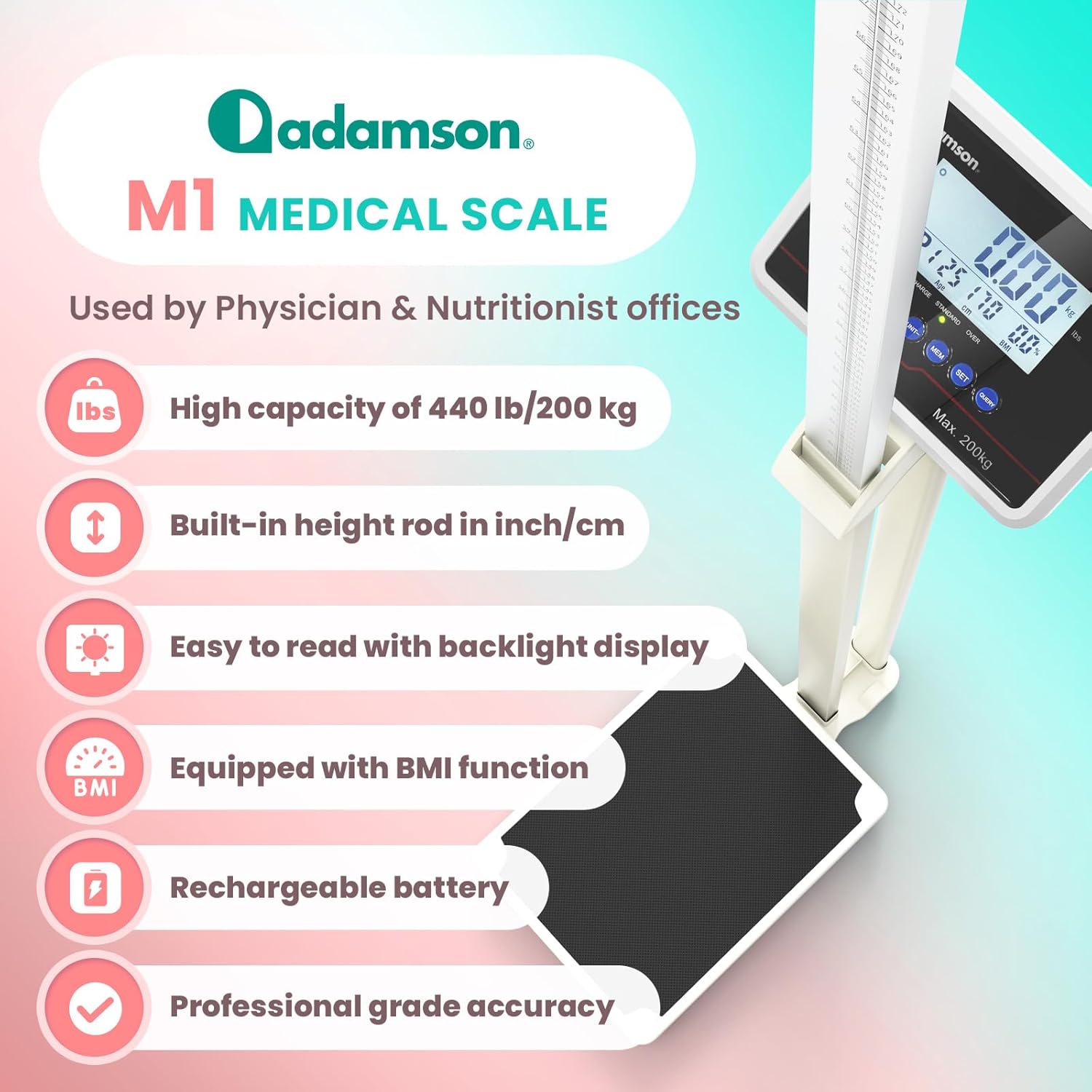
Image 2.1: An infographic detailing the main features of the Adamson M1 Medical Scale, including its high capacity, built-in height rod, backlight display, BMI function, rechargeable battery, and professional-grade accuracy.
3. Components Overview
The Adamson M1 Medical Scale consists of the following main components:
- Weighing Platform: The base where the user stands, featuring an anti-slip surface.
- Support Column: Connects the platform to the display unit and height rod.
- Display Unit: Digital screen with backlight, showing weight, height, and BMI, along with control buttons.
- Mechanical Height Rod: Extendable rod for measuring height.
- Power Adapter: For charging the internal rechargeable battery.

Image 3.1: The Adamson M1 Medical Scale highlighting its heavy-duty construction, high weight and height capacity, and the low anti-slip platform for user safety and stability.
4. Setup Instructions
Follow these steps to assemble and prepare your Adamson M1 Medical Scale for first use:
- Unpack Components: Carefully remove all parts from the packaging. Ensure all components listed in Section 3 are present.
- Assemble Support Column: Attach the support column to the weighing platform using the provided hardware. Ensure it is securely fastened.
- Attach Display Unit: Mount the display unit to the top of the support column. Connect any necessary cables as indicated in the assembly diagram (refer to the quick start guide if included).
- Install Height Rod: Secure the mechanical height rod to the support column. Ensure it slides smoothly.
- Initial Charge: Before first use, connect the scale to a power outlet using the provided adapter and allow it to charge fully. The battery indicator on the display will show charging status.
- Placement: Place the assembled scale on a firm, level surface to ensure accurate readings. Avoid carpets or uneven floors.
5. Operating Instructions
This section details the basic operation of your Adamson M1 Medical Scale.
5.1. Power On/Off
- To power on the scale, press the ON/TARE button.
- To power off the scale, press the OFF button. The scale also features an energy-saving mode that automatically turns off the LCD backlight after 20 seconds of inactivity.
5.2. Weighing Procedure
- Ensure the scale is on a level surface and powered on.
- Wait for the display to show "0.00" (or "0.0" depending on unit).
- Step onto the center of the weighing platform. Stand still until the weight reading stabilizes.
- The stable weight will be displayed.
5.3. Unit Selection (kg/lb)
- Press the UNIT button to toggle between kilograms (kg) and pounds (lb). The selected unit will be indicated on the display.
5.4. Tare Function
The tare function allows you to zero out the weight of an object (e.g., a baby carrier) before weighing a person or item. This is useful for obtaining the net weight.
- Place the object you wish to tare on the platform.
- Press the ON/TARE button. The display will reset to "0.00".
- Now, place the person or item to be weighed on the platform. The display will show only the weight of the person/item, excluding the tared object.

Image 5.1: A detailed view of the Adamson M1 Medical Scale's display panel, illustrating the functions of the control buttons for power, unit selection, memory, setting user information, and querying saved data.
6. BMI Measurement Guide
The Adamson M1 Medical Scale can calculate your Body Mass Index (BMI) based on your weight and height. BMI is a measure that uses your height and weight to work out if your weight is healthy.
- Measure Height: Extend the mechanical height rod and measure the user's height accurately. Note this value.
- Enter User Information: Press the SET button to enter user information. You may need to input gender, age, and height using the display controls.
- Weigh User: Follow the weighing procedure (Section 5.2).
- View BMI: Once weight is stable and user information is entered, the scale will automatically calculate and display the BMI value.

Image 6.1: A visual representation of the BMI measurement chart, categorizing BMI values into underweight, normal, overweight, obese, and extremely obese ranges for health management.
7. Data Saving and User Profiles
The scale includes a memory function to save weighing data and manage multiple user profiles. This allows for tracking progress over time.
- Saving Data: After a measurement, press the MEM button to save the current weight and BMI data to the active user profile.
- Creating/Selecting Profiles: Use the SET button to navigate through or create new user profiles. The scale can typically store data for multiple individuals.
- Querying Data: Press the QUERY button to review saved data for the current user profile. You may need to press it multiple times to cycle through previous measurements.
Note: Some users have reported inconsistencies with saving individual patient data. If you experience issues, ensure you are correctly assigning data to profiles and consult the troubleshooting section or customer support.
8. Maintenance
Proper maintenance ensures the accuracy and longevity of your Adamson M1 Medical Scale.
- Cleaning: Wipe the scale's surface with a soft, damp cloth. Do not use abrasive cleaners or immerse the scale in water.
- Battery Charging: Recharge the internal battery when the low battery indicator appears on the display. Connect the scale to a power outlet using the provided adapter. A full charge can last up to 14 days depending on usage.
- Storage: Store the scale in a dry, stable environment away from extreme temperatures and direct sunlight.
- Calibration: While the scale is factory-calibrated, if you suspect inaccuracies, refer to the troubleshooting section or contact customer support for potential recalibration procedures.
9. Troubleshooting
If you encounter issues with your Adamson M1 Medical Scale, refer to the following common problems and solutions:
| Problem | Possible Cause | Solution |
|---|---|---|
| Scale does not power on | Low battery; Power adapter issue | Charge the battery fully. Ensure power adapter is correctly connected and functional. |
| Inaccurate weight readings | Uneven surface; Scale not zeroed; Overload | Place scale on a firm, level surface. Ensure display shows "0.00" before weighing. Do not exceed maximum capacity. |
| Display not working or flickering | Loose connection; Battery issue | Check all connections. Recharge battery. If issue persists, contact customer support. |
| Cannot save user data/profiles | Incorrect operation; Software glitch | Review Section 7 for correct data saving procedure. If problem persists, a factory reset (if available, consult support) or contacting customer support may be necessary. |
| Height rod not extending smoothly | Obstruction; Misalignment | Check for any physical obstructions. Ensure the rod is correctly aligned in its track. |
If you encounter a problem not listed here or if the suggested solutions do not resolve the issue, please contact Adamson customer support for further assistance.
10. Specifications
- Model: Adamson M1 Medical Scale
- Weight Capacity: 440 lbs (200 kg)
- Height Rod Range: Up to 7'2" (218 cm)
- Units of Measurement: Kilograms (kg), Pounds (lb)
- Functions: Weight, Height, BMI, Tare, Data Saving, User Profiles
- Display: Digital LCD with backlight
- Power Source: Rechargeable internal battery (1 Nonstandard Battery included)
- Battery Life: Up to 14 days on a full charge (usage dependent)
- Product Dimensions: 40.55 x 24.02 x 11.61 inches (103 x 61 x 29.5 cm)
- Item Weight: 20.61 Pounds (9.35 kg)

Image 10.1: An infographic summarizing the key features and physical dimensions of the Adamson M1 Medical Scale.
11. Warranty and Support
Adamson is committed to customer satisfaction and stands behind the quality of the M1 Medical Scale.
- 5-Year Assurance: Your Adamson M1 Medical Scale is backed by a 5-year assurance period.
- Lifetime Customer Support: We offer exceptional lifetime customer support for any inquiries or issues you may have.
- 24-Hour Issue Addressal: Our support team aims to address any issues within 24 hours of contact.
For support, please visit the official Adamson website or refer to the contact information provided with your product packaging.

Image 11.1: An image highlighting Adamson's commitment to customer support, featuring icons for lifetime support, a 5-year assurance, and a promise of issue resolution within 24 hours.