
1. Introduction
Thank you for choosing the FUZHUI S966 Electric Bicycle LCD Display Panel. This manual provides essential information for the proper installation, operation, and maintenance of your display panel. Please read this manual thoroughly before use to ensure optimal performance and safety.

Figure 1: Front view of the FUZHUI S966 LCD Display Panel with the screen off.
2. Package Contents
Upon opening the package, please verify that all items are present and undamaged:
- 1 x FUZHUI S966 Electric Bicycle LCD Display Panel
- 1 x User Manual (this document)
3. Setup and Installation
The S966 LCD display panel is designed for easy installation on electric bicycles with 22.2mm handlebars.
3.1 Mounting the Display
- Identify a suitable position on your bicycle's 22.2mm handlebar for optimal visibility and access to the control buttons.
- Loosen the screws on the display bracket.
- Place the display bracket around the handlebar and tighten the screws securely. Ensure the display is firmly attached and does not rotate freely.

Figure 2: Rear view of the display panel, illustrating the mounting brackets and cable connections.
3.2 Connecting the Cables
Connect the display panel's cable to the corresponding port on your electric bicycle's controller system. Ensure the connection is secure and the connectors are fully engaged to prevent water ingress and ensure reliable data transmission.
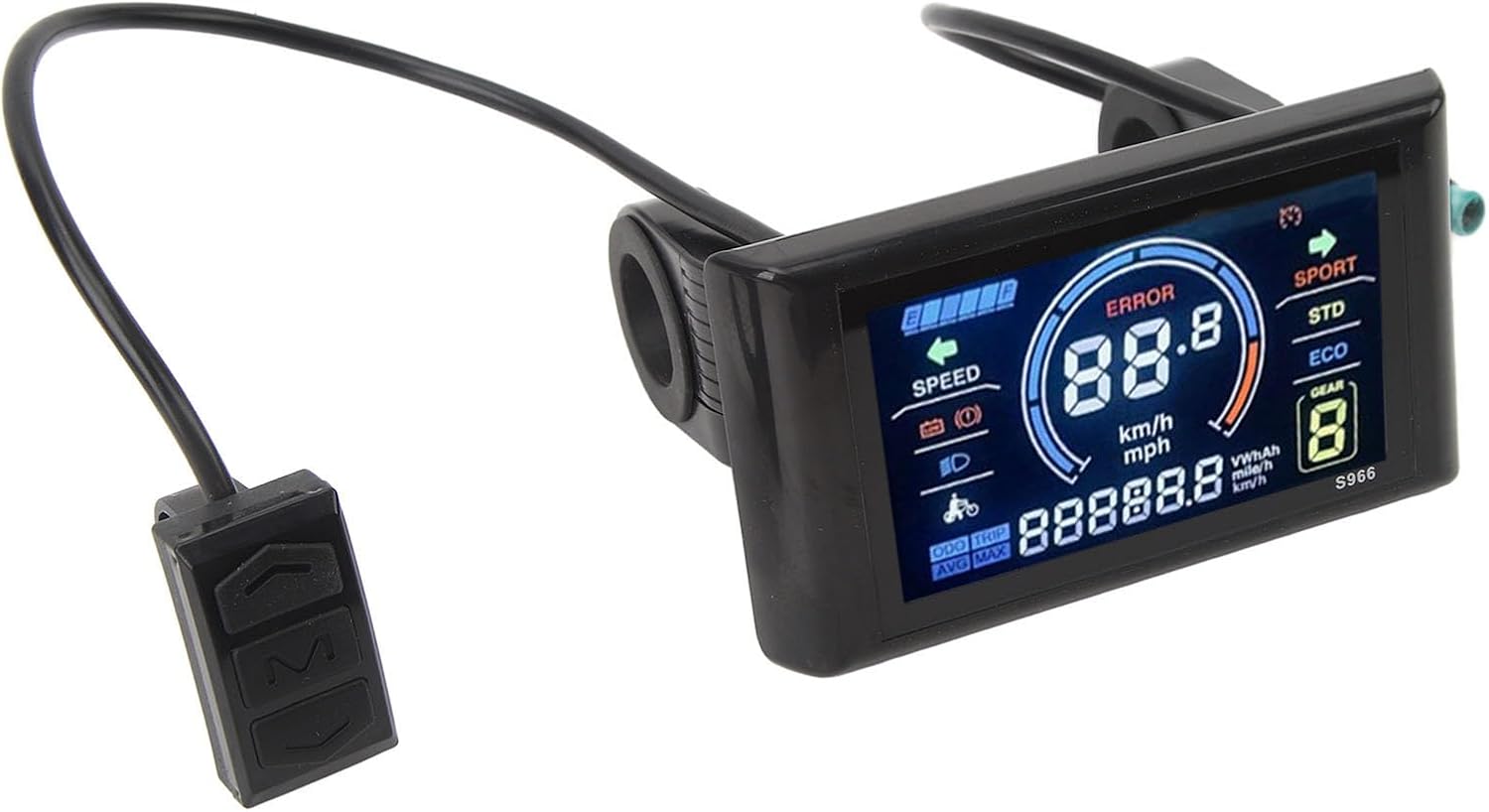
Figure 3: The S966 display panel mounted on a handlebar, showing the integrated control buttons.
4. Operating Instructions
The S966 LCD display provides clear visual data for an intuitive riding experience. It features a large screen and easy-to-use control buttons.

Figure 4: The S966 display panel showing various data points and indicators during operation.
4.1 Powering On/Off
- To power on the display, press and hold the 'M' button for a few seconds.
- To power off the display, press and hold the 'M' button again for a few seconds until the screen turns off.
4.2 Displayed Information
The LCD screen provides real-time data, including:
- Speed: Current riding speed (km/h or mph).
- Battery Level: Indication of remaining battery charge.
- Error Codes: Displays 'ERROR' with a code if a system fault is detected.
- Riding Mode: SPORT, STD (Standard), ECO (Economy) modes.
- Gear/Assist Level: Current pedal assist level.
- Odometer (ODO): Total distance traveled.
- Trip Distance (TRIP): Distance traveled during the current ride.
- Average Speed (AVG): Average speed of the current ride.
- Maximum Speed (MAX): Maximum speed achieved during the current ride.
- Headlight Indicator: Indicates if headlights are on.
4.3 Navigating Modes and Settings
Use the control buttons (Up arrow, Down arrow, M) to navigate through different display modes and adjust settings.
- 'M' Button: Short press to cycle through ODO, TRIP, AVG, MAX displays. Long press to power on/off.
- Up Arrow Button: Increase pedal assist level or navigate upwards in settings menus.
- Down Arrow Button: Decrease pedal assist level or navigate downwards in settings menus.
5. Maintenance
The FUZHUI S966 LCD Display Panel is constructed from lightweight and sturdy ABS material, designed for durability. To ensure its longevity and proper function:
- Cleaning: Wipe the display screen and body with a soft, damp cloth. Avoid using abrasive cleaners or solvents, which can damage the screen or casing.
- Protection: While durable, avoid exposing the display to extreme impacts or prolonged direct sunlight when not in use.
- Connections: Periodically check that all cable connections are secure and free from corrosion or damage.
6. Troubleshooting
If you encounter issues with your S966 display panel, consider the following basic troubleshooting steps:
- Display Not Powering On:
- Ensure the bicycle's main power is on.
- Check all cable connections between the display and the controller for looseness or damage.
- Verify the bicycle's battery has sufficient charge.
- 'ERROR' Message Displayed:
- An 'ERROR' message indicates a system fault. Note the error code displayed (if any) and consult your electric bicycle's main user manual or contact the bicycle manufacturer for specific error code interpretations.
- Check for any visible damage to cables or sensors.
- Inaccurate Speed/Distance Readings:
- Ensure the speed sensor (if external) is correctly installed and aligned.
- Verify that the wheel circumference setting (if adjustable via the display or controller) is correct for your bicycle.
If problems persist after performing these checks, please contact your dealer or the manufacturer for further assistance.
7. Specifications
| Feature | Specification |
|---|---|
| Item Type | Electric Bicycle S966 LCD Display Panel |
| Material | ABS |
| Voltage Compatibility | 24-72V |
| Weight | Approx. 228g / 8.04oz |
| Handlebar Diameter | 22.2mm (0.87 inches) |
8. Warranty and Support
For warranty information and technical support, please refer to the purchase documentation or contact the retailer from whom you purchased the FUZHUI S966 LCD Display Panel. Specific warranty terms and support channels may vary by region and seller.