1. Introduction
This manual provides essential information for the safe and efficient operation of your VGVGV Pure Sine Wave Power Inverter. Please read this manual thoroughly before installation and use, and retain it for future reference. This inverter converts DC power from a battery into AC power suitable for various electronic devices.
2. Safety Instructions
WARNING: Failure to follow these instructions may result in serious injury or damage to the inverter.
- Ensure the inverter is connected to a battery with the correct voltage (12V, 24V, 48V, or 60V) as specified on the unit.
- Do not connect the inverter to an AC power source.
- Avoid reverse polarity connections. Reverse polarity will damage the unit.
- Install the inverter in a well-ventilated area, away from direct sunlight, heat sources, and flammable materials.
- Do not expose the inverter to water or excessive moisture.
- Do not open the inverter casing. There are no user-serviceable parts inside.
- Keep children away from the inverter during operation.
- Ensure all connections are tight and secure to prevent overheating and arcing.
- Use appropriate gauge wiring for battery connections to handle the current.

Figure 1: VGVGV Pure Sine Wave Power Inverter with included battery connection cables. Note the warning label regarding reverse polarity.
3. Package Contents
Verify that all items are present in the package:
- 1 x Pure Sine Wave Inverter
- 1 x English User Manual (this document)
- 1 x Certificate of Conformity
- 1 x Battery Thick Line (Red)
- 1 x Battery Clip (Black)
4. Product Features
The VGVGV Pure Sine Wave Power Inverter offers advanced features for reliable power conversion:
- Pure Sine Wave Output: Provides clean power suitable for sensitive electronics, including TVs, LED lights, LCD displays, refrigerators, freezers, and induction cookers.
- Efficient Cooling System: Features an aluminum-magnesium alloy shell for excellent thermal conductivity and an intelligent temperature-controlled fan. The fan operates only when the internal temperature exceeds 45°C, ensuring quiet operation and extended component life.
- High Conversion Efficiency: Up to 95% conversion efficiency minimizes power loss and extends battery life.
- Comprehensive Protection: Equipped with an eight-bit intelligent protection system against overload, high voltage, low voltage, overheating, reverse connection, short circuit, overcurrent, and insurance protection. A buzzer reminder alerts users to protection triggers.
- Universal Socket: Compatible with various plug types (e.g., France, Germany, USA, Australia, UK).

Figure 2: Front view of the inverter, highlighting the Pure Sine Wave output and various power ratings (1600W, 2800W).
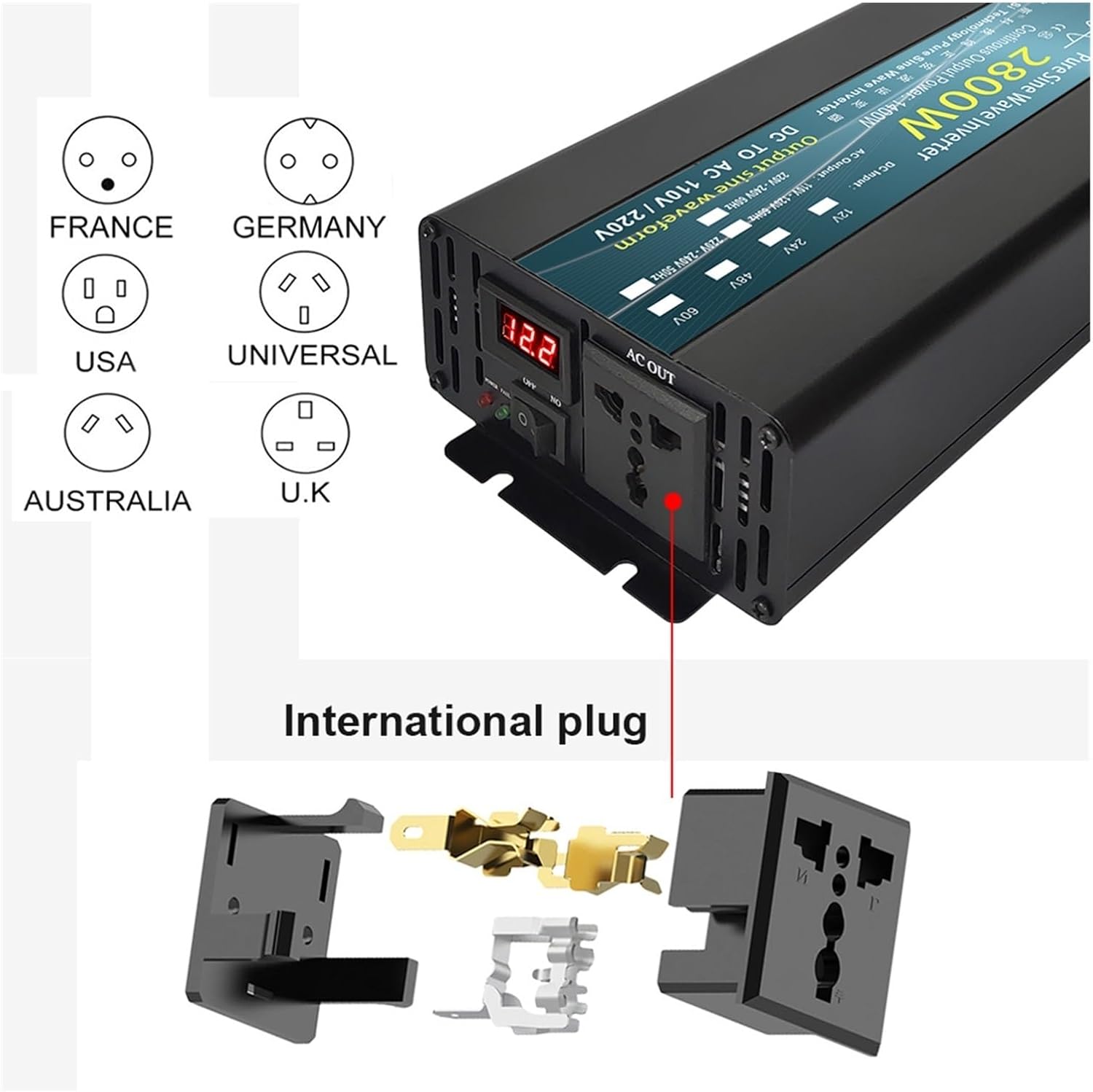
Figure 3: The inverter features a universal AC output socket, compatible with various international plug standards.
5. Setup and Installation
5.1 Choosing an Installation Location
- Select a dry, cool, and well-ventilated area.
- Avoid areas with direct sunlight, high temperatures, or excessive dust.
- Ensure sufficient clearance around the inverter for proper airflow, especially around the fan vents.
- Mount the inverter securely on a stable surface.
5.2 Connecting to a Battery
- Ensure the inverter's power switch is in the "OFF" position.
- Connect the red battery cable (positive) to the positive (+) terminal of the inverter and the positive (+) terminal of the battery.
- Connect the black battery cable (negative) to the negative (-) terminal of the inverter and the negative (-) terminal of the battery.
- Tighten all connections securely. Loose connections can cause overheating and damage.
- Verify that the battery voltage matches the inverter's input voltage (e.g., 12V inverter with a 12V battery).

Figure 4: Detailed view of the inverter's front panel (AC output, display, switch) and rear panel (DC input terminals, cooling fan).
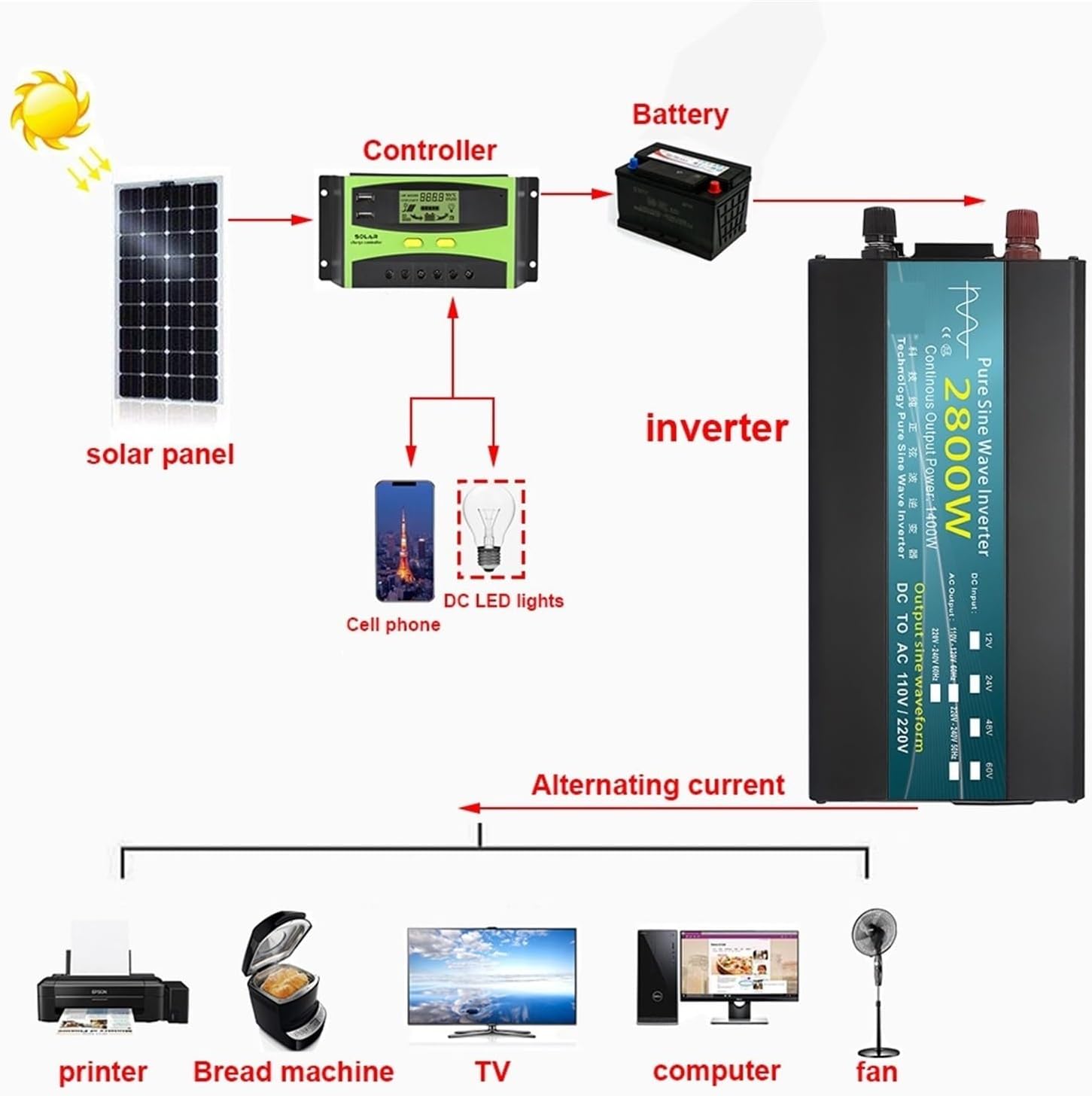
Figure 5: Example setup illustrating the connection of a solar panel, charge controller, battery, inverter, and various AC appliances.
6. Operating Instructions
6.1 Powering On the Inverter
- After ensuring all battery connections are secure, switch the inverter's power button to the "ON" position.
- The LED indicator will illuminate, and the display (if present) will show the output voltage.
6.2 Connecting AC Appliances
- Plug your AC appliance into the universal output socket on the inverter.
- Ensure the total power consumption of all connected appliances does not exceed the inverter's continuous output power (e.g., 1600W or 2800W).
- For inductive loads (e.g., refrigerators, motors), the starting current can be significantly higher than the running current. Ensure the inverter's peak power capacity can handle these surges.
6.3 Powering Off the Inverter
- Disconnect all AC appliances from the inverter.
- Switch the inverter's power button to the "OFF" position.
- For long-term storage, disconnect the inverter from the battery.
7. Maintenance
- Cleaning: Periodically clean the exterior of the inverter with a dry, soft cloth. Do not use liquid cleaners or solvents.
- Ventilation: Ensure the cooling fan and vents are free from dust and obstructions. Blocked vents can lead to overheating.
- Connections: Regularly check battery and AC connections for tightness and corrosion.
- Battery Care: Maintain your battery according to its manufacturer's instructions to ensure optimal performance and lifespan of the inverter system.
8. Troubleshooting
| Problem | Possible Cause | Solution |
|---|---|---|
| Inverter not turning on |
|
|
| No AC output |
|
|
| Buzzer alarm sounds |
|
|
9. Specifications
| Parameter | Value |
|---|---|
| Type | Pure Sine Wave Inverter |
| Output Voltage Waveform | Pure sine wave |
| Continuous Output Power | 1600W / 2800W (model dependent) |
| Output Voltage | 220-240V AC |
| Input Voltage Options | 12V / 24V / 48V / 60V DC |
| Output Frequency | 50Hz / 60Hz |
| Socket Type | Universal |
| Shell Material | Aluminum-magnesium alloy |
| Cooling | Intelligent temperature control fan |
| Protection Features | Overload, High/Low Voltage, Overheating, Reverse Connection, Short Circuit, Overcurrent |
| Model Number | YZL2023.6.69 |
10. Warranty Information
Please refer to the Certificate of Conformity included in your package for specific warranty terms and conditions. Generally, VGVGV products are covered by a limited warranty against defects in materials and workmanship from the date of purchase. This warranty does not cover damage caused by improper installation, misuse, unauthorized modifications, or natural disasters.
11. Customer Support
If you encounter any issues or have questions regarding your VGVGV Pure Sine Wave Power Inverter that are not addressed in this manual, please contact your retailer or the manufacturer's customer support. Provide your model number (YZL2023.6.69) and a detailed description of the issue for faster assistance.
For further information, you may visit the VGVGV brand page on Amazon.


