Introduction
Thank you for purchasing the SKMEI 1762 Digital Watch. This manual provides detailed instructions on how to set up, operate, and maintain your watch. Please read this manual carefully to ensure proper use and to enjoy all the features of your new timepiece.
The SKMEI 1762 is a versatile digital watch designed for daily wear and outdoor activities, featuring water resistance, an alarm, calendar, stopwatch, and backlight.
Product Overview
The SKMEI 1762 watch features a clear digital display and four control buttons for various functions.
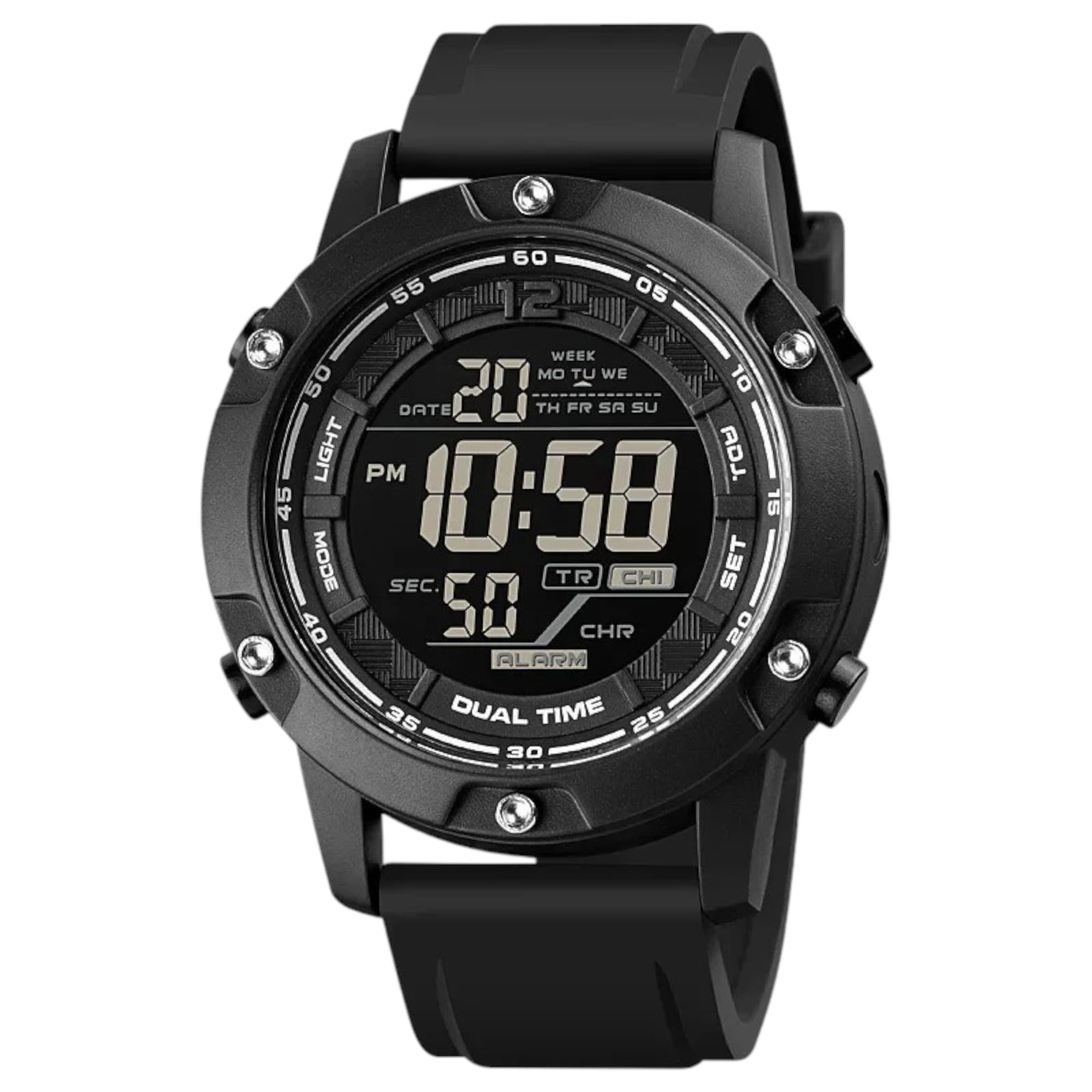
This image displays the front of the SKMEI 1762 digital watch, highlighting its digital display and the four control buttons located on the sides of the watch case.
Button Functions:
- LIGHT (Top Left): Activates the backlight for illumination in low-light conditions.
- MODE (Bottom Left): Cycles through different modes: Time, Chronograph (Stopwatch), Alarm, and Dual Time.
- ADJ (Top Right): Used to adjust settings within a mode (e.g., incrementing values).
- SET (Bottom Right): Used to confirm settings or move to the next setting item.
Display Elements:
- Time Display: Shows hours, minutes, and seconds. Can be set to 12-hour or 24-hour format.
- Date Display: Shows month and day.
- Day of the Week: Indicates the current day.
- Alarm Indicator: Icon displayed when the alarm is active.
- Chronograph Display: Shows elapsed time in stopwatch mode.
Setup
Setting Time and Date:
- From Time Mode, press the MODE button repeatedly until the seconds start flashing. This indicates you are in time setting mode.
- Press the SET button to cycle through the settings: seconds → hours → minutes → 12/24-hour format → month → day → year.
- Use the ADJ button to increase the flashing value. Hold ADJ to quickly advance the numbers.
- Once all settings are adjusted, press the MODE button to exit the setting mode and return to the normal time display.
Setting the Alarm:
- From Time Mode, press the MODE button until you reach the Alarm Mode (usually indicated by an 'AL' or alarm icon).
- Press and hold the SET button until the alarm hours start flashing.
- Use the ADJ button to set the desired alarm hour.
- Press the SET button to move to the alarm minutes. Use the ADJ button to set the desired alarm minutes.
- Press the MODE button to exit the alarm setting mode.
- To turn the alarm ON/OFF, in Alarm Mode, press the ADJ button. An alarm icon will appear/disappear on the display.
Setting Dual Time:
- From Time Mode, press the MODE button repeatedly until you reach Dual Time Mode (often indicated by 'DT' or a second time display).
- Press and hold the SET button until the dual time hours start flashing.
- Use the ADJ button to set the desired dual time hour.
- Press the SET button to move to the dual time minutes. Use the ADJ button to set the desired dual time minutes.
- Press the MODE button to exit the dual time setting mode.
Operating Modes
Time Mode:
This is the default display mode, showing the current time, date, and day of the week. Press the ADJ button in Time Mode to switch between 12-hour and 24-hour formats.
Chronograph (Stopwatch) Mode:
- Press the MODE button until you reach the Chronograph Mode (usually indicated by 'ST' or 'CH').
- Press ADJ to start the stopwatch.
- Press ADJ again to pause the stopwatch.
- Press SET to reset the stopwatch to zero while it is paused.
- Press MODE to return to Time Mode.
Alarm Mode:
In Alarm Mode, you can view the set alarm time and toggle the alarm ON or OFF using the ADJ button.
Dual Time Mode:
In Dual Time Mode, you can view the second time zone you have set. This is useful for tracking time in another region.
Using the Backlight:

This image illustrates the SKMEI 1762 digital watch with its luminous display activated, showing how the backlight illuminates the screen for visibility in the dark.
Press the LIGHT button (top left) at any time to illuminate the display for a few seconds, allowing you to read the time in dark environments.
Maintenance
Cleaning:
- Wipe the watch case and strap with a soft, damp cloth.
- Avoid using chemical cleaners, as they may damage the watch's finish or seals.
Water Resistance:

This image shows the SKMEI 1762 digital watch being splashed with water, demonstrating its water-resistant capabilities suitable for swimming and outdoor activities.
- The SKMEI 1762 is water-resistant up to 10 ATM (100 meters). This means it is suitable for swimming and showering.
- Do NOT press any buttons while the watch is submerged in water, as this can compromise the water resistance.
- Avoid exposing the watch to hot water or steam, as this can damage the seals.
Battery Replacement:
- The watch uses a CR123A battery.
- When the display becomes dim or functions become erratic, it may be time to replace the battery.
- Battery replacement should ideally be performed by a qualified watch technician to ensure the water resistance seal is properly maintained.
Troubleshooting
- Display is blank or dim: The battery may be low or depleted. Replace the battery.
- Time is incorrect: Re-set the time and date according to the instructions in the "Setting Time and Date" section. Ensure the 12/24-hour format is correctly selected.
- Alarm not sounding: Check if the alarm is activated (alarm icon visible on display). Ensure the alarm time is set correctly.
- Water inside the watch: If moisture appears inside the watch, stop using it immediately and have it inspected by a professional. This indicates a compromised water seal.
If you encounter issues not covered here, please contact customer support.
Specifications
| Feature | Specification |
|---|---|
| Brand | SKMEI |
| Model Number | 1762 |
| Display Type | Digital |
| Movement | Japanese Quartz |
| Water Resistance | 10 ATM (100 meters) |
| Case Material | Stainless Steel |
| Band Material Type | Silicone |
| Clasp Type | Buckle |
| Watch Glass Material | Mineral Glass |
| Included Components | Rubber Strap |
| Item Weight | 90 grams |
| Battery Type | 1 CR123A (included) |
Warranty and Support
Your SKMEI 1762 Digital Watch is covered by a standard manufacturer's warranty against defects in materials and workmanship. Please refer to the warranty card included with your purchase for specific terms and conditions.
For technical support, warranty claims, or further assistance, please contact your retailer or visit the official SKMEI website for customer service information.


