1. Introduction
This manual provides detailed instructions for the installation, operation, and maintenance of your Acouto 7-Inch TFT LCD VGA Monitor. Please read this manual thoroughly before using the product to ensure proper function and to prevent damage. Keep this manual for future reference.
2. Safety Information
- Ensure the power supply meets the specified voltage (12V) and current (greater than 1A) requirements.
- If using a car power supply, a regulator must be added to prevent interference and voltage fluctuations.
- Avoid exposing the monitor to extreme temperatures, humidity, or direct sunlight.
- Do not attempt to disassemble or repair the unit yourself. Refer all servicing to qualified personnel.
- Keep the monitor away from water or other liquids to prevent electric shock.
3. Package Contents
Verify that all items listed below are included in your package:
- 1 x 7-Inch LCD Display Screen (1024x600)
- 1 x Driver Board (Control Kit)
- 1 x Flat Cable (for connecting LCD to driver board)
- 1 x USB Power Cord
- 1 x Remote Control

Image 3.1: Complete package contents including the LCD screen, driver board, various cables, and a remote control.
4. Product Overview
The Acouto 7-Inch TFT LCD VGA Monitor is a versatile display solution featuring a 1024x600 resolution. It is designed for various applications, including use with Raspberry Pi 3/2 or as a general computer display. The monitor supports multiple input types and offers image adjustment capabilities.
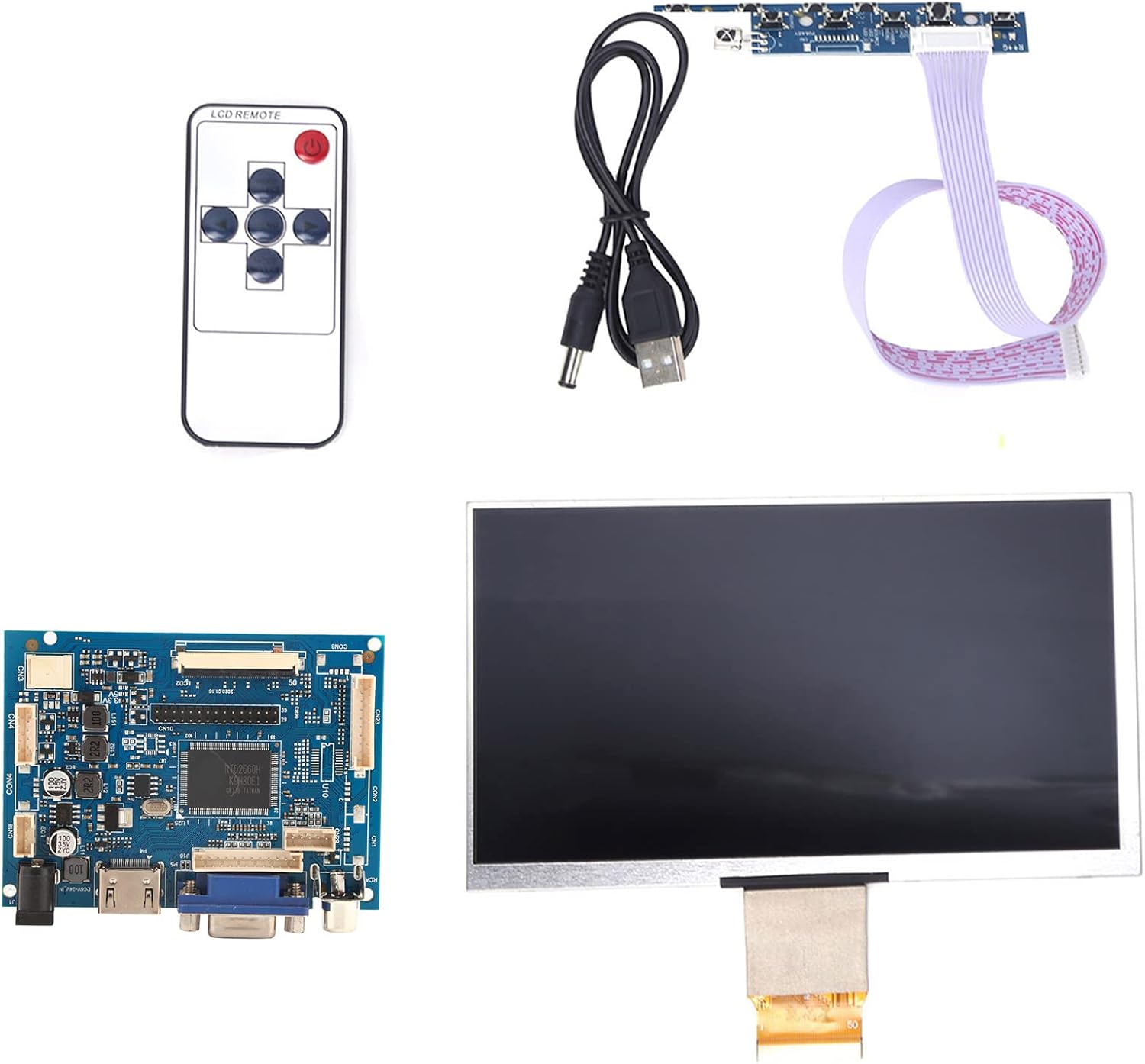
Image 4.1: Overview of the Acouto 7-inch TFT LCD VGA Monitor kit components.
4.1. LCD Display
The 7-inch TFT LCD panel provides a clear display with a physical resolution of 1024x600 pixels. It supports various resolutions from 640x480 to 1600x1200 through arbitrary adjustment.

Image 4.2: The 7-inch TFT LCD display screen.
4.2. Driver Board
The driver board serves as the control unit for the LCD, featuring multiple input interfaces including 2 x AV channels, VGA, and 1 x HD input (version 1.2). It also includes buttons for menu navigation and settings adjustment.

Image 4.3: The driver control board with input ports.
4.3. Remote Control
A remote control is included for convenient adjustment of settings and input selection.

Image 4.4: The included remote control.
5. Setup
Follow these steps to set up your Acouto 7-Inch TFT LCD VGA Monitor:
- Connect the LCD to the Driver Board: Carefully connect the flat cable from the LCD display to the corresponding connector on the driver board. Ensure the connection is secure and correctly oriented.
- Connect Video Input: Choose your desired video input (VGA, HD, AV1, or AV2) and connect the appropriate cable from your source device (e.g., Raspberry Pi, computer, DVD player) to the driver board.
- Connect Power: Connect the USB power cord to the driver board's power input, and then connect it to a 12V power source (greater than 1A). If using a car power supply, ensure a regulator is in place.
- Power On: Once all connections are secure, power on the monitor and your source device.

Image 5.1: LCD screen connected to the driver board.
6. Operating Instructions
6.1. Power On/Off
Press the power button on the driver board or the remote control to turn the monitor on or off.
6.2. Input Selection
Use the 'Input' button on the driver board or remote control to cycle through available video inputs (AV1, AV2, VGA, HD).
6.3. Menu Navigation
Access the On-Screen Display (OSD) menu by pressing the 'Menu' button. Use the arrow buttons to navigate and the 'OK' or 'Enter' button to select options. Adjust settings such as brightness, contrast, color, and aspect ratio.
6.4. Image Flip and Convert
The monitor supports image flipping (up/down, left/right) and display format conversion (4:3 / 16:9). These functions can be accessed through the OSD menu or dedicated buttons on the remote control, providing a customizable viewing experience.
Note: AV2 video input is designed for automatic camera screen display, typically used in automotive applications for reverse cameras.
7. Maintenance
To ensure the longevity and optimal performance of your monitor, follow these maintenance guidelines:
- Cleaning the Screen: Gently wipe the screen with a soft, lint-free cloth. For stubborn marks, slightly dampen the cloth with water or a non-abrasive screen cleaner. Do not spray liquid directly onto the screen.
- Cleaning the Casing: Use a soft, dry cloth to clean the monitor's casing. Avoid using strong detergents or solvents.
- Storage: When not in use for extended periods, store the monitor in a cool, dry place, away from direct sunlight and dust.
8. Troubleshooting
If you encounter any issues with your monitor, refer to the following troubleshooting guide:
| Problem | Possible Cause | Solution |
|---|---|---|
| No display / Black screen |
|
|
| Image distorted / Poor quality |
|
|
| Remote control not working |
|
|
9. Specifications
Detailed technical specifications for the Acouto 7-Inch TFT LCD VGA Monitor:
| Feature | Specification |
|---|---|
| Brand | Acouto |
| Model Name | Acouto536ocyn8e0 |
| Screen Size | 7 inches |
| Display Type | TFT LCD |
| Physical Resolution | 1024 x 600 |
| Supported Resolutions | 640x480 to 1600x1200 |
| Aspect Ratio | 4:3 (convertible to 16:9) |
| Hardware Interface | VGA, HD (version 1.2), 2 x AV channels |
| Human Interface Input | Buttons, Remote Control |
| Operating Voltage | 12V (Power supply > 1A required) |
| Rated Power | 6-7 W |
| Product Dimensions | 30 x 19 x 4 cm |
| Product Weight | 323 g |
10. Warranty and Support
For warranty information and technical support, please refer to the documentation provided at the time of purchase or contact your retailer. Keep your purchase receipt as proof of purchase for any warranty claims.
