
GODREJ INTERIO 56101522SD04581
GODREJ INTERIO Posture Perfect Executive Ergonomic Revolving Chair User Manual
Model: 56101522SD04581
Introduction
This manual provides detailed instructions for the assembly, operation, and maintenance of your GODREJ INTERIO Posture Perfect High Back Leather Executive Ergonomic Revolving Chair. Please read this manual thoroughly before use to ensure proper setup and to maximize the chair's ergonomic benefits and longevity.
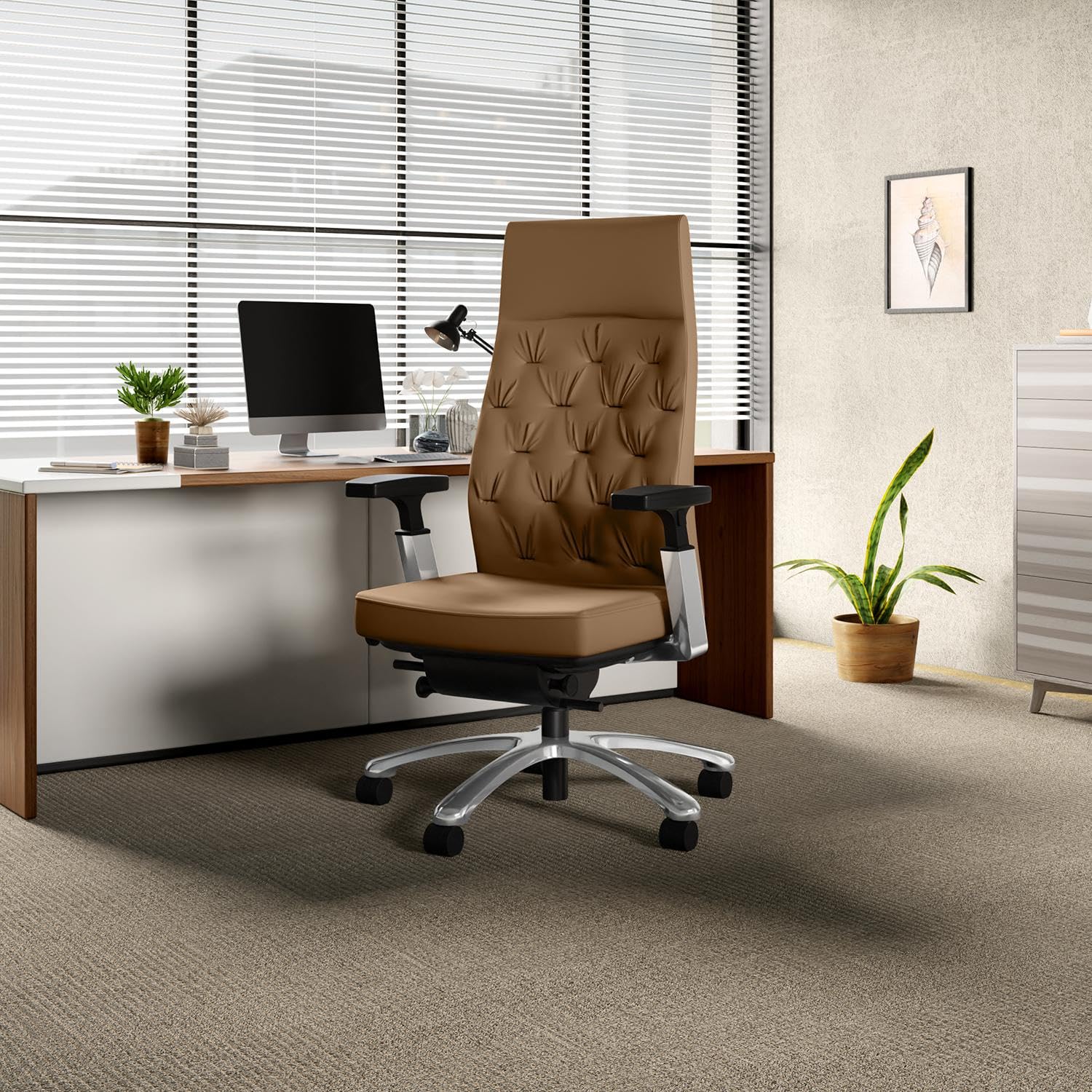
Image: The GODREJ INTERIO Posture Perfect Executive Ergonomic Revolving Chair, tan color, positioned in a contemporary office environment with a desk and computer.
Product Features and Benefits
- Posture Perfect Trackback Technology: Provides consistent and even back support across all recline positions, adapting to the natural movement of the spine to prevent stress and maintain lumbar support.
- Ergonomic Design: Engineered for optimal support and comfort during long hours of seating, reducing fatigue and improving posture.
- Advanced Adjustability: Features adjustable seat width, back height, 4-dimensional armrests, and a 3-position tilt limiter for personalized comfort.
- Durable Construction: Robust design tested to stringent BIFMA and EN performance standards, ensuring longevity and reliability.
- Quality Materials: Crafted with high-quality leather and metal components for a premium finish and sturdy structure.

Image: An illustration highlighting the "Posture Perfect Chair" and its core attributes: Trusted Legacy, Expert Craftsmanship, Innovative Designs, and Easy Delivery & Setup.
Assembly Instructions
The GODREJ INTERIO Posture Perfect chair requires assembly. Please follow these general steps. For detailed visual instructions, refer to the included assembly guide in your product packaging.
- Unpack Components: Carefully remove all parts from the packaging and lay them out on a clean, soft surface to prevent scratches. Verify all components are present against the parts list in your packaging.
- Attach Casters to Base: Insert the casters (wheels) into the holes at the end of each leg of the chair base. Push firmly until they click into place.
- Insert Gas Lift: Place the gas lift cylinder into the center hole of the chair base.
- Attach Mechanism to Seat: Secure the chair mechanism to the underside of the seat cushion using the provided screws. Ensure the front of the mechanism aligns with the front of the seat.
- Attach Armrests: Fasten the armrests to the seat mechanism using the designated screws.
- Attach Backrest: Connect the backrest to the seat mechanism and armrests, securing it with screws.
- Connect Seat Assembly to Gas Lift: Carefully place the assembled seat and backrest onto the gas lift cylinder, ensuring it is centered and stable.
- Final Checks: Test all adjustments and ensure all screws are tightened securely before use.

Image: A side view of the chair, illustrating the distinct components of the seat and backrest before full assembly.
Operating Instructions
Your Posture Perfect chair offers several adjustments to customize your seating experience. Familiarize yourself with these controls for optimal comfort and ergonomic support.
- Height Adjustment: To raise the seat, lift the lever located under the seat on the right side while taking your weight off the chair. To lower, lift the lever while seated.
- Armrest Adjustment (4D): The armrests can be adjusted in four dimensions:
- Height: Press the button on the side of the armrest and move it up or down.
- Width: Slide the armrest pads inward or outward.
- Depth: Slide the armrest pads forward or backward.
- Pivot: Rotate the armrest pads to your desired angle.
- Tilt and Recline Tension:
- Tilt Lock (3 Positions): Use the lever on the left side under the seat to lock the chair in one of three recline positions: upright, half-recline, or full-recline.
- Recline Tension: Rotate the knob located under the front of the seat to increase or decrease the tension required to recline. Turn clockwise for more tension, counter-clockwise for less.
- Seat Depth Adjustment: Pull the lever or button (depending on model variation) under the seat and slide the seat forward or backward to achieve a comfortable distance from the backrest, ensuring 2-3 fingers can fit between the edge of the seat and the back of your knee.
- Back Height Adjustment: To adjust the backrest height, lift the backrest upwards until it clicks into the desired position. To reset to the lowest position, lift it to its highest point, and it will drop down.
- Adjustable Lumbar Support: The chair features an adjustable lumbar support system. Adjust the lumbar support by rotating the knob or sliding the mechanism on the back of the chair to provide optimal support to your lower back.

Image: A visual guide detailing the chair's adjustment features, including back height, 4D arm support, seat depth, front tilt lock, tilt limiter technology, seat height, and recline tension.

Image: A detailed view of the chair's backrest, highlighting the adjustable lumbar support mechanism designed to conform to the user's spine.
Maintenance
Proper care and maintenance will extend the life and appearance of your GODREJ INTERIO chair.
- Cleaning: Wipe surfaces with a soft, thick cloth. For leather upholstery, use a damp cloth with mild soap if necessary, then wipe dry.
- Avoid Bleach: Do not use bleach or harsh chemical cleaners on upholstery or any part of the chair.
- Heat Protection: Do not place hot items directly on the chair surface. Use protective pads if needed.
- Sunlight Exposure: To prevent fading, avoid placing the chair in direct sunlight for extended periods.
- Regular Checks: Periodically check and tighten all screws and fasteners to ensure stability.
Troubleshooting
If you encounter any issues with your chair, refer to the following common solutions:
- Chair Sinks or Won't Stay Up: The gas lift cylinder may be faulty. Contact customer support for a replacement.
- Chair Wobbles: Ensure all assembly screws are securely tightened. Check if the casters are fully inserted into the base.
- Casters Not Rolling Smoothly: Check for debris (hair, lint) caught in the casters and clean them. Lubricate if necessary.
- Adjustments Not Working: Verify that no levers are jammed or obstructed. Ensure you are applying the correct pressure or movement as described in the operating instructions.
- Squeaking Noises: Apply a small amount of silicone lubricant to moving parts or joints where the noise originates. Avoid oil-based lubricants on plastic components.
Specifications
| Feature | Detail |
|---|---|
| Brand | GODREJ INTERIO |
| Model Name | Posture Perfect |
| Item Model Number | 56101522SD04581 |
| Colour | Tan |
| Material | Metal (Frame), Leather (Seat Material Type) |
| Product Dimensions (D x W x H) | 74D x 74W x 132.5H Centimeters |
| Seat Height | 58 Centimetres |
| Seat Depth | 74 Centimeters |
| Back Style | High Back |
| Special Features | Adjustable Height, Arm Rest, Back Support, Big and Tall, Ergonomic, Tilting, Swivel, Reclining (3 positions) |
| Item Weight | 25 kg 500 g |
| Included Components | 1 Chair |
| Country of Origin | India |

Image: A diagram illustrating the key dimensions of the chair, including overall height, width, and seat height range.
Warranty and Support
Your GODREJ INTERIO Posture Perfect Executive Ergonomic Revolving Chair comes with a 1 Year Manufacturer Warranty.
For warranty claims, technical support, or inquiries regarding your product, please contact Godrej Interio customer service:
- Manufacturer Contact: Godrej Interio
- Email: giorder@godrej.com
- Please have your model number (56101522SD04581) and proof of purchase ready when contacting support.
Related Documents - 56101522SD04581
 |
Godrej Refrigerator Additional Warranty Terms & Conditions Detailed terms and conditions for the Godrej Refrigerator Additional Warranty Scheme, covering warranty period, coverage, exclusions, and customer instructions for refrigerators. |
 |
Godrej Ace Pro Green Solar Camera: Quick Start Guide & Features Comprehensive guide to setting up and using the Godrej Ace Pro Green Solar Powered Camera. Learn about its features, specifications, safety instructions, and mounting. |
 |
Godrej SeeThru RE7 V-Series Video Door Phone User Manual Comprehensive user manual for the Godrej SeeThru RE7 V-Series Video Door Phone, detailing features, specifications, hardware description, installation, operation, precautions, and e-waste management. Includes contact information and company details. |
 |
Godrej EON Washing Machine User Manual - WSAXIS DX 70 5.0 SN2 T Comprehensive user manual for the Godrej EON WSAXIS DX 70 5.0 SN2 T Fully Automatic Top Load Washing Machine. Includes installation, operation, maintenance, safety guidelines, and troubleshooting. |
 |
How to Delete Your Godrej Secure Hub Account and Data Learn how to permanently delete your Godrej Secure Hub account and all associated data. This guide provides step-by-step instructions for account removal and explains the consequences. |
 |
Godrej Catus Touch Digital Mortise Door Lock Owner's Manual - Installation and Operation Guide Comprehensive owner's manual for the Godrej Catus Touch Digital Mortise Door Lock. Learn about installation, password management, safety features, troubleshooting, and specifications. |
Ask a question about this manual
Ask about setup, troubleshooting, compatibility, parts, safety, or missing instructions. Manuals+ will review the question and use this page’s manual context to help answer it.