
1. Introduction
This manual provides essential information for the safe and efficient operation of your Steinbach Solid 4.3 Heat Pump. Please read it thoroughly before installation and use, and keep it for future reference.
The Steinbach Solid 4.3 Heat Pump is designed to efficiently heat swimming pools up to 20,000 liters. It features a high Coefficient of Performance (COP) of 6, requiring only 700 W of input power for 4,300 W of heating output, making it highly energy-efficient. Its compact design and quiet operation (37 dB(A)) ensure minimal disruption. The heat pump is also suitable for saltwater pools and offers convenient control via a dedicated mobile application for iOS and Android devices.
2. Safety Information
Always observe the following safety precautions to reduce the risk of injury or damage:
- Read all instructions before using the appliance.
- Ensure the power supply matches the specifications listed on the product label.
- Do not operate the heat pump if the power cord or plug is damaged.
- Keep children and pets away from the heat pump during operation.
- Ensure proper ventilation around the unit.
- Do not attempt to repair or modify the unit yourself. Contact qualified service personnel.
- Disconnect power before performing any maintenance or cleaning.
- This appliance is not intended for use by persons (including children) with reduced physical, sensory or mental capabilities, or lack of experience and knowledge, unless they have been given supervision or instruction concerning use of the appliance by a person responsible for their safety.
3. Package Contents
Please check that all items are present and in good condition:
- 1 x Steinbach Solid 4.3 Heat Pump
- 2 x Adapters
- 1 x User Manual (this document)
4. Setup and Installation
Proper installation is crucial for the heat pump's performance and longevity. Ensure the unit is placed on a stable, level surface with adequate ventilation.
4.1 Placement
Position the heat pump outdoors, ensuring at least 50 cm of clear space around the air inlet and outlet for optimal airflow. Avoid placing it in enclosed spaces or directly against walls that would obstruct air circulation.
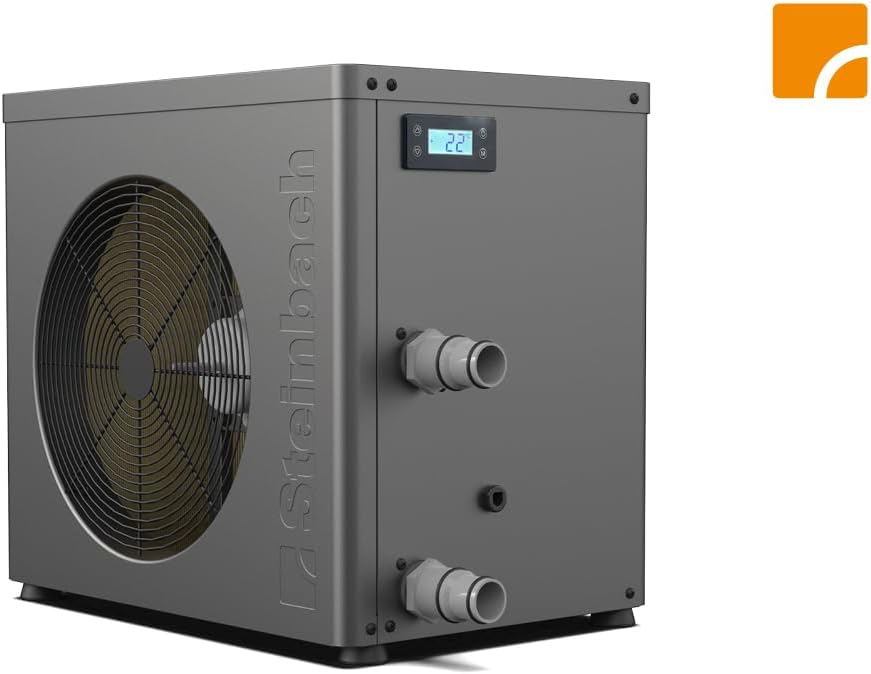
Figure 4.1: Front view of the Steinbach Solid 4.3 Heat Pump, showing the main fan and control panel. This view is important for understanding air intake and exhaust requirements.

Figure 4.2: Back view of the Steinbach Solid 4.3 Heat Pump, illustrating the rear grille for air circulation. Ensure this area is clear of obstructions.
4.2 Water Connections
Connect the heat pump to your pool's filtration system. The heat pump should be installed after the filter and before any chemical feeders. The connection size for swimming pool hoses is Ø 32/38 mm. Use the provided adapters if necessary.

Figure 4.3: Detail of the water connection port on the heat pump, designed for Ø 32/38 mm pool hoses. Ensure a secure and leak-free connection.
4.3 Electrical Connection
Connect the heat pump to a grounded electrical outlet. Ensure the electrical circuit can handle the maximum input power of 900W. Consult a qualified electrician if you are unsure about your electrical system's capacity.
5. Operating Instructions
The Steinbach Solid 4.3 Heat Pump offers intuitive operation through its integrated control panel and a convenient mobile application.
5.1 Control Panel Operation
The digital display on the unit shows the current water temperature and allows for basic adjustments. Refer to the on-screen prompts for setting desired temperatures and modes.

Figure 5.1: The intuitive control panel of the heat pump, displaying temperature and control buttons for easy adjustments.
5.2 App Control (Wi-Fi)
For convenient remote control, download the "Steinbach Control" app from the App Store (iOS) or Google Play Store (Android). The app allows you to monitor and adjust settings via Wi-Fi.
- Download the "Steinbach Control" app.
- Ensure your heat pump is powered on and within Wi-Fi range (2.4 GHz frequency).
- Follow the in-app instructions to connect your heat pump to your Wi-Fi network.
- Once connected, you can control the heat pump's temperature, mode, and schedule from your smartphone.

Figure 5.2: Screenshot of the Steinbach Control app interface, demonstrating remote temperature adjustment. QR codes for App Store and Google Play are visible for easy download.

Figure 5.3: Visual representation highlighting key features: App & WiFi control, extremely quiet operation (37 dB(A)), and suitability for saltwater up to 5g/L.
6. Maintenance
Regular maintenance ensures the optimal performance and extends the lifespan of your heat pump.
- Cleaning: Periodically clean the exterior of the unit with a soft, damp cloth. Ensure the air intake and outlet grilles are free from debris, leaves, and dirt.
- Water Quality: Maintain proper pool water chemistry. For saltwater pools, ensure the salt concentration does not exceed 0.50% (5 g/L or 5,000 ppm) to protect the titanium heat exchanger.
- Winterization: If you live in an area with freezing temperatures, properly winterize your heat pump by draining all water from the unit and storing it in a dry, protected area. Consult a professional if unsure.
- Professional Inspection: Consider an annual professional inspection to ensure all components are functioning correctly.
7. Troubleshooting
This section provides solutions to common issues you might encounter. If the problem persists, contact customer support.
| Problem | Possible Cause | Solution |
|---|---|---|
| Heat pump not heating water. | Insufficient water flow; Low ambient temperature; Incorrect temperature setting; Air in system. | Check pump and filter for proper operation; Ensure ambient temperature is within operating range (5°C to 50°C); Verify desired temperature setting; Bleed air from the system. |
| Unit not turning on. | No power supply; Circuit breaker tripped; Faulty wiring. | Check power connection and outlet; Reset circuit breaker; Contact a qualified electrician. |
| App connection issues. | Incorrect Wi-Fi password; Router too far; 5GHz Wi-Fi network. | Verify Wi-Fi password; Move router closer or use a Wi-Fi extender; Ensure you are connecting to a 2.4 GHz Wi-Fi network. |
| Unusual noise during operation. | Debris in fan; Loose components; Compressor issue. | Inspect fan for obstructions (disconnect power first); Tighten any loose screws; If noise persists, contact customer support. |
8. Technical Specifications
| Feature | Specification |
|---|---|
| Model Number | 049400Y |
| Heating Capacity | 4300 W |
| Input Power (Heating) | 700 W |
| Input Current (Heating) | 3.1 A |
| Maximum Input Power | 900 W |
| Maximum Input Current | 3.9 A |
| Power Supply | 220-240 V ~ / 50 Hz |
| COP (Coefficient of Performance) | 6 |
| Sound Pressure Level | 37 dB(A) |
| Water Capacity (Max Pool Volume) | 20,000 L |
| Minimum Water Flow Rate | 1500 L/h |
| Dimensions (L x W x H) | 48.50 x 33 x 44 cm |
| Weight | 29 kg |
| Saltwater Compatible | Yes (up to 0.50% / 5 g/L) |
| Connection Dimensions | Ø 32/38 mm |
| Refrigerant | R290 |
| Max Refrigerant Capacity | 280 g |
| GWP (Global Warming Potential) | 3 |
| CO2 Equivalent | 0.00084 t |
| Water Temperature Range | 5 °C to 45 °C |
| Ambient Temperature Range | 5 °C to 50 °C |
| App Name | Steinbach Control |
| Connectivity | Wi-Fi (2.4 GHz) |
*Specifications are subject to change based on environmental conditions and heat pump operating mode.
9. Warranty and Support
For warranty information and technical support, please refer to the warranty card included with your product or visit the official Steinbach website. Keep your proof of purchase for any warranty claims.
Customer Service: If you encounter any issues not covered in this manual or require further assistance, please contact Steinbach customer service through their official channels.


