Introduction
This manual provides comprehensive instructions for the safe and efficient use of your Truely M16 Pro Mini 3G Smartphone. Please read this guide thoroughly before operating the device to ensure optimal performance and longevity.

Image: The Truely M16 Pro Mini Smartphone, pink in color, held in a hand, demonstrating its compact size. A credit card is shown behind it for scale. The phone displays various app icons on its screen.
Package Contents
Verify that all items are present in the package:
- Truely M16 Pro Mini Smartphone
- USB Type-C Charging Cable
- User Manual (this document)
- Phone Case
- Screen Protector
- SIM Tray Ejector
Setup
1. SIM Card and Micro SD Card Installation
The Truely M16 Pro supports dual SIM cards and an external Micro SD card for expanded storage. Use the provided SIM tray ejector tool to open the SIM tray.
- Locate the SIM tray slot on the side of the phone.
- Insert the SIM tray ejector tool into the small hole next to the tray and press gently until the tray pops out.
- Carefully pull out the SIM tray.
- Place your Nano SIM card(s) and/or Micro SD card into the designated slots on the tray. Refer to the diagram on the tray for correct orientation.
- Gently push the tray back into the phone until it is flush with the device's side.

Image: A visual representation of the SIM tray, illustrating how to insert two Nano SIM cards or one Nano SIM card and one Micro SD card into the Truely M16 Pro Mini Smartphone.
2. Initial Charging
Before first use, it is recommended to fully charge the device.
- Connect the USB Type-C charging cable to the phone's charging port.
- Connect the other end of the cable to a compatible USB power adapter (not included) and plug it into a power outlet.
- The charging indicator will appear on the screen.

Image: The Truely M16 Pro Mini Smartphone screen showing a charging icon and battery percentage, indicating the device is being charged.
3. Power On/Off
- To Power On: Press and hold the Power button (located on the right side of the phone) until the Truely logo appears.
- To Power Off: Press and hold the Power button until the power options menu appears on the screen. Select "Power off".
- To Restart: From the power options menu, select "Restart".
Operating Instructions
1. Basic Navigation (Android 10.0)
Your Truely M16 Pro runs on Android 10.0, offering an intuitive user experience.
- Touch Screen: Tap to select, swipe to scroll, pinch to zoom.
- Home Screen: Access your apps and widgets. Swipe left or right to navigate between screens.
- Notification Panel: Swipe down from the top of the screen to view notifications and quick settings.
- App Drawer: Swipe up from the bottom of the screen to access all installed applications.
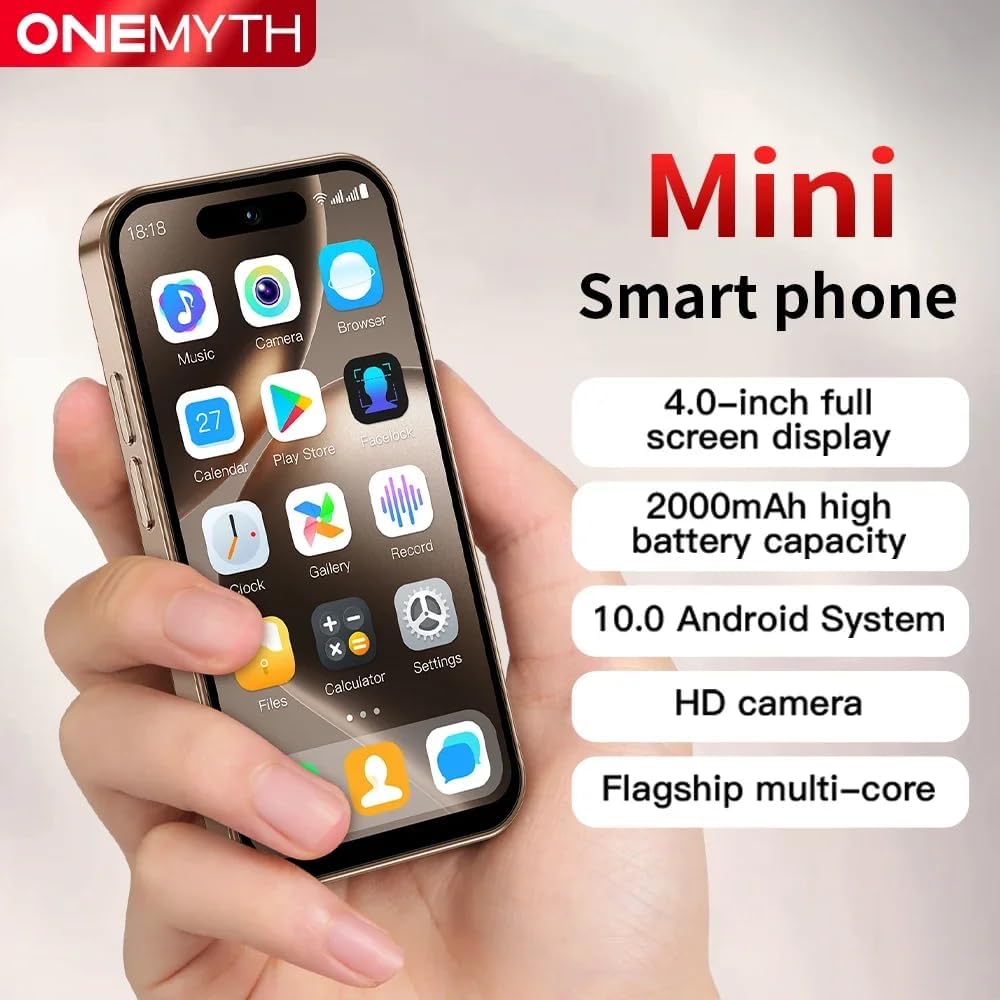
Image: The Truely M16 Pro Mini Smartphone showcasing its 4.0-inch display with a grid of application icons, highlighting its compact design and Android interface.
2. Dual SIM Functionality
The device supports two Nano SIM cards, allowing you to manage two different phone numbers or network providers simultaneously.
- Navigate to Settings > Network & Internet > SIM cards.
- Here you can configure preferences for each SIM card, such as default SIM for calls, messages, and mobile data.
3. Camera Usage
Capture moments with the integrated cameras.
- Open the Camera application from your home screen or app drawer.
- Tap the shutter button to take a photo.
- Switch between the 5MP rear camera and 2MP front camera using the camera switch icon.
- The rear flash can be activated for improved low-light photography.
4. Security Features
Protect your device and data using various unlock methods.
- Navigate to Settings > Security.
- Choose from Pattern, PIN, Password, or Face Unlock to secure your device.
- Follow the on-screen instructions to set up your preferred security method.

Image: A graphic illustrating the facial recognition and password unlocking features available on the Truely M16 Pro Mini Smartphone for enhanced security.
5. Connectivity
The M16 Pro supports 3G cellular networks and Bluetooth connectivity.
- Mobile Data (3G): Ensure your SIM card is active and mobile data is enabled in Settings > Network & Internet > Mobile network.
- Bluetooth: To connect to Bluetooth devices, go to Settings > Connected devices > Bluetooth. Turn Bluetooth on and pair with your desired device.
Maintenance
1. Battery Care
To maximize battery life and performance:
- Avoid extreme temperatures.
- Use only compatible chargers and cables.
- Do not allow the battery to fully discharge frequently.
- For optimal charging, use the Type-C port.
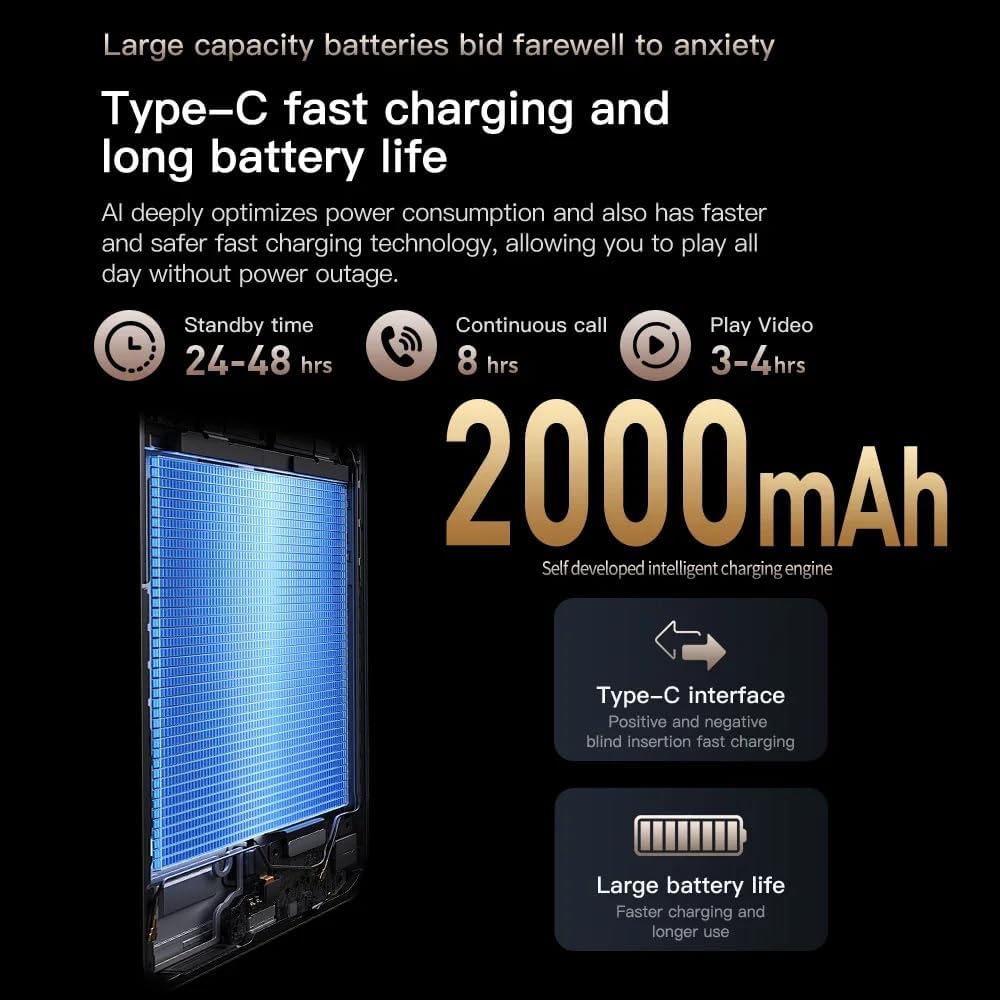
Image: An infographic detailing the 2000mAh battery capacity, Type-C fast charging, and estimated battery life (24-48 hrs standby, 8 hrs continuous call, 3-4 hrs video play) for the Truely M16 Pro Mini Smartphone.
2. Cleaning
Gently wipe the screen and body of the phone with a soft, lint-free cloth. Avoid using harsh chemicals or abrasive materials.
3. Software Updates
Periodically check for software updates to ensure your device has the latest features and security patches. Go to Settings > System > System update.
Troubleshooting
| Problem | Solution |
|---|---|
| Device does not power on. | Ensure the battery is charged. Connect the charger and wait a few minutes before attempting to power on again. |
| Cannot connect to 3G network. | Check if your SIM card is properly inserted and active. Verify mobile data is enabled in settings. Contact your network provider if issues persist. |
| Screen is unresponsive. | Restart the device by holding the power button. If unresponsive, perform a forced restart (refer to device support for specific instructions if standard power off fails). |
| Apps are crashing or slow. | Close background applications. Clear app caches (Settings > Apps > [App Name] > Storage > Clear cache). Consider a factory reset as a last resort (backup data first). |
Specifications
| Feature | Detail |
|---|---|
| Model Name | M16 Pro |
| Brand | Truely |
| Operating System | Android 10.0 |
| Display Size | 4.0 Inches |
| RAM | 2 GB |
| Internal Storage | 16 GB |
| Expandable Storage | Yes, Micro SD (up to unspecified capacity) |
| Cellular Technology | 3G (WCDMA B1/B2/B4/B5/B8, GSM 850/900/1800/1900) |
| SIM Card Support | Dual Nano SIM |
| Rear Camera | 5 MP |
| Front Camera | 2 MP |
| Battery Capacity | 2000 mAh |
| Charging Port | USB Type-C |
| Connectivity | Bluetooth |
| Dimensions | 3.94 x 1.93 x 0.39 inches (approx.) |
Warranty and Support
For warranty information and technical support, please refer to the documentation provided with your purchase or contact Truely customer service. Keep your proof of purchase for warranty claims.
For further assistance, visit the official Truely website or contact their support channels.


