
Introduction
Welcome to the OYIB S75 Wireless Earbuds user manual. This guide provides comprehensive instructions for setting up, operating, maintaining, and troubleshooting your new wireless earbuds. The OYIB S75 earbuds feature advanced Bluetooth 5.4 technology, deep stereo bass, an ENC microphone for clear calls, IP7 waterproofing, and a long-lasting 50-hour battery life with the charging case. Designed for comfort and stability, they are ideal for sports and daily use.
What's in the Box
Please check the package contents to ensure all items are present:
- S75 Headphones (Left/Right) x 2
- USB-C Charging Cable x 1
- Portable Charging Case x 1
- User Manual x 1
- Eartips with 3 Sizes (S, M, L)

Image: OYIB S75 Wireless Earbuds in their charging case, showcasing the cream white color and earhook design.
Product Overview
Components
- Earbuds: Left and Right earbuds with integrated earhooks and touch control areas.
- Charging Case: Portable case for charging and storing earbuds, featuring a dual LED digital display for battery status.
- USB-C Port: For charging the case.
- ENC Microphone: Built-in for clear call quality.
- 13mm Dynamic Drivers: For immersive stereo sound.
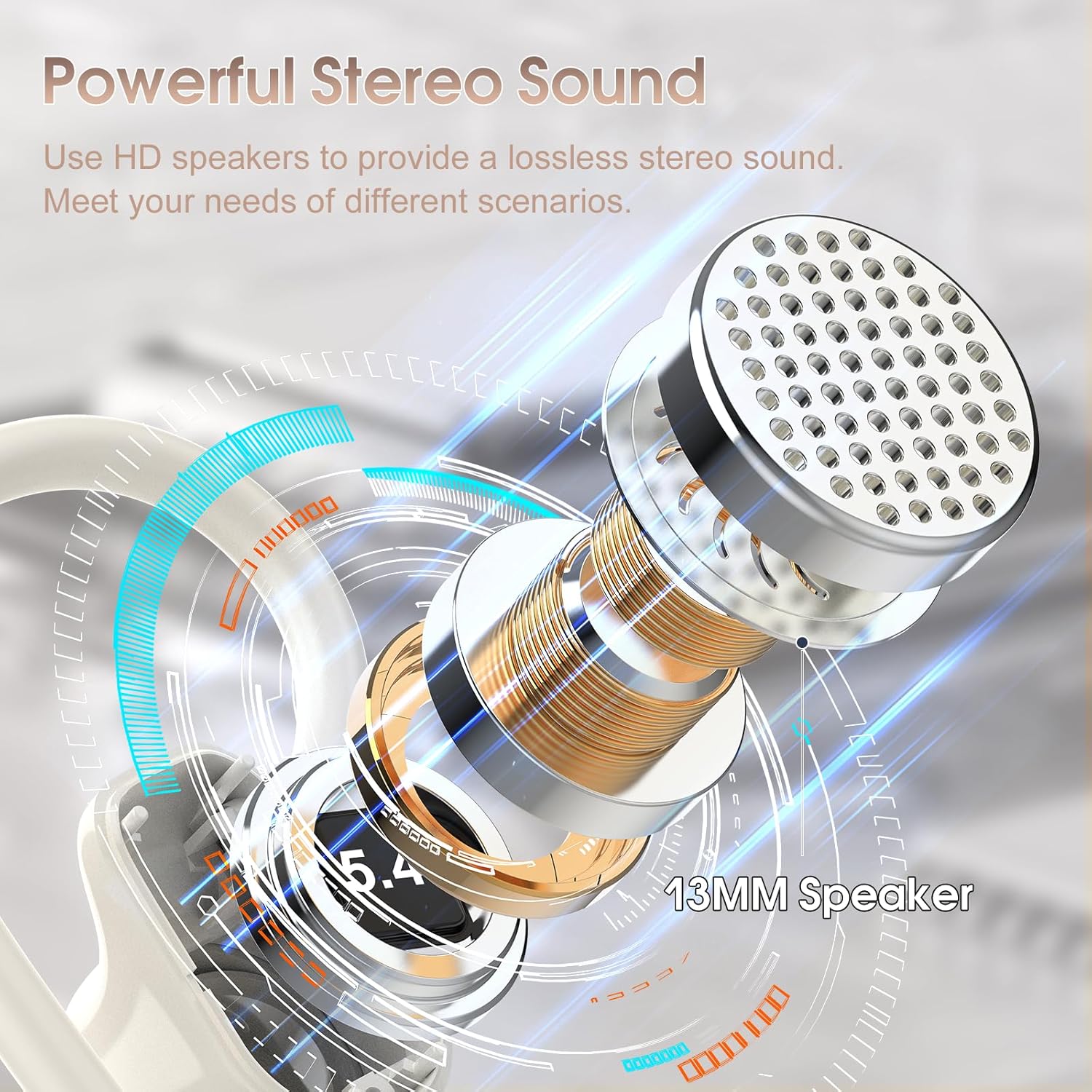
Image: Detailed diagram illustrating the 13mm speaker driver within the OYIB S75 earbud, highlighting its components for powerful stereo sound.
Touch Controls
The earbuds feature smart touch controls located on the upper part of the earbud surface. Refer to the table below for specific functions:
| Action | Function |
|---|---|
| One Click (R/L) | Play/Pause Music |
| Short Tap (R/L) | Answer/End Call |
| Long Tap (R/L) | Reject Call |
| One Click Tap R | Volume + |
| One Click Tap L | Volume - |
| Long Tap 2s L | Track Reverse |
| Long Tap 2s R | Track Forward |
| Triple Click (R/L) | Activate Voice Assistant |

Image: Visual representation of the smart touch control functions on the OYIB S75 earbuds, showing various tap and long-press actions.
Setup
1. Charging the Earbuds and Case
- Place the earbuds into the charging case. Ensure they are properly seated.
- Connect the USB-C charging cable to the charging port on the case and plug the other end into a USB power source (e.g., wall adapter, computer).
- The LED digital display on the charging case will show the battery percentage. The earbuds will also indicate their charging status.
- A full charge for the case and earbuds typically takes about 1 hour.
The earbuds provide approximately 10 hours of playtime on a single charge, and the charging case offers multiple additional charges, extending total playtime to about 50 hours.

Image: Diagram illustrating the 50-hour total battery life, 10 hours per earbud charge, and 1.5-hour fast charging via USB-C.
2. Pairing with Your Device
- Initial Pairing: Open the lid of the charging case. The earbuds will automatically power on and enter pairing mode.
- On your device (smartphone, tablet, laptop), go to the Bluetooth settings and ensure Bluetooth is enabled.
- Search for available devices and select "S75" from the list.
- Once connected, you will hear a confirmation tone, and the earbuds will be ready for use.
- Automatic Reconnection: After the initial pairing, the earbuds will automatically connect to the last paired device when you open the charging case lid.
The earbuds maintain a stable connection within a range of up to 15 meters (49 feet) from the paired device.
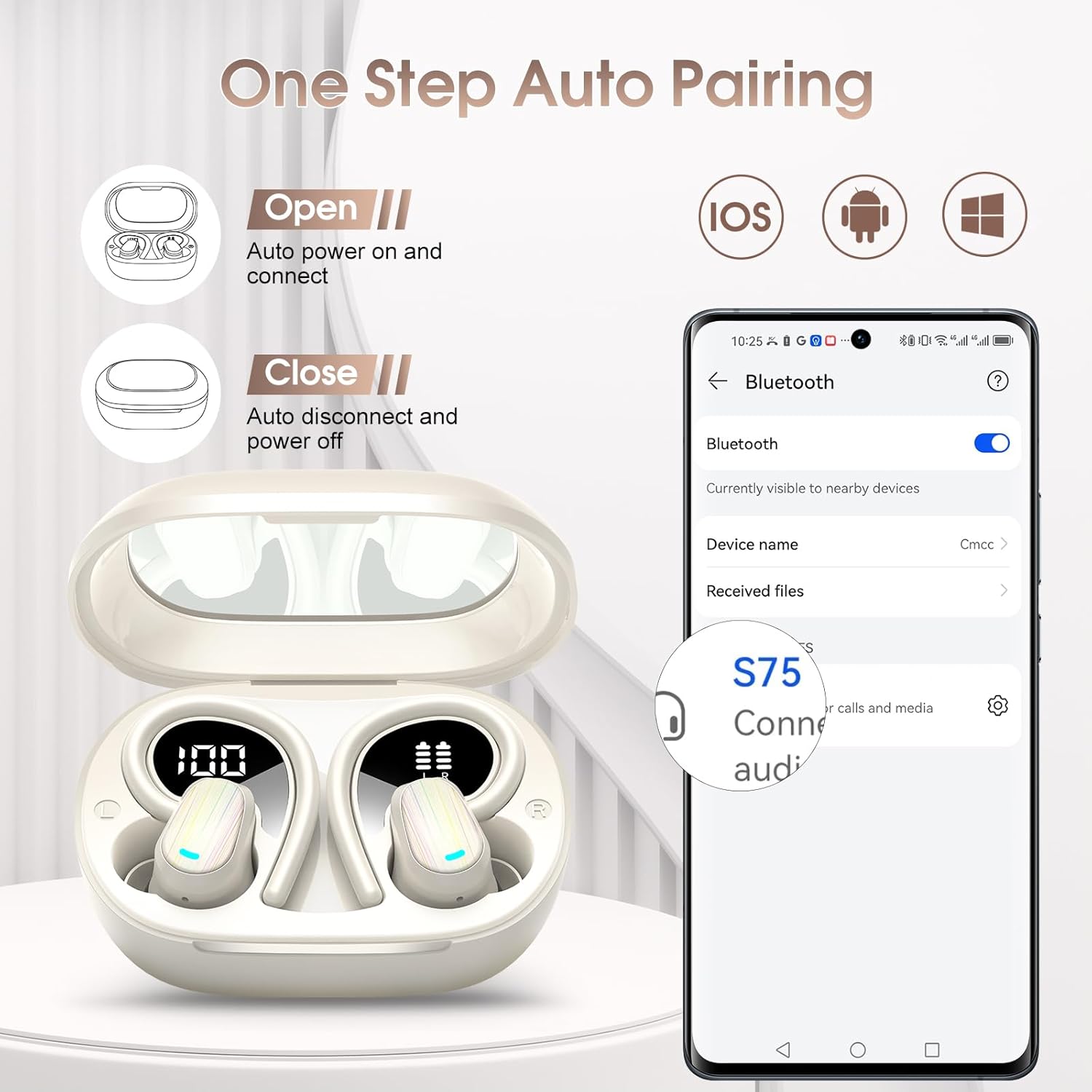
Image: Illustration of the one-step auto-pairing process for OYIB S75 earbuds, showing opening the case and selecting "S75" on a smartphone's Bluetooth menu.
3. Wearing the Earbuds
- Choose the best-fitting eartips (S, M, L) for optimal comfort and sound quality.
- Insert the headphones along the ear canal.
- Revolve the earhooks until they are securely inserted behind your ears.
- Adjust the headphones to a comfortable angle for a stable fit.

Image: Step-by-step guide on how to wear the OYIB S75 earbuds stably, including eartip selection and earhook adjustment, shown with a woman exercising.
Operating Instructions
Music Playback
- Play/Pause: One click on either earbud.
- Volume Up: One click on the Right earbud.
- Volume Down: One click on the Left earbud.
- Next Track: Long tap for 2 seconds on the Right earbud.
- Previous Track: Long tap for 2 seconds on the Left earbud.
Call Management
- Answer/End Call: Short tap on either earbud.
- Reject Call: Long tap on either earbud.
Voice Assistant
- Activate Voice Assistant: Triple click on either earbud.
Maintenance
Cleaning
- Regularly clean the earbuds and charging case with a soft, dry, lint-free cloth.
- Remove eartips and clean them with mild soap and water if necessary, ensuring they are completely dry before reattaching.
- Avoid using abrasive cleaners, solvents, or aerosol sprays.
Storage
- When not in use, always store the earbuds in their charging case to protect them and keep them charged.
- Store in a cool, dry place away from extreme temperatures and direct sunlight.
Water Resistance
The OYIB S75 earbuds have an IP7 waterproof rating, making them resistant to water splashes and sweat. They are suitable for exercise and daily use. However, they are not designed for swimming or prolonged submersion in water.

Image: A woman wiping sweat after a workout, illustrating the waterproof design of the S75 earbuds for daily and exercise use.
Troubleshooting
If you encounter any issues with your OYIB S75 Wireless Earbuds, please refer to the following common solutions:
| Problem | Possible Solution |
|---|---|
| Earbuds not pairing |
|
| No sound or low volume |
|
| Earbuds not charging |
|
| Call quality issues |
|
Specifications
| Feature | Detail |
|---|---|
| Model Name | S75 |
| Brand | OYIB |
| Connectivity Technology | Wireless (Bluetooth) |
| Bluetooth Version | 5.4 |
| Bluetooth Range | 15 Meters |
| Audio Driver Type | Dynamic Driver (13mm) |
| Battery Life (Earbuds) | 10 Hours |
| Total Playtime (with Case) | 50 Hours |
| Charging Time | 1 Hour (for full charge) |
| Charging Port | USB-C |
| Water Resistance Level | IP7 Waterproof |
| Control Method | Touch |
| Microphone | Built-in ENC Mic |
| Ear Placement | In Ear |
| Form Factor | Over Ear (with earhooks) |
| Compatible Devices | iOS, Android, and all Bluetooth-enabled devices |
| Item Weight | 0.11 Kilograms (3.84 ounces) |
| Package Dimensions | 3.7 x 3.46 x 1.46 inches |
Warranty and Support
OYIB products are designed for reliability and performance. For specific warranty information, please refer to the warranty card included in your product packaging or contact OYIB customer support.
If you require further assistance or have questions not covered in this manual, please contact OYIB customer support through the retailer where you purchased the product or visit the official OYIB website for support options.

