
Introduction
Thank you for choosing the cozoo LED Desk Lamp. This lamp is designed to provide versatile lighting for various tasks, featuring adjustable brightness and color temperatures, a 15W wireless charging station, a pen holder, and RGB ambient lighting. Please read this manual carefully before use to ensure proper operation and to maximize the product's lifespan.
What's in the Box
- cozoo LED Desk Lamp
- Power Adapter
- User Manual
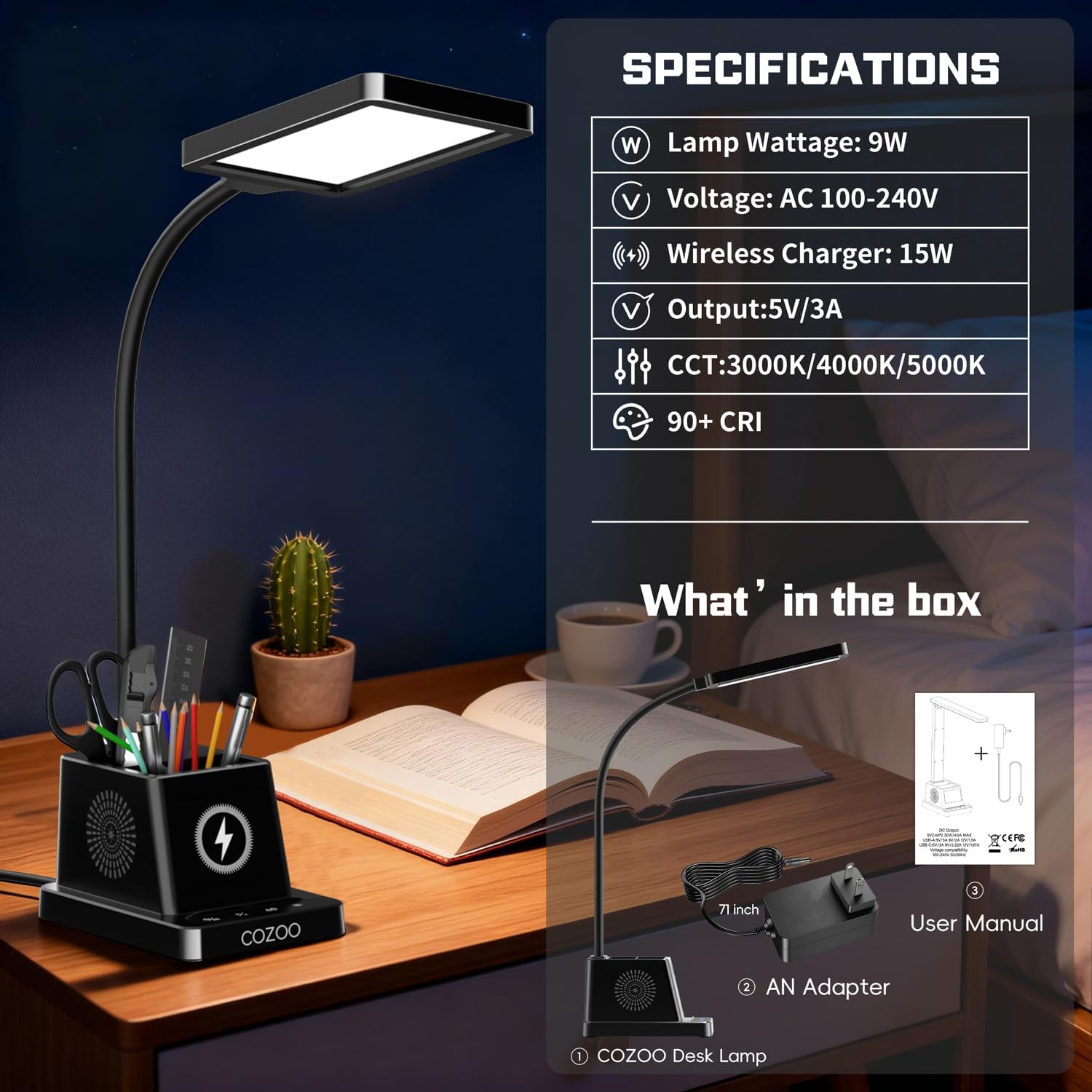
Image: The cozoo LED Desk Lamp, power adapter, and user manual as packaged.
Setup Instructions
- Unpack: Carefully remove all components from the packaging.
- Position the Lamp: Place the lamp base on a stable, flat surface.
- Connect Power: Insert the power adapter cable into the DC input port on the back of the lamp base. Plug the adapter into a standard electrical outlet.
- Adjust Gooseneck: Gently adjust the flexible gooseneck to your desired lighting angle.

Image: The flexible gooseneck allows for 360-degree rotation and precise light positioning.
Operating Instructions
The cozoo LED Desk Lamp features intuitive touch controls located on the base.

Image: The touch control panel with backlit buttons for easy operation.
1. Power On/Off and Color Temperature Adjustment
- Tap the Power/Mode button (ON/OFF icon) to turn the lamp on or off.
- While the lamp is on, tap the Color Temperature button (* icon) to cycle through 3 color temperatures: Warm White (3000K), Natural White (4000K), and Daylight White (5000K).

Image: The lamp offers three distinct color temperature settings for various needs.
2. Brightness Levels
- Tap the Brightness button (+/- icon) to adjust between 4 brightness levels (25%, 50%, 75%, 100%).

Image: Four brightness levels are available to suit different lighting requirements.
3. Wireless Charging Station
- Place your Qi-compatible smartphone on the wireless charging pad located on the lamp base.
- Ensure the phone is centered on the charging pad for optimal charging. The charging indicator light will illuminate when charging is active.
- The lamp provides 15W fast wireless charging.

Image: The lamp's base includes a 15W wireless charging pad for compatible devices.
4. RGB Ambient Light
- Tap the RGB Light button (RGB circle icon) to activate the RGB ambient lighting.
- Cycle through 9 vivid RGB modes and customizable colors by tapping the button repeatedly.

Image: The lamp's base features an RGB ambient light with multiple color modes.
5. 60-Minute Timer
- Tap the Timer button (60 icon) to activate the 60-minute auto-off timer. The lamp will automatically turn off after 60 minutes.

Image: The 60-minute timer function allows the lamp to automatically turn off.
6. Memory Function
- The lamp will remember your last brightness and color temperature settings when turned off and on again.
7. Pen Holder
- Utilize the integrated pen holder on the base to store pens, pencils, and other small office supplies, helping to keep your workspace organized.

Image: The integrated pen holder helps keep your desktop tidy.
8. Eye-Caring Light
- The lamp features a 1.5mm frosted acrylic light guide plate for soft, even, flicker-free, and glare-free illumination, reducing eye fatigue during extended use.

Image: The eye-caring light panel provides soft, flicker-free illumination for comfortable reading and work.
9. Versatile Use
- The lamp is suitable for various environments including home offices, bedrooms, study areas, and dorm rooms. It is ideal for reading, working, crafting, and other tasks requiring focused illumination.

Image: The lamp's versatile design makes it suitable for various applications, including bedside, study, office, and ambient lighting.
10. Official Product Video
Video: An official product video from CoZoo demonstrating the LED Desk Lamp with Wireless Charger.
Maintenance
- Cleaning: Disconnect the power before cleaning. Use a soft, dry cloth to wipe the lamp. Do not use abrasive cleaners or solvents.
- Storage: If storing the lamp for an extended period, unplug it and store it in a cool, dry place.
- LEDs: The LED light source is integrated and not user-replaceable.
Troubleshooting
| Problem | Possible Cause | Solution |
|---|---|---|
| Lamp does not turn on. | No power connection. | Ensure the power adapter is securely plugged into the lamp and a working electrical outlet. |
| Wireless charging not working. | Phone not Qi-compatible or not positioned correctly. | Verify your phone supports Qi wireless charging. Reposition the phone to ensure it is centered on the charging pad. Remove any thick phone cases. |
| Light flickers or is dim. | Loose power connection or power supply issue. | Check power connections. Try plugging into a different outlet. |
| Buttons unresponsive. | Temporary software glitch. | Unplug the lamp for 10 seconds, then plug it back in to reset. |
Specifications
| Feature | Detail |
|---|---|
| Model Number | MC039S |
| Lamp Type | LED Desk Lamp |
| Wattage | 12 watts (Lamp), 15W (Wireless Charger) |
| Light Source Type | LED |
| Color Temperature | 2800K–5500K (3 modes) |
| Brightness Levels | 4 levels |
| CRI | >90 |
| Lifespan | 60,000 hours |
| Control Method | Touch Control |
| Product Dimensions | 6.1"D x 4.2"W x 14.2"H |
| Item Weight | 1.5 Pounds |
| Material Type | Plastic |
| Included Components | Desk Lamp, Adapter |
Warranty and Support
Warranty Information
This cozoo LED Desk Lamp comes with a 2-year manufacturer's warranty. This warranty covers defects in materials and workmanship under normal use. It does not cover damage caused by misuse, accidents, unauthorized modifications, or improper installation.
Customer Support
For technical assistance, warranty claims, or any questions regarding your cozoo LED Desk Lamp, please contact our customer support team. Refer to the contact information provided on the product packaging or visit the official cozoo website for the most up-to-date support details.