
1. Introduction
The BAKON BK602Pro is a versatile 2-in-1 soldering station designed for precision soldering, desoldering, and hot air rework applications. This integrated unit combines a C210 all-in-one heater core precision soldering iron and a hot air station, offering efficiency and space-saving design. It features an LCD display for real-time information, including power, actual and set temperatures, airflow levels, temperature presets, and setup menus.
This manual provides essential information for the safe and effective operation, setup, and maintenance of your BK602Pro soldering station.
2. Product Features
- Integrated 2-in-1 Design: Combines a C210 precision soldering iron and a hot air rework station in a single compact unit.
- Advanced Display: Large LCD shows real-time power, actual and set temperatures (soldering and hot air), airflow levels, temperature presets, and menu settings.
- Precision Soldering Iron: Equipped with a one-piece heater core (compatible with C210/C115/C245 heater cores) for fast heat-up and stable temperature. Temperature range: 302°F-896°F.
- Powerful Hot Air Rework Station: Maximum output power of 550W. Temperature range: 212°F-932°F. Features an advanced PID temperature control system for rapid heating and stable temperature.
- Adjustable Airflow: 17 levels of air volume adjustment (F01-F17).
- Automatic Sleep Function: Activates when the hot air gun is placed in its holder, initiating an auto-cooling function to prevent overheating and prolong heating element lifespan. The soldering iron also enters sleep mode when placed in its bracket.
- Convenient Presets: Three temperature preset blocks for quick selection.
- Temperature Calibration: Allows for precise temperature adjustments.
- Temperature Unit Conversion: Easily switch between Celsius (°C) and Fahrenheit (°F).
- USB Power Output: Integrated 5V 3A USB port for charging or powering external devices.

Image: The BAKON BK602Pro showcasing its two-in-one design with a hot air gun and a precision soldering iron.
3. Package Contents
Upon unpacking, please verify that all items listed below are included in your package:
- BAKON BK602Pro Soldering Station Unit
- C210 Precision Soldering Iron Handle
- Hot Air Gun Handle
- Power Cord (Standard U.S. plug, 230V operation)
- Solder Sucker
- Tweezers
- Flux
- One-piece Heater Core (pre-installed or spare)
- 2 Hot Air Nozzles (various sizes)
- Brass Cleaner (for soldering tips)
- Suction Tape (desoldering wick)

Image: All components included with the BAKON BK602Pro Soldering Station, including the main unit, hot air gun, soldering iron, and various accessories.
4. Setup Instructions
- Unpack Components: Carefully remove all items from the packaging and inspect for any damage.
- Placement: Place the main soldering station unit on a stable, heat-resistant surface. Ensure adequate ventilation around the unit.
- Connect Soldering Iron: Connect the C210 precision soldering iron handle to its designated port on the main unit. Ensure the connection is secure.
- Connect Hot Air Gun: Connect the hot air gun handle to its designated port on the main unit. Place the hot air gun in its holder.
- Install Soldering Tip/Heater Core: Ensure the one-piece heater core and soldering tip are correctly installed in the soldering iron handle. The tip should be fully inserted to the bottom.
- Power Connection: Connect the power cord to the main unit and then to a standard 230V power outlet.
- Initial Power On: Flip the main power switch on the unit. The LCD display should illuminate.

Image: Visual guide demonstrating the correct installation of the heating element and soldering tip, ensuring it is fully inserted.
5. Operating Instructions
5.1 General Operation
- The LCD display provides real-time information on both the soldering iron and hot air gun, including actual temperature, set temperature, and airflow level.
- Use the control buttons on the front panel to adjust settings.
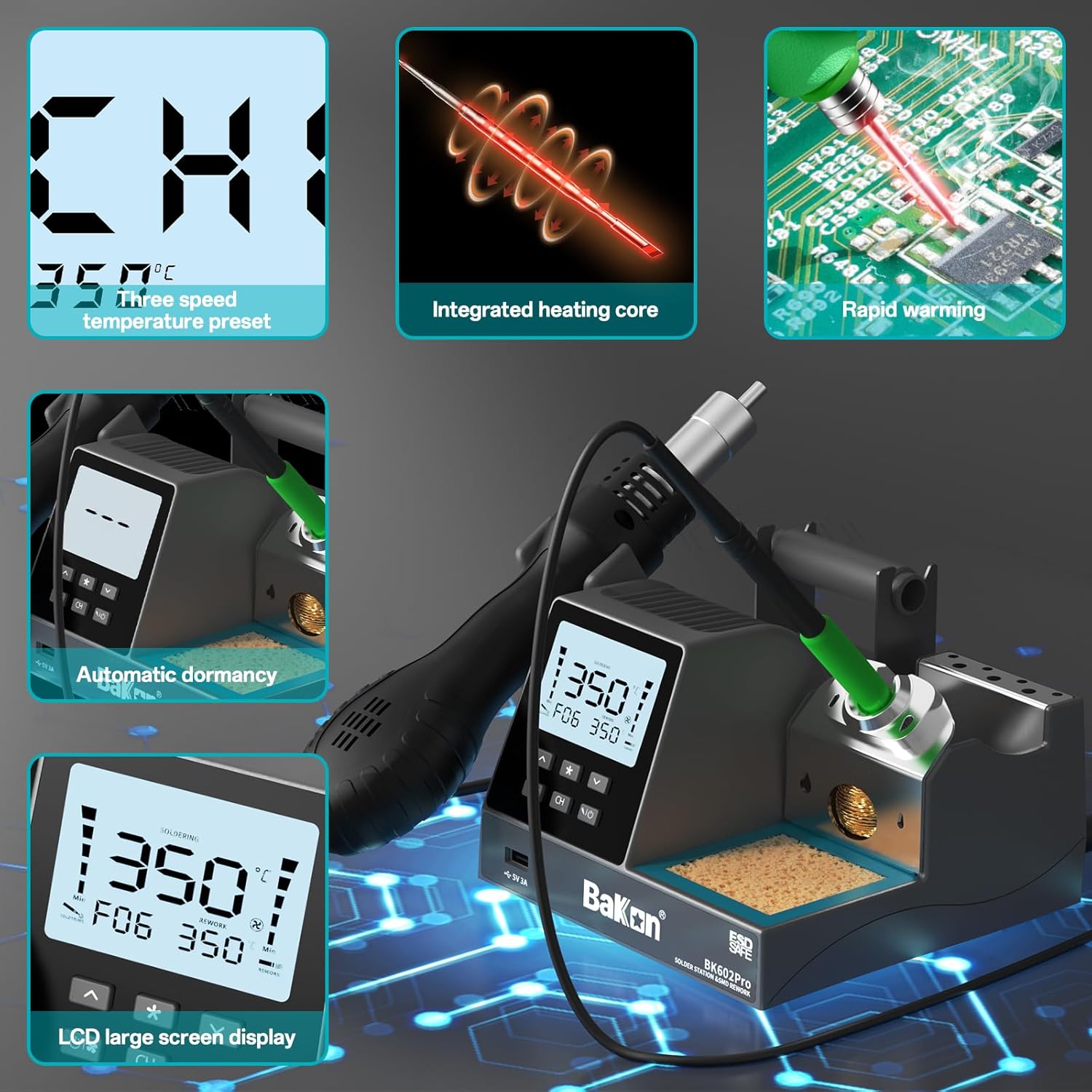
Image: The station's LCD display showing current temperature, airflow, and preset channel information.
5.2 Soldering Iron Operation
- Power On: Ensure the soldering iron is connected and the unit is powered on.
- Set Temperature: Use the dedicated buttons to set the desired temperature for the soldering iron (range: 302°F-896°F). The unit will rapidly heat to the set temperature.
- Temperature Presets: Utilize the three preset channels (CH1, CH2, CH3) for quick access to frequently used temperatures.
- Automatic Sleep: When the soldering iron is placed in its holder, it will enter sleep mode to conserve energy and prolong tip life. Picking it up will automatically resume operation.

Image: Close-up of the soldering iron's one-piece heating core, highlighting its rapid heating capability.
5.3 Hot Air Rework Station Operation
- Power On: Ensure the hot air gun is connected and the unit is powered on.
- Set Temperature: Use the dedicated buttons to set the desired temperature for the hot air gun (range: 212°F-932°F). The PID control system ensures stable temperature.
- Adjust Airflow: Use the airflow adjustment controls to select one of the 17 air volume levels (F01-F17) suitable for your application.
- Automatic Cooling/Sleep: When the hot air gun is placed back into its holder, it will automatically activate a cooling function to protect the heating element before entering sleep mode.

Image: The hot air gun in operation, demonstrating PID temperature control and adjustable air volume for precise rework.
5.4 Additional Functions
- Temperature Unit Conversion: Press the designated button to switch the temperature display between Celsius (°C) and Fahrenheit (°F).
- Temperature Calibration: Refer to the detailed instructions in the full user manual for calibrating the temperature if necessary.
- USB Power Output: The 5V 3A USB port can be used to power or charge compatible devices.

Image: The LCD display illustrating the conversion between Celsius and Fahrenheit temperature units.
6. Maintenance
- Soldering Tip Cleaning: Regularly clean soldering tips using the brass cleaner or a damp sponge to remove oxidation and ensure efficient heat transfer.
- Tip Replacement: Replace worn or damaged soldering tips as needed. Ensure the new tip is correctly seated in the heater core.
- Hot Air Nozzle Cleaning: Keep hot air nozzles free from debris and flux residue to maintain optimal airflow.
- General Cleaning: Keep the main unit and handles clean and free of dust and debris. Use a soft, dry cloth.
- Storage: Store the unit in a dry, dust-free environment when not in use.

Image: Overview of the station's components, including the tin wire rack, soldering iron tip placement area, copper wire/sponge cleaning area, and integrated soldering iron frame.
7. Troubleshooting
If you encounter issues with your BAKON BK602Pro, consider the following common troubleshooting steps:
- No Power: Ensure the power cord is securely connected to both the unit and the power outlet. Check the main power switch.
- Soldering Iron Not Heating: Verify the soldering iron handle is properly connected. Check if the heater core and tip are correctly installed. Ensure the unit is not in sleep mode.
- Hot Air Gun Not Heating/No Airflow: Ensure the hot air gun handle is properly connected and seated in its holder. Check temperature and airflow settings on the display.
- Inaccurate Temperature Reading: Perform a temperature calibration as described in the full user manual.
- Poor Soldering Performance: Clean the soldering tip. Ensure the correct temperature is set for the solder type and application. Check for proper tip installation.
For persistent issues or problems not listed here, please refer to the full user manual or contact customer support.
8. Specifications
| Feature | Specification |
|---|---|
| Model Number | 602Pro |
| Manufacturer | BAKON |
| Power Source | AC |
| Voltage | 110 Volts (operates on 230V with standard U.S. plug) |
| Wattage | 670 watts (Total) |
| Soldering Iron Temperature Range | 302°F - 896°F (150°C - 480°C) |
| Hot Air Rework Temperature Range | 212°F - 932°F (100°C - 500°C) |
| Hot Air Rework Power | 550W |
| Air Volume Adjustment | 17 levels (F01-F17) |
| Display Style | LCD |
| Item Weight | 1.78 kg |
| Parcel Dimensions | 27 x 24 x 14.2 cm |
9. Warranty and Support
BAKON provides 12 months of exclusive technical service and 24/7 professional assistance. If you have any questions or require support, please feel free to contact us through the platform where you purchased the product.


