
Lefant LS100
Lefant LS100 Cordless Wet Dry Vacuum Mop User Manual
Model: LS100
1. Important Safety Instructions
Please read all instructions carefully before using the Lefant LS100 Cordless Wet Dry Vacuum Mop. Retain this manual for future reference.
- Use only as described in this manual.
- Do not immerse the appliance in water or other liquids.
- Keep hair, loose clothing, fingers, and all parts of the body away from openings and moving parts.
- Use only manufacturer-recommended attachments.
- Do not use with damaged cord or plug. If appliance is not working as it should, has been dropped, damaged, left outdoors, or dropped into water, return it to a service center.
- Do not handle plug or appliance with wet hands.
- Do not put any object into openings. Do not use with any opening blocked; keep free of dust, lint, hair, and anything that may reduce airflow.
- Use extra care when cleaning on stairs.
- Do not use to pick up flammable or combustible liquids, such as gasoline, or use in areas where they may be present.
- Do not pick up anything that is burning or smoking, such as cigarettes, matches, or hot ashes.
- Prevent unintentional starting. Ensure the switch is in the off-position before connecting to battery pack, picking up or carrying the appliance.
2. Product Overview
The Lefant LS100 is a versatile cordless wet dry vacuum mop designed for efficient cleaning of various floor types. It combines vacuuming and mopping functions into one device.
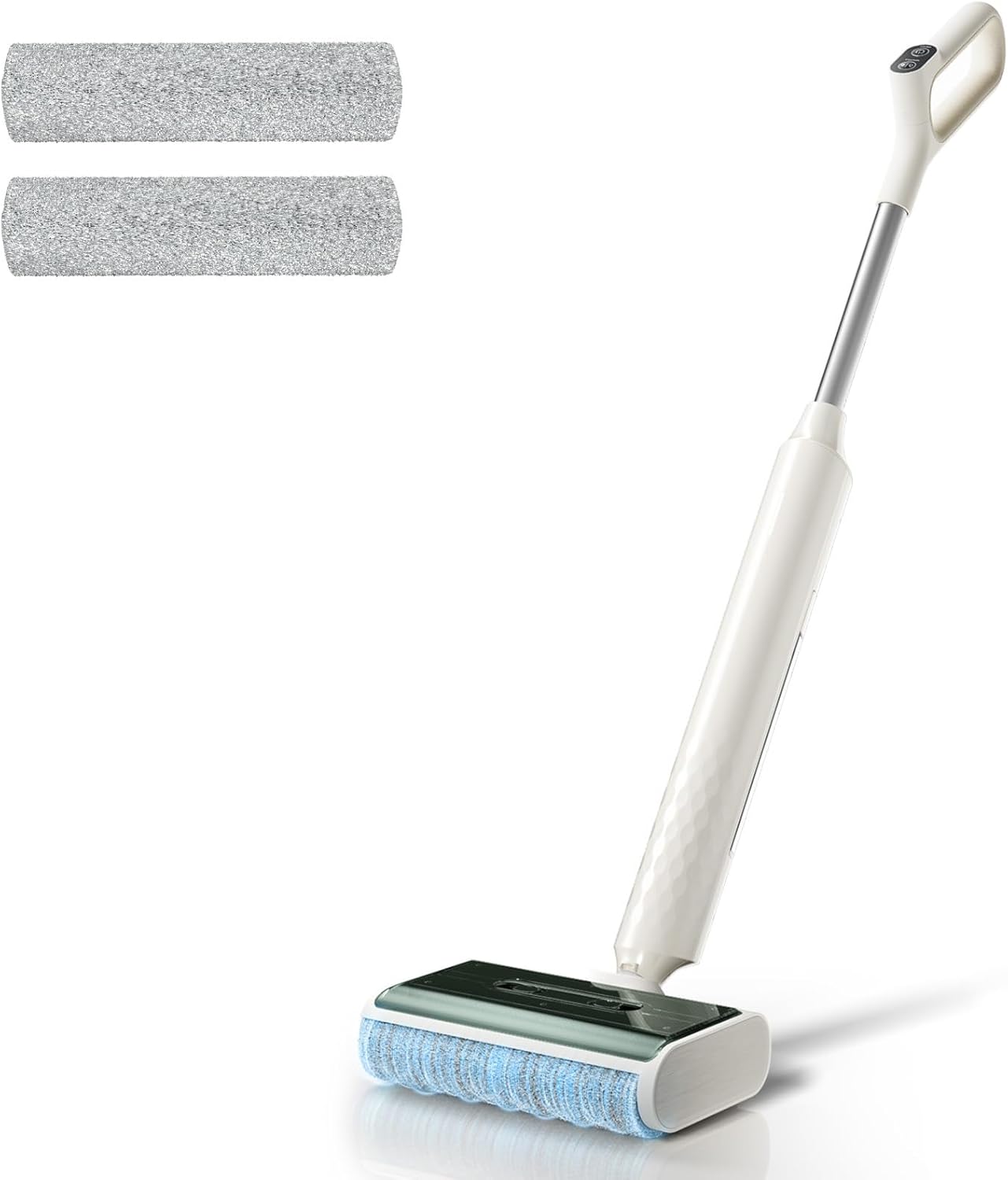
Figure 1: Lefant LS100 Cordless Wet Dry Vacuum Mop with accessories.
Included Components:
- LS100 Wet and Dry Vacuum (Main Unit)
- Charging Base
- Handle
- 2 * Brush Rollers
- 1 * Cleaning Brush
- 1 * Small Cleaning Brush
- 1 * Bottle of Cleaning Solution
3. Setup
3.1 Handle Installation
Align the handle with the main unit and push until it clicks into place. To remove, insert a small tool into the back hole and pull the handle outward.
Video 1: Demonstrates the installation and removal of the handle for the Lefant LS100 Wet Dry Vacuum Mop (0:00-0:15).
3.2 Charging Base Connection & Initial Charge
Connect the charger into the dock's base port and organize any excess cable. Plug the power adapter into a wall outlet. Place the machine vertically in the charging dock. A flashing blue light indicates charging. A full charge takes approximately 4 hours. Ensure the unit is fully charged before its first use. For long-term storage, charge monthly.
Video 2: Illustrates the charging base connection and initial charging process for the Lefant LS100 (0:05-0:40).
3.3 Water Tank Installation & Filling
To remove the clean water tank, hold the tank and press the release button, then pull it outward. Fill the tank with 380ml of water and add approximately 2.5ml (half a cap) of the provided cleaning solution. Align the water outlet with the slot and push inward until it clicks, securing the tank.

Figure 2: Demonstrates filling the clean water tank with water and cleaning solution.
4. Operating Instructions
4.1 Power On/Off and Cleaning Modes
Press the power button to turn the unit on or off. The LS100 offers two adjustable cleaning modes: "Slightly Wet" and "Fully Wet". Press the mode button to switch between these settings based on your cleaning needs. The device features a self-propelled design for effortless movement.

Figure 3: Close-up of the handle showing the power and mode selection buttons.
4.2 Versatile Cleaning Capabilities
The LS100 is designed for multi-floor cleaning, including hardwood, tile, and vinyl. Its 180° lay-flat design allows it to reach under furniture and into tight spaces (up to 3.15 inches deep). The device also offers superior edge cleaning, eliminating overlooked spots along baseboards and in corners.

Figure 4: The vacuum mop's compact design allows it to clean under low furniture.

Figure 5: The device effectively cleans edges and corners, leaving no uncleaned areas.
With over 60 minutes of runtime on a single charge, the LS100 is suitable for cleaning large areas without frequent recharging.
5. Maintenance
5.1 Automatic Self-Cleaning
After each use, place the LS100 back on its charging base and activate the "Roller Self-Cleaning" mode. The brush roll will automatically clean itself with water and spin-dry, ensuring it's ready for the next use without manual intervention.

Figure 6: The self-cleaning system ensures the roller brush is clean and ready.
5.2 Emptying and Cleaning Waste Tank
The LS100 separates dry and wet waste for easy disposal. Regularly empty the dirty water tank and clean the waste compartment to maintain optimal performance. Use the provided cleaning brush for thorough cleaning.

Figure 7: Internal view of the waste separation system.
5.3 Cleaning or Replacing the Roller Brush
For tough stains or accumulated debris, the roller brush can be manually removed, washed, and air-dried to prevent odors. Ensure the brush is reinstalled correctly after cleaning.
Video 3: Demonstrates cleaning and replacing the roller brush (2:30-2:45).
6. Troubleshooting
| Issue | Possible Cause | Solution |
|---|---|---|
| Double Lights Fast Blink | Dirty water tank is full or not installed correctly. | Empty the dirty water tank and ensure it is properly installed. |
| Alternating Blinking Lights | Roller brush is stuck due to debris or tangles. | Remove the roller brush and check for debris/tangles. Clean and reinstall. |
| Battery Indicator Blinking | Low battery. | Recharge the unit immediately by placing it on the charging base. |
Video 4: Provides visual guidance for common troubleshooting issues (2:05-2:30).
7. Specifications
- Brand: Lefant
- Model Name: LS100
- Special Feature: Cordless, Lightweight, Self-Cleaning, Self-Propulsion, Wet/Dry
- Surface Recommendation: Floor
- Item Weight: 2.05 ounces (main unit), 5.73 lbs (overall lightweight design)
- Form Factor: Stick
- Color: Ivory White
- Power Source: Battery Powered (4 Lithium Metal batteries included)
- Voltage: 36 Volts
- Capacity: 12.85 ounces (water tank)
- Product Dimensions: 41.93 x 10.63 x 8.15 inches
- Runtime: Up to 60 minutes on a single charge
- Noise Level: Below 62dB
- UPC: 609484081422
8. Warranty and Support
For warranty information, technical support, or service inquiries, please refer to the contact details provided in your product packaging or visit the official Lefant website. Keep your purchase receipt as proof of purchase.
Ask a question about this manual
Ask about setup, troubleshooting, compatibility, parts, safety, or missing instructions. Manuals+ will review the question and use this page’s manual context to help answer it.