
1. Introduction
The FlexSolar 100W Portable Solar Panel (Model lx-S100) is designed to provide efficient and reliable power for various outdoor and emergency applications. This manual provides detailed instructions for its setup, operation, maintenance, and troubleshooting to ensure optimal performance and longevity of your device.
2. Product Overview and What's Included
The FlexSolar 100W Portable Solar Panel features a foldable design, high energy conversion efficiency, and multiple output ports for wide compatibility. It is built with durable, waterproof materials suitable for various environments.
Package Contents:
- 100W Solar Panel ×1
- 4-in-1 DC Cable ×1
- Carabiners ×2
- Storage Bag ×1
- User Manual ×1

Image: The complete FlexSolar 100W Portable Solar Panel kit, including the folded panel, 4-in-1 DC cable, carabiners, storage bag, and user manual.
3. Setup Instructions
- Unfold the Solar Panel: Carefully unfold the FlexSolar 100W panel completely.
- Position for Optimal Sunlight: Place the solar panel in direct sunlight. For maximum efficiency, adjust the panel's angle to approximately 90 degrees relative to the sun's rays. This ensures the solar cells receive the most direct light.
- Secure the Panel: Use the integrated eye holes and provided carabiners to secure the panel if necessary, especially in windy conditions or when attaching to a backpack or tent.

Image: The FlexSolar 100W Portable Solar Panel deployed in a camping setting, illustrating the importance of adjusting the panel to a 90-degree optimal light angle for maximum energy conversion efficiency.
4. Operating Instructions
Connecting Devices:
The FlexSolar 100W panel offers multiple output options for charging various devices:
- USB-A (QC3.0): Connect compatible smartphones, tablets, and other USB-A powered devices for fast charging (up to 18W).
- USB-C (PD3.0): Connect compatible laptops, tablets, and other USB-C PD powered devices for fast charging (up to 45W).
- DC Output: Use the included 4-in-1 DC cable (XT60/Anderson/DC5521/DC8MM) to connect to a wide range of portable power stations (e.g., Jackery, EcoFlow, Bluetti, Anker, ALLWEI) or other DC-compatible devices. The DC output provides up to 100W (Max) at 20-27V.
Charging Process:
- Ensure the solar panel is exposed to direct sunlight.
- Connect your device or power station to the appropriate output port on the solar panel.
- The panel will automatically begin charging your connected device. The built-in IC chip provides smart protection against over-voltage, over-current, and short-circuits, ensuring safe charging.
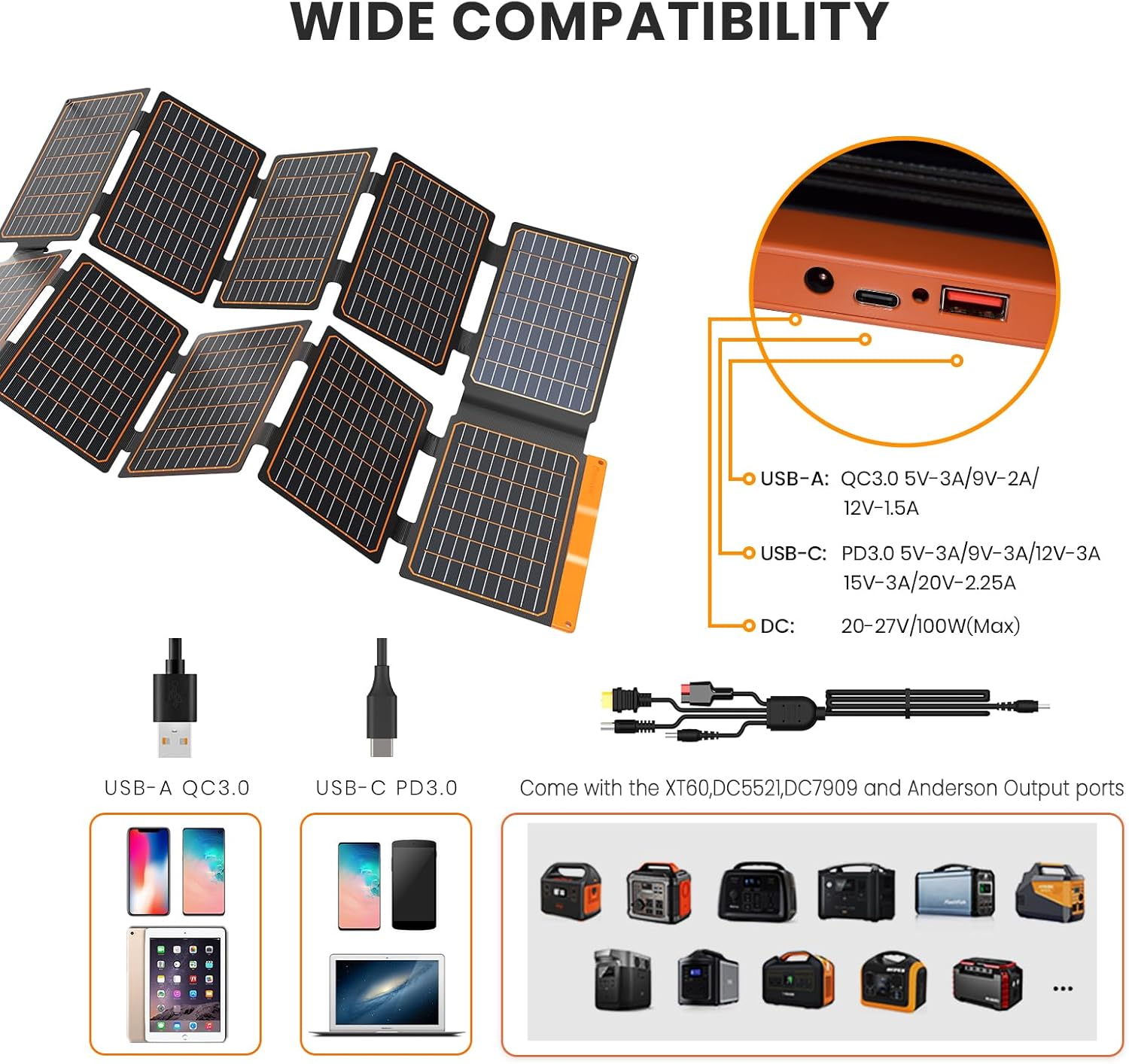
Image: A diagram illustrating the wide compatibility of the FlexSolar 100W Portable Solar Panel, detailing its USB-A, USB-C, and DC output ports, and showing various compatible power stations.
5. Maintenance
Proper maintenance ensures the longevity and efficiency of your solar panel.
- Cleaning: The ETFE laminated surface is designed for durability. Wipe the solar panel surface with a soft, damp cloth to remove dust, dirt, or debris. Avoid using harsh chemicals or abrasive materials that could damage the surface.
- Water Resistance: The panel has an IP67 waterproof rating, meaning it can withstand rain, dust, and accidental submersion. However, it is recommended to dry the panel thoroughly before folding and storing it.
- Storage: When not in use, fold the solar panel and store it in the provided storage bag. Store in a cool, dry place away from extreme temperatures and direct sunlight.

Image: The FlexSolar 100W Portable Solar Panel showcasing its IP67 dustproof and waterproof features, depicted in both desert and rainy conditions to highlight its resilience against environmental elements.
6. Troubleshooting
- No Power Output:
- Ensure the solar panel is in direct sunlight and not shaded.
- Verify all cables are securely connected to both the solar panel and the device/power station.
- Check if the device being charged is compatible with the output port used.
- Low Charging Efficiency:
- Adjust the panel's angle to face the sun directly.
- Clean the solar panel surface to remove any dirt or dust that may be obstructing sunlight.
- Cloudy weather or indirect sunlight will reduce charging efficiency.
- Device Not Charging:
- Confirm the device's power requirements do not exceed the panel's output capabilities.
- The built-in IC chip protects against over-voltage/current/short-circuit. If a fault is detected, the panel may temporarily stop charging. Disconnect and reconnect the device.
7. Specifications
| Feature | Specification |
|---|---|
| Brand | FlexSolar |
| Model Number | lx-S100 |
| Material | Monocrystalline |
| Maximum Power | 100 Watts |
| Efficiency | Up to 24% |
| Output Voltage | 20 Volts (DC) |
| Product Dimensions (Folded) | 13"L x 10.4"W x 2.2"H |
| Item Weight | 4.1 Pounds (1.85 kg) |
| Special Features | Portable, Foldable, IP67 Waterproof, QC3.0 USB-A, PD3.0 USB-C, 4-in-1 DC Cable |
8. Warranty and Support
Warranty Information:
The FlexSolar 100W Portable Solar Panel comes with a 1-year warranty from the date of purchase. This warranty covers manufacturing defects and workmanship under normal use. Please retain your proof of purchase for warranty claims.
Customer Support:
For any questions, technical assistance, or warranty inquiries, please contact FlexSolar customer support. Our team is available to provide assistance and solutions.
Please refer to the contact information provided on the FlexSolar official website or your purchase documentation for the most up-to-date support channels.


