
1. Introduction
Thank you for choosing the RUZIZAO 4K 1080P Digital Microscope. This electronic microscope features a high-quality imported sensor, capable of capturing 48MP images (8000x6000P) and 4K videos (3840x2160P) for exceptional clarity. It provides 1080P high-quality images for exploring the microscopic world via HDMI and USB 2.0 outputs. With support for up to a 64GB TF card (not included), you can record your observations and discoveries at any time.
The microscope is equipped with a 150X C-mount optical lens, which, combined with the camera's 5X electronic magnification, offers a high overall magnification ratio. Its maximum working distance of 1000mm allows for easy exploration of minute details. This device is ideal for electronic repair, coin observation, inspections, research, and educational purposes, revealing intricate wonders invisible to the naked eye.
The integrated 56-LED ring light provides bright, uniform illumination with a color temperature of 6500K-7000K and a maximum illumination of 60,000 Lux, ensuring clear visibility for precision work in electronics, jewelry, and other fields.
2. Package Contents
Please verify that all items listed below are included in your package:
- Digital Microscope Camera Unit x1
- 150X C-Mount Lens x1
- Continuous Dimming LED Ring Light x1
- Metal Base Stand Combination x1
- Remote Control x1 (Battery not included)
- Power Adapter x1
- HDMI Cable x1
- USB Cable x1
- User Manual x1
3. Product Overview and Components
Familiarize yourself with the main components of your RUZIZAO Digital Microscope.

Figure 1: Labeled diagram of RUZIZAO Digital Microscope components and application examples. Key parts include (1) Metal base, (2) Riser, (3) Limit ring, (4) Fixed screw, (5) Lifting handwheel, (6) Camera, (7) Lens, (8) Lens focus, (9) Ring light. Examples show observation of leaves, insects, jewelry, and PCBs.
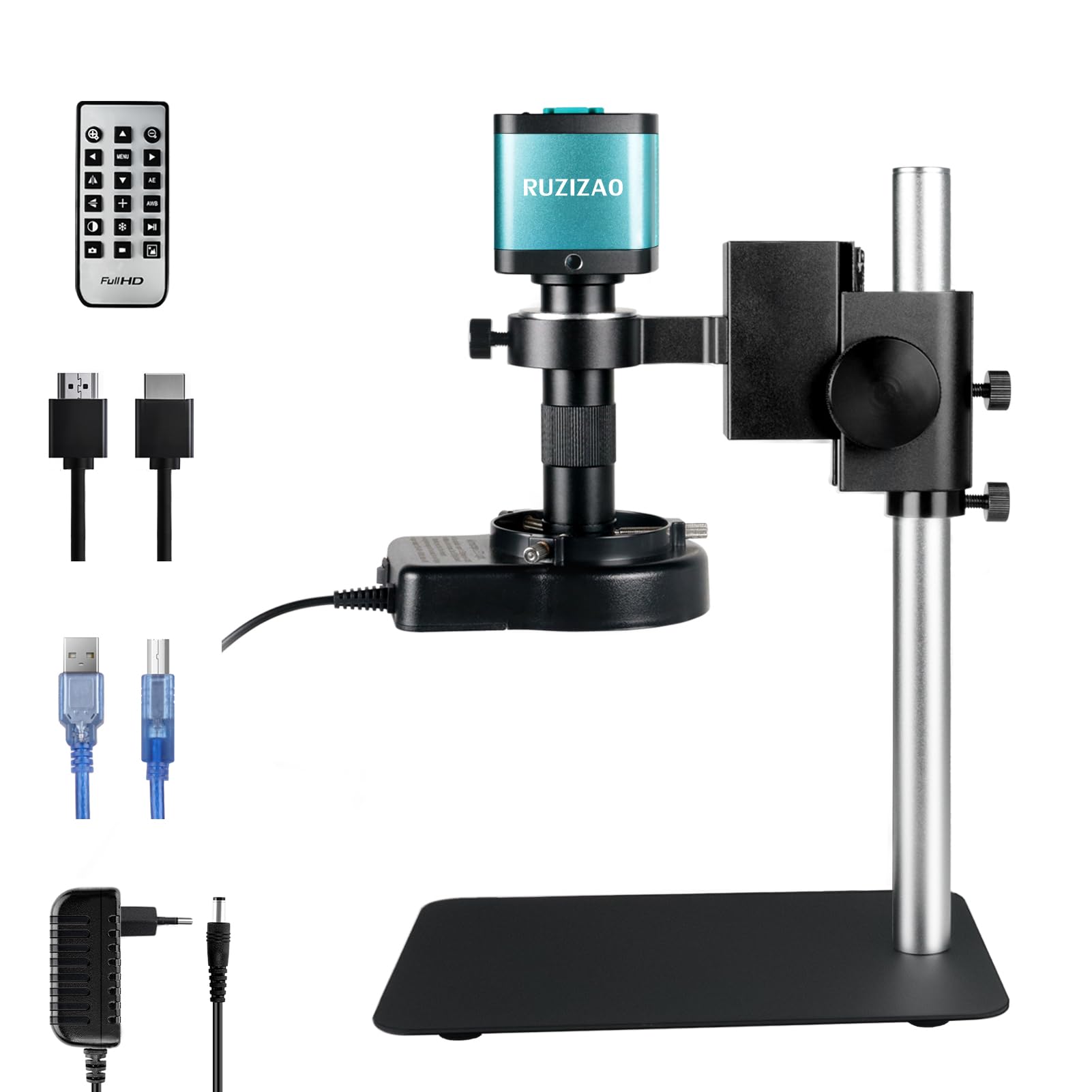
Figure 2: The main camera unit of the RUZIZAO digital microscope, featuring a 48MP back-illuminated CMOS sensor for 4K video recording and high-resolution photo capture. Supports up to 64GB TF card (not included) for storage and offers HDMI and USB2.0 driverless output.

Figure 3: The 150X C-mount lens, providing optical magnification. Rotate the barrel to adjust focus. It offers a working distance of 50mm to 1000mm, allowing for detailed observation of various objects.

Figure 4: The 56-LED ring light provides uniform and bright illumination for your specimens. Rotate the knob to adjust brightness, with a maximum illumination of 60,000 Lux, ensuring clear visibility of intricate details.

Figure 5: The robust metal stand features a 30cm support column and a 22x15cm base, providing stability. The microscope holder can rotate 360 degrees and be raised or lowered by up to 29cm using the rotary knob for precise positioning.
4. Setup
- Assemble the Stand: Attach the microscope holder to the riser column and secure it to the metal base. Ensure all screws are tightened for stability. The stand allows for 360-degree rotation and height adjustment up to 29cm.
- Mount the Camera and Lens: Securely attach the 150X C-mount lens to the camera unit, then mount the assembled camera and lens onto the microscope holder.
- Attach the LED Ring Light: Place the 56-LED ring light around the lens and connect its power cable.
- Connect Power: Plug the power adapter into the microscope camera unit and then into a power outlet.
- Connect to Display/PC:
- HDMI Output: Connect the HDMI cable from the microscope to a TV or projector for real-time viewing.
- USB Output: Connect the USB cable from the microscope to your PC for viewing and software control.
- Insert TF Card (Optional): If you wish to save images and videos directly on the microscope, insert a TF card (up to 64GB, not included) into the designated slot on the camera unit.

Figure 6: The digital microscope connected to a personal computer via USB, displaying a magnified view of a circuit board. This setup allows for real-time observation and analysis on a larger screen.
5. Operating Instructions
5.1 Power On/Off
Press the power button on the camera unit or remote control to turn the microscope on or off.
5.2 Adjusting Focus and Magnification
Place your specimen on the base. Rotate the focus ring on the 150X C-mount lens to achieve a clear image. Adjust the height of the microscope holder using the rotary knob on the stand for coarse focus and to change the working distance. The electronic magnification can be adjusted via the remote control or connected software.
5.3 Adjusting LED Illumination
Rotate the knob on the LED ring light to adjust its brightness. Ensure adequate and uniform lighting for optimal image quality.
5.4 Capturing Images and Videos
The microscope can capture 48MP images and 4K videos. Use the dedicated buttons on the remote control or the connected PC software to take photos or start/stop video recording. Files will be saved to the inserted TF card or directly to your PC if connected via USB.

Figure 7: The RUZIZAO Digital Microscope displaying high-quality 4K images on an external monitor, ideal for detailed inspection and analysis.
5.5 Using the Wireless Remote Control
The wireless remote control (requires CR2025 battery, not included) provides convenient access to various functions, especially in HDMI mode. Functions include:
- Zoom In/Out: Adjust magnification.
- Menu Bar: Access settings and options.
- AE (Exposure): Adjust exposure settings.
- AWB (White Balance): Adjust white balance.
- Balance: Image balance adjustment.
- Crosshairs: Display crosshairs for measurement.
- Monochrome: Switch to black and white mode.
- Freeze Button: Freeze the live image.
- Pause: Pause video recording.
- Camera: Take a photo.
- Video: Start/stop video recording.
- Photo Album: Access saved images and videos.

Figure 8: The wireless remote control allows for convenient operation of the microscope's functions, including zoom, menu navigation, exposure adjustment (AE), white balance (AWB), monochrome mode, freeze frame, pause, camera, video recording, and photo album access. Requires CR2025 battery (not included).
6. Maintenance
- Cleaning: Use a soft, dry cloth to clean the microscope body. For the lens, use a specialized lens cleaning cloth and solution to avoid scratches.
- Storage: Store the microscope in a clean, dry, and dust-free environment when not in use. Protect it from direct sunlight and extreme temperatures.
- Handling: Handle the microscope with care to prevent damage from drops or impacts.
7. Troubleshooting
- No Image on Screen:
- Ensure the microscope is powered on.
- Check HDMI/USB cable connections to the display/PC.
- Verify the correct input source is selected on your TV/monitor.
- Image is Blurry:
- Adjust the focus ring on the lens.
- Adjust the height of the microscope using the stand's rotary knob.
- Ensure the specimen is flat and properly positioned.
- Insufficient Lighting:
- Adjust the brightness of the LED ring light.
- Check if the LED ring light is properly connected and powered.
- Remote Control Not Responding:
- Ensure the remote control has a CR2025 battery installed and it is not depleted.
- Point the remote control directly at the microscope's IR receiver.
- Cannot Save Files to TF Card:
- Ensure the TF card is inserted correctly.
- Check if the TF card has sufficient free space.
- Verify the TF card is not write-protected.
8. Specifications
| Feature | Specification |
|---|---|
| Model Number | XDZ-XHU4002 |
| Brand | RUZIZAO |
| Camera Sensor | 48 MP (8000 x 6000 P) |
| Video Resolution | 4K (3840 x 2160P), 1080P |
| Lens Type | 150X C-Mount Zoom Lens |
| Maximum Magnification | 150X |
| Working Distance | 50mm ~ 1000mm |
| Light Source | 56-LED Ring Light |
| Illumination | Max 60,000 Lux |
| Color Temperature | 6500K-7000K |
| Outputs | HDMI, USB 2.0 |
| Storage | TF Card (up to 64GB, not included) |
| Compatible Devices | PC, Laptop, Tablet, Television |
| Material | Metal |
| Product Dimensions (L x W x H) | 22 x 15 x 35 cm |
| Item Weight | 1.5 Kilograms |
| UPC | 768351108669 |
9. Support
For any questions or assistance regarding your RUZIZAO Digital Microscope, please do not hesitate to contact us. Our support team is committed to responding to your inquiries within 24 hours.
Please refer to the contact information provided with your purchase or on the official RUZIZAO website for support.