
Opstrava 1350W 550ML
Contents
Opstrava Pressurized Handheld Steam Cleaner User Manual
Model: 1350W 550ML
1. Introduction
Thank you for choosing the Opstrava Pressurized Handheld Steam Cleaner. This manual provides essential information for the safe and effective use, maintenance, and troubleshooting of your new steam cleaner. Designed for multi-purpose cleaning, this device utilizes powerful, chemical-free steam to sanitize and remove dirt from various surfaces.
2. Important Safety Information
WARNING: Failure to follow these instructions may result in electric shock, fire, or serious injury.
- Always ensure the unit is unplugged before filling or emptying the water tank.
- Do not open the safety cap while the unit is pressurized or hot. Release pressure by pressing the steam trigger until steam stops.
- Use only distilled or demineralized water to prevent mineral buildup and extend product life.
- Keep the steam cleaner out of reach of children and pets. Utilize the child safety lock feature.
- Do not direct steam at people, animals, or electrical appliances.
- Always wear appropriate protective gear, such as gloves, when operating the steam cleaner.
- Ensure the power cord is not damaged and avoid kinking or stretching it excessively.
3. Package Contents
Your Opstrava Handheld Steam Cleaner comes with a comprehensive set of accessories to tackle various cleaning tasks:
- 1x Handheld Steam Cleaner Unit
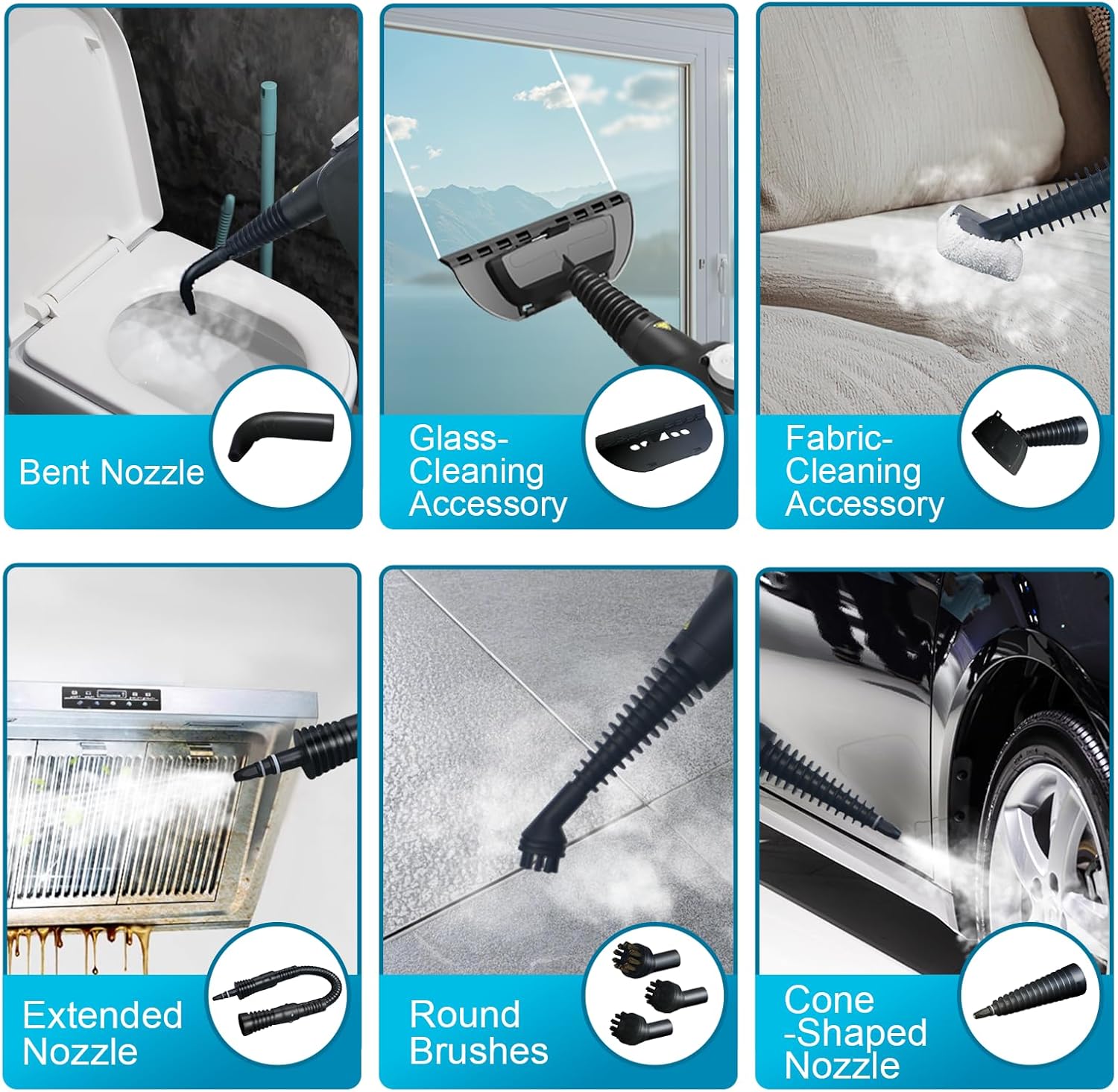
- 1x Extended Nozzle
- 1x Bent Nozzle
- 1x Fabric-Cleaning Accessory
- 1x Cone Shaped Nozzle
- 1x Funnel
- 3x Towel Sleeves
- 1x Measuring Cup
- 4x Round Brushes (various types)
- 1x Glass-Cleaning Accessory

4. Setup
- Fill Water Tank: Ensure the steam cleaner is unplugged. Unscrew the safety cap. Use the provided measuring cup and funnel to add up to 530ML (18 oz) of distilled water into the tank. Do not overfill. Securely close the safety cap.
- Attach Desired Accessory: Select the appropriate nozzle or brush for your cleaning task. Align the accessory with the steam outlet and twist to lock it securely in place. For extended reach, connect the extension hose first, then attach the desired cleaning tool.
- Power On: Plug the steam cleaner into a grounded electrical outlet. The indicator light will illuminate, signaling that the unit is heating up.
- Wait for Heating: The steam cleaner heats up in approximately 15-20 seconds. The indicator light will turn off when the unit has reached its optimal operating temperature and is ready to produce steam.


5. Operating Instructions
- Release Steam: Once the indicator light turns off, press the steam trigger to release a continuous jet of hot, pressurized steam.
- Lockable Steam Button: For continuous steam without holding the trigger, engage the lockable steam button. This frees your fingers for comfortable cleaning. Remember to disengage the lock when finished or when refilling.
- Cleaning Surfaces: Direct the steam towards the surface you wish to clean. Use the appropriate accessory for best results. For stubborn dirt, allow the steam to penetrate for a few seconds before scrubbing or wiping.
- Refilling Water: The unit allows for continuous water addition. If the water level is low, you can refill the tank at any time without waiting for the unit to cool down. Always ensure the safety cap is securely closed after refilling.
- Accessory Usage Examples:
- Extended Nozzle & Bent Nozzle: Ideal for reaching tight corners, crevices, and around fixtures like toilets.
- Round Brushes: Excellent for scrubbing grout, stubborn stains on tiles, or car tires.
- Fabric-Cleaning Accessory with Towel Sleeve: Use for refreshing upholstery, curtains, or clothing.
- Glass-Cleaning Accessory: Perfect for streak-free windows and mirrors.


Video 1: Official Opstrava video demonstrating the cleaning effect and various usage skills of the steam cleaner.
6. Maintenance
- Cleaning the Unit: After each use, ensure the unit is unplugged and completely cooled. Wipe the exterior of the steam cleaner with a damp cloth.
- Emptying Water Tank: It is recommended to empty any remaining water from the tank after each use to prevent mineral buildup.
- Accessory Care: Clean all accessories with water and allow them to air dry before storing. Towel sleeves can be machine washed.
- Storage: Store the steam cleaner and its accessories in a cool, dry place, away from direct sunlight and out of reach of children.
7. Troubleshooting
| Problem | Possible Cause | Solution |
|---|---|---|
| No steam or low steam output | Water tank empty; Unit not heated; Mineral buildup | Refill water tank; Wait for indicator light to turn off; Descale unit (refer to manufacturer's descaling instructions if available) |
| Water leaking from nozzle | Accessory not securely attached; Overfilled water tank | Ensure accessory is twisted and locked; Do not overfill water tank |
| Unit not turning on | Not plugged in; Power outlet issue | Check power connection; Try a different outlet |
8. Specifications
- Brand: Opstrava
- Model Name: 1350W 550ML
- Wattage: 1350 watts
- Tank Volume: 550 Milliliters (recommended 530ML/18 oz for optimal use)
- Maximum Temperature: 230 Degrees Fahrenheit
- Heat-up Time: Approximately 15-20 seconds
- Continuous Steam Time: Up to 30 minutes (with full tank)
- Item Weight: 4.8 pounds (2.18 Kilograms)
- Product Dimensions: 5.51 x 9.92 x 9.21 inches
- Special Features: Add Water Anytime Without Any waiting, Continuously Steam Without Any Interruption, Heat Light Indicator, Lockable Steam Button Child Lock, Rapid Heat Up Within 20s, High Pressure, Water Level Indicator
9. Warranty and Support
Your Opstrava Handheld Steam Cleaner is backed by a lifetime warranty. For warranty claims, technical support, or to inquire about additional accessories, please refer to the contact information provided with your product packaging or visit the official Opstrava website.
Ask a question about this manual
Ask about setup, troubleshooting, compatibility, parts, safety, or missing instructions. Manuals+ will review the question and use this page’s manual context to help answer it.