
1. Introduction
This manual provides detailed instructions for the operation and maintenance of your LEOTEC FM Radio with Bluetooth. Please read this manual thoroughly before using the device to ensure proper function and to prevent damage.

Figure 1: Front view of the LEOTEC FM Radio with Bluetooth. The radio features a wooden exterior, a black speaker grille, a digital display, and a numeric keypad with function buttons.
2. Safety Information
- Do not expose the device to water or excessive moisture.
- Avoid extreme temperatures, direct sunlight, and dusty environments.
- Do not disassemble or attempt to repair the device yourself. Refer to qualified service personnel.
- Keep out of reach of children.
- Use only the specified charging cable and power adapter.
- Ensure proper ventilation when operating the device.
3. Package Contents
Please check the package for the following items:
- LEOTEC FM Radio with Bluetooth (Model: LT-1812)
- Type-C Charging Cable
- User Manual
- Lanyard
- Antenna (pre-attached or included separately)
4. Product Overview
The LEOTEC FM Radio with Bluetooth is a versatile device combining multiple audio functions with emergency features. Key components include:
- Digital Display: Shows frequency, time, and mode.
- Numeric Keypad: For direct frequency input and other functions.
- Function Buttons: Power, Mode, Play/Pause, Skip, Volume, Alarm, SOS.
- Extendable Antenna: For FM radio reception.
- Speaker: Integrated audio output.
- Type-C Charging Port: For battery charging.
- USB Port: For USB drive playback.
- AUX Input: For external audio devices.
- 3.5mm Headphone Jack: For private listening.
- LED Lantern: Integrated light source.
- SOS Button: Activates emergency alarm.

Figure 2: Overview of the radio's main features and connectivity options.
5. Setup
5.1. Charging the Battery
The radio is equipped with a built-in 1800mAh rechargeable battery. Before first use, or when the battery indicator on the display shows low power, charge the device.
- Connect the provided Type-C charging cable to the Type-C port on the side of the radio.
- Connect the other end of the cable to a USB power adapter (not included) or a computer's USB port.
- The charging indicator on the display will show charging status. A full charge typically takes approximately 2.5 hours.

Figure 3: The radio connected to a power source for charging via its Type-C port.
5.2. Extending the Antenna
For optimal FM radio reception, fully extend the telescopic antenna located on the top of the radio.
6. Operating Instructions
6.1. Power On/Off
To power on the radio, press and hold the power button (usually marked with a power symbol or integrated with the mode button). The display will light up, and a voice prompt will indicate 'Power on'. To power off, press and hold the same button again.
6.2. FM Radio Operation
After powering on, the radio typically defaults to FM mode. If not, press the 'M' (Mode) button to switch to FM mode. The display will show the current FM frequency.
- Automatic Scan: Press and hold the 'Play/Pause' button to initiate an automatic scan for available FM stations. The radio will scan and save stations with strong signals.
- Manual Tuning: Use the 'Previous' (|<<) and 'Next' (>>|) buttons to fine-tune the frequency step by step.
- Direct Frequency Input: Use the numeric keypad (0-9) to directly enter the desired FM frequency (e.g., 98.5).
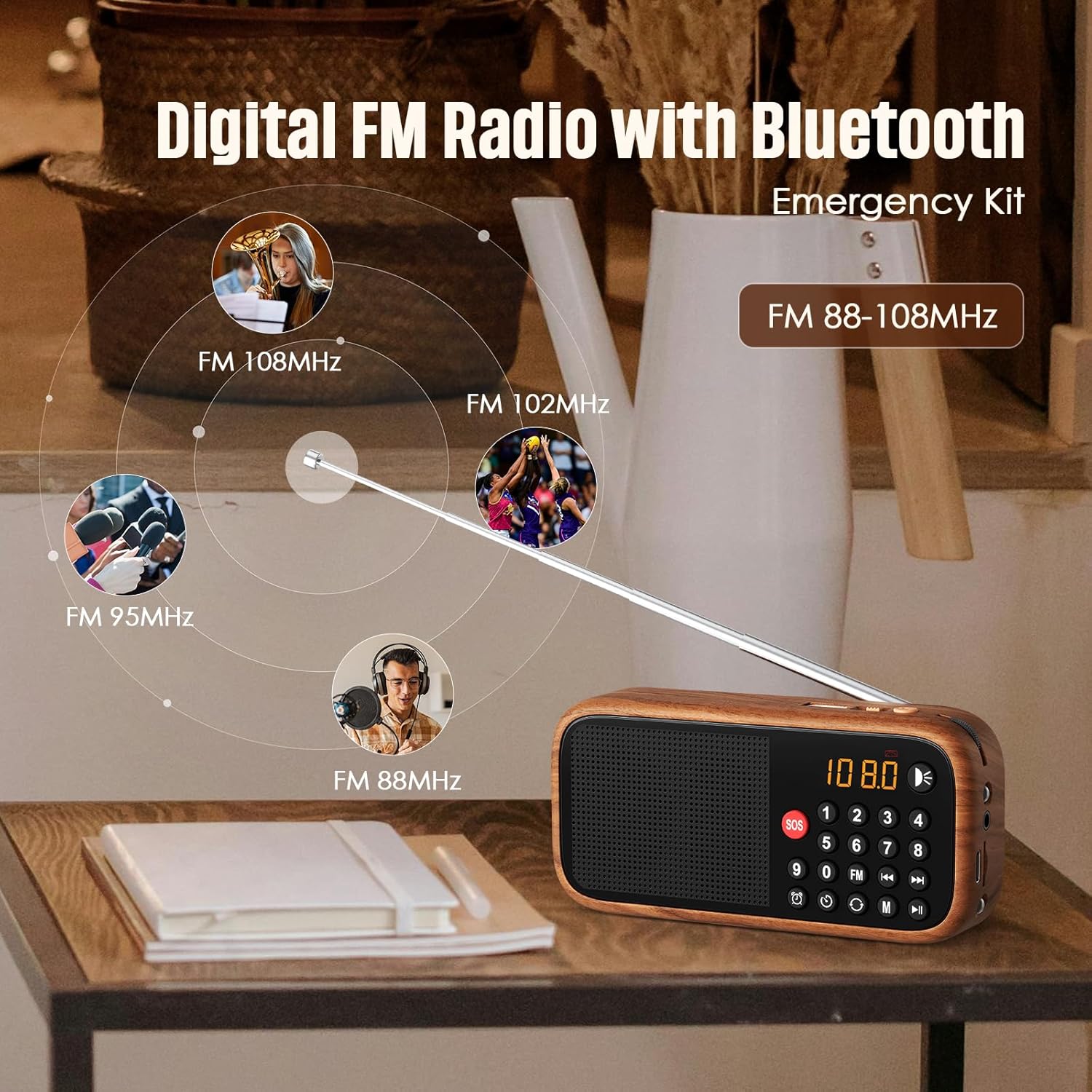
Figure 4: The radio's extendable antenna helps in receiving various FM frequencies.
6.3. Bluetooth Pairing
Press the 'M' (Mode) button to switch to Bluetooth mode. The radio will enter pairing mode, indicated by a flashing Bluetooth icon on the display or a voice prompt.
- Enable Bluetooth on your smartphone or other audio device.
- Search for available Bluetooth devices and select 'LEOTEC LT-1812' (or similar name).
- Once paired, the radio will confirm with a voice prompt, and the Bluetooth icon will stop flashing.
- You can now play audio from your connected device through the radio.
6.4. AUX/USB Playback
The radio supports audio playback via AUX input and USB drives.
- AUX Mode: Connect an external audio device (e.g., MP3 player, phone) to the 3.5mm AUX input port using an audio cable (not included). Press the 'M' (Mode) button until 'AUX' mode is selected.
- USB Mode: Insert a USB flash drive containing audio files into the USB port. The radio should automatically switch to USB mode and begin playback. If not, press the 'M' (Mode) button to select USB mode.
6.5. Alarm Clock Setting
To set the alarm time:
- Press the 'Alarm' button (often indicated by a clock icon).
- Use the numeric keypad or navigation buttons to set the desired hour and minute.
- Confirm the setting by pressing the 'Alarm' button again or a designated 'Set' button.
6.6. SOS Function
The SOS function activates a loud emergency alarm.
- To activate, press and hold the red 'SOS' button.
- To deactivate, press the 'SOS' button again or power off the device.

Figure 5: The SOS button for emergency alerts and the integrated LED light for illumination.
6.7. LED Lantern Operation
The radio includes a built-in LED lantern for illumination.
- To turn on the LED light, press the 'Light' button (often indicated by a light bulb icon).
- Press the button again to turn off the LED light.
7. Maintenance
- Clean the radio with a soft, dry cloth. Do not use abrasive cleaners or solvents.
- Avoid exposing the device to extreme temperatures or direct sunlight for prolonged periods.
- When not in use for an extended period, store the radio in a cool, dry place.
8. Troubleshooting
| Problem | Possible Cause | Solution |
|---|---|---|
| Radio does not power on. | Battery is low or depleted. | Charge the battery using the Type-C cable. |
| Poor FM reception. | Antenna not fully extended or weak signal area. | Fully extend the antenna. Try repositioning the radio for better signal. |
| Bluetooth not connecting. | Radio not in Bluetooth pairing mode or device too far. | Ensure radio is in Bluetooth mode. Move device closer to the radio. Restart both devices. |
| No sound from speaker. | Volume is too low or muted. | Increase the volume. Check if headphones are connected. |
9. Specifications
| Feature | Detail |
|---|---|
| Model Number | LT-1812 |
| Product Dimensions | 5.63"L x 1.73"W x 4.02"H (14.3 x 4.4 x 10.2 cm) |
| Item Weight | 4.2 ounces (119 grams) |
| Connectivity Technology | Bluetooth |
| Tuner Technology | FM |
| Radio Bands Supported | FM |
| Power Source | Battery Powered (1800mAh rechargeable battery included) |
| Charging Port | Type-C 5V |
| Special Features | Portable, Digital Display, Alarm Clock, SOS Function, LED Lantern, USB/AUX Input |

Figure 6: The compact dimensions of the radio, emphasizing its portability.
10. Warranty and Support
For warranty information and customer support, please refer to the documentation included with your product packaging or visit the official LEOTEC website. Keep your purchase receipt as proof of purchase for warranty claims.
