
1. Introduction
The FOUKWAKC H7 Thumb Action Camera is a compact, wearable device designed for capturing high-quality 1080P video and photos. Its small size, magnetic attachment, and Wi-Fi connectivity make it ideal for various activities, from outdoor sports and travel to daily vlogging and monitoring. This manual provides essential information to help you set up, operate, and maintain your camera.
2. What's in the Box
Please verify that all items are present in your package:
- FOUKWAKC H7 Thumb Action Camera
- Magnetic Lanyard
- Adjustable Rotating Back Clip
- USB Charging Cable
- 64GB Micro SD Card (pre-installed or included separately)
- USB Card Reader

Image 2.1: Contents of the FOUKWAKC H7 package, including the camera, magnetic lanyard, back clip, USB cable, 64GB Micro SD card, and USB card reader.
3. Setup
3.1 Initial Charge
Before first use, fully charge the camera using the provided USB cable. Connect the cable to the camera's USB port and a standard USB power adapter (not included) or a computer's USB port. The charging indicator light will show the charging status.
3.2 Inserting the Micro SD Card
Ensure the 64GB Micro SD card is properly inserted into the camera's card slot. The camera requires a memory card for recording.
3.3 App Installation and Wi-Fi Connection
To unlock full functionality and easily manage your recordings, download the companion app:
- Download the App: Search for "Sports-DV" in the Apple App Store (for iOS) or Google Play Store (for Android). Alternatively, scan the QR code provided in the manual or visit http://www.joyhonest.com/app/Sports-DV-JOY.php.
- Power On Camera: Press and hold the Power Button on the camera to turn it on. The blue light will be steady if a memory card is inserted correctly. If the blue light is flashing and vibrating, no memory card is detected.
- Enter Wi-Fi Pairing Mode: Quickly press the Power Button twice consecutively. The blue and green lights will flash alternately, indicating the device is ready for pairing.
- Connect via App: Open the "Sports-DV" app on your mobile device. Go to the recorder connection section within the app. Open your device's Wi-Fi settings, find the Wi-Fi network named "H88..." and select it. Enter the password: 12345678. Return to the app. The app should now show a successful connection.
- Troubleshooting Wi-Fi: If you cannot find the "H88..." network, turn your phone's Wi-Fi off and then on again to refresh the search. If the lights do not flash alternately after multiple attempts, press the RESET BUTTON located on the side of the recorder to restore factory settings. Then, repeat steps 2 and 3.

Image 3.1: Visual guide for connecting the FOUKWAKC H7 camera to your mobile device via Wi-Fi using the Sports-DV app.
4. Operating Instructions
4.1 Power On/Off
- Power On: Simply press the home button on the front of the mini camera for 3 seconds to power on. The blue LED will turn ON.
- Power Off: Simply press the home button on the front of the mini camera for 3 seconds to power off. The LED will turn OFF.
4.2 Recording Modes
The camera supports two primary recording modes:
- 1. APP Recording: After the camera is connected to the "Sports-DV" app via Wi-Fi, you can initiate and stop recording directly from the app interface. This allows for real-time viewing and control.
- 2. Direct Recording (without APP): To record without connecting to the app, turn on the product (blue light is always on). Then, press the record button once. The blue light will flash slowly to indicate that recording has started. Press the button again to stop recording.

Image 4.1: Diagram illustrating power on/off, quick capture via button, and live streaming via Wi-Fi with the app.
4.3 Viewing and Sharing Content
With the Wi-Fi connection to your phone, you can view, transfer, and share videos and photos directly from the camera to your mobile device at any time. This allows for instant sharing to social media or other platforms.

Image 4.2: The camera's built-in Wi-Fi enables one-click download and sharing of content to your mobile phone.
5. Key Features
- 1080P & 120° Wide Angle: The camera records video at 1920*1080P resolution with a 120° wide-angle lens, capturing a broad field of view. Clarity can be adjusted within the app. This ensures clear and comprehensive footage for various scenarios.
- Extended Battery Life & Charging: Equipped with an 800mAh battery, the camera provides approximately 150 minutes of continuous recording. It also supports recording while charging, ensuring you don't miss important moments.
- Hands-Free Operation with Magnetic Lanyard: The camera can be connected to the magnetic lanyard and worn around your neck, allowing for convenient, hands-free recording.
- Portable Back Clip: A 360° adjustable rotating back clip allows the camera to be clipped onto clothing, pockets, folders, school bags, or waistbands, offering versatile mounting options.
- Lightweight Design: Weighing only 0.8 lbs, the camera is extremely lightweight, making it comfortable for extended wear during outdoor activities like cycling or motorcycling.
- Loop Recording: The camera supports loop recording, which automatically overwrites the oldest footage when the memory card is full, ensuring continuous recording without manual deletion. It supports up to 256GB memory cards.
- Universal Compatibility: This mini vlogging camera can be used for various purposes, including monitoring babies, pets, elderly parents, or as a general bodycam in offices, living rooms, or outdoors.

Image 5.1: Demonstrates the 1080P UHD recording capability, providing clear photos and videos without blur or distortion.
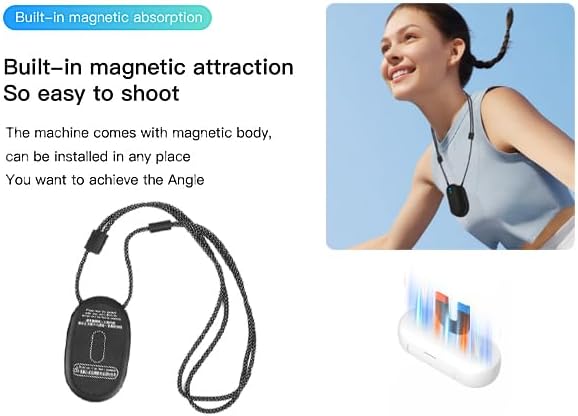
Image 5.2: The camera features built-in magnetic absorption for easy attachment and versatile shooting angles.

Image 5.3: The portable back clip allows the camera to be clipped onto various items for hands-free recording.

Image 5.4: Explains the loop recording feature, which provides automatic coverage by overwriting old files when storage is full.
Video 5.5: An overview of the FOUKWAKC H7 Thumb Camera, showcasing its design and key functionalities.
6. Specifications
| Feature | Detail |
|---|---|
| Brand | FOUKWAKC |
| Model Number | H7 |
| Video Capture Resolution | 1080p (1920*1080P) |
| Video Capture Format | MP4 |
| Photo Sensor Technology | CMOS |
| Maximum Aperture | 2.8 f |
| Lens Angle | 120° Wide Angle |
| Internal Storage | 64GB (built-in) |
| Flash Memory Type | Micro SD (supports up to 256GB) |
| Battery Capacity | 800mAh |
| Recording Time | Approx. 150 minutes (continuous) |
| Connectivity Technology | USB, Wi-Fi |
| Item Weight | 5.3 ounces (approx. 0.33 lbs) |
| Product Dimensions | 0.79 x 1.1 x 2.54 inches |
| Color | Black |
| Special Features | Lightweight, Magnetic Attachment, Loop Recording |
7. Maintenance
- Cleaning: Use a soft, dry cloth to clean the camera body. For the lens, use a specialized lens cleaning cloth and solution to avoid scratches.
- Storage: Store the camera in a cool, dry place away from direct sunlight and extreme temperatures.
- Battery Care: To prolong battery life, avoid fully discharging the battery frequently. If storing for a long period, charge the battery to about 50% every few months.
- Firmware Updates: Check the manufacturer's website or app periodically for any available firmware updates to ensure optimal performance and new features.
8. Troubleshooting
- Camera not turning on: Ensure the battery is charged. Connect to a power source and try again. If the issue persists, try resetting the camera using the reset button.
- Cannot connect to Wi-Fi: Double-check the Wi-Fi password (12345678). Ensure the camera is in Wi-Fi pairing mode (blue and green lights flashing alternately). Try turning your phone's Wi-Fi off and on. If necessary, reset the camera to factory settings.
- Poor video quality: Ensure the lens is clean. Check the recording resolution settings in the app. Ensure sufficient lighting in the recording environment.
- Camera not recording: Verify that a Micro SD card is inserted correctly and has sufficient free space. The blue light should be steady when a card is inserted. If the card is full, loop recording should overwrite old files, but ensure it's enabled if desired.
- Camera freezing/unresponsive: Press the reset button on the side of the camera to restart it.
9. Warranty and Support
For warranty information, technical support, or service inquiries, please refer to the product packaging or contact FOUKWAKC customer service directly. Keep your purchase receipt as proof of purchase.
You can visit the FOUKWAKC brand store for more information: FOUKWAKC Store