
1. Introduction
Thank you for purchasing the Ocean Loong AB01H Bladeless Tower Fan and Space Heater Combo. This appliance is designed to provide both cooling airflow and heating capabilities for your home or office. Please read this manual thoroughly before operation to ensure safe and efficient use of the product. Keep this manual for future reference.
2. Important Safety Instructions
When using electrical appliances, basic precautions should always be followed to reduce the risk of fire, electric shock, and injury to persons, including the following:
- Read all instructions before using this heater/fan.
- This appliance is hot when in use. To avoid burns, do not let bare skin touch hot surfaces. Use handles when moving this heater/fan. Keep combustible materials, such as furniture, pillows, bedding, papers, clothes, and curtains at least 3 feet (0.9 m) from the front of the heater/fan and keep them away from the sides and rear.
- Extreme caution is necessary when any heater/fan is used by or near children or invalids and whenever the heater/fan is left operating and unattended.
- Always unplug heater/fan when not in use.
- Do not operate any heater/fan with a damaged cord or plug or after the heater/fan malfunctions, has been dropped or damaged in any manner. Return heater/fan to authorized service facility for examination, electrical or mechanical adjustment, or repair.
- Do not use outdoors.
- This heater/fan is not intended for use in bathrooms, laundry areas and similar indoor locations. Never locate heater/fan where it may fall into a bathtub or other water container.
- Do not run cord under carpeting. Do not cover cord with throw rugs, runners, or similar coverings. Arrange cord away from traffic area and where it will not be tripped over.
- To disconnect heater/fan, turn controls to off, then remove plug from outlet.
- Do not insert or allow foreign objects to enter any ventilation or exhaust opening as this may cause an electric shock or fire, or damage the heater/fan.
- To prevent a possible fire, do not block air intakes or exhaust in any manner. Do not use on soft surfaces, like a bed, where openings may become blocked.
- A heater/fan has hot and arcing or sparking parts inside. Do not use it in areas where gasoline, paint, or flammable liquids are used or stored.
- Use this heater/fan only as described in this manual. Any other use not recommended by the manufacturer may cause fire, electric shock, or injury to persons.
- This appliance is equipped with a tip-over switch and overheat protection for enhanced safety. If the unit tips over or overheats, it will automatically shut off.
- The self-regulating ceramic heating element keeps the exterior cool to the touch, except for the hot air outlet and plug. All other external parts remain safe to touch.
3. Package Contents
Upon unpacking, please ensure all items listed below are present and in good condition:
- 1 x Fan Body
- 1 x Fan Base
- 1 x User Manual (this document)
- 1 x Remote Control (including 2 x LR03 AAA alkaline batteries)
4. Product Overview

Figure 4.1: Front View of AB01H Unit
A direct front view of the Ocean Loong AB01H unit, showcasing its sleek, bladeless design and control panel.
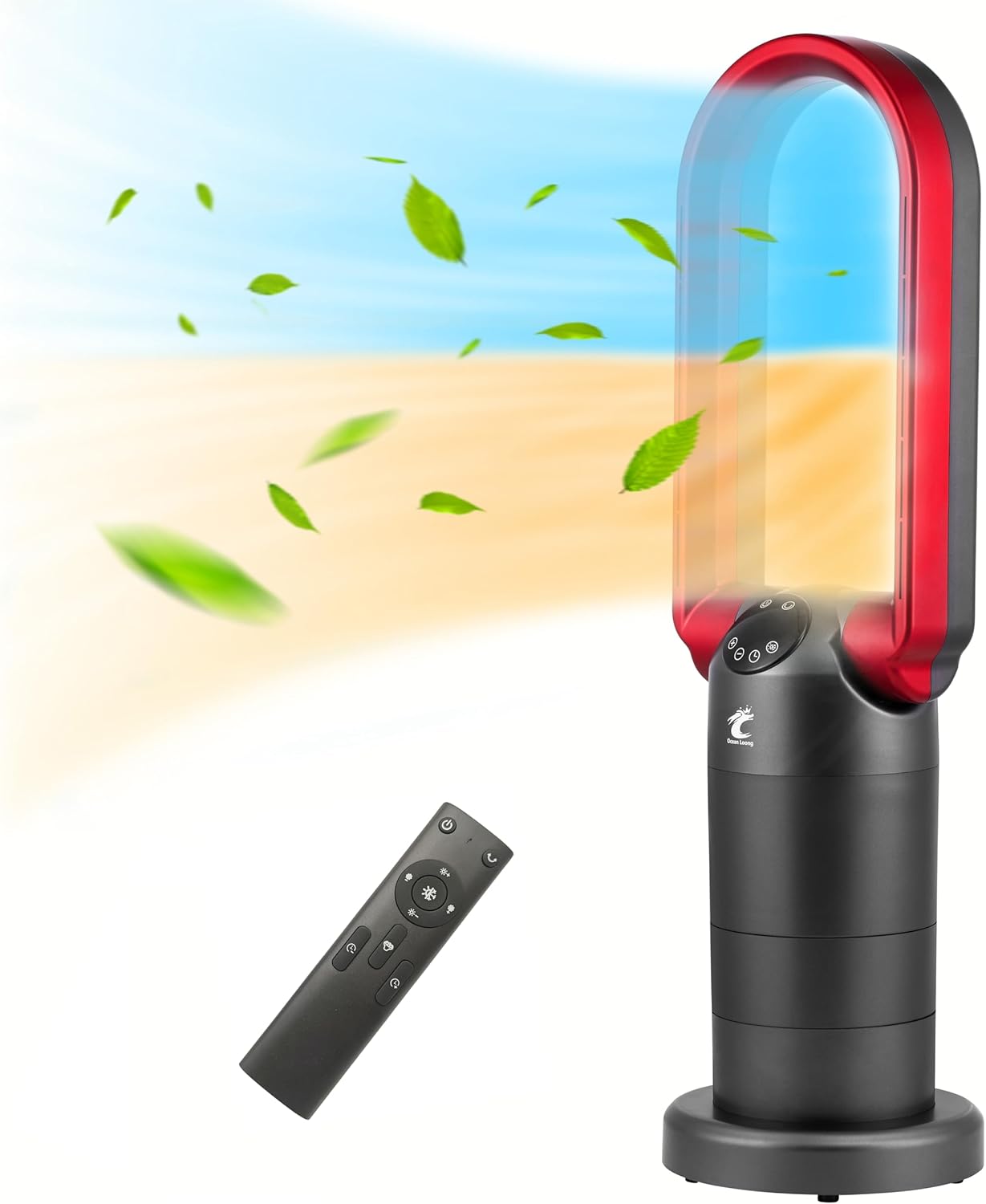
Figure 4.2: AB01H with Remote and Airflow Indication
This image displays the Ocean Loong AB01H unit, highlighting its dual functionality as a bladeless fan (blue airflow) and a space heater (orange airflow). The remote control is also visible.
4.1 Control Panel

Figure 4.3: Dual Control Methods (Touch Panel and Remote)
This image details the two control methods for the AB01H: the integrated touch screen panel and the included remote control. The touch panel buttons are magnified for clarity.
- Power Button: Turns the unit on or off.
- Wind Speed +/-: Adjusts fan speed in fan mode.
- Heater/Cooler Switch: Toggles between fan (cooling) and heater modes.
- Oscillation Button: Activates or deactivates 120° horizontal oscillation.
- Timer Button: Sets the auto-off timer.
4.2 Remote Control

Figure 4.4: Remote Control Layout
A close-up view of the remote control for the AB01H, labeling each button for power, fan speed, heating settings, and timer.
- Fan Power Key: Turns the unit on or off.
- Fan Speed Up/Down: Increases or decreases fan speed.
- Heating Setting Temperature Up/Down: Adjusts the target temperature in heater mode.
- Heater / Fan Switch Button: Toggles between heating and fan modes.
- Oscillation Button: Activates or deactivates 120° horizontal oscillation.
- Timer Button: Sets the auto-off timer.
5. Assembly and Setup
The Ocean Loong AB01H requires minimal assembly. Follow these steps:
- Carefully remove all components from the packaging.
- Place the fan body onto the fan base, aligning the connectors.
- Twist the fan body clockwise onto the base until it locks securely. Ensure the base is firmly attached to prevent damage to the rotation mechanism.
- Insert the 2 AAA batteries into the remote control, observing polarity.
- Place the unit on a firm, level surface, ensuring adequate clearance from walls and furniture.
- Plug the power cord into a standard 110V AC electrical outlet.
6. Operating Instructions
6.1 Power On/Off
- Press the Power button on the control panel or the remote control to turn the unit on or off.
6.2 Fan Mode (Cooling)
- When the unit is on, press the Heater/Cooler Switch button on the control panel or remote to select fan mode.
- Use the Wind Speed +/- buttons on the control panel or remote to adjust between 9 fan speeds.
6.3 Heater Mode

Figure 6.1: Adjustable Thermostat Operation
An illustration explaining how the adjustable thermostat of the AB01H works to maintain a consistent room temperature efficiently.
- Press the Heater/Cooler Switch button on the control panel or remote to select heater mode.
- In heater mode, the fan speed cannot be manually adjusted. The unit will operate at a fixed speed to distribute heat.
- Use the Heating Setting Temperature Up/Down buttons on the remote control to set the desired room temperature between 60°F and 99°F (16°C to 38°C). The heater will operate until the room temperature reaches the set temperature.
- To switch the displayed temperature between Celsius and Fahrenheit, press and hold the heating button on the remote control for 5 seconds.
6.4 Oscillation and Tilt

Figure 6.2: Oscillation and Tilt Capabilities
The AB01H unit is shown with arrows indicating its 120° oscillation and 360° tilt capabilities, providing wide air coverage.
- Press the Oscillation button on the control panel or remote to activate 120° horizontal oscillation, distributing air across a wider area. Press again to stop oscillation.
- The unit features a 260° tilt head, allowing manual adjustment of the vertical airflow direction.
6.5 Timer Function
- Press the Timer button on the control panel or remote to set the auto-off timer. Each press will increase the timer by 1 hour, from 1 to 9 hours.
- The unit will automatically turn off after the set time has elapsed.
6.6 LED Display
- The LED display automatically turns off after 1 minute of inactivity to minimize light disturbance.
- Press any button on the control panel or remote to wake up the LED display.
7. Maintenance
Regular maintenance ensures optimal performance and longevity of your appliance.
- Cleaning: Always unplug the unit before cleaning. Use a soft, damp cloth to wipe the exterior surfaces. Do not use abrasive cleaners or solvents. Ensure no water enters the internal components.
- Storage: If storing the unit for an extended period, unplug it, clean it thoroughly, and store it in a cool, dry place, preferably in its original packaging.
8. Troubleshooting
If you encounter issues with your Ocean Loong AB01H, refer to the following common problems and solutions:
| Problem | Possible Cause | Solution |
|---|---|---|
| Unit does not turn on. | No power, power cord not plugged in, unit tipped over, overheat protection activated. | Ensure power cord is securely plugged into a working outlet. Check if the unit has tipped over and place it upright. Allow unit to cool down if overheat protection was triggered. |
| No heat output in heater mode. | Temperature setting too low, overheat protection activated. | Increase the target temperature setting. Allow unit to cool down if overheat protection was triggered. |
| Fan does not oscillate. | Oscillation function not activated. | Press the Oscillation button on the control panel or remote. |
| Remote control not working. | Dead batteries, obstruction. | Replace the AAA batteries in the remote control. Ensure there is no obstruction between the remote and the unit. |
| Display shows 'CP ERROR'. | Internal error or sensor issue. | Press and hold the '+' and '-' buttons on the control panel simultaneously for approximately 5 seconds to clear the error. If the error persists, contact customer support. |
If the problem persists after attempting these solutions, please contact Ocean Loong customer support.
9. Specifications
| Feature | Specification |
|---|---|
| Model Number | AB01H |
| Power Source | AC Electric |
| Voltage | 110 Volts |
| Wattage | 1500 Watts |
| Product Dimensions | 8.3"D x 8.3"W x 29"H |
| Item Weight | 6.7 Pounds |
| Noise Level | 40 dB |
| Fan Speeds | 9 Levels |
| Oscillation | 120° Horizontal |
| Tilt Head | 260° Adjustable |
| Adjustable Thermostat | 60°F to 99°F (16°C to 38°C) |
| Timer | 1-9 Hours Auto-Off |
| Safety Features | Tip-Over Switch, Overheat Protection, Cool-to-Touch Exterior |
| Control Method | Remote, Touch |
10. Warranty and Support
Ocean Loong is committed to providing high-quality products. For any questions, concerns, or warranty inquiries regarding your AB01H unit, please contact our customer support team. Refer to the product packaging or the official Ocean Loong website for contact information.


