
1. Introduction
This manual provides instructions for the ECONTROLLY AXD7690 replacement infrared remote control. This remote is designed to function as a direct replacement for the original Pioneer AV Receiver remote, offering easy operation without the need for programming. Please read this manual carefully to ensure proper use and longevity of your remote control.
Compatible Pioneer AV Receiver Models:
- VSX-523
- VSX-524
- VSX-5231
- VSX-323
- VSX-324
- HTP-072
- VSX-424
- VSX-329
- VSX-423
- VSX-329-K
- VSX-423-K
- VSX-524-K
- VSX-424-K
- VSX-423-S
- VSX-324-K-P
- VSX-523-K
- VSX-323-K
- VSX-524-K
2. Setup
2.1 Battery Installation
The ECONTROLLY AXD7690 remote control requires AAA ALKALINE batteries for operation. Batteries are not included with the remote control. Follow these steps to install the batteries:
- Locate the battery compartment cover on the back of the remote control.
- Press down on the tab and slide the cover off.
- Insert two (2) AAA ALKALINE batteries, ensuring the positive (+) and negative (-) terminals align correctly with the markings inside the compartment.
- Slide the battery compartment cover back into place until it clicks securely.
Important: Do not use rechargeable batteries. Only use AAA ALKALINE batteries.
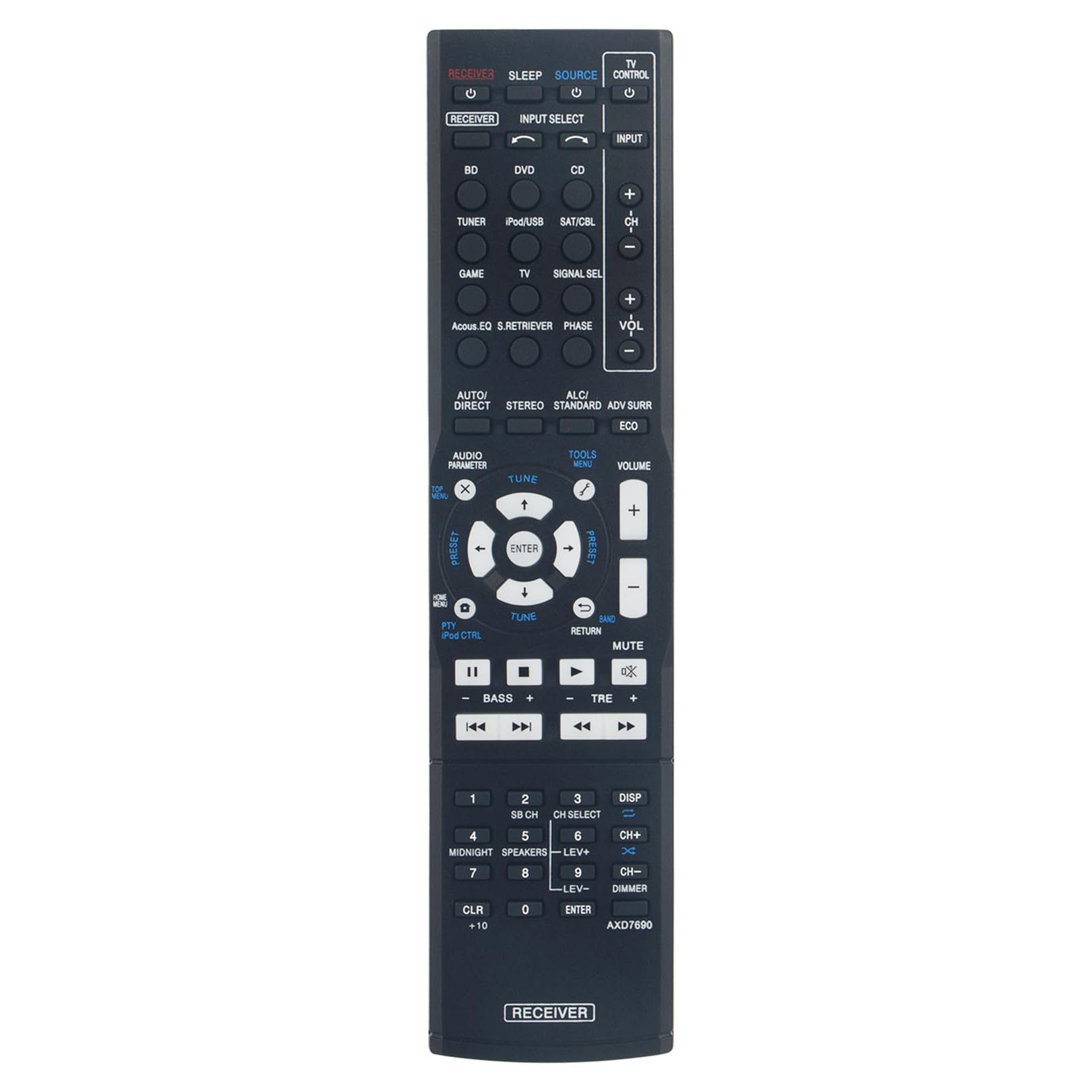
Image: The ECONTROLLY AXD7690 remote control, showing its full layout and design.
2.2 Initial Use
This remote control is an infrared (IR) device and does not require any programming. Once batteries are correctly installed, it is ready for immediate use with compatible Pioneer AV Receiver models. Ensure there is a clear line of sight between the remote control and your AV receiver.
3. Operating Instructions
The remote control features a standard layout for controlling your Pioneer AV Receiver. Below are descriptions of common button functions:

Image: Top-down view of the ECONTROLLY AXD7690 remote control, highlighting button arrangement.
- POWER (RECEIVER / TV CONTROL): Turns the AV receiver or TV on/off.
- INPUT SELECT (BD, DVD, CD, TUNER, iPod/USB, SAT/CBL, GAME, TV): Selects the desired input source for your AV receiver.
- VOLUME (+/-): Adjusts the master volume level of the AV receiver.
- CH (+/-): Changes channels on a connected tuner or cable/satellite box.
- MUTE: Temporarily silences the audio output.
- NAVIGATION (Up, Down, Left, Right, ENTER): Used for menu navigation and selection.
- TOOLS / MENU: Accesses the receiver's on-screen menu or settings.
- RETURN: Goes back to the previous menu or screen.
- AUDIO PARAMETER / AUTO/DIRECT / STEREO / ADV SURR / ECO: Buttons for selecting various audio modes and sound enhancements.
- PRESET (+/-): Navigates through radio presets.
- TUNE (+/-): Manually tunes radio frequencies.
- PLAYBACK CONTROLS (Play, Pause, Stop, Fast Forward, Rewind, Skip): Controls playback for connected media devices.
- NUMBER PAD (0-9, +10, CLR, ENTER): For direct input of numbers, such as channel numbers or menu selections.
- BASS (+/-) / TRE (+/-): Adjusts bass and treble levels.
- MIDNIGHT / SPEAKERS / CH SELECT / DIMMER: Additional function buttons for specific receiver features.

Image: A person using the remote control with a home theater setup, demonstrating typical usage.
4. Maintenance
4.1 Battery Replacement
When the remote control's range decreases or it becomes unresponsive, it is time to replace the batteries. Follow the battery installation steps outlined in Section 2.1. Always replace both batteries at the same time with new AAA ALKALINE batteries.
4.2 Cleaning
To clean the remote control, use a soft, dry cloth. For stubborn dirt, slightly dampen the cloth with water or a mild, non-abrasive cleaner. Do not use harsh chemicals, solvents, or abrasive cleaning pads, as these can damage the remote's surface or internal components. Ensure no liquid enters the remote control.
4.3 Storage
If the remote control will not be used for an extended period, it is recommended to remove the batteries to prevent leakage, which can damage the device. Store the remote in a cool, dry place away from direct sunlight and extreme temperatures.
5. Troubleshooting
- Remote not responding:
- Check if the batteries are inserted correctly with the correct polarity (+/-).
- Replace the batteries with new AAA ALKALINE batteries.
- Ensure there is a clear line of sight between the remote's IR emitter and the AV receiver's IR sensor. Obstructions can block the signal.
- Make sure you are within the effective operating range of the remote control (typically up to 20 feet or 6 meters).
- Specific buttons not working:
- This may indicate a dirty or faulty button. Try cleaning the remote as described in Section 4.2.
- If only a few buttons are unresponsive after battery replacement and cleaning, the remote may be damaged.
- Remote works intermittently:
- This often indicates low battery power. Replace the batteries.
- Ensure no strong light sources (like direct sunlight or fluorescent lights) are interfering with the IR signal.
6. Specifications

Image: The ECONTROLLY AXD7690 remote control displaying its physical dimensions.
| Feature | Detail |
|---|---|
| Model Number | AXD7690 |
| Product Dimensions | 8.34 x 2 x 0.56 inches (21.18 x 5.08 x 1.42 cm) |
| Item Weight | 1.76 ounces (50 grams) |
| Power Source | 2 x AAA ALKALINE Batteries (not included) |
| Technology | Infrared (IR) |
| Compatibility | Pioneer AV Receivers (listed in Section 1) |
| Special Feature | Pre-Programmed, No Setup Required |
7. Warranty and Support
Specific warranty information for this replacement remote control is not provided in the product details. For any issues or support inquiries, please refer to the seller or manufacturer directly through your purchase platform.
Always ensure to keep your purchase records for any potential support needs.