
Lenovo IdeaPad Flex 5 16ABR8 (82XYJFGFG)
Lenovo IdeaPad Flex 5 16ABR8 User Manual
Model: 82XYJFGFG
Introduction
This manual provides comprehensive instructions for the setup, operation, maintenance, and troubleshooting of your Lenovo IdeaPad Flex 5 16ABR8 laptop. Please read this manual thoroughly before using your device to ensure optimal performance and longevity.
The Lenovo IdeaPad Flex 5 16ABR8 is a versatile 16-inch WUXGA Touch laptop, featuring an AMD Ryzen 7 7730U processor, 16GB LPDDR4 RAM, and a 512GB NVMe SSD. It comes with Windows 11 Home and includes a backlit keyboard, fingerprint reader, and Wi-Fi 6 connectivity.
Setup Guide
1. Unboxing and Initial Inspection
Carefully remove the laptop and all accessories from the packaging. Inspect for any signs of damage during transit. The package should include:
- Lenovo IdeaPad Flex 5 16ABR8 Laptop
- 65W AC Adapter
- 32GB USB Drive
- Documentation (this manual, warranty information)

Figure 1: Lenovo IdeaPad Flex 5 16ABR8 in tent mode, highlighting its adaptable design.
2. Connecting the Power Adapter
Connect the AC adapter to the power port on your laptop and then plug it into a wall outlet. It is recommended to fully charge the battery before initial use.
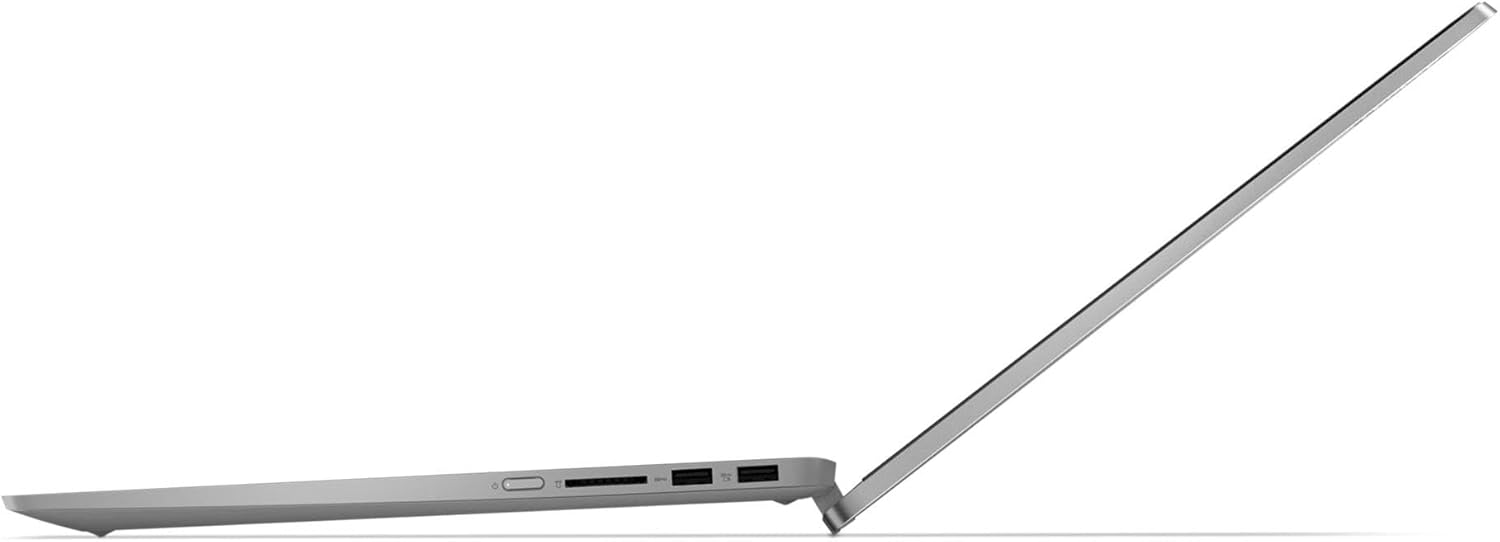
Figure 2: Side view of the laptop, illustrating the power input and various ports.
3. Initial Boot-up and Windows Setup
Press the power button to turn on the laptop. Follow the on-screen instructions to complete the Windows 11 Home setup process. This includes selecting your region, connecting to a Wi-Fi network, and creating a user account.

Figure 3: The laptop screen showing the Windows 11 interface, ready for use.
Operating Your Laptop
1. Using the Keyboard and Touchpad
The laptop features a full-size backlit keyboard with a numeric keypad for comfortable typing. The precision touchpad supports multi-touch gestures for navigation.

Figure 4: Overhead view of the keyboard and touchpad, showing the layout and integrated fingerprint reader.
2. Utilizing the Touchscreen and Pen (Optional)
The 16-inch WUXGA display is a touchscreen, allowing for direct interaction with the operating system and applications. An optional digital pen (sold separately) can be used for drawing, writing, and precise navigation.
3. Connecting External Devices
Your IdeaPad Flex 5 16ABR8 is equipped with various ports for connecting peripherals:
- USB 3.2 Gen 2 Type-C: Supports Power Delivery, DisplayPort, and 10Gbps data transfer.
- USB 3.2 Gen 1 Type-A (Always On): For charging devices even when the laptop is off.
- USB 3.2 Gen 1 Type-A: Standard USB port for peripherals.
- HDMI v1.4: For connecting to external displays.
- Headphone/Microphone Combo Jack (3.5mm): For audio input/output.

Figure 5: Right side view of the laptop, detailing the available connectivity ports.
Maintenance and Care
1. Cleaning Your Laptop
Use a soft, lint-free cloth slightly dampened with water or a screen cleaner to clean the display. For the keyboard and chassis, use a dry, soft cloth. Avoid harsh chemicals or abrasive materials.
2. Battery Care
To maximize battery life, avoid extreme temperatures. It is recommended to occasionally discharge the battery completely and then fully recharge it. The laptop features a 52.5Wh Lithium-Ion battery, providing up to 6 hours of usage.
3. Software Updates
Regularly check for and install Windows updates and Lenovo driver updates to ensure optimal performance, security, and compatibility.
Troubleshooting Common Issues
| Problem | Possible Cause | Solution |
|---|---|---|
| Laptop does not power on. | Battery drained or AC adapter not connected properly. | Ensure AC adapter is securely connected and plugged into a working outlet. Allow battery to charge for at least 30 minutes before attempting to power on. |
| Wi-Fi connection issues. | Wi-Fi adapter disabled, incorrect password, or router issue. | Check Wi-Fi settings in Windows. Ensure Wi-Fi is enabled. Verify password. Restart router and laptop. |
| Screen is dim or black. | Brightness settings, sleep mode, or display driver issue. | Adjust brightness using keyboard function keys. Press any key or move mouse to wake from sleep. Restart laptop. |
Technical Specifications
| Feature | Detail |
|---|---|
| Model | Lenovo IdeaPad Flex 5 16ABR8 (82XYJFGFG) |
| Display | 16" WUXGA (1920 x 1200) Touchscreen, 300 nits, 45% NTSC, TÜV Low Blue Light |
| Processor | AMD Ryzen 7 7730U (8 Cores, 16 Threads, up to 4.5 GHz) |
| Graphics | AMD Radeon Graphics (Integrated) |
| Memory | 16GB LPDDR4 4266 MHz |
| Storage | 512GB NVMe M.2 SSD |
| Operating System | Windows 11 Home |
| Wireless Connectivity | Realtek Wi-Fi 6 (2x2), Bluetooth 5.3 |
| Ports | 1x USB 3.2 Gen 2 Type-C (PD/DP/10Gbps), 1x USB 3.2 Gen 1 Type-A (Always On), 1x USB 3.2 Gen 1 Type-A, 1x HDMI v1.4, 1x Headphone/Mic Combo Jack |
| Camera | 1080p FHD Camera with Privacy Shutter |
| Battery | 52.5Wh Lithium-Ion (up to 6 hours) |
| Dimensions (LxWxH) | 14.09" x 9.99" x 0.74" inches |
| Weight | 4.63 lbs |
| Color | Arctic Grey |
Warranty and Support
Your Lenovo IdeaPad Flex 5 16ABR8 comes with a standard manufacturer's warranty. Please refer to the warranty card included in your product packaging for specific terms and conditions, including warranty period and coverage details.
Customer Support
For technical assistance, troubleshooting beyond this manual, or warranty claims, please contact Lenovo customer support. You can find contact information on the official Lenovo support website or through the support application pre-installed on your laptop.
Online resources and FAQs are also available on the Lenovo support portal: support.lenovo.com