
1. Introduction
This manual provides detailed instructions for the installation, operation, and maintenance of your Bloepum P5C Electric Bike LCD Display Meter and its accompanying Sine Wave Controller. This system is designed to enhance your e-bike experience by providing essential ride data and control functions.
Key functions include power indication, headlight control, boost function, speed display, mileage tracking (subtotal/total), running time, metric conversion, and fault prompts.
2. Package Contents
- 1 x P5C LCD Display
- 1 x Sine Wave Controller
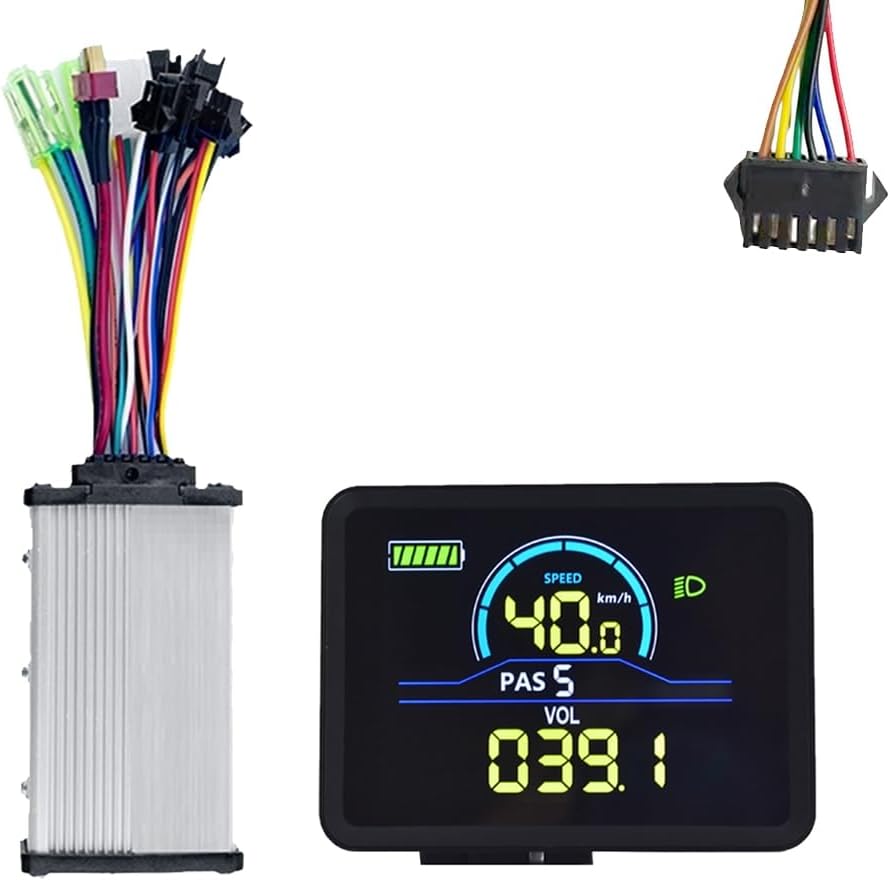
Image 2.1: The P5C LCD Display and the Sine Wave Controller, showing their respective wiring harnesses for connection to the e-bike system.
3. Setup and Installation
3.1 Compatibility
- Applicable Voltage: 24V / 36V / 48V / 60V e-bike systems.
- Applicable Handlebar Size: 22.2MM diameter.
- Communication Method: UART protocol.
3.2 Installation Steps
- Mount the Display: Securely attach the P5C LCD Display to your e-bike's handlebar (22.2MM diameter) using the integrated clamp. Ensure it is positioned for optimal visibility and accessibility.
- Connect the Display: Connect the display's wiring harness to the e-bike's main wiring system, ensuring the UART communication port is correctly aligned and secured.
- Install the Controller: Mount the Sine Wave Controller in a protected location on your e-bike frame, away from direct moisture and physical impact.
- Connect the Controller: Connect the controller's various wires (motor, battery, display, throttle, brake sensors, etc.) to their corresponding ports on your e-bike. Refer to your e-bike's specific wiring diagram if available.
- Power On Test: After all connections are made, power on your e-bike to verify the display illuminates and functions correctly.

Image 3.1: Side view of the P5C LCD Display, illustrating the integrated clamp for handlebar mounting.
4. Operating Instructions
4.1 Display Overview
The P5C LCD Display provides real-time information about your e-bike's status and performance.

Image 4.1: A close-up view of the P5C LCD Display interface, showing current speed (km/h), Pedal Assist System (PAS) level, and battery voltage (VOL).
4.2 Button Functions
The display features three buttons for control and navigation:

Image 4.2: Underside view of the P5C LCD Display, highlighting the '+', '-', and Power buttons for user interaction.
- Power Button (⏻): Press and hold to power the display on or off. A short press may cycle through display modes or confirm selections.
- Plus Button (+): Increases values, navigates up in menus, or increases Pedal Assist System (PAS) level.
- Minus Button (-): Decreases values, navigates down in menus, or decreases Pedal Assist System (PAS) level.
4.3 Displayed Information
- Power Indicator: Shows current battery charge level.
- Speed Display: Current riding speed (km/h or mph, depending on settings).
- PAS Level: Indicates the current Pedal Assist System level.
- Voltage (VOL): Displays the real-time battery voltage.
- Headlight Control: An icon indicates if the e-bike's headlights are on.
- Boost Function: Activates a temporary power boost (if supported by your e-bike system).
- Mileage: Tracks subtotal trip mileage and total accumulated mileage.
- Running Time: Displays the duration of the current ride.
- Fault Prompt: Displays error codes or warnings if a system fault is detected.
5. Maintenance
5.1 Cleaning
The P5C display is rated IP67 waterproof, meaning it is protected against dust and temporary immersion in water. To clean, wipe the display and controller with a soft, damp cloth. Avoid using harsh chemicals or abrasive materials that could damage the screen or casing.

Image 5.1: The P5C LCD Display shown with water droplets, highlighting its IP67 waterproof rating for durability in various weather conditions.
5.2 General Care
- Regularly check all connections to ensure they are secure and free from corrosion.
- Avoid exposing the display to extreme temperatures for prolonged periods.
- Do not attempt to disassemble the display or controller, as this will void any potential warranty and may cause damage.
6. Troubleshooting
If you encounter issues with your P5C display or controller, consider the following:
- No Power: Check all power connections from the battery to the controller and from the controller to the display. Ensure the battery is charged.
- Incorrect Readings: Verify that all sensor connections (e.g., speed sensor) are properly installed and functioning.
- Fault Prompt: If a fault code appears, consult your e-bike's specific documentation or contact the manufacturer for guidance on the meaning of the code.
- Display Not Responding: Try powering the system off and on again. Check the UART communication cable for damage or loose connections.
For complex issues, it is recommended to seek assistance from a qualified e-bike technician.
7. Specifications
| Feature | Detail |
|---|---|
| Product Model | P5C (Display) |
| Kit Model Number | 500734577A1 |
| Product Dimensions (Display) | 52.7 x 70.2 x 15.2 MM |
| Communication Method | UART |
| Adaptive Voltage | 24V / 36V / 48V / 60V |
| Applicable Handlebar Size | 22.2MM |
| Product Enclosures | ABS and Metal Parts |
| Item Weight (Kit) | 1.1 pounds (500 Grams) |
| Manufacturer | Bloepum |
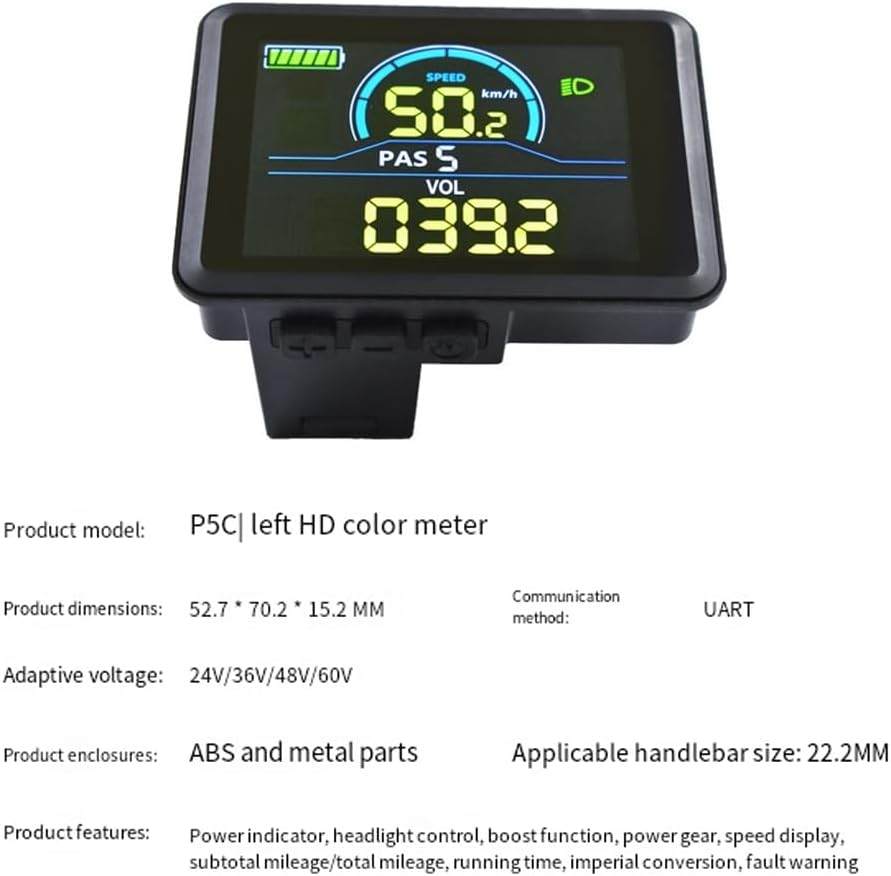
Image 7.1: The P5C LCD Display alongside a summary of its key technical specifications.
8. Warranty and Support
Specific warranty information for the Bloepum P5C Electric Bike LCD Display and Sine Wave Controller is not provided within this manual. Please refer to the product packaging, the retailer's website, or contact Bloepum customer support directly for details regarding warranty coverage and technical assistance.