
1. Introduction
The Aiwa AWS70BT is a portable Bluetooth speaker designed for both indoor and outdoor use. It features 14W of power, Bluetooth 5.3 connectivity, TWS (True Wireless Stereo) functionality, an LED lamp with sunset effect, USB and USB-C ports, and FM radio. Its IPX4 splash-resistant design and compact size make it suitable for various environments.

Image 1.1: Front-side view of the Aiwa AWS70BT Portable Bluetooth Speaker, showcasing its grey fabric finish and brown carrying handle.
2. Package Contents
Please check the box for the following items:
- Aiwa AWS70BT Portable Bluetooth Speaker
- Power Cable
- Quick Start Guide
- Warranty Card
3. Product Features
- Bluetooth 5.3: For stable and efficient wireless connection.
- True Wireless Stereo (TWS): Connect two AWS70BT speakers for a stereo sound experience.
- LED Lamp: Integrated light with sunset effect to enhance ambiance.
- Multiple Playback Options: USB, USB-C, and AUX input for versatile audio sources.
- FM Radio: Built-in radio tuner for listening to local stations.
- IPX4 Splash Resistance: Protects against splashing water from any direction.
- Portable Design: Lightweight with a convenient carrying handle.
- Long Battery Life: Up to 3.5 hours of playback on a single charge.

Image 3.1: Front view of the Aiwa AWS70BT speaker, highlighting its compact and symmetrical design.
4. Setup and Charging
4.1 Initial Charge
Before first use, fully charge the speaker. Connect the provided power cable to the USB-C port on the back of the speaker and to a compatible USB power adapter (not included). The charging indicator light will show the charging status. A full charge takes approximately 3 hours.

Image 4.1: Rear view of the speaker, showing the AUX, USB, and DC 5V (USB-C) charging ports. The ports are protected by a rubber flap.
4.2 Power On/Off
- To Power On: Press and hold the Power button (O) on the top panel until the indicator light illuminates.
- To Power Off: Press and hold the Power button (O) again until the indicator light turns off.
5. Operation
5.1 Bluetooth Pairing
- Ensure the speaker is powered on and in Bluetooth pairing mode (the Bluetooth indicator light will flash).
- On your device (smartphone, tablet), enable Bluetooth and search for available devices.
- Select "AWS70BT" from the list of devices.
- Once paired, the Bluetooth indicator light will stop flashing and remain solid.
5.2 True Wireless Stereo (TWS) Function
To connect two Aiwa AWS70BT speakers for stereo sound:
- Ensure both speakers are powered on and not connected to any Bluetooth device.
- On one speaker (this will be the primary speaker), press and hold the "M" button until you hear a prompt indicating TWS pairing mode.
- The two speakers will automatically connect to each other. Once connected, you will hear a confirmation sound.
- Now, connect your device to the primary speaker via Bluetooth as described in Section 5.1.
5.3 Playback Controls
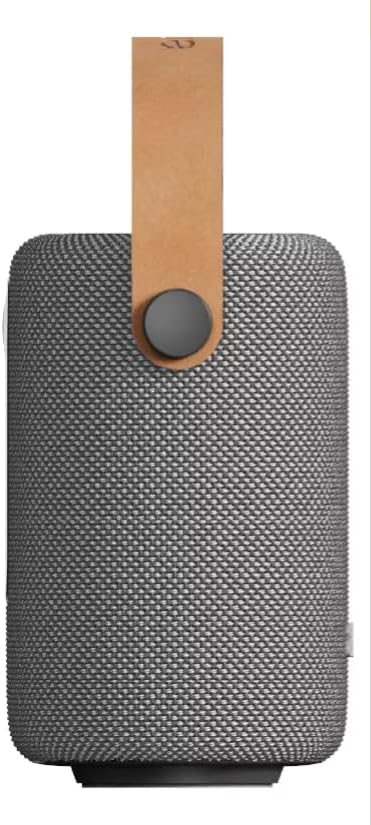
Image 5.1: Top view of the speaker, displaying the control panel with buttons for volume, playback, mode, and LED light.
- Volume Up: Press the "+" button.
- Volume Down: Press the "-" button.
- Play/Pause: Press the "►" (Play/Pause) button.
- Next Track: Press and hold the "+" button.
- Previous Track: Press and hold the "-" button.
- Change Mode (Bluetooth/USB/AUX/FM): Press the "M" button to cycle through modes.
5.4 LED Lamp Operation
- Turn On/Off LED Lamp: Press the Light button (☀).
- Change LED Light Mode: Press the Light button (☀) repeatedly to cycle through different light effects, including the sunset effect.
5.5 USB and AUX Playback
- USB: Insert a USB flash drive into the USB port. The speaker will automatically switch to USB mode and begin playing compatible audio files.
- AUX: Connect an audio device using a 3.5mm AUX cable (not included) to the AUX port. Press the "M" button to switch to AUX mode.
5.6 FM Radio Operation
- Enter FM Mode: Press the "M" button until you hear the FM radio mode activated.
- Auto Scan: Press and hold the Play/Pause button (►) to automatically scan and save available FM stations.
- Change Station: Use the "+" and "-" buttons to navigate through saved stations.
6. Maintenance
- Cleaning: Use a soft, dry cloth to clean the speaker. Do not use abrasive cleaners or solvents.
- Water Resistance: The speaker is IPX4 splash-resistant. Avoid submerging it in water or exposing it to heavy rain. Ensure the port cover is securely closed when near water.
- Storage: Store the speaker in a cool, dry place away from direct sunlight and extreme temperatures.
7. Troubleshooting
| Problem | Possible Cause | Solution |
|---|---|---|
| Speaker does not turn on. | Low battery. | Charge the speaker fully. |
| Cannot pair via Bluetooth. | Speaker not in pairing mode; device Bluetooth off; too far from speaker. | Ensure speaker is in pairing mode. Turn on Bluetooth on your device. Move device closer to speaker (within 10 meters). |
| No sound. | Volume too low; incorrect mode selected; audio cable not connected properly. | Increase volume. Press "M" to select correct input mode. Check audio cable connection. |
| TWS pairing fails. | Speakers already paired to another device; incorrect TWS pairing procedure. | Ensure both speakers are disconnected from other devices. Follow TWS pairing steps in Section 5.2 carefully. |
8. Specifications
| Feature | Detail |
|---|---|
| Model | AWS70BT |
| Bluetooth Version | 5.3 |
| Output Power | 14 Watts (Max) / 7 Watts (Nominal) |
| Speaker Type | Tweeter |
| Impedance | 4 Ohms |
| Frequency Response | 80 KHz |
| Battery Life | Up to 3.5 Hours |
| Charging Time | 3 Hours |
| Battery Capacity | 2000 mAh |
| Water Resistance | IPX4 (Splash Resistant) |
| Connectivity | Bluetooth, USB, AUX, USB-C |
| Dimensions | 15.5 cm (D) x 8 cm (W) x 17 cm (H) |
| Control Method | Buttons on device |
9. Product Videos
Video 9.1: This video demonstrates the Aiwa AWS70BT speaker's compact design, sound clarity, LED light features, and various connectivity options including Bluetooth, USB, and AUX. It also highlights its splash resistance and portability for indoor and outdoor use.
Video 9.2: This video provides an overview of the Aiwa AWS70BT speaker, showcasing its unboxing, 14W power output, clean audio, and the LED light with sunset effect. It emphasizes the speaker's elegant grey design and stable Bluetooth 5.3 connection.
Video 9.3: This video highlights the Aiwa AWS70BT speaker's portability, 7W sound output, Bluetooth 5.3 connectivity, and USB/AUX input options. It also demonstrates its splash resistance and the ambient LED light feature, suitable for various settings.
10. Warranty and Support
The Aiwa AWS70BT speaker comes with a limited warranty. Please refer to the included Warranty Card for detailed terms and conditions. For technical support or service inquiries, please contact Aiwa customer service through their official channels.
Keep your purchase receipt as proof of purchase for warranty claims.


