
Product Overview
The Miaosical Dual Automatic Cat Feeder is designed to provide a convenient and reliable feeding solution for up to two cats. It features a 4.2L food capacity, flexible scheduling for up to 6 meals per day, and 12 portions per meal. The feeder supports dual power supply options and includes a 10-second voice recording function to call your pets at meal times. Its thoughtful design with opposite dual bowls ensures peaceful feeding for multiple pets and easy maintenance.

Figure 1: Miaosical Dual Automatic Cat Feeder with two bowls.
Key Features
- Dual Cat Feeding: Designed to feed two cats simultaneously with separate bowls.
- Flexible Scheduling: Up to 6 meals per day, with 1 to 12 portions per meal (approx. 4g-8g per portion).
- 4.2L Capacity: Large dry food tank to minimize refill frequency.
- Dual Power Supply: Operates with 5V USB power adapter (included) and 3x D cell batteries (not included) for backup.
- 10-Second Voice Recording: Record a personalized message to call your pets.
- Anti-Clog Rotor: Prevents kibble jams, suitable for dry food kibble sizes 2-10mm.
- 2-in-1 Design: Can be configured for single or dual bowl feeding using a stopper.
- Easy Cleaning: Detachable food tank, lid, and bowls for hassle-free cleaning.
- Memory Chip Function: Retains time and programming settings after power outages.
Safety Information
- Ensure the feeder is placed on a stable, level surface to prevent tipping.
- Use only dry pet food with kibble sizes between 2-10mm to prevent jamming.
- Do not immerse the main unit of the feeder in water. Only detachable parts are washable.
- Keep out of reach of children and pets when not in use or during assembly/disassembly.
- Always unplug the feeder before cleaning or performing maintenance.
- Use only the provided 5V USB power adapter or recommended D cell batteries.
- The feeder features three safety locks (two lid locks, one panel lock) to prevent pets from accessing food or altering settings. Ensure these are engaged after filling and programming.

Figure 2: Safety lock features for secure operation.
Setup Guide
Package Contents
- Miaosical Dual Automatic Cat Feeder Main Unit
- Food Tank
- Lid
- 2 x Pet-safe ABS Bowls (or Stainless Steel, if optional variant purchased)
- Stopper (for single bowl configuration)
- 5V USB Power Adapter
- USB Cable
- User Manual (this document)
Assembly
- Unpack all components and ensure nothing is missing.
- Place the main feeder unit on a flat, stable surface.
- Attach the two feeding bowls to the designated slots at the base of the feeder. Ensure they are securely clicked into place.
- If using the single bowl configuration, insert the provided stopper into one of the food dispensing outlets. This will direct all food to the other bowl. The stopped bowl can then be used for water or other treats.
- Place the food tank onto the main unit, aligning it properly.
- Fill the food tank with dry kibble. Ensure the kibble size is between 2-10mm.
- Close the lid securely, ensuring both lid locks are engaged.

Figure 3: Configuring the feeder for single or dual use with the stopper.
Power Supply
The feeder supports dual power supply options:
- Primary Power: Connect the USB cable to the feeder and the 5V USB power adapter, then plug it into a wall outlet.
- Backup Power: For uninterrupted operation during power outages, install 3 x D cell batteries (not included) into the battery compartment located at the bottom of the feeder.

Figure 4: Dual power supply options for reliable feeding.
Operating Instructions
Setting the Time
- Press the "SET" button to enter time setting mode.
- Use the "Up" and "Down" arrows to adjust the hour. Press "SET" to confirm.
- Repeat for minutes.
- The LCD screen will display the current time in AM/PM 12-hour format.
Programming Feeding Schedule
The feeder allows for up to 6 meals per day, with adjustable portions for each meal.
- Press the "SET" button repeatedly until you reach the desired meal number (e.g., "1" for the first meal).
- Use the "Up" and "Down" arrows to set the feeding time for this meal. Press "SET" to confirm the time.
- Next, set the number of portions for this meal (1-12 portions). Each portion is approximately 4g-8g. Use the "Up" and "Down" arrows to adjust, then press "SET" to confirm.
- Repeat steps 2-3 for additional meals (up to 6).
- To exit programming mode, press and hold the "SET" button for a few seconds, or wait for the screen to time out.
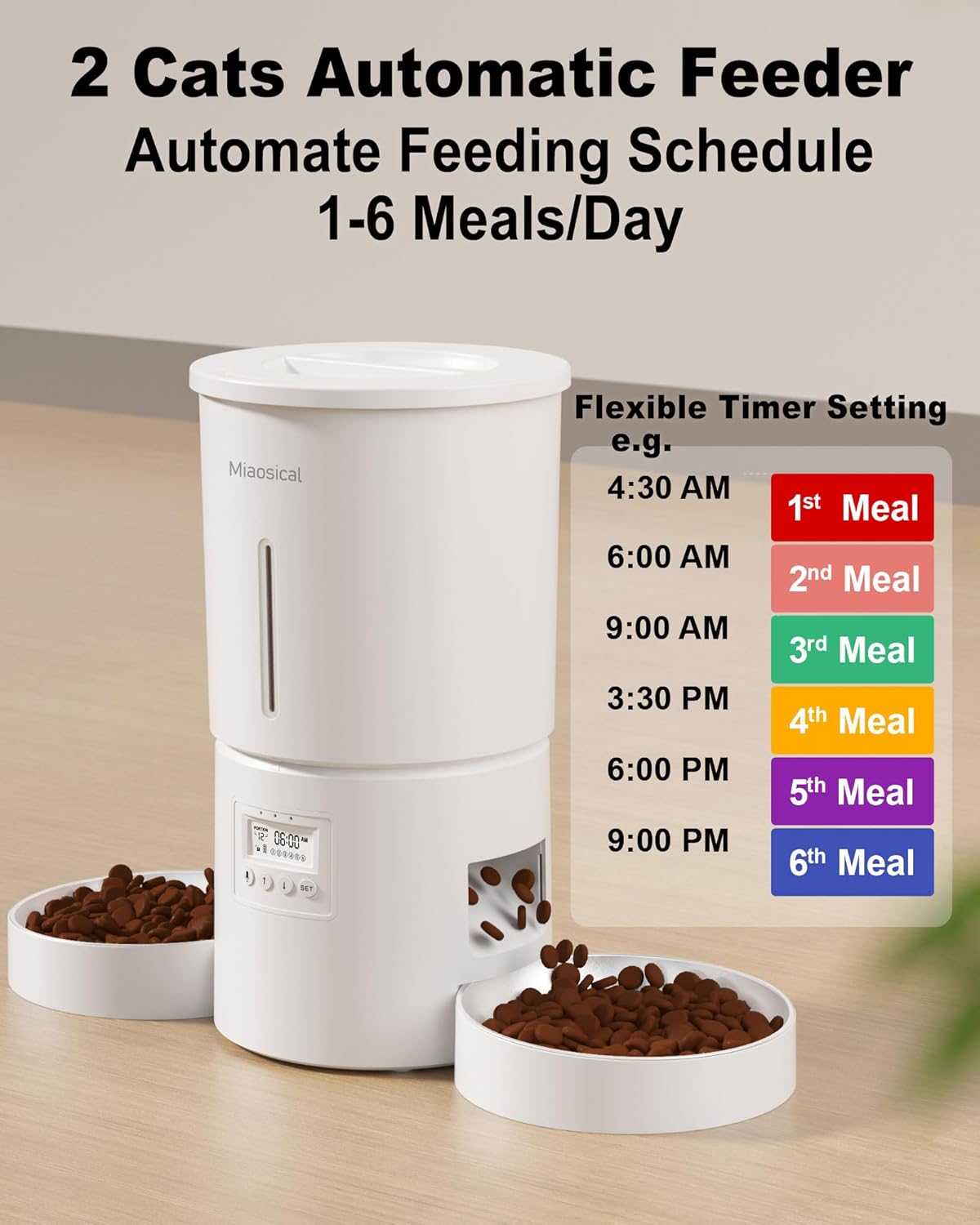
Figure 5: Example of a flexible feeding schedule.

Figure 6: Portion distribution for balanced feeding.
Voice Recording
You can record a 10-second voice message to call your pets at each meal time.
- Press and hold the microphone button (usually indicated by a microphone icon) until you hear a beep.
- Speak your message clearly into the microphone. The recording will automatically stop after 10 seconds or when you release the button.
- To play back the recording, briefly press the microphone button.

Figure 7: Using the 10-second voice recording feature.
Manual Feeding
To dispense food manually, briefly press the manual feed button (often indicated by a food bowl icon or similar). This will dispense one portion of food.
Suggested Feeding Amount
The following table provides a reference for daily feeding amounts based on cat weight and activity level. Adjust according to your pet's appetite, weight, age, and health condition.

Figure 8: Reference for daily feeding amounts.
Maintenance and Cleaning
Regular cleaning ensures the longevity and hygienic operation of your feeder.
- Disassembly: Unplug the feeder and remove any remaining food. Detach the food bowls, food tank, and lid.
- Cleaning Detachable Parts: The food bowls, food tank, and lid are made of pet-safe, BPA-free ABS material and are washable. Hand wash these parts with mild soap and water. Rinse thoroughly and dry completely before reassembling.
- Cleaning Main Unit: The main unit, which contains electronic components, is not washable. Wipe the exterior of the main unit with a clean, damp cloth. Do not use abrasive cleaners or immerse it in water.
- Anti-Clog Rotor: Periodically check the anti-clog rotor mechanism for any food residue or blockages. Ensure it rotates freely.
- Desiccant Bag: The feeder includes a desiccant bag holder in the lid to keep food fresh and dry. Replace the desiccant bag periodically (e.g., every 1-2 months) for optimal freshness.
- Reassembly: Once all parts are clean and dry, reassemble the feeder by reversing the disassembly steps. Ensure all parts are securely in place before plugging in the power.

Figure 9: Anti-clog rotor mechanism.

Figure 10: Desiccant bag for food freshness.

Figure 11: Cleaning detachable components of the feeder.
Troubleshooting
| Problem | Possible Cause | Solution |
|---|---|---|
| Feeder not dispensing food. |
|
|
| Voice recording not playing or unclear. |
|
|
| Feeder not turning on. |
|
|
| Food not evenly distributed between bowls. |
|
|
Specifications
| Feature | Detail |
|---|---|
| Model Name | Dual Automatic Cat Feeder for 2 Cats |
| Model Number | SC-A80K |
| Brand | Miaosical |
| Capacity | 4.2 Liters (approx. 2.97 pounds / 1.35 kg of dry food) |
| Material | Acrylonitrile Butadiene Styrene (ABS) |
| Kibble Size Compatibility | 2-10 mm |
| Meals Per Day | Up to 6 meals |
| Portions Per Meal | 1-12 portions (approx. 4g-8g per portion) |
| Voice Recording | 10 seconds |
| Power Supply | 5V USB Power Adapter (included), 3 x D Cell Batteries (not included) |
| Dimensions (LxWxH) | 6.89 x 6.89 x 8.27 inches (17.5 x 17.5 x 21 cm) |
| Weight | 2.97 pounds (1.35 kg) |
| Care Instructions | Hand Wash detachable parts only. Main unit not washable. |

Figure 12: Product structure and components.
Warranty and Support
Warranty Information
The Miaosical Dual Automatic Cat Feeder comes with a 1-year warranty from the date of purchase. This warranty covers manufacturing defects and malfunctions under normal use. It does not cover damage caused by misuse, accidents, unauthorized modifications, or improper maintenance.
Please retain your proof of purchase for warranty claims.
Customer Support
For any questions, technical assistance, or warranty claims, please contact Miaosical customer support through the retailer where you purchased the product or visit the official Miaosical store on Amazon:
When contacting support, please provide your product model number (SC-A80K) and a detailed description of the issue.