
Superun B0DWXSVDT3
Superun Home Exercise Bike User Manual
Model: B0DWXSVDT3
1. Introduction
This manual provides comprehensive instructions for the assembly, operation, maintenance, and troubleshooting of your Superun Home Exercise Bike. Please read this manual thoroughly before initial use to ensure safe and efficient operation and to maximize the lifespan of your equipment.
For customer support, please refer to the "Warranty and Support" section.
2. Important Safety Information
- Consult a physician before starting any exercise program.
- Ensure all parts are correctly assembled and tightened before each use.
- Keep children and pets away from the equipment during operation.
- Place the exercise bike on a flat, stable surface.
- Wear appropriate exercise attire and footwear.
- Maximum user weight capacity: 300 lbs (136 kg).
- Minimum user height: 4'6" (137 cm), Maximum user height: 6'1" (185 cm).
- Inseam height range: 29" - 36" (74 cm - 91 cm).
- Stop exercising immediately if you feel faint, dizzy, or experience pain.
3. Package Contents
Before assembly, verify that all components are present and undamaged. Refer to the included parts diagram for identification.
- Main Frame
- Front Stabilizer
- Rear Stabilizer
- Pedals (Left and Right)
- Seat Post and Seat
- Handlebar Post and Handlebars with LCD Display
- Hardware Kit (bolts, washers, nuts, tools)
- User Manual
4. Setup and Assembly
Assembly typically takes approximately 30 minutes. It is recommended to have two people for certain steps.
4.1 Attaching Stabilizers
Attach the front and rear stabilizers to the main frame using the provided bolts and washers. Ensure they are securely tightened to provide a stable base for the bike.

Image: Components of the Superun Home Exercise Bike laid out for assembly, showing the main frame, stabilizers, and other parts. This illustrates the initial setup phase.
4.2 Installing Pedals
Identify the left (L) and right (R) pedals. The left pedal screws counter-clockwise, and the right pedal screws clockwise. Ensure they are fully threaded and tightened to prevent loosening during use.
4.3 Assembling Seat and Handlebars
Insert the seat post into the main frame and secure it at the desired height. Attach the seat to the seat post. Similarly, insert the handlebar post into the frame and attach the handlebars, ensuring the LCD display is correctly positioned.

Image: A close-up of the Superun Home Exercise Bike highlighting the adjustable seat and handlebars with arrows indicating their four-way and two-way adjustment capabilities, respectively. This demonstrates the customization options for user comfort.
5. Operating Instructions
5.1 Adjusting Seat and Handlebars
For optimal comfort and exercise posture, adjust the seat (4-way: up/down, forward/backward) and handlebars (2-way: up/down) to fit your body. Ensure the seat height allows for a slight bend in your knee at the bottom of the pedal stroke.
Image: A close-up of the Superun Home Exercise Bike highlighting the adjustable seat and handlebars with arrows indicating their four-way and two-way adjustment capabilities, respectively. This demonstrates the customization options for user comfort.
5.2 Using the LCD Display
The integrated LCD monitor tracks various workout metrics:
- TIME: Duration of your workout.
- SPEED: Current cycling speed.
- DIST: Distance covered during the workout.
- RPM: Revolutions Per Minute (pedal cadence).
- CALO: Calories burned (estimated).
- ODO: Odometer (total accumulated distance).
- LEVEL: Resistance level.
- CNT: Count (if applicable, e.g., pedal strokes).
Use the buttons on the display to cycle through modes or reset values as per the display's specific instructions.
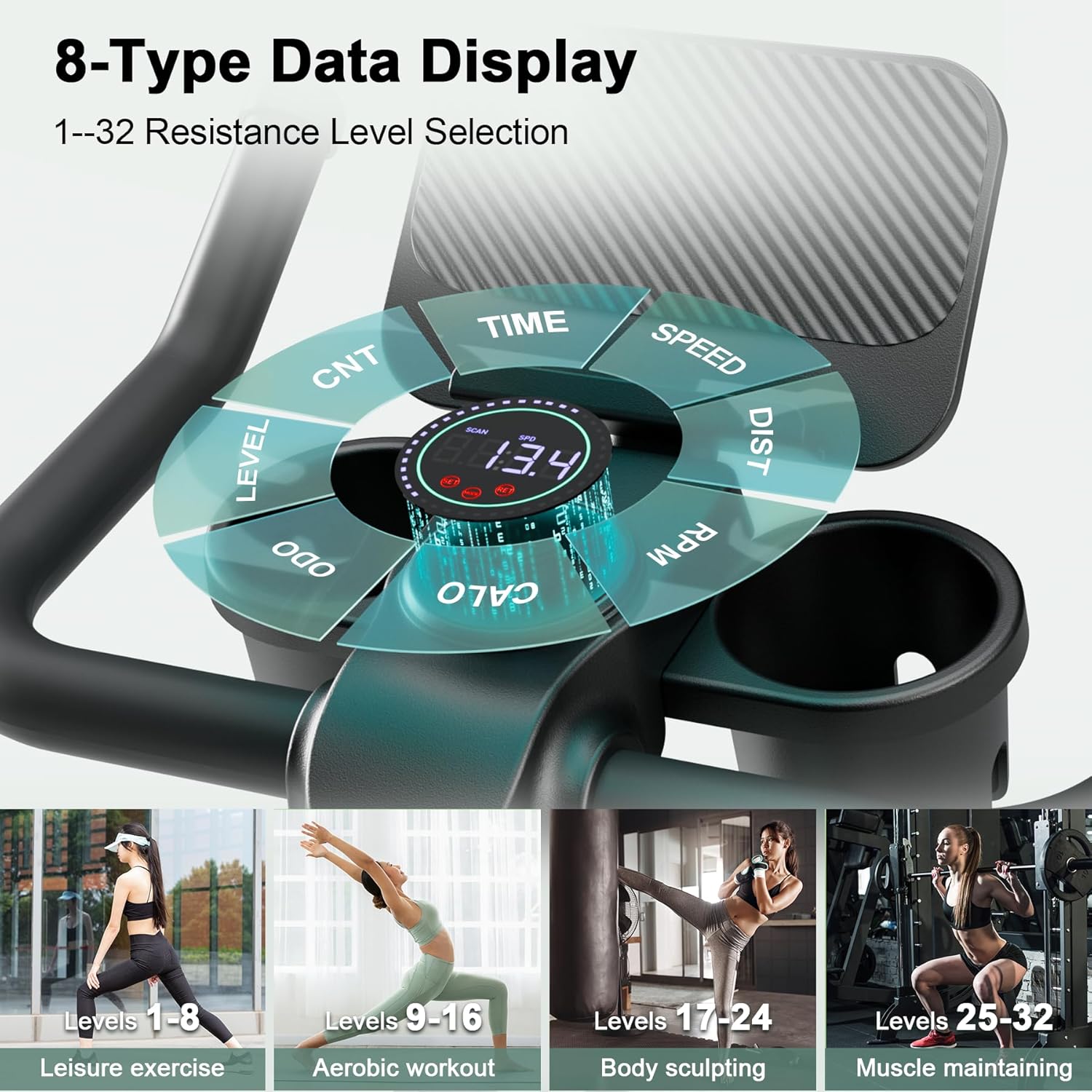
Image: A detailed view of the Superun Home Exercise Bike's LCD display, showing various workout data points like time, speed, distance, RPM, calories, and resistance level. This illustrates the data tracking capabilities of the bike.
5.3 Adjusting Magnetic Resistance
The bike features an adjustable magnetic resistance system. Turn the resistance knob clockwise to increase resistance and counter-clockwise to decrease it. There are multiple levels of resistance to suit various fitness levels and workout intensities.
The magnetic resistance system provides a quiet and smooth operation, eliminating the need for brake pad replacements.

Image: An illustrative graphic showing the 32 resistance levels of the Superun Home Exercise Bike, categorized into four groups for different workout types: leisure, aerobic, body sculpting, and muscle maintaining. This highlights the versatility of the resistance system.
5.4 APP Data Tracking
The exercise bike supports APP data tracking. Connect your device to the bike via Bluetooth (if applicable) to monitor your workout data more comprehensively through a compatible fitness application. Refer to the app's instructions for pairing and usage.

Image: A user on the Superun Home Exercise Bike, with a tablet mounted on the handlebars displaying a fitness application interface. The image shows various workout metrics and interactive elements, illustrating the APP data tracking feature.
6. Maintenance
Regular maintenance ensures the longevity and safe operation of your Superun Home Exercise Bike.
- Cleaning: Wipe down the bike with a damp cloth after each use to remove sweat and dust. Avoid abrasive cleaners.
- Inspections: Periodically check all bolts, nuts, and moving parts for tightness. Tighten any loose components.
- Lubrication: The magnetic resistance system and belt drive are generally maintenance-free. No lubrication is typically required for these components.
- Storage: Store the bike in a dry, cool place away from direct sunlight and extreme temperatures. The transport wheels allow for easy movement.
7. Troubleshooting
| Problem | Possible Cause | Solution |
|---|---|---|
| Bike is unstable or wobbles. | Loose stabilizer bolts; uneven floor surface. | Ensure all stabilizer bolts are tightened. Adjust the leveling feet on the stabilizers if your floor is uneven. |
| Pedals feel loose or make noise. | Pedals not fully tightened. | Re-tighten pedals. Remember the left pedal tightens counter-clockwise, and the right pedal tightens clockwise. |
| Resistance adjustment is not smooth. | Internal mechanism issue (rare for magnetic resistance); debris. | Inspect for any visible obstructions. If the issue persists, contact customer support. |
| LCD display is not working. | Batteries dead or incorrectly installed; loose connection. | Check and replace batteries. Ensure all display cables are securely connected. |
| Unusual noises (creaking, squeaking). | Loose components; friction between parts. | Identify the source of the noise. Tighten all bolts and nuts. Apply a small amount of silicone lubricant to contact points if necessary (avoiding the belt and flywheel). |
8. Specifications
| Feature | Detail |
|---|---|
| Model | B0DWXSVDT3 |
| Brand | Superun |
| Resistance Mechanism | Magnetic |
| Drive System | Belt |
| Power Source | Pedal-powered (non-electric) |
| Maximum Weight Recommendation | 300 lbs (136 kg) |
| Product Dimensions (L x W x H) | 90 x 46 x 104 cm (35.4 x 18.1 x 40.9 inches) |
| Item Weight | 19 kg (41.9 lbs) |
| Adjustable Seat | 4-way (up/down, forward/backward) |
| Adjustable Handlebars | 2-way (up/down) |
| LCD Display Functions | Time, Speed, Distance, RPM, Calories, Odometer, Level, Count |
| UPC | 717097607639 |
9. Warranty and Support
Superun provides customer support for its products. For warranty information, technical assistance, or to report any issues, please contact Superun customer service. Details are typically found on the product packaging or the official Superun website.
The product features 24/7 after-sales service to address any problems.
For further assistance, please visit the Superun Store on Amazon.
Related documentsB0DWXSVDT3

Ask a question about this manual
Ask about setup, troubleshooting, compatibility, parts, safety, or missing instructions. Manuals+ will review the question and use this page’s manual context to help answer it.