
Introduction
Thank you for choosing the LBW Grow Light for Indoor Plants. This full-spectrum plant light is designed to provide optimal lighting conditions for your indoor plants, promoting healthy growth and vitality. Featuring adjustable height, multiple light modes, dimmable brightness, and an auto-timer function, this grow light is suitable for a variety of small indoor plants, including succulents, herbs, and orchids. Please read this manual carefully before use to ensure proper setup and operation.
Safety Information
- Ensure the power supply voltage is compatible with the product's requirements (5 Volts).
- Do not expose the grow light to water or high humidity. This product is designed for indoor use only.
- Avoid looking directly into the LED lights for extended periods, as this may cause eye strain.
- Keep the device away from heat sources and flammable materials.
- Do not attempt to disassemble or modify the product. Repairs should only be performed by qualified personnel.
- Unplug the power cord before cleaning or when not in use for an extended period.
- Ensure the product stand is stable, especially when using the base. For optimal stability, place a flower pot on the base.
Package Contents
Verify that all components are present in the package:
- LED Grow Light Head with Control Cable (USB)
- Adjustable Telescopic Pole
- Base Stand
- AC Adapter (USB power supply)
- Instruction Manual

Image: Contents of the LBW Grow Light package, showing the light head, adjustable pole, base, and power adapter.
Specifications
| Feature | Detail |
|---|---|
| Lamp Type | LED |
| Shade Color | White |
| Switch Type | Touch, Dimmer |
| Brand | LBW |
| Model Number | 250201 |
| Power Source | Corded Electric (USB) |
| Voltage | 5 Volts |
| Wattage | 7 watts |
| Number of Light Sources | 1 |
| Indoor/Outdoor Usage | Indoor |
| Mounting Type | Tabletop / Soil Stake |
| Material Type | Aluminum |
| Adjustable Height | 7.8" to 26" |
| Light Spectrum | Full Spectrum (380nm to 800nm) |
| LED Configuration | 33 Cold White (6000K), 12 Warm White (3200K), 3 Red (660nm) |
Setup
The LBW Grow Light offers two installation methods to suit your needs: using the detachable base or inserting it directly into the soil.
Method 1: Using the Detachable Base
- Insert Pole into Base: Gently insert the bottom end of the telescopic pole into the designated slot on the detachable base. Ensure it is securely seated.
- Position Plant: Place your potted plant on top of the base, ensuring the pot's weight helps stabilize the grow light.
- Adjust Height: Extend or retract the telescopic pole to adjust the light head's height, positioning it appropriately above your plant. The height is adjustable from 7.8 inches to 26 inches.
Method 2: Inserting into Soil
- Insert Pole into Soil: Carefully insert the pointed end of the telescopic pole directly into the soil of your potted plant. Ensure it is stable and upright.
- Adjust Height: Extend or retract the telescopic pole to adjust the light head's height, positioning it appropriately above your plant.
- Adjust Angle: The light head can be slightly angled to direct light precisely onto your plant.

Image: Illustration of the two installation methods: using the detachable base or inserting the pole directly into the soil.
Video: A demonstration of setting up the LBW desk plant grow light, showing both the base and soil stake installation options, and height adjustment.
Operating Instructions
The LBW Grow Light features an inline controller with buttons for power, timer, light mode, and brightness adjustment.

Image: The inline controller showing buttons for power, timer, light modes, and brightness levels.
Power On/Off
- Connect the USB cable to the provided AC adapter and plug it into a power outlet.
- Press the Power Button (
 ) on the inline controller to turn the light on or off.
Adjusting Brightness Levels
The grow light offers 5 dimmable brightness levels:
- Press the Brightness Up (+) or Brightness Down (-) buttons to cycle through 20%, 40%, 60%, 80%, and 100% brightness.
Changing Light Modes (Colors)
The grow light provides three light color options:
- Press the Light Mode Button (
 ) to switch between:
- White Light (6500K): Primarily cold white LEDs.
- Warm Light (3000K): Primarily warm white LEDs.
- Full Spectrum (5000K): A combination of cold white, warm white, and red LEDs (380nm to 800nm) for comprehensive plant growth.
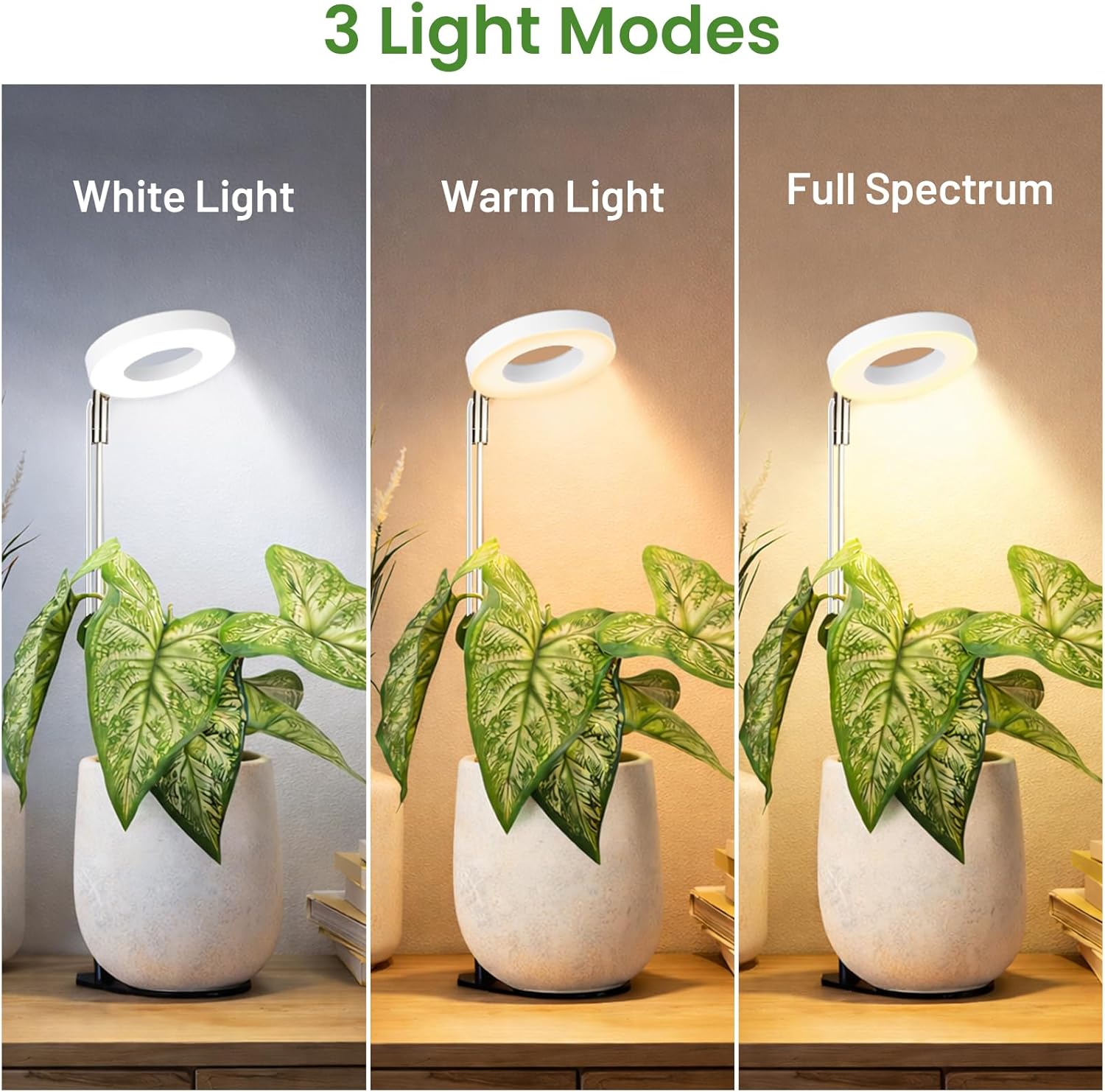
Image: Visual representation of the three available light modes: White Light, Warm Light, and Full Spectrum.
Setting the Auto-Timer
The grow light includes an auto-timer function to provide consistent lighting for your plants.
- Press the Timer Button (
 ) to select a duration: 6 hours, 8 hours, 12 hours, or 16 hours.
- Once set, the light will automatically turn on and off at the same time each day according to the selected cycle.
Maintenance
- Cleaning: Ensure the grow light is unplugged before cleaning. Use a soft, dry cloth to wipe the light head and pole. Do not use abrasive cleaners or solvents.
- Storage: When not in use for extended periods, unplug the light, clean it, and store it in a cool, dry place away from direct sunlight.
- Cable Care: Avoid bending or crimping the power cable excessively. Do not place heavy objects on the cable.
Troubleshooting
Light Does Not Turn On
- Check Power Connection: Ensure the USB cable is securely connected to the AC adapter and the adapter is firmly plugged into a working power outlet.
- Inspect Cable: Check the power cable for any visible damage or kinks. Try gently adjusting the cable connections.
- Test Outlet: Plug another device into the same power outlet to confirm it is functioning correctly.
- Try Different Adapter: If possible, try using a different compatible USB power adapter (5V) to rule out an adapter issue.
Light Flickers or Changes Brightness Unexpectedly
- Stable Power: Ensure the power source is stable and not experiencing fluctuations.
- Cable Connection: Re-check all cable connections for looseness.
Timer Function Not Working
- Verify Setting: Ensure you have pressed the Timer Button to select a specific duration (6H, 8H, 12H, or 16H). The indicator light for the selected duration should be illuminated.
- Power Interruption: If power is interrupted, the timer setting may need to be reset.
Warranty and Support
The LBW Grow Light (Model 250201) comes with a one-year manufacturer's warranty. Additionally, we offer a 30-day satisfaction or return policy.
If you encounter any issues or have questions regarding your product, please contact LBW customer service. Provide your model number (250201) and a detailed description of the problem for prompt assistance.
Contact information can typically be found on the product packaging or through your point of purchase.