
1. Introduction
Thank you for choosing the iNVItop Front Open Carry Case. This manual provides essential information for the proper setup, operation, maintenance, and troubleshooting of your new carry case. Please read this manual thoroughly before use to ensure optimal performance and longevity of the product.
2. Product Features
The iNVItop Front Open Carry Case is designed for convenience, durability, and security, incorporating several key features:
- Front-Opening Design & Waterproofing: Allows quick access to essential items without fully opening the main compartment. The material offers excellent waterproofing to protect your belongings.
- Lightweight Design & Hidden Cup Holder: Engineered for easy portability, reducing strain during travel. A discreet cup holder is integrated for beverages or small umbrellas.
- USB Port & Hidden Hook: Features an external USB charging port for convenient device charging on the go (power bank not included). A hidden hook provides a place to hang bags or clothing.
- Stylish Appearance & Aluminum Frame Structure: Combines a sophisticated aesthetic with a robust ABS material and reinforced aluminum frame for high durability and shock resistance.
- Security: Equipped with a password lock to enhance the security of your belongings during travel.

Image: Overview of the iNVItop Carry Case highlighting its dimensions and key features such as the front-open compartment, USB port, and cup holder.
3. Setup
3.1 Setting the Password Lock
- The default password is usually 0-0-0.
- Locate the small reset button (often recessed) next to the number dials. Use a pen or a pointed object to press and hold this button.
- While holding the reset button, set your desired 3-digit combination by rotating the dials.
- Release the reset button. Your new password is now set. Remember your combination carefully.

Image: Detailed view of the password lock mechanism and the integrated USB charging port on the side of the carry case.
3.2 Adjusting the Telescopic Handle
The telescopic handle can be adjusted to multiple heights for comfortable maneuvering. Press the button on top of the handle and pull up or push down to extend or retract it to your preferred height. Ensure it clicks securely into place.
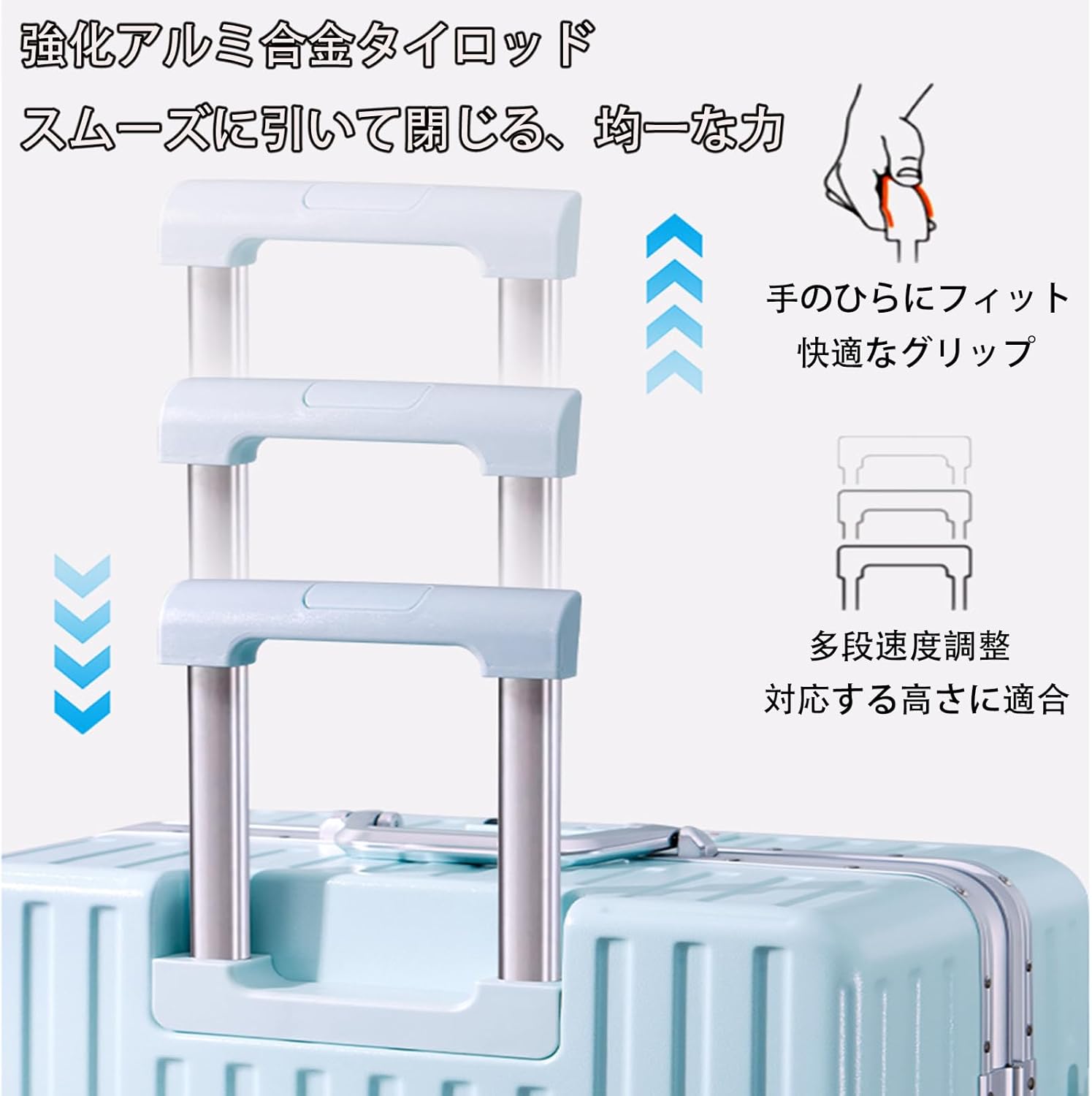
Image: Illustration showing the multi-stage adjustment of the telescopic handle for ergonomic use.
4. Operating Instructions
4.1 Using the Front-Open Compartment
To access the front compartment, simply unlatch the front panel. This section is ideal for laptops, documents, or items you need to retrieve quickly without exposing the main contents of your suitcase.
4.2 Charging Devices via USB Port
Connect your power bank (not included) to the internal USB cable inside the carry case. Then, use the external USB port to connect your smartphone, tablet, or other USB-powered devices for charging.
4.3 Utilizing the Hidden Cup Holder
The hidden cup holder can be pulled out from the side of the case. It is designed to securely hold drinks or a folded umbrella, providing easy access while on the move.
4.4 Using the Side Hooks
Extend the hidden side hooks to hang small bags, backpacks, or other items, keeping them off the floor and easily accessible.
4.5 Maneuvering with Double Casters
The carry case is equipped with silent, wear-resistant double casters that rotate 360 degrees, allowing for smooth and effortless movement in any direction.

Image: Close-up of the silent, wear-resistant double casters, highlighting their 360-degree rotation and load capacity.
5. Maintenance
5.1 Cleaning the Exterior
Wipe the exterior surface with a soft, damp cloth and mild soap. Avoid abrasive cleaners or solvents that may damage the finish. Dry thoroughly with a clean cloth.
5.2 Cleaning the Interior
Vacuum the interior lining to remove dust and debris. For stains, spot clean with a damp cloth and mild detergent. Allow to air dry completely before closing the case.
5.3 Caster Care
Periodically check the casters for any tangled hair or debris. Remove any obstructions to ensure smooth rolling. Lubricate the wheel axles with a silicone-based spray if they become stiff.
5.4 Zipper Maintenance
Keep zippers clean and free of debris. If a zipper becomes stiff, apply a small amount of zipper lubricant or wax to the teeth.
6. Troubleshooting
6.1 Password Lock Not Opening
- Ensure you are entering the correct 3-digit combination.
- If you have forgotten your combination, you may need to try all 1000 combinations (000-999) or contact customer support for assistance.
6.2 Casters Not Rolling Smoothly
- Check for and remove any hair, lint, or debris wrapped around the wheel axles.
- Ensure the casters are not damaged. If damaged, they may need replacement.
6.3 Telescopic Handle Sticking
- Ensure the release button is fully pressed when extending or retracting the handle.
- Check for any visible obstructions in the handle mechanism.
- Wipe the handle shafts clean and apply a small amount of silicone lubricant if necessary.
7. Specifications
| Feature | Detail |
|---|---|
| Brand | iNVItop |
| Model Number | HW05168-A-20 |
| Product Dimensions | 44 x 26 x 69 cm (L Size) |
| Material | ABS with Aluminum Frame |
| Casters | Removable Double Casters, 360-degree rotation, Silent, Wear-resistant TPE |
| Security | Password Lock |
| Connectivity | USB Charging Port |
| Additional Features | Front-Open Compartment, Hidden Cup Holder, Hidden Side Hooks |
8. Warranty and Support
iNVItop is committed to providing high-quality products. For any questions, concerns, or issues regarding your carry case, please contact our customer support. Please refer to your purchase documentation for specific warranty terms and contact information.