
1. Introduction
The HAIZHIHUI Fitdays Smart Body Fat Scale WOLAIFL2019 is designed to provide comprehensive body composition analysis. Utilizing advanced Bio-electrical Impedance Analysis (BIA) technology, this scale measures various body metrics beyond just weight, offering insights into your health and fitness journey. It connects wirelessly to the Fitdays application on your smartphone for detailed tracking and analysis.
This manual provides instructions for setting up, operating, and maintaining your smart scale, ensuring accurate and consistent measurements.
Important Safety Information
- Consult a healthcare professional before making significant changes to your diet, exercise routine, or health goals.
- Do not use this device if you are pregnant, have a pacemaker, or other internal medical devices.
- The scale's surface is tempered glass. Avoid dropping objects on it or hitting its edges, as this may cause damage.
- Ensure the scale is placed on a hard, flat surface for accurate readings. Soft surfaces like carpets can affect precision.
- Keep the scale dry. Do not immerse it in water or use abrasive cleaners.
- This scale is for household use only and not intended for medical diagnosis or treatment.
2. Package Contents
- 1 x HAIZHIHUI Fitdays Smart Body Fat Scale WOLAIFL2019
- 1 x User Manual (this document)
- Note: AAA batteries are typically not included and must be purchased separately. The scale requires 4x AAA batteries.
3. Product Overview
The WOLAIFL2019 Smart Body Fat Scale features a sleek design with a tempered glass platform and an integrated display. It uses four high-precision sensors and electrodes to measure your body composition.

Figure 3.1: The HAIZHIHUI Fitdays Smart Body Fat Scale WOLAIFL2019, showing its overall design and the integrated digital display.
3.1 Dual Screen Display
The scale is equipped with a unique dual screen display. One section shows your current weight, while the other provides a visual representation of various body composition metrics directly on the scale.

Figure 3.2: Close-up of the scale's dual screen display, illustrating separate areas for weight and body test data.
3.2 Stable and Safe Design
The scale incorporates a 6mm tempered glass platform for durability and safety. It features super accurate G-shape high-precision sensors and four anti-slip foot mats to ensure stability and accurate measurements on various surfaces.

Figure 3.3: Diagram showing the internal G-shape sensors, 6mm tempered glass platform, and anti-slip foot mats for enhanced stability and safety.
4. Setup
4.1 Battery Installation
- Turn the scale over to access the battery compartment on the underside.
- Open the battery compartment cover.
- Insert 4x AAA batteries, ensuring correct polarity (+/-).
- Close the battery compartment cover securely.
4.2 Downloading the Fitdays App
The Fitdays app is essential for accessing all body composition metrics and tracking your progress. It is compatible with Bluetooth 4.0 and above.
- Search for "Fitdays" in the Apple App Store (for iOS devices) or Google Play Store (for Android devices).
- Download and install the application on your smartphone.

Figure 4.1: Image showing the Fitdays app interface on a smartphone and icons for App Store and Google Play, indicating Bluetooth connectivity.
4.3 Initial Pairing and User Profile Creation
- Ensure Bluetooth is enabled on your smartphone.
- Open the Fitdays app. You may be prompted to create an account or log in.
- Follow the on-screen instructions to create your user profile, including personal details such as age, gender, height, and activity level. This information is crucial for accurate body composition calculations.
- Step onto the scale barefoot. The scale will automatically turn on and attempt to pair with the app.
- Once paired, your weight and other metrics will be displayed on the scale and synchronized with the Fitdays app.
5. Operating Instructions
5.1 Taking a Measurement
- Place the scale on a hard, flat surface.
- Step onto the scale barefoot, ensuring your feet are centered on the electrodes.
- Stand still until your weight is displayed and stabilized. The scale will then proceed to measure other body composition data.
- Your weight will appear on the scale's display. If the app is open and connected via Bluetooth, all measured data will automatically sync to your profile.
5.2 Using the Fitdays App
The Fitdays app provides a detailed overview of your body composition data and allows for long-term tracking.
- Dashboard: View your latest measurements and a summary of key metrics.
- Trends: Track your daily, weekly, and monthly progress for each metric through graphs.
- User Management: Add unlimited users to the app, allowing the entire family to use the scale and track their individual data.
- Baby Weighing Mode: Use this feature to weigh infants or pets. First, weigh yourself, then hold the baby/pet and weigh again. The app will calculate the baby/pet's weight.
- Data Sharing: The app supports syncing with other fitness apps and sharing data on social media platforms.
5.3 Offline Functionality
The scale includes an offline function with a memory IC chip. This allows it to store up to 8 core data points even when not connected to the app. The stored data will sync to the app once a connection is re-established.

Figure 5.1: Illustration of the 8 core data points (Weight, Body Fat, Body Water, Heart Rate, Bone Mass, Muscle Mass, Body Type, BMI) that can be stored offline.
6. Understanding Your Data
The Fitdays Smart Body Fat Scale provides up to 17 core body composition measurements. These metrics offer a comprehensive view of your health.
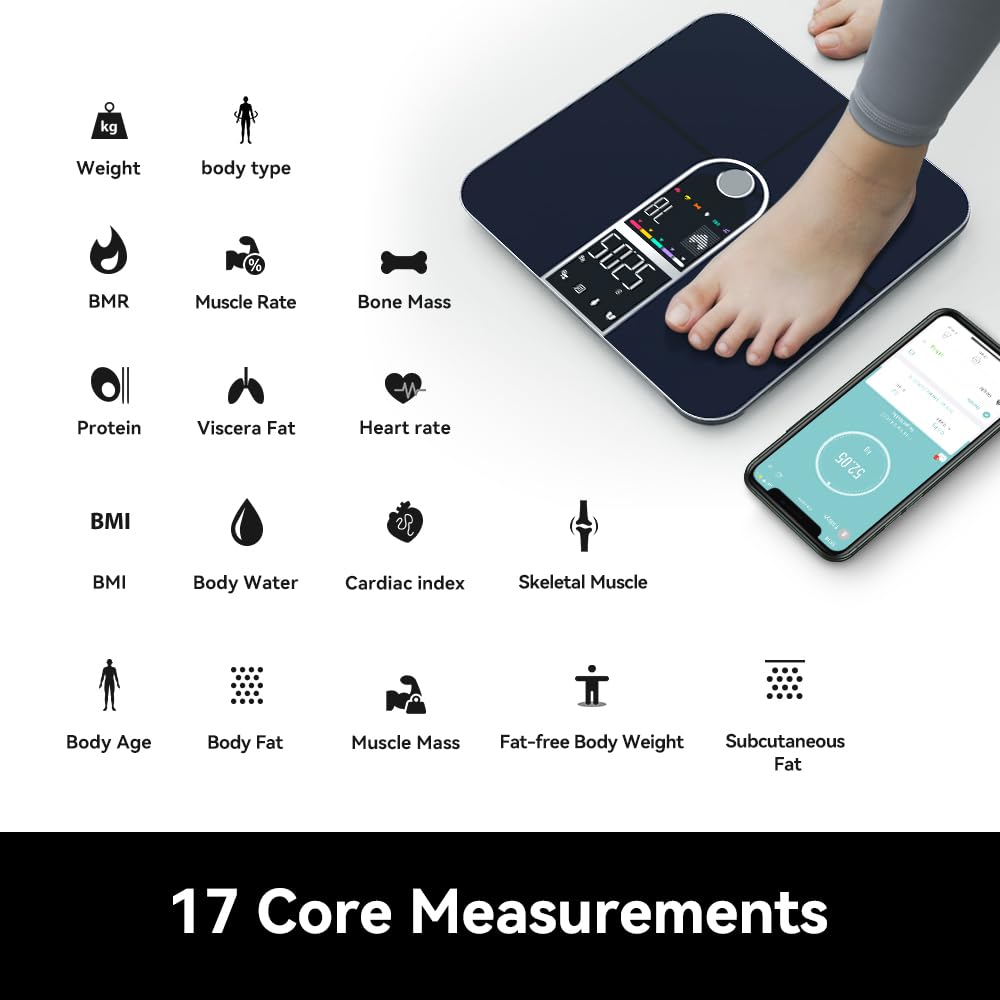
Figure 6.1: Visual representation of the 17 core measurements provided by the scale, including Weight, Body Type, BMR, Muscle Rate, Bone Mass, Protein, Viscera Fat, Heart Rate, BMI, Body Water, Cardiac Index, Skeletal Muscle, Body Age, Body Fat, Muscle Mass, Fat-free Body Weight, and Subcutaneous Fat.
Key Metrics Explained:
- Weight: Your total body mass.
- BMI (Body Mass Index): A measure of body fat based on height and weight.
- Body Fat Percentage: The proportion of fat to total body weight.
- Body Water Percentage: The total amount of fluid in your body.
- Muscle Mass: The total weight of muscle in your body.
- Bone Mass: The total weight of bone mineral in your body.
- Heart Rate: Real-time measurement of your heart rate.
- BMR (Basal Metabolic Rate): The number of calories your body needs to perform basic, life-sustaining functions.
- Visceral Fat: Fat stored around the organs in your abdomen.
- Subcutaneous Fat: Fat stored directly under the skin.
- Protein: The total amount of protein in your body.
- Body Age: An estimation of your body's biological age based on your metrics.
- Skeletal Muscle: Muscles attached to bones, responsible for movement.
- Fat-free Body Weight: The total weight of your body excluding fat.

Figure 6.2: The scale displaying heart rate measurement, with an accompanying smartphone app view.
7. Maintenance and Care
- Cleaning: Wipe the scale's surface with a damp cloth and mild detergent. Do not use abrasive cleaners or immerse the scale in water.
- Storage: Store the scale in a cool, dry place. Avoid extreme temperatures.
- Battery Replacement: Replace batteries when the low battery indicator appears on the display or in the app. Always replace all 4 AAA batteries at the same time.
- Handling: Handle the scale with care. The tempered glass surface is durable but can break if subjected to sharp impacts or drops. Avoid hitting the edges of the scale.
8. Troubleshooting
| Problem | Possible Cause | Solution |
|---|---|---|
| Scale does not turn on. | Batteries are dead or incorrectly installed. | Check battery polarity. Replace all 4 AAA batteries. |
| Inaccurate weight readings. | Scale is on an uneven or soft surface (e.g., carpet). Scale needs calibration. | Place the scale on a hard, flat surface. Step on and off the scale quickly to auto-calibrate before taking a measurement. |
| No body composition data (only weight). | Not stepping on barefoot. Feet not making proper contact with electrodes. App not connected or profile incomplete. | Ensure you are barefoot and your feet are centered on the electrodes. Open the Fitdays app and ensure Bluetooth is on. Complete your user profile in the app. |
| App not connecting to scale. | Bluetooth is off. App permissions not granted. Scale is out of range. | Ensure Bluetooth is enabled on your phone. Check app permissions. Move closer to the scale. Restart the app and/or your phone. |
| "Err" message on display. | Overload or measurement error. | The scale's maximum capacity is 400 lbs (180 kg). Step off the scale and try again. If the issue persists, contact support. |
9. Specifications

Figure 9.1: Diagram illustrating the product dimensions, screen size, power requirements, capacity, and division.
| Feature | Detail |
|---|---|
| Product Model | WOLAIFL2019 |
| Product Dimensions | 278 x 278 x 27 mm (10.9 x 10.9 x 1.06 inches) |
| VA Screen Size | 107 x 59 mm |
| Power Source | 4 x AAA batteries |
| Capacity | 180 kg / 400 lbs |
| Division (Precision) | 50 g / 0.1 lb |
| Display Type | LED, Colorful Digit Display |
| Special Features | Auto Shut Off, Backlit Display, Basal Metabolic Rate, Body Mass Index, Lightweight |
| Connectivity | Bluetooth 4.0 and above |
| Manufacturer | HAIZHIHUI |
10. Warranty and Support
For warranty information and customer support, please refer to the documentation included with your purchase or contact the manufacturer directly. Keep your purchase receipt as proof of purchase.
Manufacturer: HAIZHIHUI
For further assistance, please visit the official HAIZHIHUI store on Amazon: HAIZHIHUI Store