
X-shop HJ012
X-shop Kids Drone User Manual - Model HJ012
Brand: X-shop | Model: HJ012
Introduction
This manual provides essential information for the safe and effective operation of your X-shop Kids Drone. Designed with user-friendly features, this foldable drone offers an immersive flying experience with its HD camera and intuitive controls. Please read thoroughly before first use.
Package Contents
- X-shop Kids Drone (Model HJ012)
- Remote Control
- Rechargeable Drone Battery (Lithium Ion)
- USB Charging Cable
- Propeller Guards (4)
- Extra Propellers
- Screwdriver
- Carrying Case
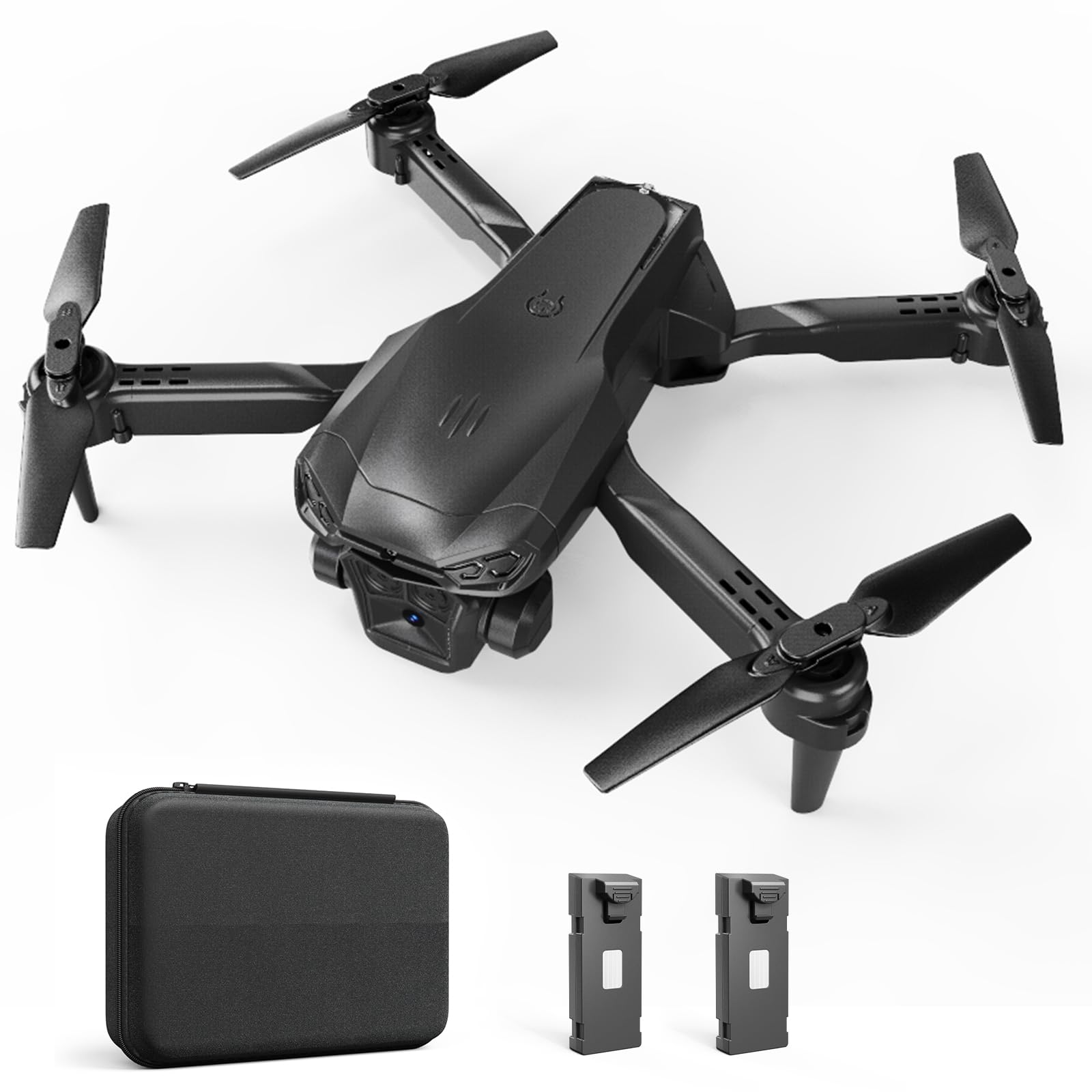
The package includes the foldable drone, a remote control, a rechargeable drone battery, a USB charging cable, propeller guards, extra propellers, a screwdriver for maintenance, and a convenient carrying case for portability.
Setup Guide
1. Charging the Battery
Before first use, fully charge the drone's Lithium Ion battery using the provided USB charging cable. Connect one end of the cable to the drone battery and the other to a compatible USB power source. The charging indicator will show progress. The remote control requires 2 9V batteries (not included).
2. Installing Propeller Guards
For added protection, especially for beginners, attach the propeller guards to each motor arm. Align the guards with the designated slots and gently press until they click into place.

The propeller guards are designed to protect the propellers from impact during flight, which is particularly useful for new pilots.
3. Powering On and Connecting
- Place the drone on a flat, level surface.
- Press and hold the power button on the drone until the indicator lights flash.
- Press the power button on the remote control. The remote will automatically pair with the drone. A solid light on both devices indicates a successful connection.
- For FPV and advanced features, download the companion app to your smartphone and connect to the drone's Wi-Fi network.
The drone and remote are designed for quick and easy pairing. Ensure both devices are powered on and within range for automatic frequency matching.
Video 1: Demonstration of the X-shop Kids Drone's features and ease of use for beginners, including camera functionality.
Operating Instructions
1. Basic Flight Controls
- One-Key Takeoff/Landing: Press the dedicated button on the remote for automatic takeoff to a stable hover or for a gentle landing.
- Altitude Hold: The drone maintains its current altitude, allowing for stable flight and easier control.
- Headless Mode: In this mode, the drone's orientation is irrelevant; it will move forward, backward, left, or right relative to the pilot's position, simplifying control for beginners.
- Speed Settings: Choose from three speed settings (low, medium, high) to match your skill level and flying environment.
2. Advanced Features
- 360° Flips: Execute exciting aerial stunts with a single button press.
- FPV Transmission: Stream real-time 1080P HD video footage directly to your smartphone via Wi-Fi for an immersive flying experience.
- Gesture Control: Use specific hand gestures for taking photos or recording videos when connected to the smartphone app.
- Trajectory Flight: Draw a flight path on your smartphone screen, and the drone will automatically follow it.
3. Camera Operation
The drone is equipped with a 1080P HD WIFI camera with a 90° adjustable lens. Photos and videos can be captured directly from the remote control or through the smartphone app. Ensure your smartphone is connected to the drone's Wi-Fi for FPV and media capture.
Maintenance
- Propeller Replacement: If propellers are damaged, use the provided screwdriver to replace them with the extra sets included in the package. Ensure correct orientation (A and B blades).
- Cleaning: Regularly clean the drone body and camera lens with a soft, dry cloth. Avoid using liquids.
- Storage: When not in use, fold the drone and store it along with the remote control and accessories in the provided carrying case to prevent damage.
Troubleshooting
- Connection Issues: Ensure both drone and remote are fully charged and powered on. Restart both devices and try pairing again. For app connection, verify Wi-Fi is enabled and connected to the drone's network.
- Unstable Flight: Calibrate the drone on a flat surface before takeoff. Check for any damaged propellers and replace if necessary. Avoid flying in strong winds.
- Short Battery Life: Ensure the drone battery is fully charged before each flight. Flight time can vary based on flight style and environmental conditions.
- Poor Camera Quality: Ensure the camera lens is clean. Video and photo quality can be affected by Wi-Fi signal strength; try flying closer to the drone or in an area with less interference.
Product Specifications
| Brand | X-shop |
| Model Name | X-shop Drone |
| Item Model Number | HJ012 |
| Age Range (Recommended) | 8 years and up |
| Color | Black |
| Material | Plastic |
| Item Weight | 8.1 ounces (230 Grams) |
| Product Dimensions | 8.85 x 6.96 x 2.55 inches |
| Video Capture Format | MP4 |
| Supported Image Format | JPEG |
| Remote Control Technology | Wi-Fi |
| Wireless Communication Technology | Wi-Fi |
| Battery Cell Composition | Lithium Ion |
Safety Information
Always operate the drone in open areas, away from people, animals, and obstacles. Do not fly in strong winds or adverse weather conditions. Keep fingers and hair away from rotating propellers. This drone weighs less than 249g, so FAA registration is not required. For detailed safety guidelines, please refer to the 'Safety Information' section in the included manual.
Warranty and Support
For product support, troubleshooting assistance, or warranty inquiries, please contact X-shop customer service. You can also visit the official X-shop Amazon Store for more information.
Ask a question about this manual
Ask about setup, troubleshooting, compatibility, parts, safety, or missing instructions. Manuals+ will review the question and use this page’s manual context to help answer it.