1. Product Overview
The AJAZZ AK980 is a versatile mechanical keyboard designed for both gaming and daily productivity. It features a 96% layout with 98 keys, offering a compact design while retaining essential keys including a numeric keypad. Key highlights include a 1.14-inch smart TFT color display, multi-functional metal knob, tri-mode connectivity (wired USB-C, 2.4Ghz wireless, and Bluetooth 5.1), and hot-swappable switches for personalized typing experiences. The keyboard incorporates a unique gasket structure with five layers of sound-absorbing materials to enhance typing feel and reduce noise. It is equipped with an 8000mAh battery for extended wireless use and supports both Windows and Mac systems.

Figure 1.1: Overview of the AJAZZ AK980 Mechanical Keyboard highlighting its main features and dimensions.
2. Package Contents
Please check the package contents upon unboxing to ensure all items are present and undamaged:
- AJAZZ AK980 Mechanical Keyboard
- USB-C to USB-A Cable
- 2.4Ghz Wireless Receiver (USB Dongle)
- Keycap Puller
- Switch Puller
- User Manual (this document)
3. Setup & Installation
The AJAZZ AK980 keyboard offers three versatile connection modes: wired, 2.4Ghz wireless, and Bluetooth. Choose the mode that best suits your device and preference.

Figure 3.1: The three available connection modes for the AK980 keyboard.
3.1 Wired Connection (USB-C)
- Locate the USB-C port on the keyboard (typically on the top edge).
- Connect one end of the provided USB-C cable to the keyboard and the other end to an available USB port on your computer.
- Ensure the mode switch on the keyboard (usually on the back or side) is set to "USB" or "Wired" mode.
- The keyboard will be automatically recognized by your operating system.
3.2 2.4Ghz Wireless Connection
- Locate the 2.4Ghz wireless receiver (USB dongle) in the package.
- Plug the 2.4Ghz receiver into an available USB port on your computer.
- Set the mode switch on the keyboard to "2.4G" mode.
- The keyboard should automatically connect to the receiver. If not, press and hold the designated pairing key combination (refer to the display or quick guide for specific instructions, often Fn + 4).
3.3 Bluetooth Connection (BT5.1)
- Set the mode switch on the keyboard to "BT" mode.
- On your computer or device, enable Bluetooth and search for new devices.
- On the keyboard, press and hold the designated Bluetooth pairing key combination (e.g., Fn + 1, Fn + 2, or Fn + 3) for a few seconds until the indicator light flashes rapidly, indicating pairing mode.
- Select "AJAZZ AK980" from the list of available Bluetooth devices on your computer/device.
- Follow any on-screen prompts to complete the pairing process.
- The keyboard can store up to three Bluetooth devices, allowing for quick switching between them using the corresponding Fn + (1/2/3) keys.

Figure 3.2: The keyboard's tri-mode connectivity in action.
4. Key Features
4.1 Smart TFT Display and Multi-functional Knob
The AK980 features a 1.14-inch TFT color display and a metal multi-functional knob. The display provides real-time information such as connection mode, time, battery level, and current lighting effects. It also supports custom GIF images via the driver software. The knob allows for quick adjustments of volume, backlight brightness/speed, and navigation through RGB modes and colors.

Figure 4.1: Various display modes and functions on the 1.14-inch TFT screen.
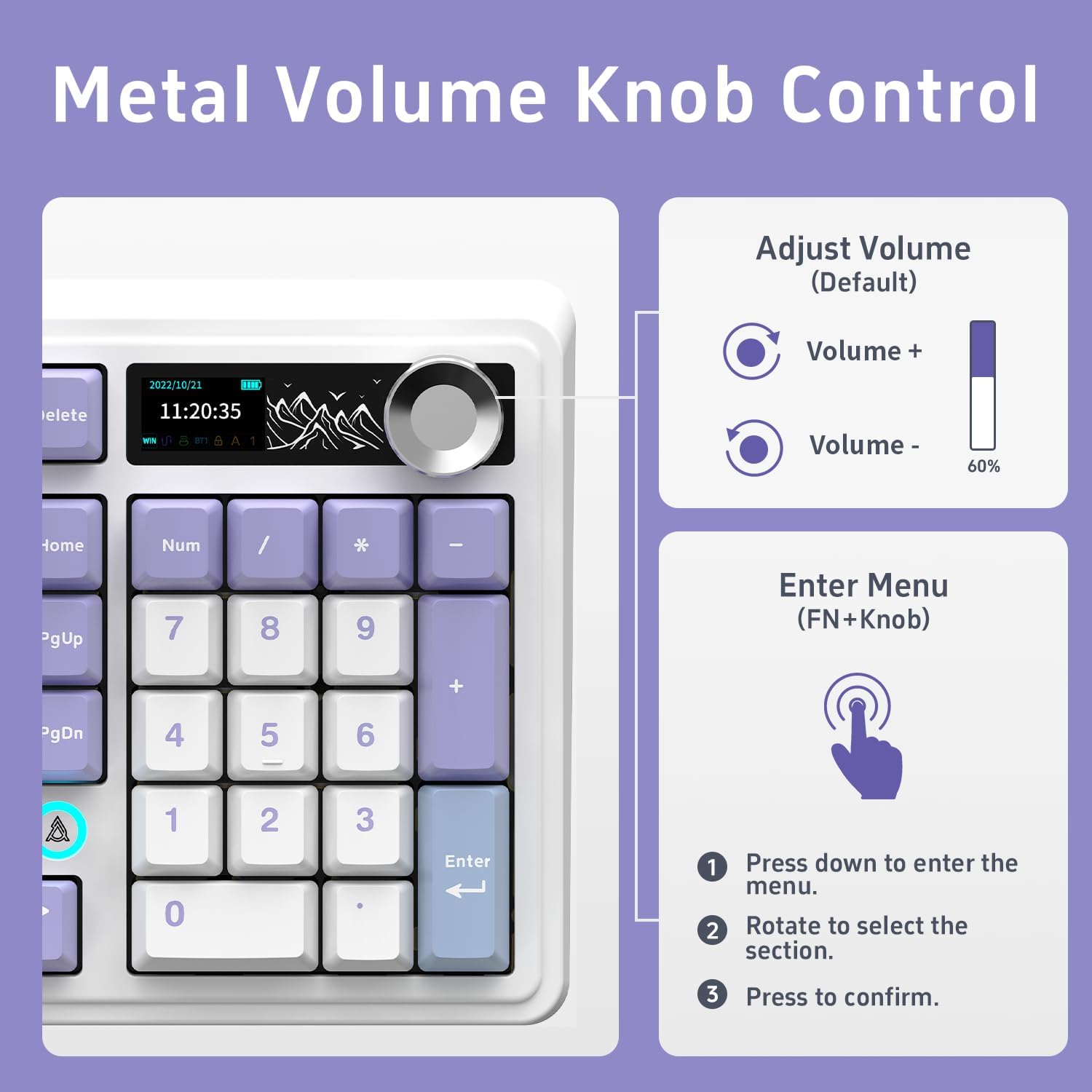
Figure 4.2: Instructions for using the metal volume knob for volume control and menu navigation.
4.2 Gasket Structure and Noise Reduction
The AK980 employs a sophisticated gasket-mounted design with five layers of sound-absorbing materials to provide a premium typing experience. These layers include an FR4 localization plate, IXPE switch pads, PET pads, sponge pads, and silicone pads. This construction significantly reduces hollow typing noise and vibrations, resulting in a more solid and pleasant sound profile with improved key rebound.

Figure 4.3: Detailed diagram of the AK980's five-layer gasket structure for noise reduction.
4.3 Hot-Swappable Switches
The keyboard features a hot-swappable PCB, allowing users to easily change switches without soldering. It is compatible with most 3-pin and 5-pin mechanical switches available on the market, providing extensive customization options for typing feel and sound. The keyboard comes pre-installed with original pre-lubricated linear switches (Cyan Cloud Switches) for a smooth and quiet typing experience.

Figure 4.4: Demonstrating the hot-swappable switch feature with a switch puller.

Figure 4.5: Specifications of the pre-installed Cyan Cloud Switches.
4.4 Long-lasting Battery
The AK980 is equipped with a high-capacity 8000mAh battery, providing extended usage in wireless modes. This large battery ensures long periods of productivity or gaming without frequent recharging.

Figure 4.6: Battery endurance test results for the AK980 keyboard.
4.5 Other Thoughtful Features
- PBT Keycaps: Oil-resistant OEM-style PBT keycaps prevent long-term dirt accumulation and maintain their texture.
- Anti-Ghosting & NKRO: All keys are conflict-free with N-key rollover (NKRO), ensuring every keystroke is registered accurately, even during rapid typing or complex gaming commands.
- Adjustable Bracket: Two-stage adjustable feet on the underside of the keyboard allow you to set a more comfortable typing angle.

Figure 4.7: The two-stage adjustable feet for ergonomic comfort.
5. Operating Instructions
5.1 Knob Control
The metal knob located on the top right of the keyboard serves multiple functions:
- Volume Adjustment (Default): Rotate the knob clockwise to increase volume, counter-clockwise to decrease volume.
- Enter Menu: Press the knob down (click) to enter the display menu.
- Navigate Menu: Once in the menu, rotate the knob to scroll through options.
- Confirm Selection: Press the knob down (click) to confirm a selection within the menu.
5.2 Display Menu Functions
The 1.14-inch TFT display provides access to various settings and information. To access the menu, press the metal knob. Navigate using the knob and confirm selections by pressing it down.
- Home: Displays current time, date, connection mode, and battery level.
- GIF Image Display: Allows selection and display of custom GIF images (requires driver software for upload).
- Connection & System: View and manage connection modes (wired, 2.4G, BT) and system settings.
- RGB Hotkey Function: Adjust RGB lighting modes, brightness, and speed.
- Language: Change the display language.
- LED Effect Function: Fine-tune LED lighting effects.
5.3 RGB Lighting Control
The keyboard features customizable RGB backlighting. You can control the lighting effects directly from the keyboard using function key combinations or through the display menu.
- Change Lighting Mode: Use Fn + (specific key, refer to keyboard legends or software).
- Adjust Brightness: Use Fn + Up/Down arrow keys.
- Adjust Speed: Use Fn + Left/Right arrow keys.
- Change Color: Use Fn + (specific key, refer to keyboard legends or software).
For advanced customization and programming of RGB effects, please download the official AJAZZ driver software from the manufacturer's website.
6. Maintenance
Proper maintenance ensures the longevity and optimal performance of your AJAZZ AK980 keyboard.
- Cleaning:
- Disconnect the keyboard from your computer before cleaning.
- Use a soft, lint-free cloth slightly dampened with water or a mild cleaning solution to wipe the keycaps and chassis.
- For dust and debris between keycaps, use compressed air or a small brush.
- Avoid using harsh chemicals, abrasives, or excessive moisture.
- Keycap and Switch Removal/Installation:
- Use the provided keycap puller to gently remove keycaps by pulling straight up.
- Use the provided switch puller to remove switches. Ensure the switch puller prongs engage with the clips on the top and bottom of the switch, then pull straight up.
- When installing new switches, align the pins with the holes on the PCB and press down gently until the switch clicks into place. Do not force switches, as bent pins can damage the PCB.
- When installing keycaps, align them with the switch stem and press down firmly.
- Storage: Store the keyboard in a cool, dry place away from direct sunlight and extreme temperatures. Use the included dust cover when not in use.
7. Troubleshooting
If you encounter issues with your AJAZZ AK980 keyboard, please refer to the following common solutions:
| Problem | Possible Cause | Solution |
|---|---|---|
| Keyboard not responding (Wired) | Loose cable connection; incorrect mode. | Ensure USB-C cable is securely connected. Check if the keyboard mode switch is set to "USB" or "Wired". Try a different USB port or cable. |
| 2.4Ghz Wireless not connecting | Receiver not plugged in; incorrect mode; pairing issue; low battery. | Ensure 2.4Ghz receiver is plugged into a USB port. Set keyboard mode switch to "2.4G". Re-pair the keyboard (Fn + 4). Charge the keyboard. |
| Bluetooth connection unstable or not pairing | Incorrect mode; pairing issue; interference; low battery. | Set keyboard mode switch to "BT". Ensure Bluetooth is enabled on your device. Re-enter pairing mode (Fn + 1/2/3). Move closer to the device. Charge the keyboard. Remove other Bluetooth devices causing interference. |
| Keys not registering or double-typing | Faulty switch; debris under keycap/switch. | Remove the keycap and switch. Clean any debris. Reinstall the switch firmly. If the issue persists, replace the switch with a new one. |
| RGB lighting not working or incorrect | Software glitch; incorrect settings; low battery. | Check RGB settings via the display menu or software. Ensure keyboard battery is sufficiently charged. Restart the keyboard or computer. Reinstall driver software if applicable. |
| Display screen not working | Software glitch; power issue. | Ensure keyboard is powered on and charged. Restart the keyboard. If using custom GIFs, ensure the driver is installed and the file is not corrupted. |
If the problem persists after trying these solutions, please contact customer support.
8. Specifications
| Feature | Detail |
|---|---|
| Model | AK980 |
| Brand | DAIDAI (Manufacturer: AJAZZ) |
| Layout | 96% (98 Keys) |
| Connectivity | USB-C Wired, 2.4Ghz Wireless, Bluetooth 5.1 |
| Display | 1.14-inch TFT Color Screen |
| Battery Capacity | 8000mAh |
| Switches | Hot-swappable (compatible with 3-pin/5-pin switches) |
| Keycaps | OEM-style PBT |
| Backlighting | South-Facing RGB |
| Anti-Ghosting | N-Key Rollover (NKRO) |
| Product Dimensions | 14 x 5 x 2 inches (35.56 x 12.7 x 5.08 cm) |
| Item Weight | 2.43 pounds (1.1 kg) |
| Compatible OS | Windows, Mac |
9. Warranty & Support
Your AJAZZ AK980 Mechanical Keyboard comes with a standard manufacturer's warranty. Please refer to the warranty card included in your package for specific terms and conditions.
For technical support, troubleshooting assistance, or warranty claims, please contact DAIDAI customer service through the retailer where you purchased the product or visit the official DAIDAI/AJAZZ website for contact information.
Website: DAIDAI Official Store


