
Culligan ZEROP12
Culligan with ZeroWater Technology 12-Cup Water Filter Pitcher
Instruction Manual
Product Overview
The Culligan with ZeroWater Technology 12-Cup Water Filter Pitcher provides advanced 5-Stage Water Filtration, designed to deliver cleaner, great-tasting water. This system is IAPMO certified to significantly reduce various contaminants, ensuring high-quality drinking water for your household.

Image: The Culligan with ZeroWater Technology 12-Cup Water Filter Pitcher, showcasing its clear pitcher design and internal filter.
Key features include a built-in Total Dissolved Solids (TDS) meter, an ergonomic handle for easy pouring, and a space-saving design that fits conveniently in most refrigerators. The advanced filtration process removes 99.9% of dissolved solids, including lead, Total PFAS (forever chemicals), mercury, fluoride, and chlorine.

Image: A chart illustrating the superior contaminant reduction capabilities of ZeroWater Technology compared to a leading filter, highlighting its effectiveness against chlorine, lead, Total PFAS, pharmaceuticals, and pesticides.
By using this pitcher, you contribute to reducing single-use plastic bottle waste, making it an environmentally conscious choice for your home.
Setup Instructions
Follow these steps to set up your new Culligan with ZeroWater Technology 12-Cup Water Filter Pitcher:
- Unpack Components: Carefully remove all components from the packaging. You should have the pitcher, the 5-stage filter, and the TDS meter.
- Wash Pitcher: Wash the pitcher and lid with mild soap and warm water. Rinse thoroughly. The pitcher is BPA-free.
- Prepare Filter: Remove the filter from its protective packaging. No pre-soaking is required.
- Install Filter: Screw the 5-stage filter firmly into the threaded opening on the underside of the water reservoir (the upper part of the pitcher). Ensure it is securely tightened to prevent unfiltered water from bypassing the filter.
- Assemble Pitcher: Place the reservoir with the installed filter into the pitcher body. Place the lid on top of the reservoir.
- Initial Fill: Fill the reservoir with cold tap water. Allow the water to filter through completely into the main pitcher body. Discard the first two full pitchers of filtered water to prime the filter and remove any carbon dust.
- Test with TDS Meter: Use the included TDS meter to test the filtered water. The meter should read "000" indicating virtually all dissolved solids have been removed. If it does not read "000", ensure the filter is properly installed and repeat the initial fill and discard steps.

Image: An exploded view showing the main components: the pitcher, the 5-stage filter, and the TDS meter.

Image: A detailed view of the integrated TDS meter, displaying a reading of "0 PPM" (parts per million), indicating pure filtered water.
Operating Instructions
Using your Culligan with ZeroWater Technology pitcher is straightforward:
- Filling the Pitcher: Lift the easy-slide lid and pour cold tap water into the top reservoir. The water will slowly filter through the 5-stage filter into the main pitcher. Do not overfill the reservoir.
- Pouring Water: Once the water has filtered, you can pour it directly from the pitcher. The ergonomic handle and smooth spout are designed for easy, no-drip pouring.
- Monitoring Water Quality: Regularly use the built-in TDS meter to check the quality of your filtered water. A reading of "000" indicates optimal filtration.

Image: A person pouring water from the pitcher into a glass, demonstrating the comfortable grip of the ergonomic handle and the smooth, controlled flow from the spout.
Maintenance
Proper maintenance ensures the longevity and effectiveness of your water filter pitcher:
- Filter Replacement: The TDS meter is your indicator for filter replacement. When the meter reads "006" or higher, it's time to replace the filter to maintain optimal water quality. Filter life can vary based on your tap water's initial TDS level and usage.
- Replacing the Filter: Unscrew the old filter from the reservoir. Dispose of the used filter. Screw in a new Culligan with ZeroWater Technology filter firmly. Remember, this pitcher is compatible only with NEW Culligan with ZeroWater Technology filters and not with legacy ZeroWater filters.
- Cleaning the Pitcher: Wash the pitcher and lid regularly with mild soap and warm water. Do not wash the filter with soap or put it in a dishwasher.

Image: A close-up of the Culligan ZeroWater Technology filter, emphasizing its extended filter life compared to previous models.

Image: A visual guide indicating that new Culligan with ZeroWater Technology filters are compatible with new Culligan pitchers and dispensers, but not with older ZeroWater models.
Troubleshooting
| Issue | Possible Cause | Solution |
|---|---|---|
| TDS meter reads above "000". | Filter is exhausted or not properly installed. | Ensure filter is screwed in tightly. If still high, replace the filter. |
| Water tastes unusual or has an odor. | Filter is exhausted or not properly primed. | Replace the filter. Ensure the first two pitchers of filtered water were discarded during initial setup. |
| Water filters very slowly. | Filter is nearing the end of its life or tap water has high dissolved solids. | This is normal as the filter absorbs more contaminants. Replace the filter if the TDS reading is high. |
Specifications
- Model Name: 12 Cup Pitcher
- Item Model Number: ZEROP12
- Brand: Culligan
- Product Dimensions: 10.3"L x 5"W x 10.5"H
- Weight: Approximately 3.98 Pounds
- Capacity: 12-Cup
- Special Features: Built-In TDS Meter, Change Filter Indicator, Ergonomic Handle, Lightweight, Reduces TDS
- Installation Type: Countertop
- Power Source: Manual Operation
- Maximum Flow Rate: 0.18 Liters Per Minute
- UPC: 810136500455
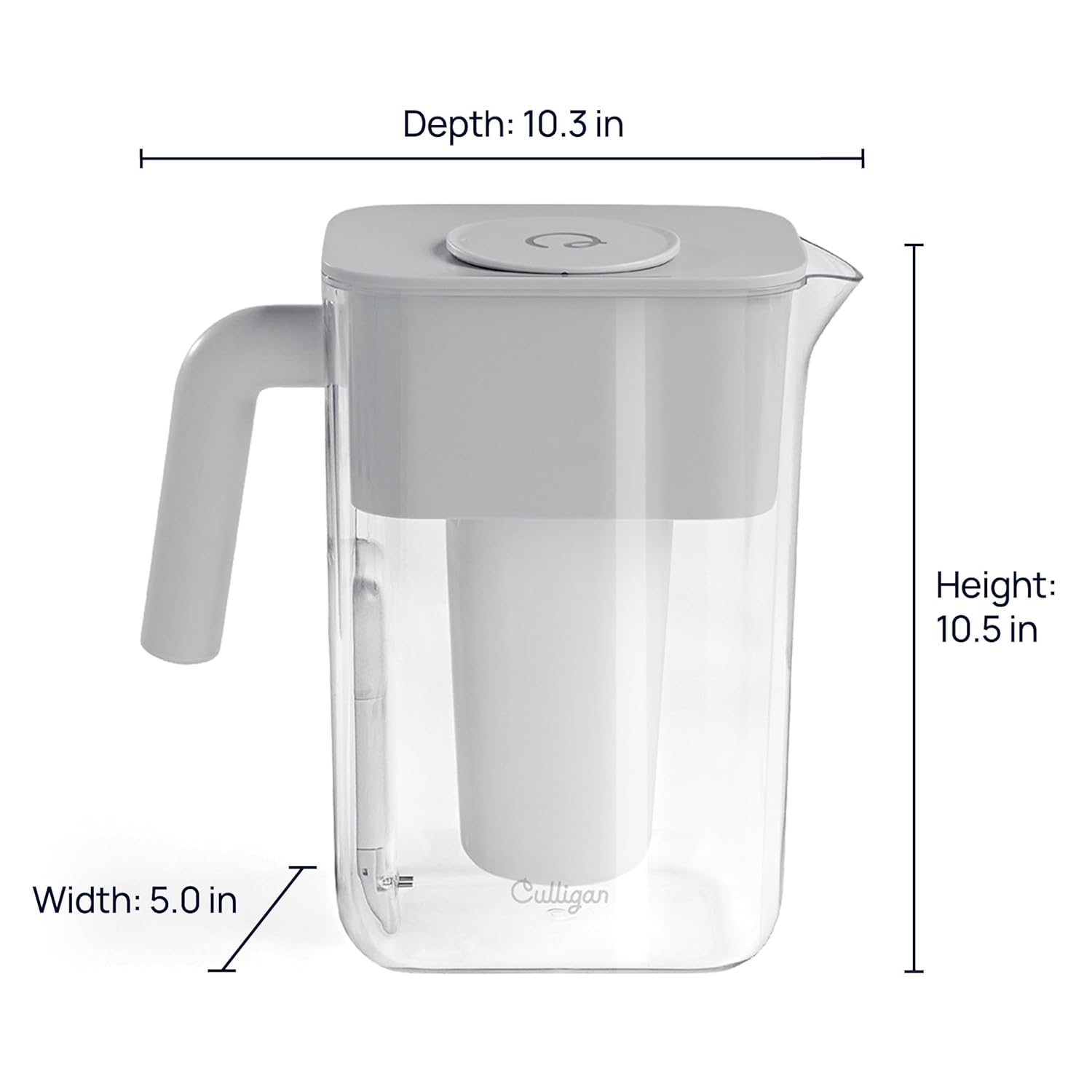
Image: A visual representation of the pitcher's dimensions, including its depth, width, and height.
Warranty and Support
For information regarding product warranty, please refer to the warranty card included with your purchase or visit the official Culligan website. If you encounter any issues or require assistance with your Culligan with ZeroWater Technology 12-Cup Water Filter Pitcher, please contact Culligan customer support.
This product includes a user manual in the box, which provides additional detailed information.
Related documentsZEROP12


Ask a question about this manual
Ask about setup, troubleshooting, compatibility, parts, safety, or missing instructions. Manuals+ will review the question and use this page’s manual context to help answer it.