
Acouto Acoutofkigpoah1u-15
Acouto Efficient R Controller User Manual
Model: Acoutofkigpoah1u-15
1. Introduction
The Acouto Efficient R Controller is designed to manage power flow from your solar panels to your battery bank and DC loads. Featuring a large LCD display and dual USB outputs, it provides essential information and convenient charging capabilities. This controller incorporates advanced 3-phase charging management and multiple built-in protections to ensure the safety and efficiency of your solar power system.
This manual will guide you through the installation, operation, and maintenance of your Acouto R Controller, helping you maximize its performance and lifespan.
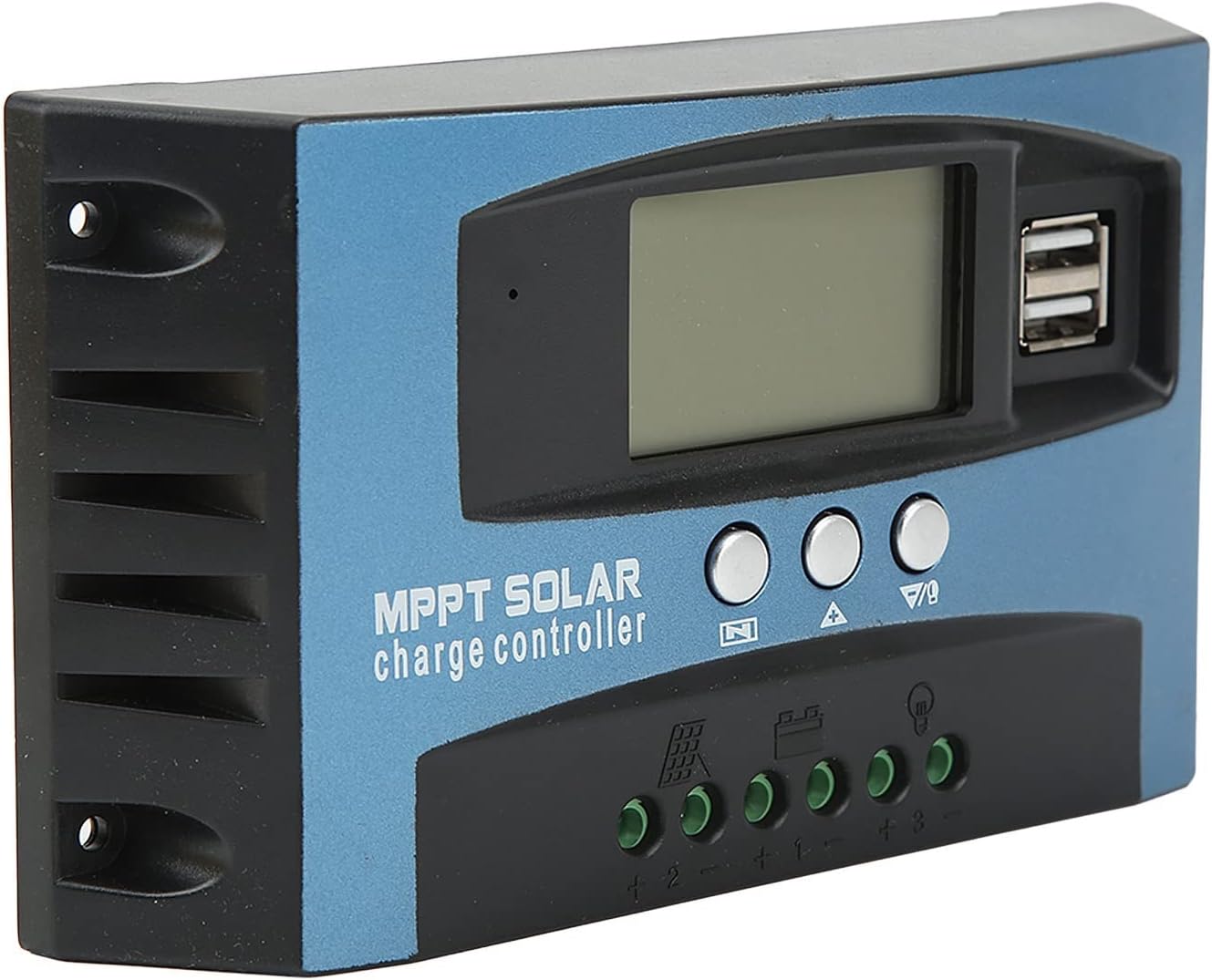
Figure 1: Front view of the Acouto Efficient R Controller, showing the LCD screen, control buttons, and USB charging ports.
2. Setup and Installation
Proper installation is crucial for the safe and efficient operation of your solar controller. Please follow these steps carefully:
- Connect the Battery: Connect the positive (+) and negative (-) poles of your battery to the corresponding battery terminals on the controller. Ensure correct polarity. The controller will automatically detect the battery voltage (12V or 24V).

Figure 2: Detailed view of the controller's wiring terminals for battery, solar panel, and load connections.
- Connect the Load: Connect the positive (+) and negative (-) poles of your DC load (e.g., LED lights, DC fan) to the load terminals on the controller. Be careful not to reverse the connection.
- Connect the Solar Panel: Connect the positive (+) and negative (-) poles of your solar panel to the solar panel terminals on the controller. Ensure correct polarity.
Important Safety Note:
- Always connect the battery first, then the load, and finally the solar panel.
- Disconnect in the reverse order: solar panel, then load, then battery.
- Ensure all connections are tight and secure to prevent loose contacts and overheating.
- Install the controller in a well-ventilated area, away from direct sunlight and moisture.
3. Operating Instructions
3.1 LCD Display and Controls
The large LCD display provides real-time information about your solar system's performance. You can monitor:
- Charging current
- Discharging current
- Accumulated electricity generated
- Accumulated electricity discharged
- Battery voltage
- Temperature
The control buttons allow you to navigate through the display modes and adjust settings (refer to the detailed programming section in the full manual for advanced settings).

Figure 3: Top view highlighting the LCD display and user interface buttons.
3.2 USB Outputs
The controller is equipped with two USB outputs (5V, 2.5A maximum) for convenient charging of mobile devices, including iOS devices. Simply connect your USB charging cable to the ports on the controller.
3.3 Charging Management
The controller utilizes a comprehensive 3-phase charging management system to optimize battery charging and prolong battery lifespan. This includes:
- Bulk Charge: Rapid charging to bring the battery to its maximum voltage.
- Absorption Charge: Maintains voltage while reducing current to fully charge the battery.
- Float Charge: Maintains a lower voltage to keep the battery fully charged and compensate for self-discharge.
4. Maintenance
To ensure the longevity and optimal performance of your Acouto R Controller, periodic maintenance is recommended:
- Cleanliness: Keep the controller clean and free from dust and debris. Use a soft, dry cloth for cleaning. Do not use liquid cleaners.
- Connections: Periodically check all wiring connections to ensure they are tight and free from corrosion. Loose connections can lead to overheating and poor performance.
- Ventilation: Ensure the installation area remains well-ventilated to prevent overheating. The controller is designed for low heat generation, but proper airflow is still important.
- Environmental Conditions: Avoid exposing the controller to extreme temperatures, direct water spray, or high humidity.
5. Troubleshooting
This section addresses common issues you might encounter with your solar controller. The controller features self-recovery protection mechanisms for most faults.
| Problem | Possible Cause | Solution |
|---|---|---|
| LCD display is off / No power | Battery not connected or reverse polarity; Battery voltage too low. | Check battery connections and polarity. Ensure battery voltage is above 8V for 12V systems or 16V for 24V systems. |
| Battery not charging | Solar panel not connected or reverse polarity; Insufficient sunlight; Damaged solar panel. | Check solar panel connections and polarity. Ensure adequate sunlight. Test solar panel voltage. |
| Load not working | Load not connected or reverse polarity; Overload/short circuit; Battery voltage too low. | Check load connections and polarity. Reduce load or check for short circuit. Charge battery. |
| Overcurrent/Short Circuit Protection activated | Excessive current draw from load or short circuit in wiring. | Disconnect load, identify and fix the cause of overcurrent/short circuit. The controller will self-recover once the fault is cleared. |
If the problem persists after attempting these solutions, please contact customer support.
6. Specifications
| Feature | Specification |
|---|---|
| System Voltage | 12V / 24V (Automatic adaptation) |
| Maximum Photovoltaic Voltage | 12V system: 23V; 24V system: 46V |
| Lifting Voltage | 14.4V |
| Floating Voltage | 13.7V (Adjustable) |
| Electric Cut Off Voltage | 10.7V (Adjustable) |
| Discharge Recovery Voltage | 12.6V (Adjustable) |
| Charging Recovery Voltage | 13V |
| Threshold Value of Light Control On | PV panel 8V (with delay) |
| Threshold Value of Light Control Switch Off | PV panel 8V (with delay) |
| USB Output | 2-way USB output, 5V, 2.5A (maximum) |
| Standby Current | Less than 10mA |
| Working Temperature | -35°C to +60°C |
| Material | ABS |
| Package Dimensions | 7.09 x 3.94 x 1.97 inches |
| Item Weight | 10.2 ounces |
| Model Number | Acoutofkigpoah1u-15 |
7. Warranty and Support
For warranty information and customer support, please refer to the documentation provided with your purchase or contact the seller directly. Keep your proof of purchase for warranty claims.
For technical assistance or further inquiries, please visit the official Acouto store on Amazon or contact their customer service department.
Ask a question about this manual
Ask about setup, troubleshooting, compatibility, parts, safety, or missing instructions. Manuals+ will review the question and use this page’s manual context to help answer it.