
1. Product Overview
The Celonix 3D Printed Snake Desktop Ornament is a decorative item designed to enhance your living or workspace. This lifelike model features intricate details and a segmented, flexible body, allowing for various display poses. It is intended for decorative purposes and collecting.
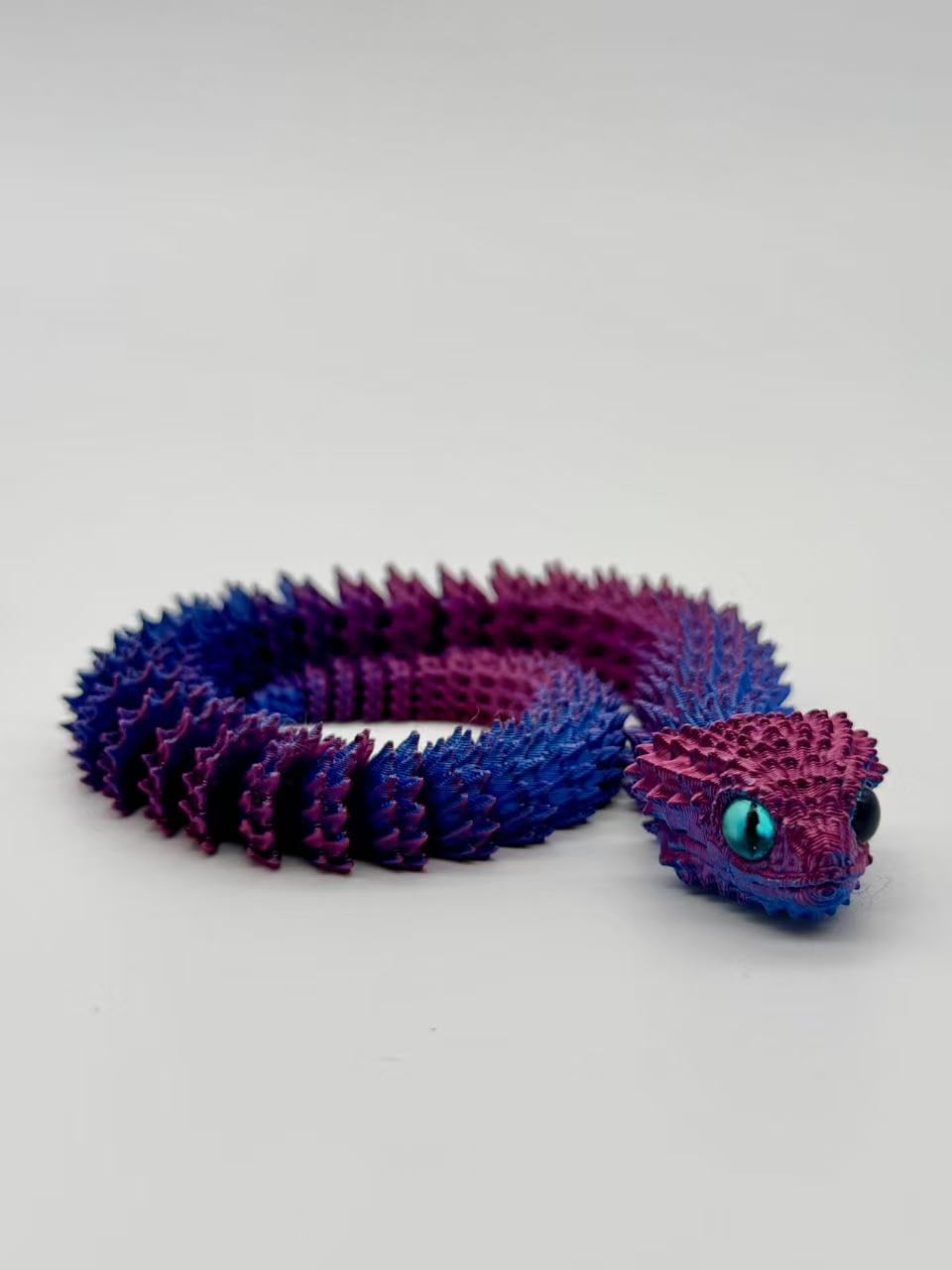
Image 1.1: The Celonix 3D Printed Snake Desktop Ornament. The snake features a segmented body with intricate, spiky textures, transitioning from a vibrant purple at the head and mid-body to a darker blue towards the tail. Its head has distinct features, including bright, light blue eyes. The flexible design allows for various poses, as depicted by its coiled position.
Key Features:
- Highly Detailed Design: Crafted with precision, showcasing intricate textures and a natural appearance.
- Dynamic Display: Each segment is flexible, enabling a variety of poses for a striking visual effect.
- Versatile Decor: Ideal for desks, bookshelves, or office spaces.
2. Setup
This product requires minimal setup. It is ready for display directly out of its packaging.
- Unpack: Carefully remove the 3D Printed Snake from its packaging.
- Inspect: Check the ornament for any visible damage from transit.
- Placement: Place the ornament on a stable, flat surface such as a desk, shelf, or display cabinet. Ensure the surface is clean and free of debris.
3. Operating (Display and Posing)
The flexible design of the Celonix 3D Printed Snake allows for various artistic poses. Handle the ornament gently to adjust its shape.
- Adjusting Pose: Gently bend and articulate the snake's body segments to achieve your desired display position. Avoid excessive force or sharp bends to prevent damage.
- Stability: Ensure the chosen pose maintains the ornament's balance on its display surface to prevent it from falling.
- Environment: Display the ornament in a location away from direct sunlight, extreme temperatures, or high humidity to preserve its material and color.
4. Maintenance
Proper care will help maintain the appearance and longevity of your 3D Printed Snake Desktop Ornament.
- Cleaning: Perform light dusting regularly using a soft, dry cloth or a soft-bristled brush. Do not use abrasive cleaners, solvents, or excessive water, as these can damage the plastic material and finish.
- Handling: Always handle the ornament by its main body. Avoid pulling or twisting individual segments forcefully.
- Storage: If storing the ornament, place it in a protective container to prevent dust accumulation and accidental damage.
5. Troubleshooting
This section addresses common concerns regarding the 3D Printed Snake Desktop Ornament.
- Ornament appears dusty:
Solution: Refer to Section 4, "Maintenance," for proper dusting instructions. Use a soft, dry cloth.
- Segments feel stiff or difficult to pose:
Solution: The segments are designed to be flexible. Apply gentle, consistent pressure when posing. Avoid forcing movements. If stiffness persists, ensure the ornament is not in a cold environment, which can temporarily affect plastic flexibility.
- Ornament falls over easily:
Solution: Adjust the pose to create a more stable base. Ensure the ornament is placed on a flat, level surface. Avoid placing it near edges where it could be easily knocked off.
6. Specifications
| Brand | Celonix |
| Model Number | ATOOLL1755141 |
| Material | Plastic |
| Color | Illusionary (Purple/Blue) |
| Dimensions | 10 x 1 x 3 inches (L x W x H) |
| Item Weight | 8 ounces (0.5 Pounds) |
| Mounting Type | Tabletop |
| Product Care | Light Dusting |
| UPC | 635412729234 |
7. Warranty and Support
Specific warranty information for the Celonix 3D Printed Snake Desktop Ornament is not provided in the product details. For any inquiries regarding warranty, product support, or assistance, please contact Celonix directly through their official channels or the retailer from whom the product was purchased.
You may visit the Celonix store on Amazon for more information: Celonix Store