1. Introduction
This manual provides essential instructions for the safe and effective operation of your Cartrend DP 6.1 Automatic Car Battery Charger. This device is designed for the comprehensive and gentle maintenance of various vehicle batteries, including lead-acid, GEL, EFB, and AGM types. It features advanced microprocessor technology for fully automated diagnostic, rescue, charging, and maintenance functions, optimizing battery life and performance.
Please read this manual thoroughly before first use and keep it for future reference.

Image 1.1: The Cartrend DP 6.1 Automatic Car Battery Charger, showing the main unit, power plug, and red and black battery clamps.
2. Safety Instructions
WARNING: Failure to follow these safety instructions may result in electric shock, fire, or serious injury.
- Always wear eye protection and protective clothing when working with batteries.
- Ensure adequate ventilation when charging batteries to prevent the accumulation of explosive gases.
- Do not smoke or allow sparks or flames in the vicinity of the battery or charger.
- Connect the charger to the battery before plugging it into the mains power supply. Disconnect from mains before disconnecting from the battery.
- Connect the red (+) clamp to the positive battery terminal and the black (-) clamp to the negative battery terminal or vehicle chassis (away from the battery).
- Do not charge frozen batteries. Allow them to thaw before charging.
- Keep the charger away from water, rain, and excessive moisture.
- Do not attempt to charge non-rechargeable batteries.
- If the power cord is damaged, it must be replaced by the manufacturer, its service agent, or similarly qualified persons to avoid a hazard.
3. Product Overview
3.1 Components
- Main Charger Unit with LCD Display
- AC Power Cord (for mains connection)
- DC Output Cables with Insulated Battery Clamps (Red for positive, Black for negative)
3.2 Key Features
- Microprocessor Controlled: Ensures optimal charging and maintenance.
- Automatic Functions: Diagnostic, rescue, charging, and maintenance modes.
- Soft Charge Function: Preserves battery health with an effective charging current of 6A.
- Automatic Restart: Resumes charging independently after a power outage.
- Battery Compatibility: Suitable for lead-acid, maintenance-free, GEL, EFB, and AGM batteries.
- LCD Display: Shows charging mode, progress, and potential errors.
- Versatile Use: Ideal for cars, motorhomes, motorcycles, boats, and tractors.

Image 3.1: The charger features protective insulated clamps for safe connection to battery terminals.

Image 3.2: The Cartrend charger is suitable for a wide range of vehicles, from cars and motorcycles to boats and tractors.
4. Setup and Connection
Follow these steps to safely connect the charger to your vehicle's battery:
- Preparation: Ensure the vehicle's ignition is off and all electrical consumers are switched off. If charging a battery outside the vehicle, place it in a well-ventilated area.
- Connect Positive: Attach the red (+) battery clamp to the positive (+) terminal of the battery.
- Connect Negative: Attach the black (-) battery clamp to the negative (-) terminal of the battery. If the battery is in the vehicle, connect the black clamp to the vehicle chassis away from the battery and fuel line.
- Power On: Plug the AC power cord into a suitable mains power outlet. The charger will automatically begin its diagnostic and charging process.

Image 4.1: Demonstrating the connection of the positive battery clamp to the battery terminal.
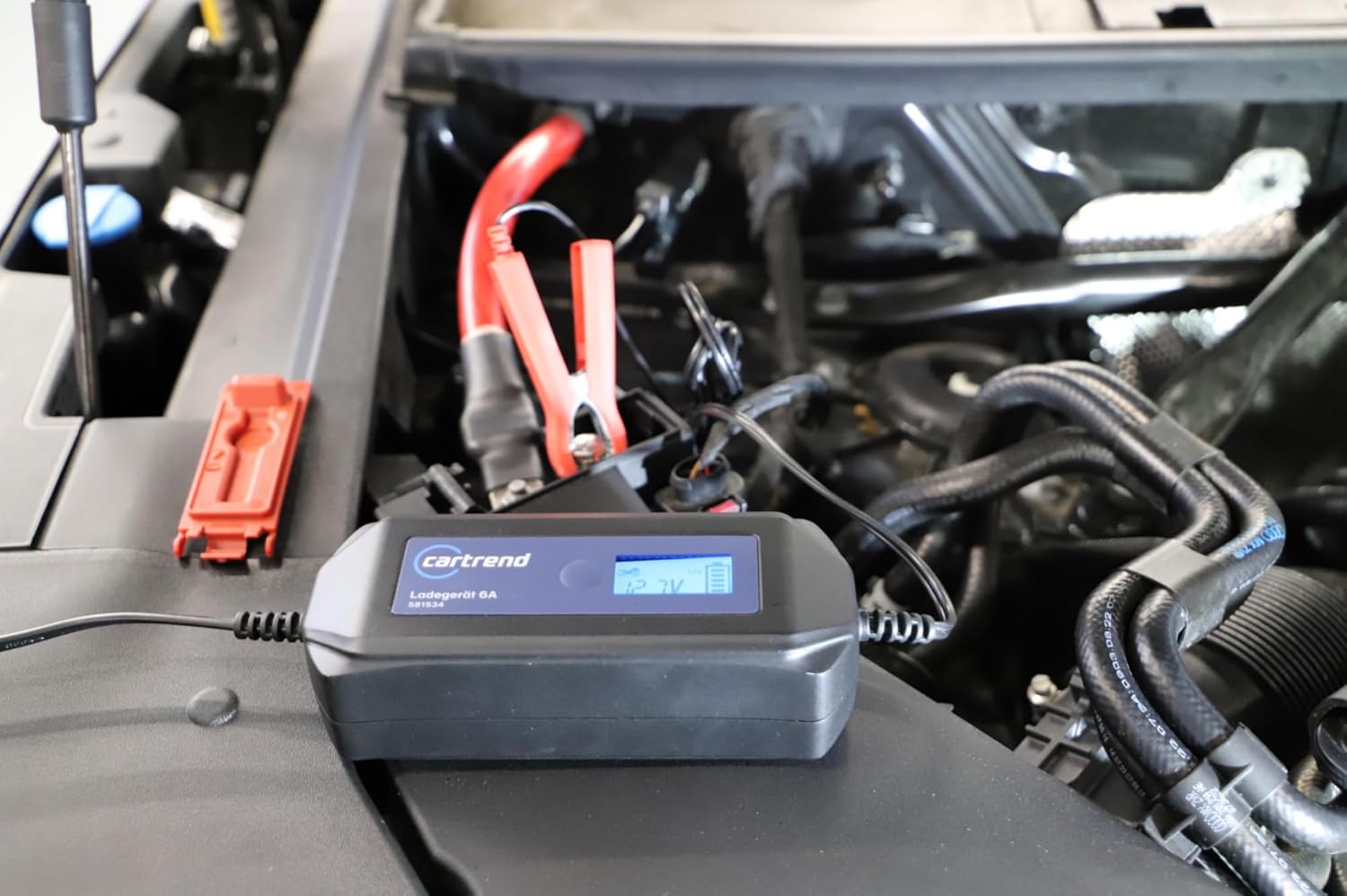
Image 4.2: The charger properly connected and placed in the engine bay, displaying battery voltage.
5. Operating Instructions
The Cartrend DP 6.1 charger operates automatically once connected. The LCD display provides real-time information.
5.1 Automatic Charging Process
Upon connection to both the battery and mains power, the charger initiates a multi-stage charging program:
- Diagnosis: The charger first analyzes the battery's condition, voltage, and capacity to determine the optimal charging strategy.
- Rescue (if needed): For deeply discharged batteries, a gentle rescue mode may be activated to restore the battery to a recoverable state.
- Bulk Charge: The main charging phase, delivering a constant current (up to 6A) until the battery reaches approximately 80% capacity.
- Absorption Charge: The voltage is held constant while the current gradually decreases, bringing the battery to 100% charge.
- Float/Maintenance Charge: Once fully charged, the charger switches to a maintenance mode, providing a small current to keep the battery at optimal voltage, preventing self-discharge.
5.2 LCD Display Information
The LCD display shows important charging parameters and status indicators:
- Battery Voltage: Displays the current voltage of the connected battery (e.g., 12.9V).
- Charging Progress: Indicated by a battery icon or percentage.
- Charging Mode: Shows the active charging stage (e.g., Charge, Maintain).
- Error Indicators: Alerts for issues like reverse polarity or faulty battery.

Image 5.1: The LCD display provides clear information on the charging process and battery status.
5.3 Automatic Restart Function
In the event of a power outage, the charger is designed to automatically resume the charging process once power is restored, ensuring continuous battery maintenance without manual intervention.

Image 5.2: The charger is designed for reliable operation in various weather conditions.
6. Maintenance
To ensure the longevity and optimal performance of your Cartrend DP 6.1 battery charger, follow these maintenance guidelines:
- Cleaning: Disconnect the charger from both the mains and the battery before cleaning. Wipe the exterior with a soft, dry cloth. Do not use harsh chemicals or abrasive cleaners.
- Storage: Store the charger in a cool, dry place when not in use. Ensure cables are neatly coiled and not kinked.
- Cable Inspection: Regularly inspect the power cord and battery cables for any signs of damage, cuts, or fraying. Do not use the charger if any cables are damaged.
7. Troubleshooting
If you encounter issues with your Cartrend DP 6.1 charger, refer to the table below for common problems and solutions.
| Problem | Possible Cause | Solution |
|---|---|---|
| Charger not turning on / No display | No mains power; Faulty power cord; Internal fault. | Check mains socket and power cord connection. Try a different outlet. If problem persists, contact support. |
| Charger not charging battery | Incorrect battery connection; Battery too deeply discharged; Faulty battery. | Ensure clamps are correctly connected (red to +, black to -). Allow charger to attempt rescue mode for deeply discharged batteries. If battery is faulty, it may not accept a charge. |
| Error message on display | Reverse polarity; Short circuit; Battery fault. | Check battery clamp connections for reverse polarity. Inspect cables for short circuits. If battery fault is indicated, have the battery tested by a professional. |
| Charger gets warm during operation | Normal operation; Poor ventilation. | It is normal for the charger to get warm during charging. Ensure it is in a well-ventilated area and not covered. If it becomes excessively hot, disconnect immediately. |
8. Technical Specifications
| Feature | Specification |
|---|---|
| Model | DP 6.1 |
| Manufacturer | Cartrend |
| Part Number | 581534 |
| Input Voltage | 220-240V AC, 50/60Hz (Standard European plug implied by product image) |
| Output Voltage | 12 Volts DC |
| Charging Current | 6 A (effective) |
| Battery Types | Lead-acid, GEL, EFB, AGM (12V) |
| Dimensions (L x W x H) | 9.5 x 11 x 33 cm (approximate, based on product data) |
| Weight | 519 g |
| Certifications | CE |
9. Warranty and Support
For warranty information and customer support, please refer to the documentation provided with your purchase or contact Cartrend customer service directly. Keep your proof of purchase for warranty claims.
For further assistance, please visit the official Cartrend website or contact your retailer.


