1. Introduction
This manual provides detailed instructions for the FOPATO P98 Tri-Mode Mechanical Gaming Keyboard. Please read this manual thoroughly before using the product to ensure proper operation and to maximize your user experience. Keep this manual for future reference.

Image 1.1: Overview of the FOPATO P98 Tri-Mode Mechanical Gaming Keyboard.
2. Package Contents
Verify that all items are present in the package:
- P98 Keyboard × 1
- USB Charging Cable × 1
- Keycap Puller × 1
- Switch Puller × 1
- TTC Gold Pink Switch × 4 (Spare)
3. Setup
3.1 Charging the Keyboard
Before first use, fully charge the keyboard. Connect the provided USB-A to C cable to the keyboard's Type-C port and the other end to a computer's USB port or a 5V USB charger. The keyboard is equipped with a 3000mAh battery.

Image 3.1: Illustration of battery life with and without backlight. The keyboard can last up to 250 hours with the backlight off.
3.2 Connecting the Keyboard
The FOPATO P98 supports three connection modes: Bluetooth (BT), 2.4GHz Wireless, and USB-A to C Wired. It can connect to up to 5 devices simultaneously.
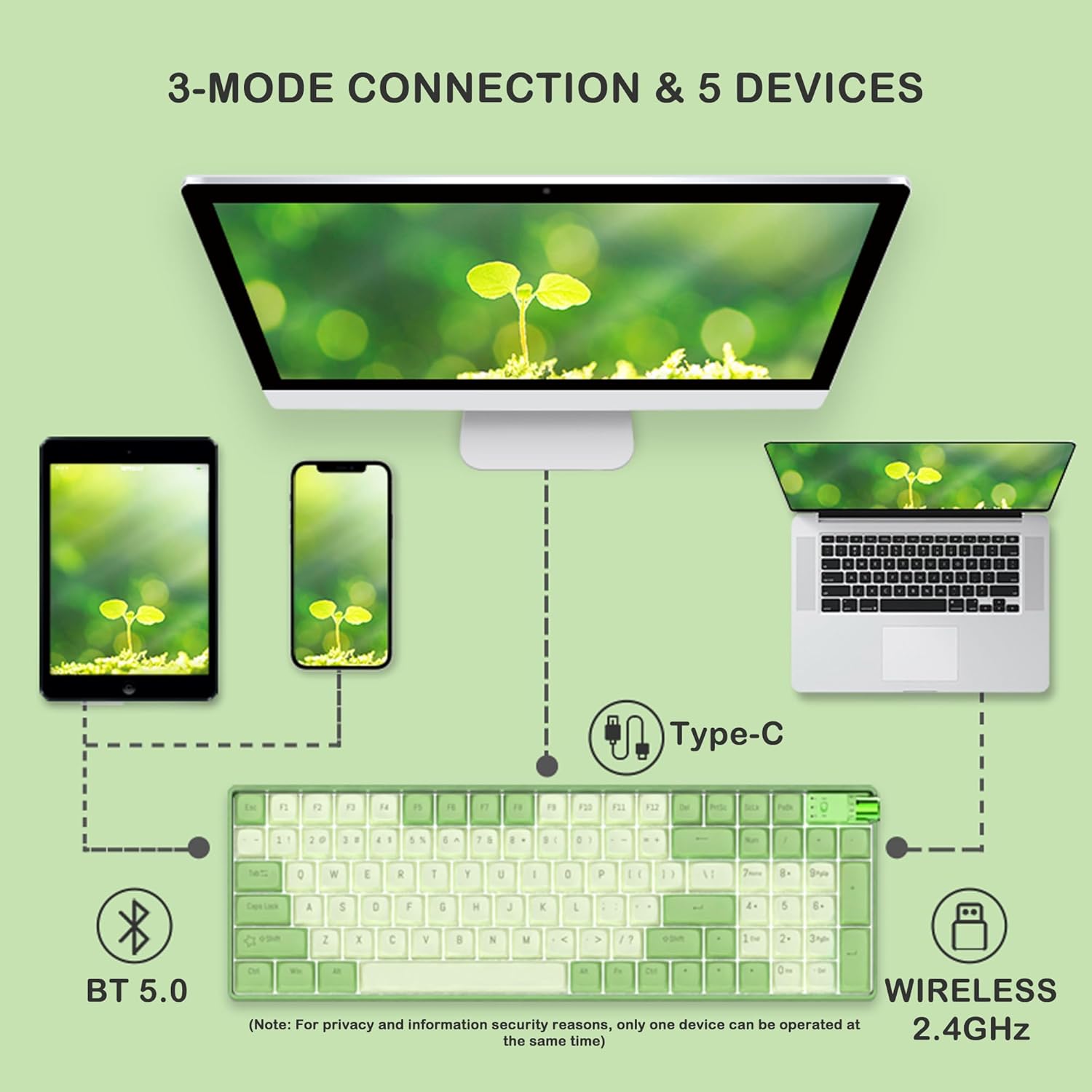
Image 3.2: The keyboard supports Bluetooth 5.0, 2.4GHz wireless, and wired Type-C connections to various devices like PCs, laptops, tablets, and smartphones.
3.2.1 Wired Connection
- Connect the USB-A to C cable to the keyboard and your device.
- Rotate the knob on the keyboard to the 'Wired' position.
- The keyboard will be recognized automatically by your device.
3.2.2 2.4GHz Wireless Connection
- Locate the 2.4GHz receiver stored on the side of the keyboard.
- Insert the receiver into a USB port on your device.
- Rotate the knob on the keyboard to the '2.4G' position.
- The keyboard will connect wirelessly to your device.
3.2.3 Bluetooth Connection
- Rotate the knob on the keyboard to the 'BT' position.
- On your device, enable Bluetooth and search for new devices.
- Select 'FOPATO P98' from the list of available devices to pair.
- The keyboard can store up to 3 Bluetooth profiles. To switch between profiles, press Fn + Q, Fn + W, or Fn + E.
4. Operating Instructions
4.1 System Switching (Windows/Mac)
The keyboard features a physical switch to toggle between Windows and macOS layouts.
- Locate the physical switch near the knob on the keyboard.
- Flip the switch to the 'WIN' position for Windows compatibility.
- Flip the switch to the 'MAC' position for macOS compatibility.

Image 4.1: The physical switch allows quick toggling between Windows and Mac operating systems, and the knob switches between connection modes.
4.2 RGB Backlight Control
The keyboard offers 18+4 RGB lighting effects.
- Press Fn + \| to cycle through different lighting effects.
- Press Fn + ↑ / Fn + ↓ to adjust backlight brightness.
- Press Fn + ← / Fn + → to adjust backlight speed/direction.

Image 4.2: The FOPATO P98 keyboard displaying its RGB backlight effects.
4.3 Knob Functionality
The multi-function knob allows for quick switching between connection modes and can also control media functions.
- Rotate: Switch between Wired, 2.4G, and BT connection modes.
- Press: Mute/Unmute audio (when in media mode).
4.4 Hot-Swappable Switches
The FOPATO P98 keyboard features 5-pin hot-swappable switch sockets, allowing you to change switches without soldering.
- Use the provided switch puller to carefully remove the existing switch.
- Align the pins of the new switch with the socket holes.
- Gently press the new switch into place until it clicks. Ensure pins are not bent.

Image 4.3: Illustration of the hot-swappable feature, showing switches being removed and inserted.
4.5 Keycap Replacement
The keyboard comes with durable PBT dual-color keycaps. You can replace them using the provided keycap puller.
- Use the keycap puller to gently grip and lift the desired keycap.
- Align the new keycap with the switch stem.
- Press down firmly until the keycap is securely seated.
5. Maintenance
5.1 Cleaning the Keyboard
- Disconnect the keyboard from all devices before cleaning.
- Use a soft, lint-free cloth slightly dampened with water or a mild cleaning solution to wipe the keycaps and chassis.
- For dust and debris between keycaps, use compressed air or a small brush.
- Avoid using harsh chemicals or abrasive materials.
5.2 Battery Care
- Avoid fully discharging the battery frequently.
- Store the keyboard in a cool, dry place if not used for extended periods.
- Charge the keyboard regularly to maintain battery health.
6. Troubleshooting
| Issue | Possible Cause | Solution |
|---|---|---|
| Keyboard not responding | Low battery, incorrect connection mode, loose cable/receiver. | Charge the keyboard. Ensure the knob is set to the correct mode (Wired, 2.4G, or BT). Reconnect the cable or 2.4GHz receiver. Re-pair Bluetooth. |
| Bluetooth connection unstable | Interference, distance, device issues. | Move closer to the device. Ensure no other strong wireless signals are interfering. Try re-pairing the keyboard. |
| Keys not registering | Faulty switch, debris under keycap. | Remove the keycap and switch. Clean the socket. Replace the switch with a spare or known working one. |
| RGB backlight not working | Backlight turned off, low battery. | Press Fn + \| to cycle effects. Adjust brightness with Fn + ↑. Charge the keyboard. |
| System switch (Win/Mac) not working | Incorrect switch position. | Ensure the physical switch is firmly set to the desired operating system. |
7. Specifications
- Model: P98
- Brand: FOPATO
- Connectivity: 2.4GHz Wireless, Bluetooth 5.0, USB-A to C Wired
- Key Count: 98 Keys
- Switch Type: TTC Gold Pink Linear Switch (Hot-Swappable)
- Keycaps: PBT Dual Color Keycaps
- Backlight: RGB (18+4 effects)
- Battery: 3000mAh Lithium Battery
- Compatible Systems: Windows 7+, Android 3.2+, macOS 10.5+, iPadOS, iOS
- Product Dimensions: 14.53 x 4.79 x 1.75 inches (36.9 x 12.17 x 4.45 cm)
- Item Weight: 2.18 pounds (0.99 kg)
- Material: Plastic, Polybutylene Terephthalate

Image 7.1: Exploded view showing the internal structure including PBT keycaps, mechanical switches, positioning board, silicone pad, PCB, hot-swappable socket, and bottom case.

Image 7.2: Detailed specifications of the TTC Gold Pink Switch, including linear switch type, 37±5gf operating force, 4.0±0.3mm total travel, and 2.0±0.3mm conduction stroke.
8. Warranty and Support
For warranty information and technical support, please refer to the official FOPATO website or contact their customer service directly. Details are typically provided on the product packaging or the brand's official online channels.


