Introduction
This manual provides detailed instructions for the assembly, operation, and maintenance of your GarveeHome NGACC-BR96C 67-inch Tall Corner Storage Cabinet. Designed with a farmhouse aesthetic, this cabinet features glass doors, adjustable shelving, and integrated LED lighting, making it a versatile storage and display solution for various rooms in your home.
Thank you for choosing GarveeHome. Please read this manual thoroughly before assembly and use to ensure proper function and safety.
Product Features
- Optimal Fit: Measuring 18.4 x 26 x 67 inches, this tall corner storage cabinet is designed to fit perfectly into unused corners, maximizing storage space in kitchens, living rooms, bathrooms, and laundry rooms.
- Versatile Storage: The upper section features a shelf and glass doors, ideal for displaying dishes or decorative items. The bottom cabinet includes an adjustable shelf, allowing you to customize the space for various storage needs.
- Farmhouse Aesthetic: With rustic barn doors and a warm wood finish, this cabinet adds a charming touch to any decor, blending seamlessly with various home styles.
- Durable Construction: Crafted from thick engineered wood, the corner hutch cabinet is built for strength and durability, designed to withstand daily wear and tear for long-lasting use.
- Integrated LED Lighting: Features customizable LED lights that can be controlled via a remote or a mobile application, offering various colors and modes to enhance ambiance.
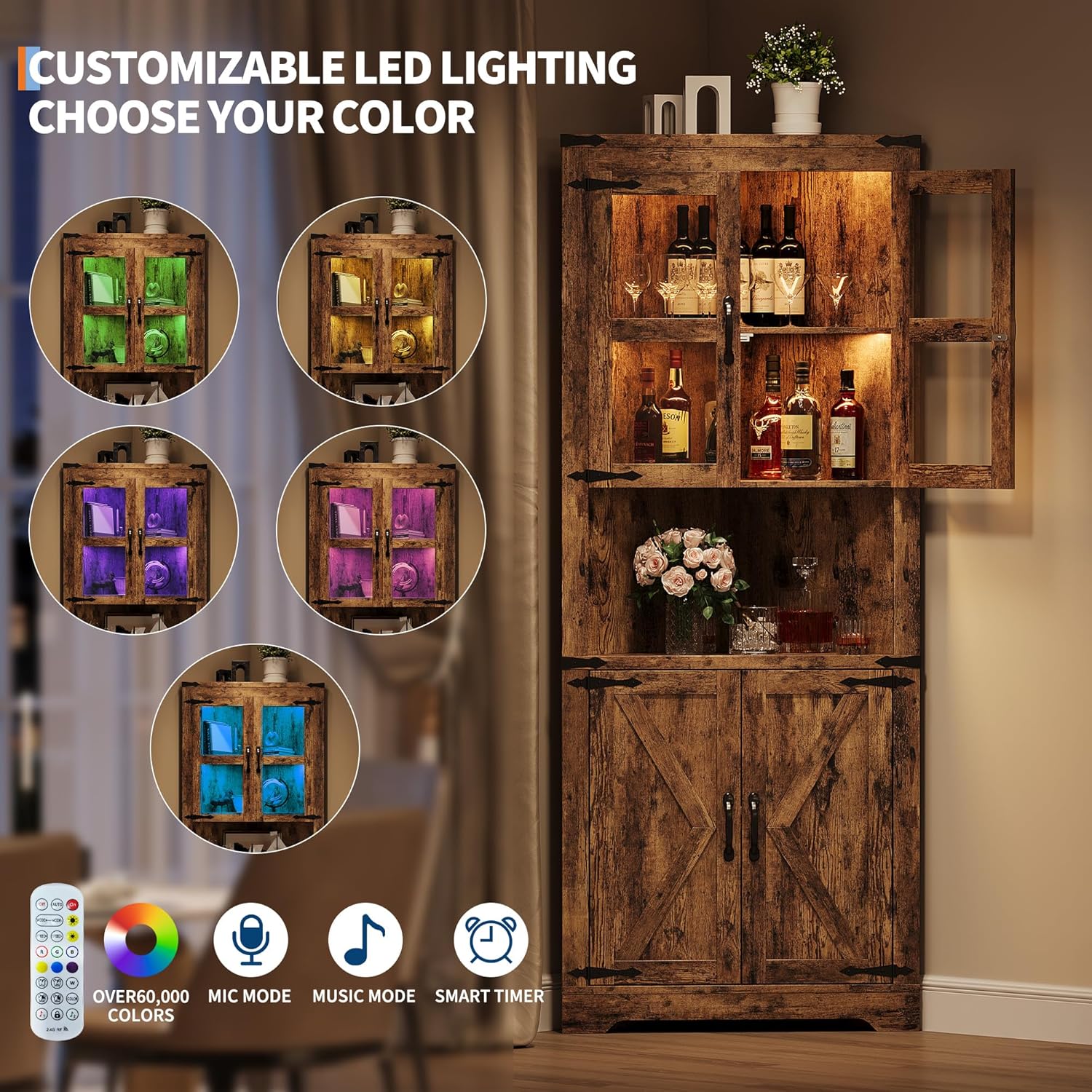
Image: The GarveeHome corner cabinet showcasing its customizable LED lighting feature, with different colors illuminating the interior.
Assembly Instructions
Assembly of the GarveeHome NGACC-BR96C corner display cabinet is designed to be straightforward. Clear instructions and labeled parts are provided to guide you through the process. For optimal results and ease of setup, it is recommended that two people assist with the assembly.
- Unpack and Verify: Carefully unpack all components and compare them against the provided parts list in your separate assembly manual. Ensure all pieces and hardware are present and undamaged.
- Follow Manual Steps: Refer to the detailed, step-by-step diagrams and instructions in the included assembly manual. Each part is labeled for easy identification.
- Secure Connections: Ensure all screws and connections are properly tightened during each assembly step to guarantee stability and safety.
- Install Doors: Attach the glass doors to the upper section and the barn-style doors to the lower section, ensuring they open and close smoothly.
- Adjust Shelves: Position the adjustable shelf in the bottom cabinet to your desired height.
- Connect LED Lights: Follow the instructions for connecting the LED light strip and its control cord.
Note: For best results, assemble the cabinet on a soft, clean surface to prevent scratches.
Operating Instructions (LED Lights)
Your GarveeHome corner cabinet features integrated LED lighting that can be controlled via a remote or a dedicated mobile application, allowing for extensive customization of the lighting to suit your preferences.
Using the Remote Control
- Power On/Off: Use the 'On' and 'Off' buttons to activate or deactivate the lights.
- Color Selection: Press the colored buttons (R, G, B, W, Yellow, Cyan, Purple, etc.) to change the light color.
- Brightness Adjustment: Use the sun icon buttons (brighter/dimmer) to adjust the light intensity.
- Mode Selection: Cycle through various dynamic modes (e.g., flashing, fading, smooth transitions) using the 'MODE+' and 'MODE-' buttons.
- Speed Adjustment: In dynamic modes, use the 'SPEED+' and 'SPEED-' buttons to increase or decrease the transition speed.
- Music Sync Mode: The remote may include a setting to synchronize the lights with ambient sound, such as music or TV audio.
Using the Mobile App (LotusLantern APP)
For advanced control and customization, download the 'LotusLantern' app from your smartphone's app store (available for iOS and Android).
- Download App: Search for 'LotusLantern' in your app store and install it.
- Enable Bluetooth: Ensure Bluetooth is enabled on your mobile device.
- Connect Device: Open the app, and it should automatically search for and connect to your cabinet's LED lights. If prompted, allow Bluetooth access.
- Customize Colors: Use the app's color wheel or RGB manual adjustment view to select from over 60,000 colors.
- Adjust Settings: Control brightness, speed, and various lighting modes directly from the app.
- Set Timers: Utilize the app's timer function to schedule when the lights turn on or off automatically.
Maintenance
To ensure the longevity and appearance of your GarveeHome corner cabinet, follow these maintenance guidelines:
- Cleaning: Use a soft, damp cloth for regular cleaning. Avoid harsh chemicals, abrasive cleaners, or scouring pads, as these can damage the wood finish and glass.
- Dusting: Regularly dust all surfaces with a dry, soft cloth to prevent buildup.
- Hardware Check: Periodically inspect and tighten all screws, hinges, and connections to maintain the cabinet's structural integrity.
- Spill Management: Immediately wipe up any spills to prevent moisture damage to the engineered wood.
Troubleshooting
If you encounter any issues with your GarveeHome corner cabinet, refer to the following common solutions:
- LED Lights Not Functioning:
- Ensure the power adapter is securely plugged into a working outlet and the light strip.
- Check if the remote control's battery needs replacement.
- If using the app, verify that Bluetooth is enabled on your device and the app is properly connected to the lights.
- Doors Not Closing Securely:
- Inspect for any obstructions preventing the doors from closing fully.
- Check the alignment of the magnetic latches and adjust if necessary.
- Ensure hinges are securely fastened to the cabinet frame and doors.
- Cabinet Feels Unstable/Wobbly:
- Verify that all assembly screws are fully tightened.
- Ensure the cabinet is placed on a flat, level surface.
- If anti-tip hardware was included, ensure it is properly installed and anchored to the wall.
Specifications

Image: Detailed product dimensions of the GarveeHome 67-inch Tall Corner Storage Cabinet.
| Attribute | Detail |
|---|---|
| Brand | GarveeHome |
| Model Name | NGACC |
| Item Model Number | NGACC-BR96C |
| Color | Brown |
| Product Dimensions | 18.4"D x 26"W x 67"H |
| Special Feature | Lights (LED) |
| Mounting Type | Floor Mount |
| Room Type | Living Room (Versatile for Kitchen, Bathroom, Laundry Room) |
| Door Style | Open Frame (Glass Doors on top, Barn Doors on bottom) |
| Included Components | Shelves |
| Finish Type | Rustic |
| Number of Shelves | 3 (including base and adjustable shelf) |
| Item Weight | 69.5 Pounds |
| Base Type | Pedestal |
| Installation Type | Freestanding |
| Top Material Type | Engineered Wood |
| Handle Material | Metal |
| Assembly Required | Yes |
| Frame Material | Engineered Wood |
| Number of Compartments | 2 (Upper with glass doors, Lower with barn doors) |
| Is Customizable | No (referring to overall structure, but shelves are adjustable) |
| Number of Levels | 2 (main sections) |
| Set Name | Farmhouse |
| Assembly Instructions Description | Clear and easy to follow instructions provided |
| UPC | 199414879446 |
| Manufacturer | GarveeHome |
| Date First Available | June 13, 2025 |
Important Safety Information
Please read and adhere to the following safety information to prevent injury or damage to the product or property:
- Assembly: Always ensure all screws and connections are properly tightened during assembly. Failure to do so may result in instability and potential collapse.
- Cleaning: Never use harsh chemicals or abrasive materials to clean the cabinet. This can damage the finish and compromise the material integrity. Use only a soft, damp cloth.
- Following Instructions: Always follow the assembly instructions carefully to avoid potential injuries during setup.
- Stability: Place the cabinet on a level surface. If anti-tip hardware is included, it is highly recommended to install it and anchor the cabinet to a wall, especially in households with children or pets, to prevent tipping.
- Weight Limits: Do not overload the shelves. Distribute weight evenly to maintain stability. Refer to the assembly manual for specific weight capacities if provided.
- Electrical Safety: When connecting the LED lights, ensure the power source is appropriate and follow all electrical safety guidelines. Do not expose electrical components to water.
Warranty and Support
GarveeHome products are designed for durability and quality. For any questions, technical assistance, or support regarding your corner storage cabinet, please contact GarveeHome customer service.
- Returns: This product is eligible for 30-day easy returns. Please refer to your purchase platform's return policy for details.
- Customer Service: GarveeHome offers 24-hour customer support to assist with any inquiries or issues.
- Protection Plans: Extended protection plans are available for purchase to provide additional coverage beyond the standard warranty. Options include 2-Year and 3-Year Protection Plans.
For more information, please visit the official GarveeHome store or contact their customer support directly.
