
Product Overview
The Ymiko Alarm Clock with Bed Shaker is designed to provide a reliable wake-up solution, especially for heavy sleepers. It features adjustable volume, multiple wake-up modes, and a vibrating bed shaker to ensure you wake up on time.

Image: The Ymiko Alarm Clock, bed shaker, and USB cable. This image displays all components included in the package.
Package Contents
Verify that all items are present in the package:
- 1 x Alarm Clock
- 1 x Bed Shaker
- 1 x Instruction Manual
- 1 x USB Cable
Setup
Powering the Alarm Clock
The alarm clock can be powered via the included USB cable or by batteries for backup.
- Connect the USB cable to the alarm clock's power input port and plug the other end into a compatible USB power adapter (not included) or a USB port.
- For battery backup, open the battery compartment on the back of the alarm clock and insert 2 x AAA batteries (not included), ensuring correct polarity.
Connecting the Bed Shaker
To utilize the vibration feature, connect the bed shaker to the alarm clock.
- Locate the dedicated port for the bed shaker on the alarm clock.
- Insert the bed shaker's plug firmly into this port.
- Place the bed shaker under your pillow or mattress for optimal vibration.
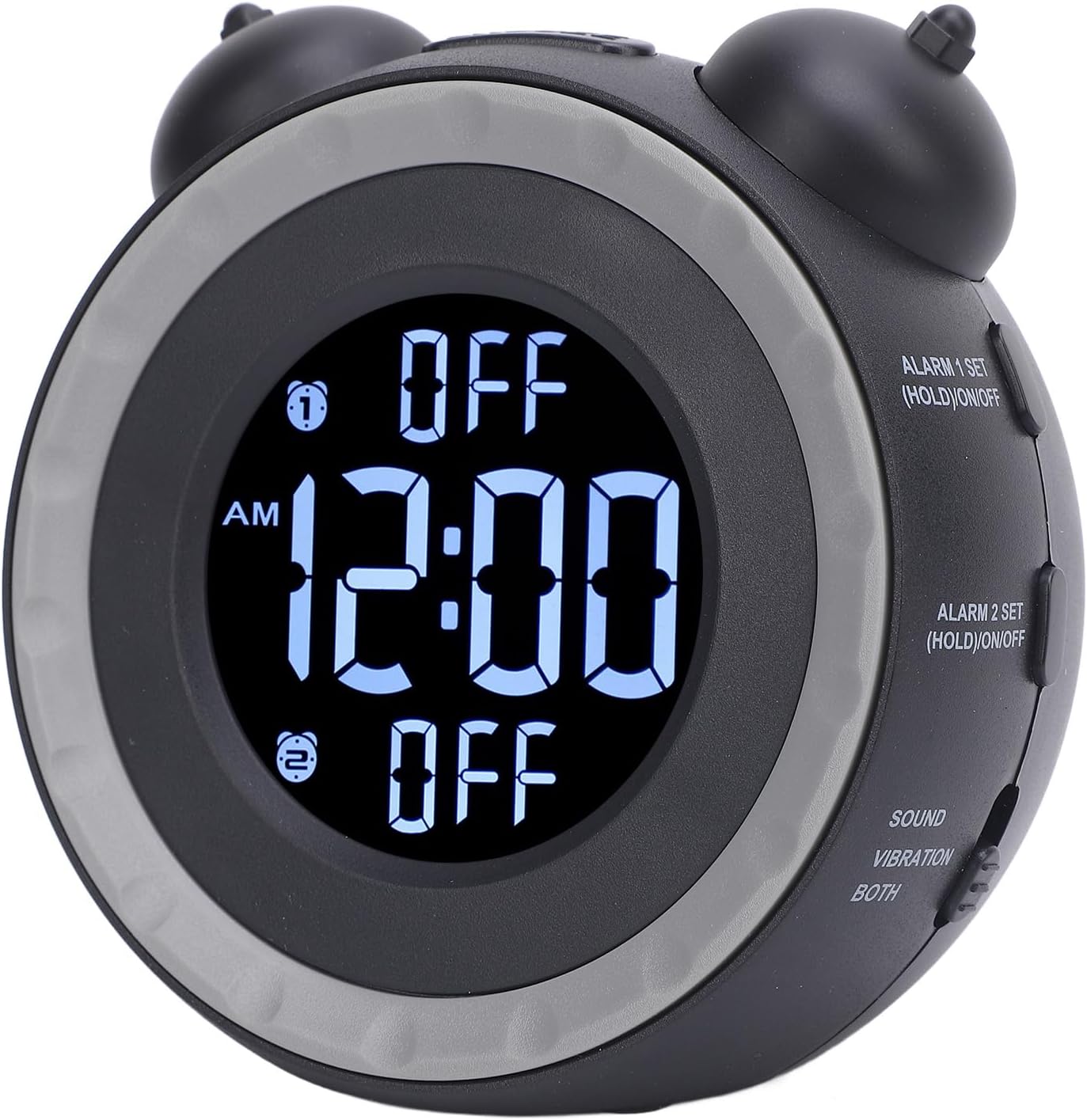
Image: Rear view of the alarm clock, highlighting the power input and bed shaker port.
Operating Instructions
Setting the Time
- Press the TIME SET button. The time display will begin to flash.
- Rotate the left bell knob (HR SETTING / DIMMER) to adjust the hour.
- Rotate the right bell knob (MIN SETTING / DIMMER) to adjust the minute.
- Press TIME SET again to confirm and exit time setting mode.

Image: Side view of the alarm clock showing the "TIME SET" button and other controls.
Switching 12/24 Hour Format
The default time format is 12-hour.
- Press the 12/24 HR button to toggle between 12-hour and 24-hour display formats.
Setting Alarm 1
- Press and hold the ALARM 1 SET (HOLD)/ON/OFF button for 3 seconds. The Alarm 1 time will flash.
- Rotate the left bell knob to adjust the alarm hour.
- Rotate the right bell knob to adjust the alarm minute.
- Press ALARM 1 SET again to confirm and exit alarm setting mode.
- To turn Alarm 1 ON or OFF, short press the ALARM 1 SET (HOLD)/ON/OFF button. An indicator will appear on the display when Alarm 1 is active.

Image: Side view of the alarm clock showing the "ALARM 1 SET" and "ALARM 2 SET" buttons.
Setting Alarm 2
Follow the same steps as Setting Alarm 1, but use the ALARM 2 SET (HOLD)/ON/OFF button.
Adjusting Alarm Sound and Wake-up Mode
The alarm clock offers 3 wake-up modes and 3 music alarm tones.
- Press the ALARM SOUND button to cycle through the available alarm tones (e.g., beeping, bird chirping, music).
- Use the SOUND / VIBRATION / BOTH switch to select your preferred wake-up mode:
- SOUND: Alarm will only use the selected sound tone.
- VIBRATION: Alarm will only use the bed shaker.
- BOTH: Alarm will use both the selected sound tone and the bed shaker.
Adjusting Volume
The alarm volume can be adjusted to suit your preference.
- Press the VOLUME button to adjust the alarm sound level.
Adjusting Screen Brightness (Dimmer)
The display brightness can be continuously adjusted.
- Rotate the HR SETTING / DIMMER knob (left bell knob) or MIN SETTING / DIMMER knob (right bell knob) to adjust the screen brightness.

Image: Top view of the alarm clock, indicating the hour and minute setting knobs which also function as dimmer controls.
Snooze Function
When the alarm sounds, press the SNOOZE button located on top of the clock to temporarily pause the alarm. The alarm will sound again after a short interval.
Maintenance
To ensure the longevity and proper functioning of your Ymiko Alarm Clock, follow these maintenance guidelines:
- Cleaning: Wipe the alarm clock and bed shaker with a soft, dry cloth. Do not use abrasive cleaners, solvents, or harsh chemicals, as these can damage the surfaces.
- Storage: If storing the device for an extended period, remove the AAA batteries to prevent leakage. Store in a cool, dry place away from direct sunlight and extreme temperatures.
- Avoid Water: Keep the alarm clock and bed shaker away from water and high humidity. This device is not waterproof.
- Handle with Care: Avoid dropping the device or subjecting it to strong impacts.
Troubleshooting
If you encounter issues with your Ymiko Alarm Clock, refer to the following common problems and solutions:
| Problem | Possible Cause | Solution |
|---|---|---|
| Clock display is blank or flickering. | No power or low battery. |
|
| Alarm does not sound or vibrate. | Alarm not activated, volume too low, or bed shaker not connected. |
|
| Cannot set time or alarm. | Incorrect button sequence or mode. |
|
| Display is too bright or too dim. | Dimmer setting needs adjustment. |
|
Specifications
| Feature | Detail |
|---|---|
| Brand | Ymiko |
| Model Number | Ymikovzge57sar2 |
| Display Type | Digital |
| Product Dimensions (W x H) | 4.72"W x 4.33"H |
| Power Source | AC/DC (USB connectivity) |
| Battery Requirement | 2 x AAA batteries (not included) |
| Frame Material | Acrylonitrile Butadiene Styrene |
| Special Features | Adjustable volume, 3 wake-up modes, 3 alarm tones, bed shaker, screen brightness dimmer. |
| Indoor/Outdoor Usage | Indoor |
Warranty Information
For detailed warranty information regarding your Ymiko Alarm Clock, please refer to the warranty card included in your product packaging or visit the official Ymiko website. Warranty terms and conditions may vary by region and retailer.
Support
If you require further assistance or have questions not covered in this manual, please contact Ymiko customer support.
- Online Support: Visit the official Ymiko store on Amazon for product information and support resources: Ymiko Store
- Contact Information: Refer to your product packaging or the Ymiko website for specific customer service contact details.