
1. Introduction
Thank you for choosing the ErgoFocus Triple Monitor Desk Mount. This manual provides detailed instructions for the safe and efficient installation, operation, and maintenance of your new monitor mount. Please read this manual thoroughly before installation and keep it for future reference.
This fully adjustable triple monitor arm is designed to optimize your workspace by supporting three computer screens up to 32 inches, with each arm holding up to 19.8 lbs. It is compatible with VESA patterns 75x75mm and 100x100mm. The mount offers extensive movement capabilities including 360° rotation for landscape or portrait orientation, 180° swivel, and 90° up/down tilt for optimal viewing angles.
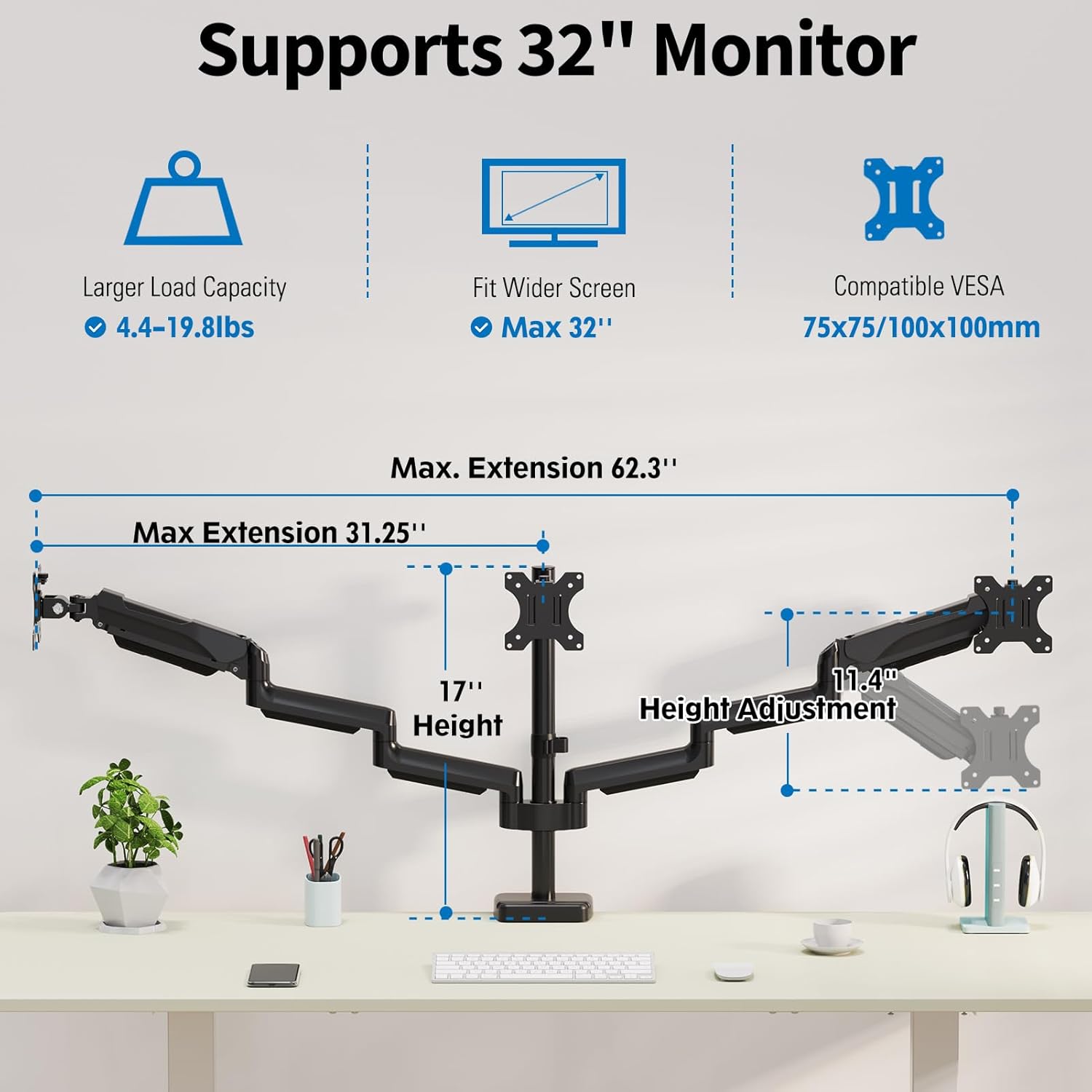
Image 1.1: The ErgoFocus Triple Monitor Desk Mount supports three monitors up to 32 inches, each weighing up to 19.8 lbs, with VESA compatibility of 75x75mm and 100x100mm.
2. Package Contents
Before beginning installation, please verify that all components are present and undamaged. Refer to the parts list provided in your product packaging. The package typically includes:
- Main Pole
- Monitor Arms (3 units)
- C-Clamp Base Components
- Grommet Base Components
- VESA Plates (3 units)
- Hardware Kit (screws, washers, Allen keys)
- Cable Management Clips
Video 2.1: This video provides an overview of the components included in the Triple Monitor Mount package and demonstrates the initial steps of installation.
3. Compatibility
Ensure your monitors and desk meet the following compatibility requirements:
- Monitor Size: Fits most 13" to 32" flat/curved computer screens.
- Monitor Weight: Each arm holds up to 19.8 lbs.
- VESA Patterns: Compatible with 75x75mm and 100x100mm VESA patterns.
- Desk Thickness (C-Clamp): 0.39"-3.15" (10-80mm).
- Desk Thickness (Grommet Base): 0.39"-1.97" (10-50mm) with a hole diameter of 0.39"-1.97" (10-50mm).

Image 3.1: This chart illustrates the compatibility requirements for monitor size, weight, VESA mounting patterns, and desk thickness for both C-clamp and grommet installations.
4. Setup
4.1 Choose Installation Type
The mount offers two installation options: C-Clamp or Grommet Base. Select the method best suited for your desk.

Image 4.1: Visual representation of the C-Clamp installation (left) and Grommet Base installation (right) for the desk mount.
4.2 Base Installation (C-Clamp or Grommet)
Follow the instructions provided in the video for your chosen installation method.
Video 4.2: This video demonstrates the step-by-step process for installing the monitor mount base using either the C-Clamp or Grommet method.
4.3 Attach Monitor Arms
Once the main pole is securely installed, attach the monitor arms. Ensure they are oriented correctly before tightening.
Video 4.3: This video illustrates how to attach the monitor arms to the main pole and secure them in place.
4.4 Attach VESA Plates to Monitors
Secure the VESA plates to the back of each monitor using the provided screws. Ensure the plate is correctly aligned with the VESA holes on your monitor.
4.5 Mount Monitors to Arms
Carefully slide each monitor, with the attached VESA plate, onto the corresponding arm. Secure with the locking mechanism.
Video 4.4: This video demonstrates the process of attaching the VESA plates to the monitors and then mounting the monitors onto the arms.
5. Operating Instructions
The ErgoFocus Triple Monitor Desk Mount offers extensive adjustability to achieve your ideal ergonomic setup.
5.1 Adjusting Monitor Position
Each monitor arm can be independently adjusted:
- Rotation: Rotate screens 360° for landscape or portrait orientation.
- Swivel: Swivel 180° to share your display or adjust viewing angles.
- Tilt: Tilt up 90°/down 90° for optimal viewing.
- Height: Dynamically adjust the height of the arms along the main pole.
- Extension/Retraction: Extend or retract the arms to bring monitors closer or push them further away.

Image 5.1: This image demonstrates the range of motion for the monitor arms, including swivel, tilt, and rotation, allowing for customized viewing angles.
5.2 Tension Adjustment
The gas spring arms require tension adjustment based on your monitor's weight to ensure smooth movement and stability.
- Monitor raises up too easily: Turn clockwise ('-') to reduce tension for lighter monitors.
- Monitor drops down too easily: Turn counter-clockwise ('+') to increase tension for heavier monitors.
- Tilt Angle Adjustment: Loosen the tilting bolt (Turn to '-') to adjust to your desired angle, then retighten (Turn to '+').

Image 5.2: Instructions for adjusting the gas spring tension for monitor height and the tilt angle tension to prevent monitors from sagging or rising too easily.
5.3 Cable Management
Utilize the integrated cable management system to keep your workspace tidy and organized.
- Route cables through the designated channels on the arms and along the main pole.
- Use the provided cable clips to secure cables neatly.

Image 5.3: The monitor mount features integrated cable management to keep wires organized and out of sight, contributing to a clutter-free workspace.
6. Maintenance
To ensure the longevity and optimal performance of your ErgoFocus Triple Monitor Desk Mount, follow these simple maintenance guidelines:
- Regularly check all screws and connections to ensure they are tight. Retighten if necessary.
- Clean the mount with a soft, dry cloth. Avoid abrasive cleaners or solvents.
- Periodically check the gas spring tension and adjust as needed to maintain proper monitor positioning.
7. Troubleshooting
If you encounter any issues with your monitor mount, refer to the following common troubleshooting tips:
- Monitors are sagging or not holding position: Adjust the gas spring tension as described in Section 5.2.
- Mount feels unstable: Ensure the C-clamp or grommet base is securely tightened to the desk. Check all arm connections.
- Difficulty adjusting monitor: Loosen the relevant adjustment screws slightly, reposition the monitor, and then retighten.
- Cables are messy: Re-route cables through the integrated cable management channels and secure them with clips.
8. Specifications
| Feature | Specification |
|---|---|
| Brand | ErgoFocus |
| Model | B0DWRZDWWD |
| Item Weight | 14.74 pounds |
| Color | Black |
| Material | Metal |
| Mounting Type | Tabletop Mount (C-Clamp or Grommet) |
| Movement Type | Rotate, Swivel, Tilt, Articulating |
| Maximum Tilt Angle | 90 Degrees |
| Compatible Devices | Monitor (13" to 32" screens) |
| Weight Capacity per Arm | Up to 19.8 lbs |
| VESA Compatibility | 75x75mm, 100x100mm |
9. Warranty and Support
ErgoFocus products are tested for durability before leaving our factory. For any questions or concerns regarding your Triple Monitor Desk Mount, please do not hesitate to contact our customer support team. We are committed to providing reliable products and excellent service.
Please retain your proof of purchase for warranty claims.
