
Backnets SF20251004B0DWRVK9P4
Backnets Digital Display 3-Way Shower Diverter Mixing Valve
Model: SF20251004B0DWRVK9P4
Introduction
Thank you for choosing the Backnets Digital Display 3-Way Shower Diverter Mixing Valve. This manual provides essential information for the safe installation, operation, and maintenance of your new shower valve. Please read these instructions thoroughly before installation and keep them for future reference.
Product Overview and Features
The Backnets Digital Display Shower Valve is designed to enhance your showering experience with precise temperature control and versatile water flow options. It features a durable construction and an innovative digital display.
- Digital Temperature Display: Shows real-time water temperature without requiring batteries, powered by water flow.
- Triple Function Diverter: Allows selection of up to three shower functions simultaneously or individually: rain shower head, handheld shower, and shower body jets.
- Durable Construction: Made from high-quality brass with a multi-layer electroplated stainless steel panel for longevity.
- Safety Certified: cUPC certified to ensure safe water temperatures and prevent scalding.
- Standard Connections: Features US standard NPT 1/2" threads for inlets and outlets.

Figure 1: Digital display showing hot and cold water temperatures. The display is powered by hydroelectric energy from water flow.
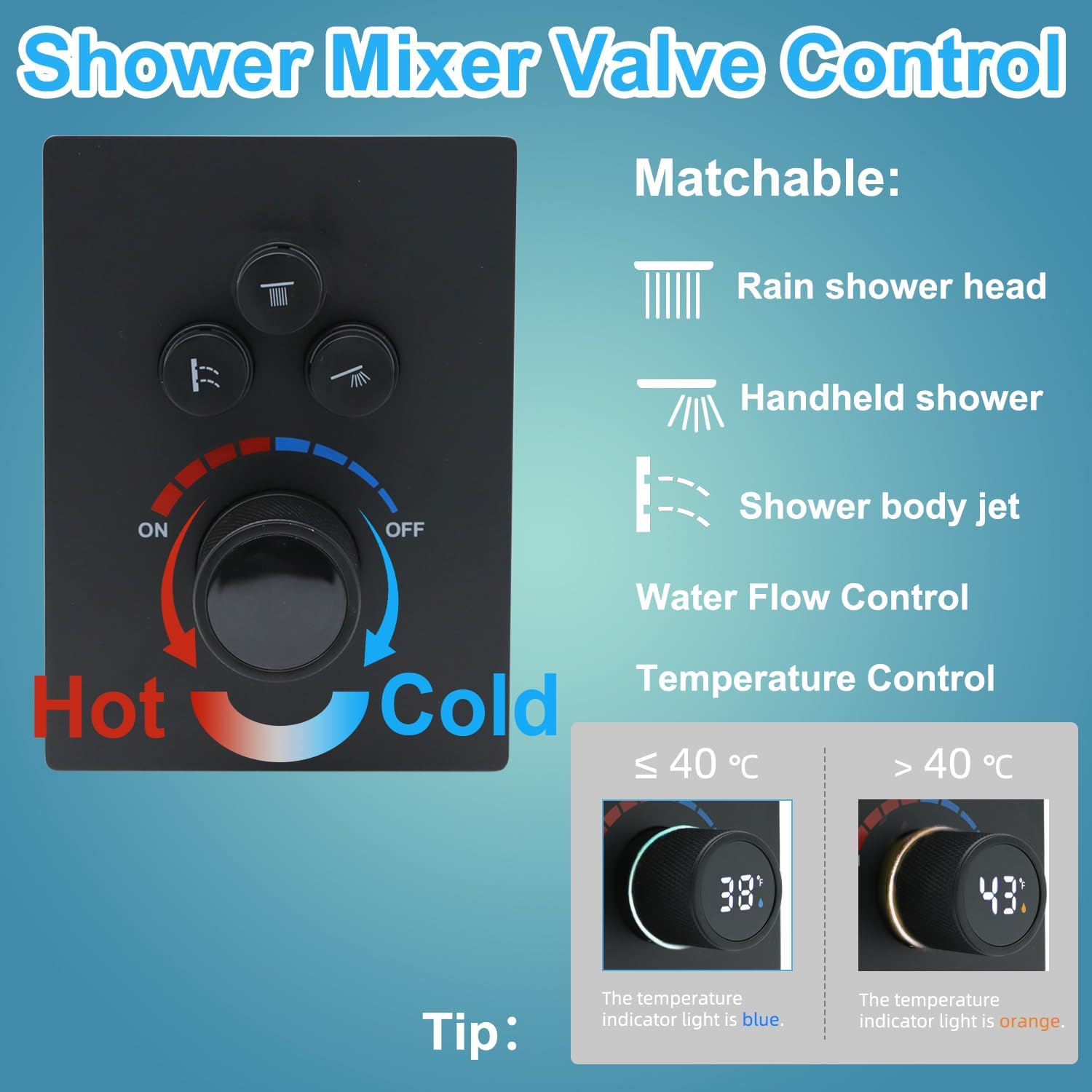
Figure 2: Shower mixer valve control panel. The temperature indicator light is blue for temperatures ≤ 40°C and orange for > 40°C.

Figure 3: Comparison highlighting the integrated forging and solid brass construction of the Backnets valve body, ensuring high durability and resistance to rust and deformation.
Specifications
| Feature | Detail |
|---|---|
| Model Number | SF20251004B0DWRVK9P4 |
| Material | Brass (Valve Body), Stainless Steel (Exterior Finish) |
| Dimensions (L x W x H) | 9.5 x 2.8 x 3.6 inches (24.13 x 7.11 x 9.14 cm) |
| Number of Ports | 5 (2 Inlets, 3 Outlets) |
| Thread Size | 1/2 inch NPT Standard |
| Valve Type | Diverter, Triple Function |
| Certification | cUPC, NSF |
| Power Source for Display | Hydroelectric (no batteries required) |

Figure 4: Product dimensions and weight for installation planning.
Setup and Installation
Professional installation is recommended for this product. Ensure all local plumbing codes are followed. Turn off the main water supply before beginning installation.
Installation Steps:
- Prepare the Wall: Create an opening in the wall suitable for the valve body, considering the depth of 2.75-3.54 inches (70-90mm) as shown in Figure 4.
- Connect Water Inlets: Connect the hot water supply to the "Hot Water Inlet" (typically on the left, marked red) and the cold water supply to the "Cold Water Inlet" (typically on the right, marked blue). Both inlets are 1/2" NPT.
- Connect Outlets: Connect your desired shower components (rain shower head, handheld shower, body jets) to the three available 1/2" NPT outlets. The valve allows for individual or simultaneous use of these functions.
- Secure the Valve: Mount the valve body securely within the wall opening.
- Install Trim Plate and Controls: Once plumbing connections are complete and tested, install the decorative trim plate and control knobs.

Figure 5: Connection diagram for hot water inlet, cold water inlet, and three mixed water outlets.
Important: Pressure Test
After installing the shower valve and before closing the wall, a pressure test is mandatory to ensure there are no leaks.
- Block all three outlets of the shower valve.
- Adjust the water pressure to 10 kg (1 MPa) for testing.
- Check all water pipe connections and the interior of the shower valve for any signs of leakage.
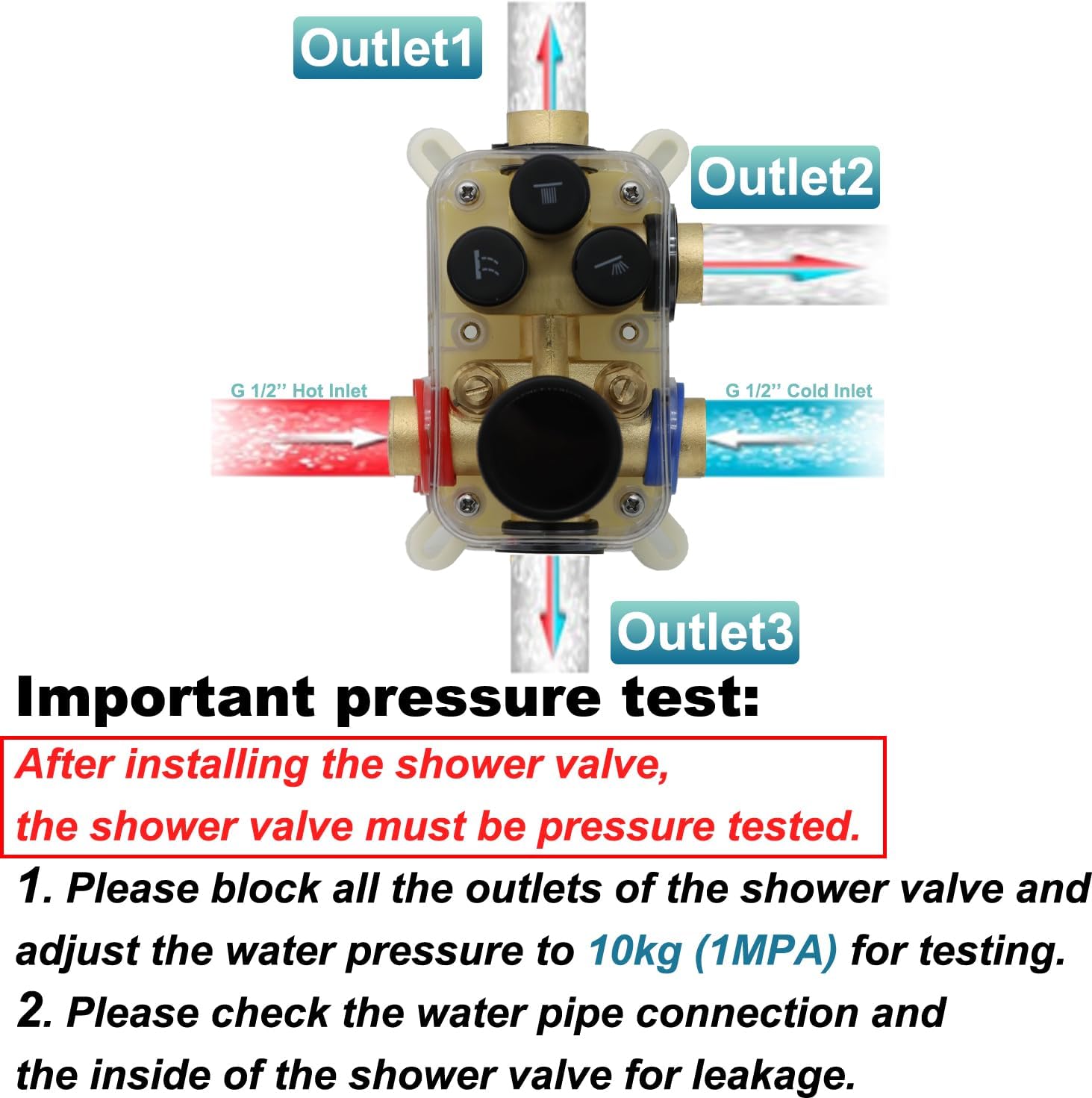
Figure 6: Illustration of the critical pressure test after installation.
Operating Instructions
The Backnets Digital Display Shower Valve offers intuitive control over water temperature and flow.
Temperature Control:
- The large central knob controls the water temperature. Rotate it clockwise for colder water and counter-clockwise for warmer water.
- The digital display will show the current water temperature in real-time.
- An indicator light around the temperature knob will glow blue when the water temperature is 40°C (104°F) or below, and orange when the temperature is above 40°C (104°F).
Water Flow and Diverter Functions:
- The three smaller buttons above the temperature knob control the individual shower functions:
- Top Button: Typically for the Rain Shower Head.
- Middle Button: Typically for the Handheld Shower.
- Bottom Button: Typically for Shower Body Jets.
- Press a button to activate its corresponding shower function. You can activate one, two, or all three functions simultaneously for a customized showering experience.

Figure 7: The digital display valve allows for simultaneous use of multiple shower functions.
Maintenance
Regular cleaning and maintenance will ensure the longevity and optimal performance of your Backnets shower valve.
- Cleaning the Finish: For the matte black finish, use a soft cloth and mild soap with water. Avoid abrasive cleaners, harsh chemicals, or scouring pads, as these can damage the finish.
- Digital Display: The digital display is self-powered and requires no battery replacement. Keep the surface clean for clear readability.
- Internal Components: The brass valve body is designed for durability. If water flow issues or persistent leaks occur, consult a qualified plumber.
Troubleshooting
If you encounter issues with your shower valve, refer to the following common problems and solutions:
| Problem | Possible Cause | Solution |
|---|---|---|
| No water flow or low pressure | Main water supply off; clogged inlets/outlets; incorrect installation. | Check main water supply. Inspect for blockages. Verify installation with a plumber. |
| Water temperature inconsistent | Imbalance in hot/cold water pressure; faulty thermostatic cartridge. | Check household water pressure. If issue persists, contact support or a plumber. |
| Digital display not working | Insufficient water flow to power the hydroelectric generator. | Ensure adequate water flow. If no display with sufficient flow, contact support. |
| Leaks from connections | Loose connections; damaged seals/gaskets. | Turn off water supply. Tighten connections. Replace seals/gaskets if damaged. Professional assistance recommended. |
Warranty and Support
Backnets is committed to providing high-quality products and customer satisfaction. This product comes with a commitment to service and support.
- Customer Service: For any questions, concerns, or technical assistance, please contact Backnets customer service. Refer to your purchase documentation for contact details.
- Lifetime Maintenance: Backnets offers lifetime maintenance support for this product.
For more information, visit the Backnets Store on Amazon.
Ask a question about this manual
Ask about setup, troubleshooting, compatibility, parts, safety, or missing instructions. Manuals+ will review the question and use this page’s manual context to help answer it.