
ATG RF-3001
ATG RF-3001 4-in-1 Rechargeable Hair Removal Device User Manual
Comprehensive instructions for safe and effective use of your ATG RF-3001 hair removal device.
Introduction
Thank you for choosing the ATG RF-3001 4-in-1 Rechargeable Hair Removal Device. This manual provides essential information for the safe operation, maintenance, and troubleshooting of your device. Please read it thoroughly before first use and retain it for future reference.
Important Safety Information
- Keep the device out of reach of children.
- Do not use the device on irritated, infected, or broken skin. Consult a physician if you have any skin conditions.
- Avoid using the device on sensitive areas such as eyelids or inside the nose/ears, except with the designated attachments.
- The attachment heads are waterproof and washable, but the main body of the device is not designed for full submersion. Do not immerse the main body in water.
- Ensure the device is fully charged before use to maintain optimal performance.
- Do not attempt to repair or disassemble the device yourself. Contact customer support for assistance.
- Use only the provided charging cable and a compatible USB power source to charge the device.
What's Included
Your ATG RF-3001 package contains the following components:

The complete ATG RF-3001 kit, including the main body, various attachment heads, charging cable, and cleaning brush.
- Main Body: The primary handheld unit with power button and LED display.
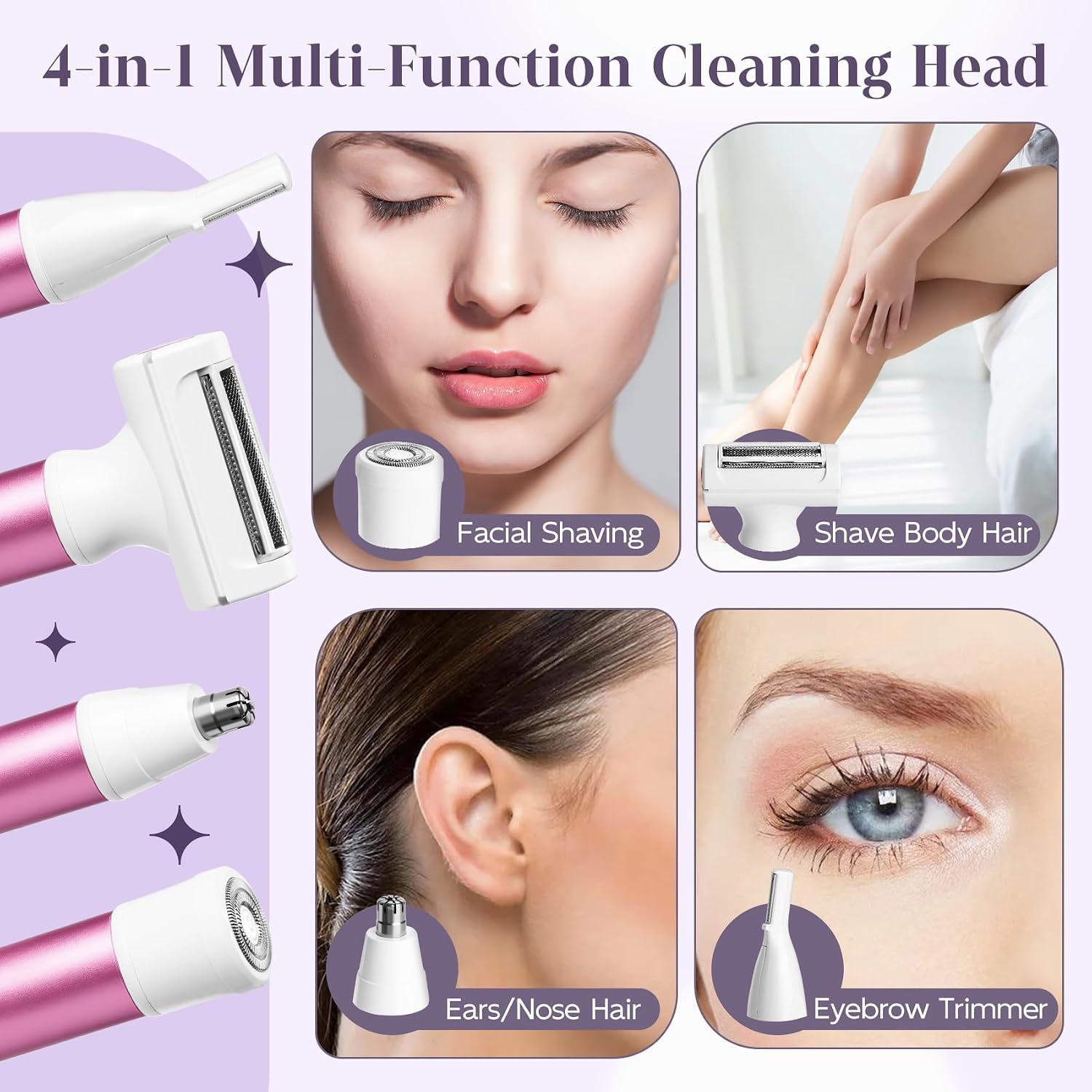
- Facial Shaving Head: For gentle hair removal on the face.
- Body Shaving Head: For larger areas like arms and legs.
- Ear/Nose Hair Trimming Head: For precise trimming of ear and nose hair.
- Eyebrow Trimmer Head: For shaping and trimming eyebrows.
- USB-C Charging Cable: For recharging the device.
- Cleaning Brush: For maintaining the attachment heads.
- User Manual: This instruction guide.
Setup and Charging
Initial Charge
Before first use, fully charge the device. The LED display will show the battery percentage.
- Connect the USB-C charging cable to the charging port at the bottom of the main body.
- Plug the other end of the USB-C cable into a compatible USB power source (e.g., wall adapter, computer, power bank, car charger).
- The LED display will indicate charging progress. A full charge takes approximately 30 minutes and provides up to 80 minutes of runtime.

The device charging via its USB-C port, with the LED display showing battery status. Various USB power sources are depicted.
Attaching and Removing Heads
The device features interchangeable heads for different functions.
- To remove a head: Gently pull the attached head upwards from the main body.
- To attach a head: Align the desired head with the main body and push it down until it clicks securely into place.
Visual guide demonstrating how to remove an attachment head by pulling it upwards and how to install a new head by twisting it clockwise until secure.
Operating Instructions
Ensure your skin is clean and dry before use. For best results, hold the device at a 90-degree angle to the skin and move it gently against the direction of hair growth.
General Operation
- Select and attach the appropriate head for the desired area.
- Press the power button to turn on the device. The LED display will illuminate.
- Gently glide the device over the skin. Do not press too hard.
- After use, press the power button again to turn off the device.

A visual guide showing the steps: opening the protective lid, pressing the power button, using the device on skin, and cleaning with the brush.
Specific Head Usage
- Facial Shaving Head: Use for delicate facial hair. Move in small, circular motions or against the direction of hair growth.
- Body Shaving Head: Ideal for larger areas like arms, legs, and underarms. Glide smoothly over the skin.
- Ear/Nose Hair Trimming Head: Carefully insert the trimmer tip into the nostril or ear canal. Do not insert too deeply. Move gently to trim visible hairs.
- Eyebrow Trimmer Head: Use for shaping and defining eyebrows. For precise shaping, use the edge of the blade.

An illustration of the four interchangeable heads: facial shaving, body shaving, ear/nose hair trimming, and eyebrow trimming, demonstrating their specific uses.
Maintenance and Cleaning
Regular cleaning ensures optimal performance and extends the lifespan of your device.
- After Each Use: Turn off the device and remove the attachment head.
- Clean Heads: Use the provided cleaning brush to remove any trapped hairs from the blades and cutting elements. The heads can also be rinsed under running water. Ensure they are completely dry before reattaching or storing.
- Clean Main Body: Wipe the main body with a dry or slightly damp cloth. Do not rinse the main body under water.
- Storage: Store the device and its attachments in a cool, dry place, away from direct sunlight and moisture.
A user cleaning the epilator head with the included cleaning brush after use, as part of the maintenance routine.
Troubleshooting
| Problem | Possible Cause | Solution |
|---|---|---|
| Device does not turn on. | Battery is depleted. | Charge the device fully. |
| Device stops during use. | Battery is low. | Recharge the device. |
| Poor hair removal performance. | Attachment head is clogged with hair. | Clean the attachment head thoroughly with the brush. |
| Skin irritation after use. | Device used on sensitive or unprepared skin; improper technique. | Ensure skin is clean and dry. Use gentle pressure. If irritation persists, discontinue use and consult a dermatologist. |
| Attachment head does not stay on. | Head not properly attached. | Ensure the head is aligned and pushed down until it clicks securely. |
Specifications
- Model: RF-3001
- Brand: ATG
- Power Source: Rechargeable Battery (USB-C)
- Charging Time: Approximately 30 minutes
- Runtime: Up to 80 minutes
- Water Resistance: Waterproof heads (main body not submersible)
- Dimensions (Package): 1 x 1 x 1 inches
- Weight (Package): 4.8 ounces
Warranty and Support
For warranty information, technical support, or any questions regarding your ATG RF-3001 device, please contact ATG customer service through the retailer where the product was purchased or visit the official ATG website. Please have your purchase receipt and product model number (RF-3001) available when contacting support.
Ask a question about this manual
Ask about setup, troubleshooting, compatibility, parts, safety, or missing instructions. Manuals+ will review the question and use this page’s manual context to help answer it.