
Introduction
Thank you for choosing the NURSAL EMS Foot Massager F100. This device utilizes dual EMS (Electrical Muscle Stimulation) and TENS (Transcutaneous Electrical Nerve Stimulation) technology to provide electrical pulses for stimulating skin nerves, promoting lower limb circulation, and enhancing muscle strength. Regular use may help alleviate symptoms associated with neuropathy, leg pain, swelling, cramps, and plantar fasciitis. This manual provides essential information for safe and effective operation of your device.
Safety Information
- Always read and follow the instructions before use.
- Do not use if you have a pacemaker or other electronic medical device.
- Keep away from water.
- Do not use if the device is damaged or shows signs of wear.
- Consult a doctor before use if you are pregnant, have a heart condition, or any other medical condition.
- Do not use on broken skin or areas with inflammation.
- Always supervise children when using the device.
Package Contents
The NURSAL EMS Foot Massager F100 package includes the following items:
- NURSAL EMS Foot Massager Device (Model F100)
- Wireless Remote Control
- 6 Reusable TENS Electrode Pads (4 small, 2 large)
- Electrode Lead Wires
- USB Charging Cable
- AAA Batteries (for remote)
- Instruction Manual

Image: NURSAL EMS Foot Massager F100 device, wireless remote, and electrode pads.
Product Overview
The NURSAL EMS Foot Massager F100 is designed for user convenience and effective therapy. It features an intuitive display and a wireless remote for easy adjustments. The device is lightweight and portable, allowing for use in various settings without being tethered to a power outlet once charged. Its ergonomic curved sole design accommodates all foot shapes and sizes.
- Dual TENS & EMS Technology: Delivers electrical pulses to stimulate nerves and muscles.
- 25 Therapeutic Modes: Offers a variety of stimulation patterns.
- 90 Adjustable Intensity Levels: Allows for personalized comfort and effectiveness.
- 30-90 Minute Timer: Customizable session durations.
- Rechargeable & Wireless: Provides portability and flexibility.
- 6 Reusable Electrode Pads: Extends therapy to other body areas like neck, back, shoulders, waist, thighs, and knees.
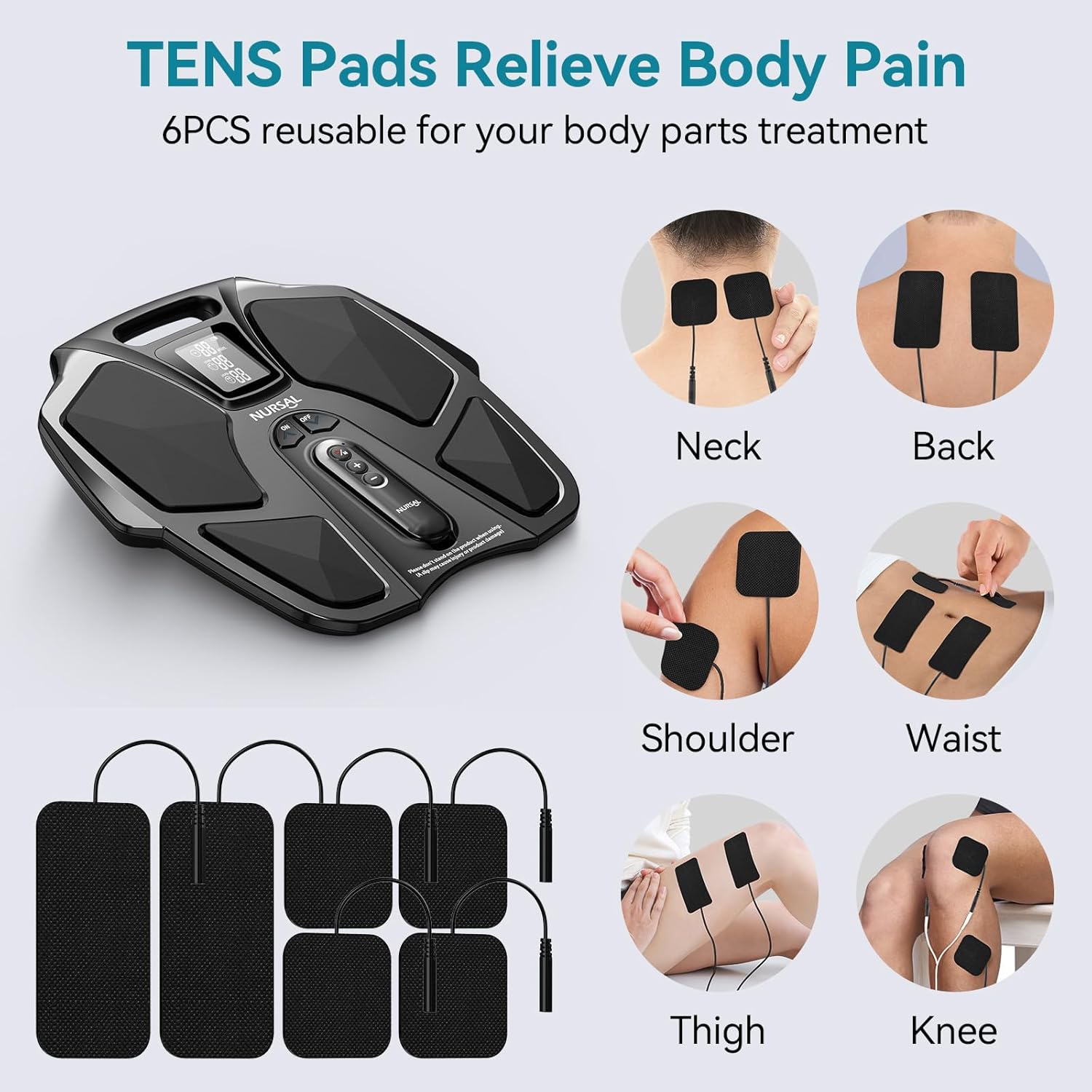
Image: User's feet on the NURSAL EMS Foot Massager, illustrating the foot stimulation function.

Image: Close-up of the wireless remote control, showing power, mode, and intensity buttons.
Setup
- Charge the Device: Connect the provided USB charging cable to the device's charging port and a suitable USB power adapter (not included). Charge until the indicator light turns green (approximately 3 hours for a full charge). The device cannot be used while charging.
- Insert Remote Batteries: Open the battery compartment on the wireless remote and insert the AAA batteries.
- Power On: Press and hold the power button on the main device for 1-2 seconds to turn it on. The remote control cannot power on the device.
- Positioning: Place the device on a flat surface. Sit comfortably and place your bare feet flat on the foot pads. Ensure both feet are making good contact with the pads for optimal stimulation.
- Attaching TENS Pads (Optional): If using the TENS electrode pads for other body areas, connect the lead wires to the pads and then plug the lead wires into the designated port on the device. Apply the pads to the desired body area. Ensure both pads on a single lead wire are placed on the skin simultaneously to form a circuit; otherwise, the stimulation will not activate.
Video: NURSAL EMS Foot Massager - An official seller video demonstrating unboxing, charging, and initial setup of the device and TENS pads.
Operating Instructions
- Select Mode: Use the 'M' button on the remote control to cycle through the 25 therapeutic modes. The current mode will be displayed on the device's screen.
- Adjust Intensity: Use the '+' and '-' buttons on the remote to adjust the intensity level from 0 to 90. Start with a low intensity and gradually increase until you feel a comfortable, yet effective, stimulation.
- Set Timer: Use the timer button on the remote to select your desired session duration (30, 60, or 90 minutes). The device will automatically shut off after the selected time.
- Using TENS Pads: When using TENS pads, ensure they are properly connected and adhered to the skin. Adjust the intensity for the TENS pads separately using the remote. Remember, both foot pads and TENS pads can be used simultaneously.
- Ending a Session: The device will automatically turn off after the set time. You can also manually turn it off by pressing and holding the power button on the device or the remote.
Video: NURSAL TENS EMS Foot Massager for Neuropathy - An official seller video demonstrating the use of TENS pads with the device.
Care and Maintenance
- Cleaning: Wipe the device and remote with a soft, damp cloth. Do not use abrasive cleaners or immerse in water.
- TENS Pads: After each use, gently reattach the TENS pads to their clear plastic holders to maintain adhesiveness. Store in a cool, dry place. Replace pads when they lose their stickiness.
- Storage: Store the device in a cool, dry place away from direct sunlight and extreme temperatures.
Troubleshooting
- No Power: Ensure the device is fully charged. The remote cannot power on the device; use the on/off button on the main unit.
- No Stimulation: Ensure both feet are firmly placed on the foot pads. If using TENS pads, ensure both pads on a single lead wire are making full contact with the skin to complete the circuit. Increase the intensity level gradually.
- Remote Not Working: Check if the AAA batteries in the remote are correctly inserted or need replacement.
- Weak Adhesion of TENS Pads: Clean the skin area before application. Replace pads if they are no longer sticky.
Specifications
| Feature | Specification |
|---|---|
| Product Dimensions | 5 x 5 x 8 inches |
| Item Weight | 1 Pound (16 ounces) |
| Item Model Number | F100 |
| Batteries | 1 Nonstandard Battery (included) |
| Power Source | Battery Powered |
| Material | Acrylonitrile Butadiene Styrene |
| Manufacturer | NURSAL |
Warranty and Support
For warranty information or technical support, please refer to the contact details provided on the product packaging or visit the official NURSAL website. Keep your purchase receipt for warranty claims.
Legal Disclaimer
Statements regarding dietary supplements have not been evaluated by the FDA and are not intended to diagnose, treat, cure, or prevent any disease or health condition.