
1. Introduction
The KINGBOLEN Soloscan KBLM01 is a Bluetooth OBD2 diagnostic scanner designed for Mercedes-Benz, Sprinter, and Maybach vehicles. This tool provides comprehensive diagnostic capabilities, including all system diagnostics, various reset functions, bidirectional control, and full OBD2 functions. It also supports advanced features such as component calibration, modifications, module customization, and personalization. The device offers lifetime free updates without subscription fees, making it a versatile tool for vehicle diagnostics.
Key Features:
- All System Diagnostics for Mercedes-Benz, Sprinter, and Maybach.
- All Reset Functions (e.g., Oil Reset, Brake Reset, BMS Reset).
- Bidirectional Control for active testing of vehicle components.
- ECU Coding for matching, disabling, activating, and customizing features.
- Full OBD2 Functions for vehicles manufactured after 1996.
- Bluetooth connectivity for iOS and Android devices.
- Lifetime free software updates.
2. Setup Guide
Follow these steps to set up your KINGBOLEN Soloscan KBLM01 device and begin diagnostics:
- Step 1: Download the EDIAG App
Search for "EDIAG" in the Apple App Store (for iOS) or Google Play Store (for Android) and download the application. - Step 2: Register & Log In
Open the EDIAG app and follow the on-screen prompts to register a new account or log in with an existing one. You will typically need to provide an email address. - Step 3: Enter Serial Number (SN) to Activate
Locate the serial number on your Soloscan device or its packaging. Enter this SN into the app to activate your device. If you encounter an invalid code, contact customer support. - Step 4: Plug into OBD2 Port
Locate your vehicle's OBD2 diagnostic port, usually under the dashboard on the driver's side. Plug the KINGBOLEN Soloscan device firmly into the port. A green indicator light on the device should illuminate. - Step 5: Start the Car & Keep Ignition On
Start your vehicle's engine and ensure the ignition is in the ON position. - Step 6: Bluetooth Connection
Within the EDIAG app, navigate to the Bluetooth settings or connection section. Select your Soloscan device from the list of available Bluetooth devices to establish a connection.

Figure 2.1: Quick Setup Guide for KINGBOLEN Soloscan KBLM01.
The EDIAG app is compatible with both iOS and Android devices, providing a user-friendly interface for diagnostics. The device supports Bluetooth 5.2 for stable connection up to 33 feet.

Figure 2.2: KINGBOLEN Soloscan KBLM01 paired with iOS and Android devices.
3. Operating Instructions
The KINGBOLEN Soloscan KBLM01 offers a range of diagnostic and control functions. After successful setup and connection, navigate through the EDIAG app to access the following features:
3.1 All System Diagnostics
This function allows for a comprehensive scan of all available electronic control units (ECUs) within your Mercedes-Benz, Sprinter, or Maybach vehicle. It identifies and reads diagnostic trouble codes (DTCs) from systems such as:
- SRS (Supplemental Restraint System - Airbags)
- SAS (Steering Angle Sensor)
- TCM (Transmission Control Module)
- ECM (Engine Control Module)
- EPB (Electronic Parking Brake)
- TPMS (Tire Pressure Monitoring System)
- And many more, including ABS, ESP, BCM, Radio, and Transmission.
The tool can read and clear fault codes, display live data streams, and provide freeze frame data to pinpoint issues. It also offers ECU information.

Figure 3.1: All Systems Diagnostics Overview.
3.2 Bidirectional Control (Active Test)
Bidirectional control allows the diagnostic tool to send commands to vehicle components and monitor their functionality. This active testing helps in identifying faults by directly interacting with actuators. Examples include:
- Turning on/off wipers.
- Controlling headlights.
- Opening/closing doors.
- Opening/closing windows.
- Monitoring engine status.
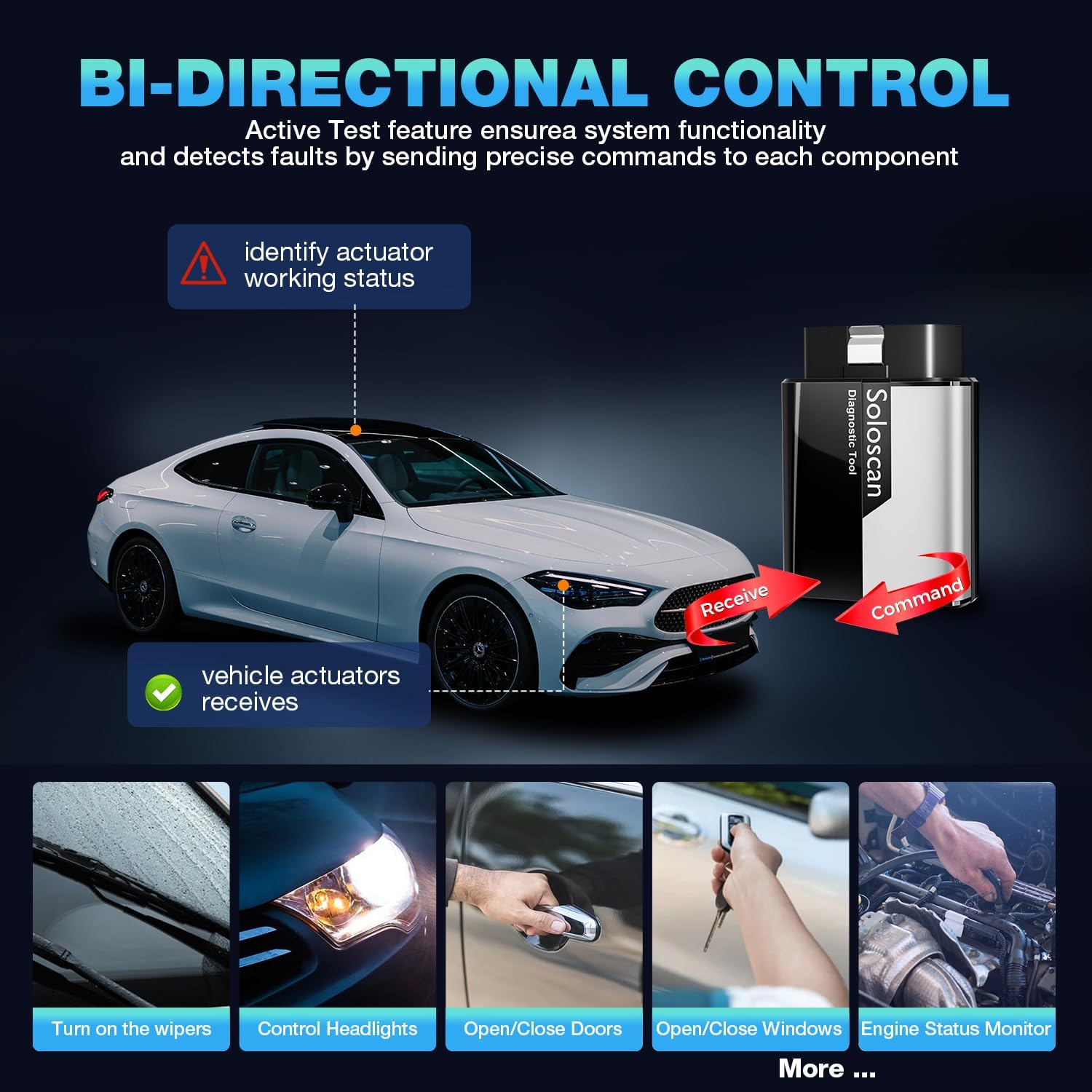
Figure 3.2: Bidirectional Control Functionality.
3.3 ECU Coding
ECU Coding enables advanced customization and adaptation of vehicle modules. This function can be used to:
- Match replaced ECUs to the vehicle.
- Disable unnecessary features.
- Activate hidden features.
- Customize vehicle settings.
Note: Coding functions may vary by vehicle model. Always check compatibility before performing ECU coding.

Figure 3.3: ECU Coding Features.
3.4 Full OBDII Functions (Post-1996 Vehicles)
The Soloscan KBLM01 provides all standard OBDII functions for vehicles compliant with the OBDII protocol (generally those manufactured after 1996). These functions include:
- Read Codes: Retrieve generic (P0, P2, P3, U0) and manufacturer specific (P1, P3, U1) codes.
- Clear Codes: Erase Diagnostic Trouble Codes (DTCs) and turn off the Check Engine Light (MIL).
- EVAP System Test: Initiate a leak test for the vehicle's evaporative emission system.
- Freeze Frame Data: View a snapshot of vehicle operating conditions at the time a fault code was set.
- Vehicle Information: Retrieve vehicle identification number (VIN), calibration ID (CALID), and calibration verification number (CVN).
- Live Data Stream: Display real-time data from various sensors in text or graph format.
- O2 Sensor Monitor Test: Retrieve O2 sensor monitoring test results.
- DTC Lookup: Access a database to understand the meaning of diagnostic trouble codes.
- Component Test: Initiate tests of specific components or systems.
- On-Board Monitor Test: Retrieve results for emission-related powertrain components and systems.

Figure 3.4: Full OBDII Functions Interface.
4. Maintenance Services
The KINGBOLEN Soloscan KBLM01 provides access to various maintenance and reset services, crucial for proper vehicle upkeep and post-repair procedures. These services include:
- Oil Reset: Resets the oil service light after an oil change.
- Brake Reset: Resets the electronic parking brake (EPB) system after brake pad replacement.
- BMS Reset: Registers a new battery to the Battery Management System (BMS) after replacement.
- SAS Reset: Calibrates the Steering Angle Sensor (SAS) after steering system repairs.
- Injector Coding: Codes new injector numbers into the ECU after replacement to optimize fuel delivery.
- ABS Bleeding: Performs automated bleeding procedures for the Anti-lock Braking System (ABS).
- ETS Reset: Resets the Electronic Throttle System (ETS) to relearn throttle body positions.
- AFS Reset (Headlamp): Adapts the Adaptive Front-lighting System (AFS) after headlamp replacement or adjustment.
- Sunroof Initialization: Initializes the sunroof system after repair or replacement.
- SUS Reset: Resets the suspension system.
- Gearbox Learn: Performs transmission adaptation learning procedures.
Note: The availability and specific procedures for reset functions may vary by car model and year. For detailed compatibility, please contact customer support.

Figure 4.1: Overview of Maintenance Services.
5. Troubleshooting
If you encounter issues while using your KINGBOLEN Soloscan KBLM01, consider the following troubleshooting steps:
- Connection Issues:
- Ensure the device is firmly plugged into the OBD2 port and the green indicator light is on.
- Verify Bluetooth is enabled on your mobile device and the Soloscan is paired within the EDIAG app.
- Restart the EDIAG app and attempt to reconnect.
- Ensure your vehicle's ignition is in the ON position or the engine is running.
- App Activation Problems:
- If the serial number (SN) is not recognized or an activation error occurs, double-check the entered SN for accuracy.
- Contact KINGBOLEN customer support with your SN for assistance if the issue persists.
- Vehicle Recognition Issues:
- Confirm your vehicle model and year are supported by checking the vehicle coverage list.
- Ensure the app and device firmware are up to date. Diagnostic tool needs to be connected to WiFi for the first time to install and auto update new car model data packets.
- Some users have reported issues with specific Sprinter models (e.g., 2019 Sprinter, 2020 Sprinter 907) not being recognized or certain functions not working as expected. In such cases, contact technical support for specific vehicle compatibility and potential software updates.
- Functionality Limitations (e.g., DEF countdown reset):
- Certain advanced functions, like resetting a DEF countdown due to tamper errors, may have specific requirements or limitations. If a function does not perform as expected, consult the app's help section or contact support.
- Inaccurate Error Descriptions:
- If the error descriptions provided by the tool differ from those from a dealer tool, it is recommended to cross-reference with official service manuals or consult a professional mechanic for clarification.
For any persistent issues or specific vehicle problems that you cannot resolve, please refer to the Warranty & Support section for contact information.
6. Specifications
| Feature | Detail |
|---|---|
| Brand | KINGBOLEN |
| Model Number | KBLM01 |
| Power Source | Battery Powered (via OBD2 port) |
| Operating System | Compatible with iOS & Android (via EDIAG App) |
| Automotive Fit Type | Vehicle Specific Fit (Mercedes-Benz, Sprinter, Maybach) |
| Included Components | KINGBOLEN SOLOSCAN Mercedes-Benz OBD2 Scanner |
| Connectivity | Bluetooth 5.2 (up to 33 feet) |
| Software Updates | Lifetime Free Update |
6.1 Vehicle Coverage List
The KINGBOLEN Soloscan KBLM01 supports a wide range of Mercedes-Benz, Sprinter, and Maybach vehicles. Below is a general overview of supported models and their approximate year ranges. For precise compatibility, it is recommended to consult the EDIAG app or contact customer support.

Figure 6.1: KINGBOLEN Soloscan Vehicle Coverage List.
Sprinter Models: Covers various Sprinter II, V-Class, 470, 471, 907, 910, Vito, Citan, Sprinter III, Viano, Vito (CAN BUSII), Sprinter I models from 1996 to 2025.
Mercedes-Benz Models: Covers SLK-Class, CL-Class, E-Class, GL-Class, SL-Class, M-Class, C-Class, A-Class, B-Class, CLS-Class, G-Class, SLR-Class, R-Class, GLK-Class, SLS-Class, CLC-Class, S-Class, CLA-Class, AMG Class, GLE-Class, AMG GT-Class, GLA-Class, EQB-Class, EQC-Class, GLB-Class, ED-Class models from 1996 to 2024.
Maybach Models: Covers Mini-G-Class, GLC-Class, CLA-Class, S-Class, M-Class, E-Class, SL-Class, SLK-Class, C-Class, CLS-Class, G-Class, A-Class, B-Class, CLK-Class, SLR-Class, R-Class, GL-Class, GLK-Class, SLS-Class, CLC-Class, S-Class, GLC-Class, AMG-Class, GLA-Class, GLE-Class, GLS-Class, AMG GT-Class, CLA-Class, EQC-Class, GLB-Class, ED-Class models from 1996 to 2024.
Mercedes-Benz/Maybach Models: Covers Maybach models from 2000 to 2020.
7. Warranty & Support
7.1 Warranty Information
The KINGBOLEN Soloscan KBLM01 comes with a 1-year manufacturer's warranty. This warranty covers defects in materials and workmanship under normal use. Please retain your proof of purchase for warranty claims.
Additionally, the device includes lifetime free software updates, ensuring you always have access to the latest software features and vehicle model data packets without any subscription fees.
7.2 Customer Support
For technical assistance, troubleshooting, or any inquiries regarding your KINGBOLEN Soloscan KBLM01, please contact our customer support team:
- Email: Support@kingbolen.com
- Online Support: You can also message us through the Amazon platform for quick responses.
Our support team aims to provide assistance within 24 hours.


